

คุณสามารถอนุญาตให้ผู้ใช้ตรวจสอบสิทธิ์กับ Firebase โดยใช้ผู้ให้บริการ OAuth เช่น GitHub ได้ด้วยการผสานรวมการเข้าสู่ระบบ OAuth ทั่วไปเข้ากับแอปโดยใช้ Firebase SDK เพื่อ ดำเนินการขั้นตอนการลงชื่อเข้าใช้แบบครบวงจร
ก่อนเริ่มต้น
หากต้องการให้ผู้ใช้ลงชื่อเข้าใช้โดยใช้บัญชี GitHub คุณต้องเปิดใช้ GitHub เป็นผู้ให้บริการลงชื่อเข้าใช้สำหรับโปรเจ็กต์ Firebase ก่อน โดยทำดังนี้
ใช้ Swift Package Manager เพื่อติดตั้งและจัดการทรัพยากร Dependency ของ Firebase
- ใน Xcode ขณะที่โปรเจ็กต์แอปเปิดอยู่ ให้ไปที่ไฟล์ > เพิ่มแพ็กเกจ
- เมื่อได้รับข้อความแจ้ง ให้เพิ่มที่เก็บ SDK ของแพลตฟอร์ม Apple ของ Firebase โดยทำดังนี้
- เลือกFirebase Authenticationคลัง
- เพิ่มแฟล็ก
-ObjCลงในส่วนแฟล็ก Linker อื่นๆ ของการตั้งค่าบิลด์ของเป้าหมาย - เมื่อเสร็จแล้ว Xcode จะเริ่มแก้ไขและดาวน์โหลดการขึ้นต่อกันในเบื้องหลังโดยอัตโนมัติ
https://github.com/firebase/firebase-ios-sdk.git
ตอนนี้ให้ทำตามขั้นตอนการกำหนดค่าต่อไปนี้
- ในคอนโซล Firebase ให้ไปที่ ความปลอดภัย > การตรวจสอบสิทธิ์
- ในแท็บวิธีการลงชื่อเข้าใช้ ให้เปิดใช้ผู้ให้บริการลงชื่อเข้าใช้ GitHub
-
เพิ่ม Client ID และ Client Secret จาก
Developer Console ของผู้ให้บริการรายนั้นลงในการกำหนดค่าผู้ให้บริการ
- ลงทะเบียนแอป เป็นแอปพลิเคชันสำหรับนักพัฒนาซอฟต์แวร์ใน GitHub และรับ OAuth 2.0 ของแอป รหัสไคลเอ็นต์และรหัสลับไคลเอ็นต์
-
ตรวจสอบว่าได้ตั้งค่า URI การเปลี่ยนเส้นทาง OAuth ของ Firebase (เช่น
my-app-12345.firebaseapp.com/__/auth/handler) เป็น URL เรียกกลับการให้สิทธิ์ในการตั้งค่าแอปใน การกำหนดค่าของแอป GitHub
- คลิกบันทึก
จัดการขั้นตอนการลงชื่อเข้าใช้ด้วย Firebase SDK
หากต้องการจัดการขั้นตอนการลงชื่อเข้าใช้ด้วย Firebase Apple Platforms SDK ให้ทำตามขั้นตอนต่อไปนี้
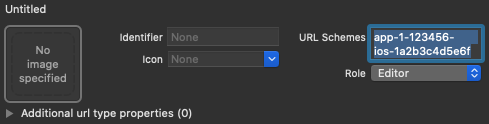
เพิ่มรูปแบบ URL ที่กำหนดเองลงในโปรเจ็กต์ Xcode โดยทำดังนี้
- เปิดการกำหนดค่าโปรเจ็กต์โดยดับเบิลคลิกชื่อโปรเจ็กต์ในมุมมองแบบต้นไม้ทางด้านซ้าย เลือกแอปจากส่วนเป้าหมาย จากนั้น เลือกแท็บข้อมูล แล้วขยายส่วนประเภท URL
-
คลิกปุ่ม + แล้วเพิ่มรหัสแอปที่เข้ารหัสเป็น URL Scheme
เว้นช่องอื่นๆ ว่างไว้
คุณดูรหัสแอปที่เข้ารหัสได้ในFirebase Console โดยไปที่
การตั้งค่า > แท็บทั่วไป จากนั้นเลื่อนลงไปที่ส่วนแอปของคุณเพื่อดูรายละเอียดเกี่ยวกับ แอป iOSเมื่อเสร็จแล้ว การกำหนดค่าควรมีลักษณะคล้ายกับ ต่อไปนี้ (แต่มีค่าเฉพาะแอปพลิเคชันของคุณ)
สร้างอินสแตนซ์ของ OAuthProvider โดยใช้รหัสผู้ให้บริการ github.com
Swift
var provider = OAuthProvider(providerID: "github.com")
Objective-C
FIROAuthProvider *provider = [FIROAuthProvider providerWithProviderID:@"github.com"];
ไม่บังคับ: ระบุพารามิเตอร์ OAuth ที่กำหนดเองเพิ่มเติมที่ต้องการ ส่งพร้อมกับคำขอ OAuth
Swift
    provider.customParameters = [
      "allow_signup": "false"
    ]
Objective-C
[provider setCustomParameters:@{@"allow_signup": @"false"}];
ดูพารามิเตอร์ที่ GitHub รองรับได้ที่ เอกสารประกอบเกี่ยวกับ OAuth ของ GitHub โปรดทราบว่าคุณไม่สามารถส่งพารามิเตอร์ที่ Firebase กําหนดด้วย
setCustomParametersพารามิเตอร์เหล่านี้คือ client_id, redirect_uri, response_type, scope และ stateไม่บังคับ: ระบุขอบเขต OAuth 2.0 เพิ่มเติมที่นอกเหนือจากโปรไฟล์พื้นฐานซึ่ง คุณต้องการขอจากผู้ให้บริการตรวจสอบสิทธิ์ หากแอปพลิเคชันของคุณ ต้องเข้าถึงข้อมูลผู้ใช้ส่วนตัวจาก GitHub API คุณจะต้อง ขอสิทธิ์เข้าถึง GitHub API ในส่วนสิทธิ์ API ใน คอนโซลนักพัฒนาแอป GitHub ขอบเขต OAuth ที่ขอต้องตรงกับขอบเขตที่กำหนดค่าไว้ล่วงหน้าในสิทธิ์ API ของแอป
Swift
    // Request read access to a user's email addresses.
    // This must be preconfigured in the app's API permissions.
    provider.scopes = ["user:email"]
Objective-C
    // Request read access to a user's email addresses.
    // This must be preconfigured in the app's API permissions.
    [provider setScopes:@[@"user:email"]];
ดูข้อมูลเพิ่มเติมได้ที่เอกสารประกอบเกี่ยวกับขอบเขตของ GitHub
ไม่บังคับ: หากต้องการปรับแต่งวิธีที่แอปแสดง
SFSafariViewControllerหรือUIWebViewเมื่อ แสดง reCAPTCHA ต่อผู้ใช้ ให้สร้างคลาสที่กำหนดเองซึ่งเป็นไปตาม โปรโตคอลAuthUIDelegateแล้วส่งไปยังcredentialWithUIDelegateตรวจสอบสิทธิ์ด้วย Firebase โดยใช้ออบเจ็กต์ผู้ให้บริการ OAuth
Swift
    provider.getCredentialWith(nil) { credential, error in
      if error != nil {
        // Handle error.
      }
      if credential != nil {
        Auth().signIn(with: credential) { authResult, error in
          if error != nil {
            // Handle error.
          }
          // User is signed in.
          // IdP data available in authResult.additionalUserInfo.profile.

          guard let oauthCredential = authResult.credential as? OAuthCredential else { return }
          // GitHub OAuth access token can also be retrieved by:
          // oauthCredential.accessToken
          // GitHub OAuth ID token can be retrieved by calling:
          // oauthCredential.idToken
        }
      }
    }
Objective-C
    [provider getCredentialWithUIDelegate:nil
                               completion:^(FIRAuthCredential *_Nullable credential,
                                            NSError *_Nullable error) {
      if (error) {
       // Handle error.
      }
      if (credential) {
        [[FIRAuth auth] signInWithCredential:credential
                                  completion:^(FIRAuthDataResult *_Nullable authResult,
                                            NSError *_Nullable error) {
          if (error) {
            // Handle error.
          }
          // User is signed in.
          // IdP data available in authResult.additionalUserInfo.profile.

          FIROAuthCredential *oauthCredential = (FIROAuthCredential *)authResult.credential;
          // GitHub OAuth access token can also be retrieved by:
          // oauthCredential.accessToken
          // GitHub OAuth ID token can be retrieved by calling:
          // oauthCredential.idToken
        }];
      }
    }];
คุณสามารถเรียกใช้ GitHub API ได้โดยใช้โทเค็นเพื่อการเข้าถึง OAuth
เช่น หากต้องการรับข้อมูลโปรไฟล์พื้นฐาน คุณสามารถเรียกใช้ REST API โดยส่งโทเค็นเพื่อการเข้าถึงในส่วนหัว
Authorizationดังนี้https://api.github.com/user
แม้ว่าตัวอย่างข้างต้นจะเน้นที่ขั้นตอนการลงชื่อเข้าใช้ แต่คุณก็ยังสามารถลิงก์ผู้ให้บริการ GitHub กับผู้ใช้ที่มีอยู่ได้ด้วย เช่น คุณสามารถ ลิงก์ผู้ให้บริการหลายรายกับผู้ใช้รายเดียวกันเพื่อให้ผู้ใช้ลงชื่อเข้าใช้ด้วยผู้ให้บริการรายใดก็ได้
Swift
    Auth().currentUser.link(withCredential: credential) { authResult, error in
      if error != nil {
        // Handle error.
      }
      // GitHub credential is linked to the current user.
      // IdP data available in authResult.additionalUserInfo.profile.
      // GitHub OAuth access token can also be retrieved by:
      // (authResult.credential as? OAuthCredential)?.accessToken
      // GitHub OAuth ID token can be retrieved by calling:
      // (authResult.credential as? OAuthCredential)?.idToken
    }
Objective-C
    [[FIRAuth auth].currentUser
        linkWithCredential:credential
                completion:^(FIRAuthDataResult * _Nullable authResult, NSError * _Nullable error) {
      if (error) {
        // Handle error.
      }
      // GitHub credential is linked to the current user.
      // IdP data available in authResult.additionalUserInfo.profile.
      // GitHub OAuth access token is can also be retrieved by:
      // ((FIROAuthCredential *)authResult.credential).accessToken
      // GitHub OAuth ID token can be retrieved by calling:
      // ((FIROAuthCredential *)authResult.credential).idToken
    }];
คุณสามารถใช้รูปแบบเดียวกันกับ
reauthenticateWithCredentialซึ่งใช้เพื่อเรียกข้อมูลเข้าสู่ระบบใหม่สำหรับการดำเนินการที่ละเอียดอ่อนซึ่งต้องมีการเข้าสู่ระบบล่าสุดได้Swift
    Auth().currentUser.reauthenticateWithCredential(withCredential: credential) { authResult, error in
      if error != nil {
        // Handle error.
      }
      // User is re-authenticated with fresh tokens minted and
      // should be able to perform sensitive operations like account
      // deletion and email or password update.
      // IdP data available in result.additionalUserInfo.profile.
      // Additional OAuth access token is can also be retrieved by:
      // (authResult.credential as? OAuthCredential)?.accessToken
      // GitHub OAuth ID token can be retrieved by calling:
      // (authResult.credential as? OAuthCredential)?.idToken
    }
Objective-C
    [[FIRAuth auth].currentUser
        reauthenticateWithCredential:credential
                          completion:^(FIRAuthDataResult * _Nullable authResult, NSError * _Nullable error) {
      if (error) {
        // Handle error.
      }
      // User is re-authenticated with fresh tokens minted and
      // should be able to perform sensitive operations like account
      // deletion and email or password update.
      // IdP data available in result.additionalUserInfo.profile.
      // Additional OAuth access token is can also be retrieved by:
      // ((FIROAuthCredential *)authResult.credential).accessToken
      // GitHub OAuth ID token can be retrieved by calling:
      // ((FIROAuthCredential *)authResult.credential).idToken
    }];
ขั้นตอนถัดไป
หลังจากที่ผู้ใช้ลงชื่อเข้าใช้เป็นครั้งแรก ระบบจะสร้างบัญชีผู้ใช้ใหม่และ ลิงก์กับข้อมูลเข้าสู่ระบบ ซึ่งได้แก่ ชื่อผู้ใช้และรหัสผ่าน หมายเลขโทรศัพท์ หรือข้อมูลผู้ให้บริการตรวจสอบสิทธิ์ที่ผู้ใช้ลงชื่อเข้าใช้ ระบบจะจัดเก็บบัญชีใหม่นี้เป็นส่วนหนึ่งของโปรเจ็กต์ Firebase และสามารถใช้เพื่อระบุผู้ใช้ในทุกแอปในโปรเจ็กต์ได้ ไม่ว่าผู้ใช้จะลงชื่อเข้าใช้ด้วยวิธีใดก็ตาม
-
ในแอป คุณสามารถรับข้อมูลโปรไฟล์พื้นฐานของผู้ใช้จากออบเจ็กต์
Userดูจัดการผู้ใช้ ใน Firebase Realtime Database และ Cloud Storage กฎความปลอดภัย คุณสามารถ รับรหัสผู้ใช้ที่ไม่ซ้ำของผู้ใช้ที่ลงชื่อเข้าใช้จากตัวแปร
authและใช้รหัสดังกล่าวเพื่อควบคุมข้อมูลที่ผู้ใช้เข้าถึงได้
คุณอนุญาตให้ผู้ใช้ลงชื่อเข้าใช้แอปโดยใช้ผู้ให้บริการการตรวจสอบสิทธิ์หลายรายได้โดยลิงก์ข้อมูลเข้าสู่ระบบของผู้ให้บริการการตรวจสอบสิทธิ์กับบัญชีผู้ใช้ที่มีอยู่
หากต้องการนำผู้ใช้ออกจากระบบ ให้เรียกใช้
signOut:
Swift
let firebaseAuth = Auth.auth()
do {
  try firebaseAuth.signOut()
} catch let signOutError as NSError {
  print("Error signing out: %@", signOutError)
}
Objective-C
NSError *signOutError;
BOOL status = [[FIRAuth auth] signOut:&signOutError];
if (!status) {
  NSLog(@"Error signing out: %@", signOutError);
  return;
}
นอกจากนี้ คุณอาจต้องเพิ่มโค้ดการจัดการข้อผิดพลาดสำหรับข้อผิดพลาดในการตรวจสอบสิทธิ์ทั้งหมดด้วย ดูจัดการข้อผิดพลาด