

Wykonywanie kodu to narzędzie, które umożliwia modelowi generowanie i uruchamianie kodu w Pythonie. Model może uczyć się iteracyjnie na podstawie wyników wykonywania kodu, aż do uzyskania ostatecznych danych wyjściowych.
Możesz używać wykonywania kodu do tworzenia funkcji, które korzystają z wnioskowania opartego na kodzie i generują tekst. Możesz na przykład użyć wykonywania kodu do rozwiązywania równań lub przetwarzania tekstu. Możesz też używać bibliotek zawartych w środowisku wykonywania kodu, aby wykonywać bardziej specjalistyczne zadania.
Podobnie jak w przypadku wszystkich narzędzi, które udostępniasz modelowi, model decyduje, kiedy użyć wykonania kodu.
Porównanie wykonywania kodu i wywoływania funkcji
Wykonywanie kodu i wywoływanie funkcji to podobne funkcje. Ogólnie rzecz biorąc, jeśli model może obsłużyć Twój przypadek użycia, lepiej jest używać wykonywania kodu. Wykonywanie kodu jest też prostsze w użyciu, ponieważ wystarczy je włączyć.
Oto kilka dodatkowych różnic między wykonywaniem kodu a wywoływaniem funkcji:
| Wykonanie kodu | Wywoływanie funkcji |
|---|---|
| Użyj wykonywania kodu, jeśli chcesz, aby model napisał i uruchomił kod w Pythonie, a następnie zwrócił wynik. | Użyj wywoływania funkcji, jeśli masz już własne funkcje, które chcesz uruchamiać lokalnie. |
| Wykonywanie kodu umożliwia modelowi uruchamianie kodu w backendzie interfejsu API w stałym, odizolowanym środowisku. | Wywoływanie funkcji umożliwia uruchamianie funkcji, których żąda model, w dowolnym środowisku. |
| Wykonanie kodu jest realizowane w ramach jednego żądania. Chociaż możesz opcjonalnie używać wykonywania kodu z funkcją czatu, nie jest to wymagane. | Wywoływanie funkcji wymaga dodatkowego żądania, aby odesłać dane wyjściowe z każdego wywołania funkcji. Dlatego musisz korzystać z funkcji czatu. |
Obsługiwane modele
gemini-4-argongemini-3.8-flashgemini-3.5-flash-lite(oraz starszy modelgemini-3.1-flash-lite)
Starsze modele Gemini 3.x Flash ogólnego zastosowania obsługują tę funkcję, ale nie zalecamy już ich używania ze względu na zbliżające się daty wyłączenia lub automatyczne przekierowywanie do nowszych modeli.
Używanie wykonywania kodu
Możesz używać wykonywania kodu zarówno z danymi wejściowymi zawierającymi tylko tekst, jak i z danymi multimodalnymi, ale odpowiedź zawsze będzie zawierać tylko tekst lub kod.
Zanim zaczniesz
|
Kliknij dostawcę Gemini API, aby wyświetlić na tej stronie treści i kod dotyczące tego dostawcy. |
Jeśli nie masz jeszcze za sobą przewodnika dla początkujących, zapoznaj się z nim. Dowiesz się z niego, jak skonfigurować projekt w Firebase, połączyć aplikację z Firebase, dodać pakiet SDK, zainicjować usługę backendu dla wybranego dostawcy Gemini API i utworzyć instancję GenerativeModel.
Do testowania i ulepszania promptów zalecamy używanie Google AI Studio.
Włącz wykonywanie kodu
|
Zanim wypróbujesz ten przykład, wykonaj czynności opisane w sekcji Zanim zaczniesz tego przewodnika, aby skonfigurować projekt i aplikację. W tej sekcji kliknij też przycisk wybranego dostawcy Gemini API, aby na tej stronie wyświetlić treści dotyczące tego dostawcy. |
Podczas tworzenia instancji GenerativeModel podaj CodeExecution jako narzędzie, którego model może używać do generowania odpowiedzi. Dzięki temu model może generować
i uruchamiać kod w Pythonie.
Swift
import FirebaseAILogic

// Initialize the Gemini Developer API backend service.
let ai = FirebaseAI.firebaseAI(backend: .googleAI())

// Create a `GenerativeModel` instance with a model that supports your use case
let model = ai.generativeModel(
  modelName: "GEMINI_MODEL_NAME",
  // Provide code execution as a tool that the model can use to generate its response.
  tools: [.codeExecution()]
)

let prompt = """
What is the sum of the first 50 prime numbers?
Generate and run code for the calculation, and make sure you get all 50.
"""

let response = try await model.generateContent(prompt)

guard let candidate = response.candidates.first else {
  print("No candidates in response.")
  return
}
for part in candidate.content.parts {
  if let textPart = part as? TextPart {
    print("Text = \(textPart.text)")
  } else if let executableCode = part as? ExecutableCodePart {
    print("Code = \(executableCode.code), Language = \(executableCode.language)")
  } else if let executionResult = part as? CodeExecutionResultPart {
    print("Outcome = \(executionResult.outcome), Result = \(executionResult.output ?? "no output")")
  }
}
Kotlin
// Initialize the Gemini Developer API backend service.
// Create a `GenerativeModel` instance with a model that supports your use case.
val model = Firebase.ai(backend = GenerativeBackend.googleAI()).generativeModel(
    modelName = "GEMINI_MODEL_NAME",
    // Provide code execution as a tool that the model can use to generate its response.
    tools = listOf(Tool.codeExecution())
)

val prompt =  "What is the sum of the first 50 prime numbers? " +
        "Generate and run code for the calculation, and make sure you get all 50."

val response = model.generateContent(prompt)

response.candidates.first().content.parts.forEach {
    if(it is TextPart) {
        println("Text = ${it.text}")
    }
    if(it is ExecutableCodePart) {
        println("Code = ${it.code}, Language = ${it.language}")
    }
    if(it is CodeExecutionResultPart) {
       println("Outcome = ${it.outcome}, Result = ${it.output}")
    }
}
Java
// Initialize the Gemini Developer API backend service.
// Create a `GenerativeModel` instance with a model that supports your use case.
GenerativeModel ai = FirebaseAI.getInstance(GenerativeBackend.googleAI())
                .generativeModel("GEMINI_MODEL_NAME",
                        null,
                        null,
                        // Provide code execution as a tool that the model can use to generate its response.
                        List.of(Tool.codeExecution()));

// Use the GenerativeModelFutures Java compatibility layer which offers
// support for ListenableFuture and Publisher APIs
GenerativeModelFutures model = GenerativeModelFutures.from(ai);

String text = "What is the sum of the first 50 prime numbers? " +
        "Generate and run code for the calculation, and make sure you get all 50.";

Content prompt = new Content.Builder()
    .addText(text)
    .build();

ListenableFuture response = model.generateContent(prompt);

Futures.addCallback(response, new FutureCallback() {
   @Override
public void onSuccess(GenerateContentResponse response)   {
    // Access the first candidate's content parts
    List parts = response.getCandidates().get(0).getContent().getParts();
    for (Part part : parts) {
        if (part instanceof TextPart) {
            TextPart textPart = (TextPart) part;
            System.out.println("Text = " + textPart.getText());
        } else if (part instanceof ExecutableCodePart) {
            ExecutableCodePart codePart = (ExecutableCodePart) part;
            System.out.println("Code = " + codePart.getCode() + ", Language = " + codePart.getLanguage());
        } else if (part instanceof CodeExecutionResultPart) {
            CodeExecutionResultPart resultPart = (CodeExecutionResultPart) part;
            System.out.println("Outcome = " + resultPart.getOutcome() + ", Result = " + resultPart.getOutput());
        }
    }
}

    @Override
    public void onFailure(Throwable t) {
        t.printStackTrace();
    }
}, executor);
Web
import { initializeApp } from "firebase/app";
import { getAI, getGenerativeModel, GoogleAIBackend } from "firebase/ai";

// TODO(developer): Replace the following with your app's Firebase configuration
// See: https://firebase.google.com/docs/web/learn-more#config-object
const firebaseConfig = {
  // ...
};

// Initialize FirebaseApp
const firebaseApp = initializeApp(firebaseConfig);

// Initialize the Gemini Developer API backend service.
const ai = getAI(firebaseApp, { backend: new GoogleAIBackend() });

// Create a `GenerativeModel` instance with a model that supports your use case.
const model = getGenerativeModel(
  ai,
  {
    model: "GEMINI_MODEL_NAME",
    // Provide code execution as a tool that the model can use to generate its response.
    tools: [{ codeExecution: {} }]
  }
);

const prompt =  "What is the sum of the first 50 prime numbers? " +
        "Generate and run code for the calculation, and make sure you get all 50."

const result = await model.generateContent(prompt);
const response = await result.response;

const parts = response.candidates?.[0].content.parts;

if (parts) {
  parts.forEach((part) => {
    if (part.type === "text") {
      console.log(`Text: ${part.text}`);
    } else if (part.type === "executableCode") {
      console.log(
        `Code: ${part.executableCode.code}, Language: ${part.executableCode.language}`
      );
    } else if (part.type === "codeExecutionResult") {
      console.log(
        `Outcome: ${part.codeExecutionResult.outcome}, Result: ${part.codeExecutionResult.output}`
      );
    }
  });
}
Dart
import 'package:firebase_core/firebase_core.dart';
import 'package:firebase_ai/firebase_ai.dart';
import 'firebase_options.dart';

// Initialize FirebaseApp
await Firebase.initializeApp(
  options: DefaultFirebaseOptions.currentPlatform,
);

// Initialize the Gemini Developer API backend service.
// Create a `GenerativeModel` instance with a model that supports your use case.
final model = FirebaseAI.googleAI().generativeModel(
  model: 'GEMINI_MODEL_NAME',
  // Provide code execution as a tool that the model can use to generate its response.
  tools: [
    Tool.codeExecution(),
  ],
);

const prompt = 'What is the sum of the first 50 prime numbers? '
    'Generate and run code for the calculation, and make sure you get all 50.';

final response = await model.generateContent([Content.text(prompt)]);

final buffer = StringBuffer();
    for (final part in response.candidates.first.content.parts) {
      if (part is TextPart) {
        buffer.writeln(part.text);
      } else if (part is ExecutableCodePart) {
        buffer.writeln('Executable Code:');
        buffer.writeln('Language: ${part.language}');
        buffer.writeln('Code:');
        buffer.writeln(part.code);
      } else if (part is CodeExecutionResultPart) {
        buffer.writeln('Code Execution Result:');
        buffer.writeln('Outcome: ${part.outcome}');
        buffer.writeln('Output:');
        buffer.writeln(part.output);
      }
    }
Unity
using Firebase;
using Firebase.AI;

// Initialize the Gemini Developer API backend service.
var ai = FirebaseAI.GetInstance(FirebaseAI.Backend.GoogleAI());

// Create a `GenerativeModel` instance with a model that supports your use case.
var model = ai.GetGenerativeModel(
  modelName: "GEMINI_MODEL_NAME",
  // Provide code execution as a tool that the model can use to generate its response.
  tools: new Tool[] { new Tool(new CodeExecution()) }
);

var prompt = "What is the sum of the first 50 prime numbers? " +
        "Generate and run code for the calculation, and make sure you get all 50.";

var response = await model.GenerateContentAsync(prompt);

foreach (var part in response.Candidates.First().Content.Parts) {
  if (part is ModelContent.TextPart tp) {
    UnityEngine.Debug.Log($"Text = {tp.Text}");
  } else if (part is ModelContent.ExecutableCodePart esp) {
    UnityEngine.Debug.Log($"Code = {esp.Code}, Language = {esp.Language}");
  } else if (part is ModelContent.CodeExecutionResultPart cerp) {
    UnityEngine.Debug.Log($"Outcome = {cerp.Outcome}, Output = {cerp.Output}");
  }
}
Dowiedz się, jak wybrać model odpowiednie do Twojego przypadku użycia i aplikacji.
Używanie wykonywania kodu na czacie
Możesz też używać wykonywania kodu w ramach czatu:
Swift
import FirebaseAILogic

// Initialize the Gemini Developer API backend service.
let ai = FirebaseAI.firebaseAI(backend: .googleAI())

// Create a `GenerativeModel` instance with a model that supports your use case
let model = ai.generativeModel(
  modelName: "GEMINI_MODEL_NAME",
  // Provide code execution as a tool that the model can use to generate its response.
  tools: [.codeExecution()]
)

let prompt = """
What is the sum of the first 50 prime numbers?
Generate and run code for the calculation, and make sure you get all 50.
"""
let chat = model.startChat()

let response = try await chat.sendMessage(prompt)

guard let candidate = response.candidates.first else {
  print("No candidates in response.")
  return
}
for part in candidate.content.parts {
  if let textPart = part as? TextPart {
    print("Text = \(textPart.text)")
  } else if let executableCode = part as? ExecutableCodePart {
    print("Code = \(executableCode.code), Language = \(executableCode.language)")
  } else if let executionResult = part as? CodeExecutionResultPart {
    print("Outcome = \(executionResult.outcome), Result = \(executionResult.output ?? "no output")")
  }
}
Kotlin
// Initialize the Gemini Developer API backend service.
// Create a `GenerativeModel` instance with a model that supports your use case.
val model = Firebase.ai(backend = GenerativeBackend.googleAI()).generativeModel(
    modelName = "GEMINI_MODEL_NAME",
    // Provide code execution as a tool that the model can use to generate its response.
    tools = listOf(Tool.codeExecution())
)

val prompt =  "What is the sum of the first 50 prime numbers? " +
        "Generate and run code for the calculation, and make sure you get all 50."
val chat = model.startChat()
val response = chat.sendMessage(prompt)

response.candidates.first().content.parts.forEach {
    if(it is TextPart) {
        println("Text = ${it.text}")
    }
    if(it is ExecutableCodePart) {
        println("Code = ${it.code}, Language = ${it.language}")
    }
    if(it is CodeExecutionResultPart) {
       println("Outcome = ${it.outcome}, Result = ${it.output}")
    }
}
Java
// Initialize the Gemini Developer API backend service.
// Create a `GenerativeModel` instance with a model that supports your use case.
GenerativeModel ai = FirebaseAI.getInstance(GenerativeBackend.googleAI())
                .generativeModel("GEMINI_MODEL_NAME",
                        null,
                        null,
                        // Provide code execution as a tool that the model can use to generate its response.
                        List.of(Tool.codeExecution()));

// Use the GenerativeModelFutures Java compatibility layer which offers
// support for ListenableFuture and Publisher APIs
GenerativeModelFutures model = GenerativeModelFutures.from(ai);
String text = "What is the sum of the first 50 prime numbers? " +
        "Generate and run code for the calculation, and make sure you get all 50.";

Content prompt = new Content.Builder()
    .addText(text)
    .build();

ChatFutures chat = model.startChat();
ListenableFuture response = chat.sendMessage(prompt);

Futures.addCallback(response, new FutureCallback() {
   @Override
public void onSuccess(GenerateContentResponse response)   {
    // Access the first candidate's content parts
    List parts = response.getCandidates().get(0).getContent().getParts();
    for (Part part : parts) {
        if (part instanceof TextPart) {
            TextPart textPart = (TextPart) part;
            System.out.println("Text = " + textPart.getText());
        } else if (part instanceof ExecutableCodePart) {
            ExecutableCodePart codePart = (ExecutableCodePart) part;
            System.out.println("Code = " + codePart.getCode() + ", Language = " + codePart.getLanguage());
        } else if (part instanceof CodeExecutionResultPart) {
            CodeExecutionResultPart resultPart = (CodeExecutionResultPart) part;
            System.out.println("Outcome = " + resultPart.getOutcome() + ", Result = " + resultPart.getOutput());
        }
    }
}

    @Override
    public void onFailure(Throwable t) {
        t.printStackTrace();
    }
}, executor);
Web
import { initializeApp } from "firebase/app";
import { getAI, getGenerativeModel, GoogleAIBackend } from "firebase/ai";

// TODO(developer): Replace the following with your app's Firebase configuration
// See: https://firebase.google.com/docs/web/learn-more#config-object
const firebaseConfig = {
  // ...
};

// Initialize FirebaseApp
const firebaseApp = initializeApp(firebaseConfig);

// Initialize the Gemini Developer API backend service.
const ai = getAI(firebaseApp, { backend: new GoogleAIBackend() });

// Create a `GenerativeModel` instance with a model that supports your use case.
const model = getGenerativeModel(
  ai,
  {
    model: "GEMINI_MODEL_NAME",
    // Provide code execution as a tool that the model can use to generate its response.
    tools: [{ codeExecution: {} }]
  }
);

const prompt =  "What is the sum of the first 50 prime numbers? " +
        "Generate and run code for the calculation, and make sure you get all 50."
const chat = model.startChat()
const result = await chat.sendMessage(prompt);

const parts = result.response.candidates?.[0].content.parts;

if (parts) {
  parts.forEach((part) => {
    if (part.type === "text") {
      console.log(`Text: ${part.text}`);
    } else if (part.type === "executableCode") {
      console.log(
        `Code: ${part.executableCode.code}, Language: ${part.executableCode.language}`
      );
    } else if (part.type === "codeExecutionResult") {
      console.log(
        `Outcome: ${part.codeExecutionResult.outcome}, Result: ${part.codeExecutionResult.output}`
      );
    }
  });
}
Dart
import 'package:firebase_core/firebase_core.dart';
import 'package:firebase_ai/firebase_ai.dart';
import 'firebase_options.dart';

// Initialize FirebaseApp
await Firebase.initializeApp(
  options: DefaultFirebaseOptions.currentPlatform,
);

// Initialize the Gemini Developer API backend service.
// Create a `GenerativeModel` instance with a model that supports your use case.
final model = FirebaseAI.googleAI().generativeModel(
  model: 'GEMINI_MODEL_NAME',
  // Provide code execution as a tool that the model can use to generate its response.
  tools: [
    Tool.codeExecution(),
  ],
);

final codeExecutionChat = await model.startChat();

const prompt = 'What is the sum of the first 50 prime numbers? '
    'Generate and run code for the calculation, and make sure you get all 50.';
final response = await codeExecutionChat.sendMessage(Content.text(prompt));

final buffer = StringBuffer();
    for (final part in response.candidates.first.content.parts) {
      if (part is TextPart) {
        buffer.writeln(part.text);
      } else if (part is ExecutableCodePart) {
        buffer.writeln('Executable Code:');
        buffer.writeln('Language: ${part.language}');
        buffer.writeln('Code:');
        buffer.writeln(part.code);
      } else if (part is CodeExecutionResultPart) {
        buffer.writeln('Code Execution Result:');
        buffer.writeln('Outcome: ${part.outcome}');
        buffer.writeln('Output:');
        buffer.writeln(part.output);
      }
    }
Unity
using Firebase;
using Firebase.AI;

// Initialize the Gemini Developer API backend service.
var ai = FirebaseAI.GetInstance(FirebaseAI.Backend.GoogleAI());

// Create a `GenerativeModel` instance with a model that supports your use case.
var model = ai.GetGenerativeModel(
  modelName: "GEMINI_MODEL_NAME",
  // Provide code execution as a tool that the model can use to generate its response.
  tools: new Tool[] { new Tool(new CodeExecution()) }
);

var prompt = "What is the sum of the first 50 prime numbers? " +
        "Generate and run code for the calculation, and make sure you get all 50.";
var chat = model.StartChat();
var response = await chat.SendMessageAsync(prompt);

foreach (var part in response.Candidates.First().Content.Parts) {
  if (part is ModelContent.TextPart tp) {
    UnityEngine.Debug.Log($"Text = {tp.Text}");
  } else if (part is ModelContent.ExecutableCodePart esp) {
    UnityEngine.Debug.Log($"Code = {esp.Code}, Language = {esp.Language}");
  } else if (part is ModelContent.CodeExecutionResultPart cerp) {
    UnityEngine.Debug.Log($"Outcome = {cerp.Outcome}, Output = {cerp.Output}");
  }
}
Dowiedz się, jak wybrać model odpowiednie do Twojego przypadku użycia i aplikacji.
Ceny
Włączenie wykonywania kodu i udostępnienie go jako narzędzia dla modelu nie wiąże się z dodatkowymi opłatami. Jeśli model zdecyduje się na użycie wykonywania kodu, opłata zostanie naliczona według aktualnej stawki za tokeny wejściowe i wyjściowe na podstawie używanego modelu Gemini.
Poniższy diagram przedstawia model rozliczeniowy wykonywania kodu:
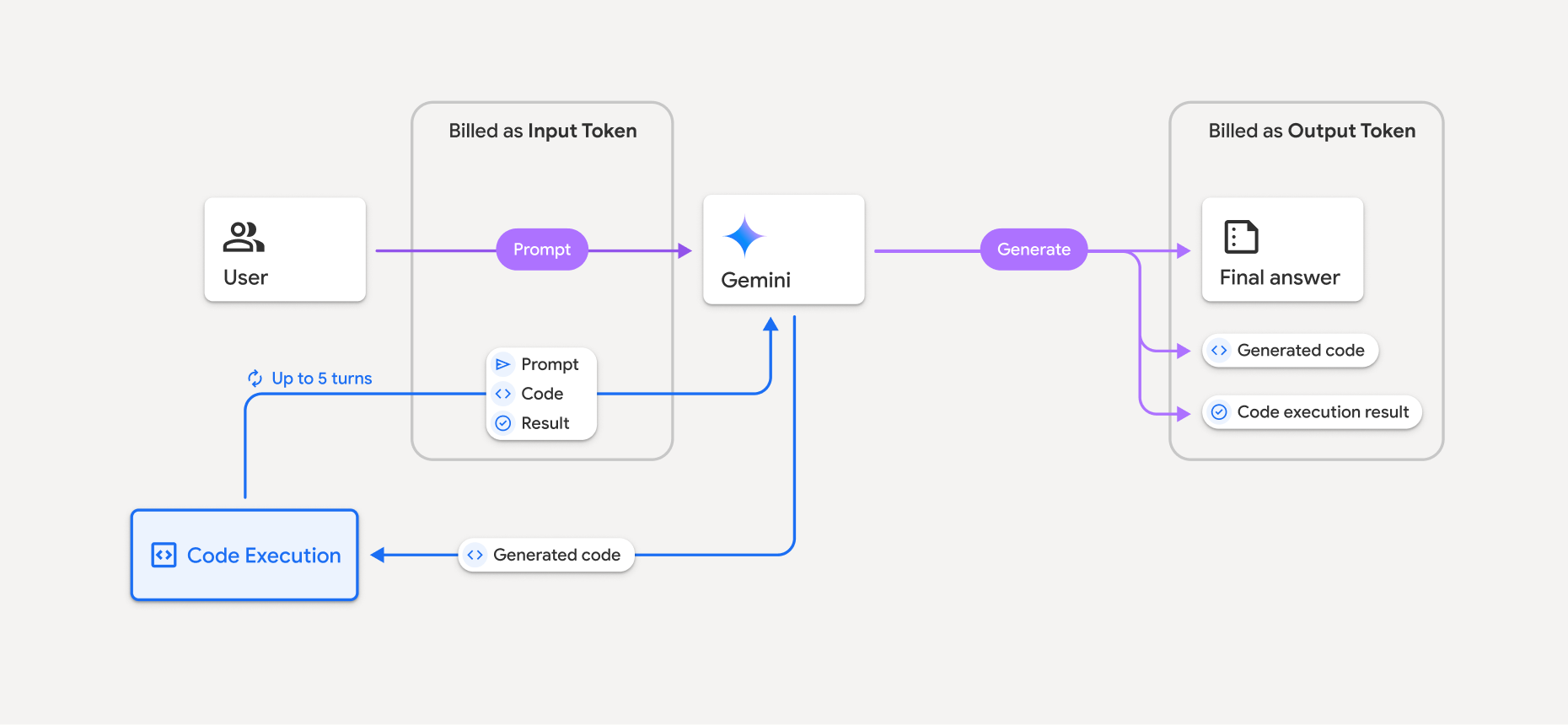
Oto podsumowanie sposobu naliczania opłat za tokeny, gdy model korzysta z wykonywania kodu:
Pierwotny prompt jest rozliczany raz. Jego tokeny są oznaczone jako tokeny pośrednie, które są rozliczane jako tokeny wejściowe.
Wygenerowany kod i wynik wykonanego kodu są rozliczane w ten sposób:
gdy są używane podczas wykonywania kodu – są oznaczane jako tokeny pośrednie, które są rozliczane jako tokeny wejściowe.
Gdy są uwzględniane w ostatecznej odpowiedzi, są rozliczane jako tokeny wyjściowe.
Podsumowanie w ostatecznej odpowiedzi jest rozliczane jako tokeny wyjściowe.
Gemini API zawiera w odpowiedzi interfejsu API liczbę tokenów pośrednich, dzięki czemu wiesz, dlaczego naliczamy opłaty za tokeny wejściowe wykraczające poza początkowy prompt.
Pamiętaj, że wygenerowany kod może zawierać zarówno tekst, jak i dane multimodalne, takie jak obrazy.
Ograniczenia i sprawdzone metody
Model może generować i wykonywać tylko kod Pythona. Nie może zwracać innych artefaktów, takich jak pliki multimedialne.
Wykonywanie kodu może trwać maksymalnie 30 sekund, zanim upłynie limit czasu.
W niektórych przypadkach włączenie wykonywania kodu może prowadzić do regresji w innych obszarach danych wyjściowych modelu (np. podczas pisania opowiadania).
Narzędzie do wykonywania kodu nie obsługuje identyfikatorów URI plików jako danych wejściowych ani wyjściowych. Narzędzie do wykonywania kodu obsługuje jednak pliki wejściowe i wyjściowe wykresy jako wbudowane bajty. Dzięki tym funkcjom wejściowym i wyjściowym możesz przesyłać pliki CSV i tekstowe, zadawać pytania na ich temat i generować wykresy Matplotlib w ramach wyniku wykonania kodu. Obsługiwane typy MIME w przypadku bajtów wbudowanych to
.cpp,.csv,.java,.jpeg,.js,.png,.py,.tsi.xml.
Obsługiwane biblioteki
Środowisko wykonywania kodu zawiera te biblioteki. Nie możesz instalować własnych bibliotek.
Przesyłanie opinii o korzystaniu z usługi Firebase AI Logic