

Modele generatywne są bardzo skuteczne w rozwiązywaniu wielu rodzajów problemów. Jednak mają one pewne ograniczenia, takie jak:
- Po wytrenowaniu są zamrażane, co prowadzi do nieaktualnej wiedzy.
- Nie mogą wysyłać zapytań do danych zewnętrznych ani ich modyfikować.
Wywoływanie funkcji może pomóc w rozwiązaniu niektórych z tych problemów. Wywoływanie funkcji jest czasami nazywane używaniem narzędzi, ponieważ umożliwia modelowi korzystanie z zewnętrznych narzędzi, takich jak interfejsy API i funkcje, do generowania ostatecznej odpowiedzi.
Z tego przewodnika dowiesz się, jak zaimplementować konfigurację wywołania funkcji podobną do scenariusza opisanego w następnej głównej sekcji tej strony. Ogólnie rzecz biorąc, aby skonfigurować wywoływanie funkcji w aplikacji, wykonaj te czynności:
Krok 1. Napisz funkcję, która może dostarczyć modelowi informacje potrzebne do wygenerowania ostatecznej odpowiedzi (np. funkcja może wywołać zewnętrzny interfejs API).
Krok 2. Utwórz deklarację funkcji, która opisuje funkcję i jej parametry.
Krok 3. Podaj deklarację funkcji podczas inicjowania modelu, aby model wiedział, jak może jej użyć w razie potrzeby.
Krok 4. Skonfiguruj aplikację tak, aby model mógł wysyłać wymagane informacje, które pozwolą aplikacji wywołać funkcję.
Krok 5. Przekaż odpowiedź funkcji z powrotem do modelu, aby mógł on wygenerować ostateczną odpowiedź.
Omówienie przykładu wywoływania funkcji
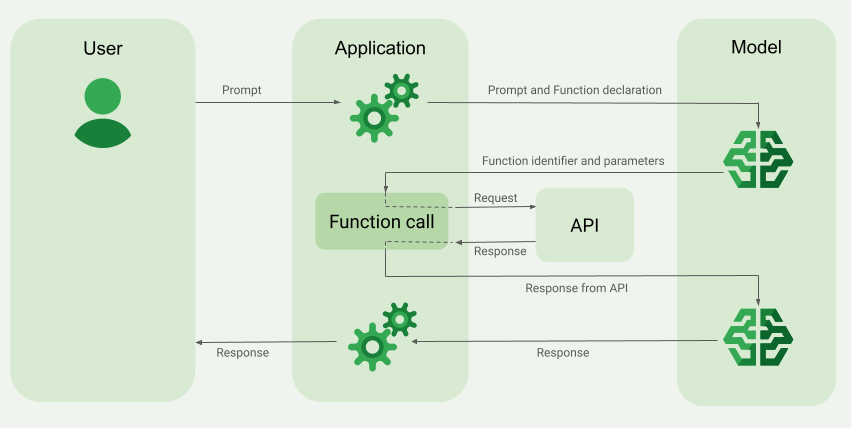
Gdy wysyłasz żądanie do modelu, możesz też udostępnić mu zestaw „narzędzi” (takich jak funkcje), których może użyć do wygenerowania ostatecznej odpowiedzi. Aby korzystać z tych funkcji i je wywoływać („wywoływanie funkcji”), model i aplikacja muszą przekazywać sobie nawzajem informacje, dlatego zalecanym sposobem korzystania z wywoływania funkcji jest interfejs czatu wieloetapowego.
Wyobraź sobie, że masz aplikację, w której użytkownik może wpisać prompta takiego jak:
What was the weather in Boston on October 17, 2024?.
Modele Gemini mogą nie znać tych informacji o pogodzie, ale wyobraź sobie, że znasz interfejs API zewnętrznej usługi pogodowej, który może je dostarczyć. Możesz użyć wywoływania funkcji, aby zapewnić modelowi Gemini dostęp do tego interfejsu API i informacji o pogodzie.
Najpierw napisz w aplikacji funkcję fetchWeather, która współdziała z tym hipotetycznym zewnętrznym interfejsem API, który ma te dane wejściowe i wyjściowe:
| Parametr | Typ | Wymagany | Opis |
|---|---|---|---|
| Dane wejściowe | |||
location |
Obiekt | Tak | Nazwa miasta i stanu, dla którego chcesz sprawdzić pogodę. Obsługiwane są tylko miasta w Stanach Zjednoczonych. Musi zawsze być zagnieżdżonym obiektem city i state.
|
date |
Ciąg znaków | Tak | Data, dla której chcesz pobrać informacje o pogodzie (musi być zawsze w formacie YYYY-MM-DD).
|
| Wyniki | |||
temperature |
Liczba całkowita | Tak | Temperatura (w stopniach Fahrenheita) |
chancePrecipitation |
Ciąg znaków | Tak | prawdopodobieństwo opadów (wyrażone w procentach), |
cloudConditions |
Ciąg znaków | Tak | Zachmurzenie (clear, partlyCloudy, mostlyCloudy lub cloudy)
|
Podczas inicjowania modelu informujesz go, że ta funkcja fetchWeather istnieje i jak można jej używać do przetwarzania przychodzących żądań, jeśli jest to konieczne.
Nazywa się to „deklaracją funkcji”. Model nie wywołuje funkcji bezpośrednio. Zamiast tego podczas przetwarzania przychodzącego żądania model decyduje, czy funkcja fetchWeather może pomóc mu odpowiedzieć na żądanie. Jeśli model uzna, że funkcja może być przydatna, wygeneruje uporządkowane dane, które pomogą aplikacji wywołać funkcję.
Spójrz jeszcze raz na przychodzące żądanie:
What was the weather in Boston on October 17, 2024?. Model prawdopodobnie uzna, że funkcja fetchWeather może pomóc mu w wygenerowaniu odpowiedzi. Model sprawdzi, jakie parametry wejściowe są potrzebne dla funkcji fetchWeather, a następnie wygeneruje dla niej uporządkowane dane wejściowe, które będą wyglądać mniej więcej tak:
{
  functionName: fetchWeather,
  location: {
    city: Boston,
    state: Massachusetts  // the model can infer the state from the prompt
  },
  date: 2024-10-17
}
Model przekazuje te uporządkowane dane wejściowe do aplikacji, aby mogła ona wywołać funkcję fetchWeather. Gdy aplikacja otrzyma z interfejsu API informacje o warunkach pogodowych, przekazuje je do modelu. Te informacje o pogodzie pozwalają modelowi dokończyć ostateczne przetwarzanie i wygenerować odpowiedź na początkowe żądanie: What was the weather in Boston on October 17, 2024?
Model może podać ostateczną odpowiedź w języku naturalnym, na przykład:
On October 17, 2024, in Boston, it was 38 degrees Fahrenheit with partly cloudy skies.
Implementowanie wywoływania funkcji
Kolejne kroki w tym przewodniku pokazują, jak zaimplementować konfigurację wywołania funkcji podobną do przepływu pracy opisanego w sekcji Przegląd przykładu wywołania funkcji (patrz górna sekcja tej strony).
Obsługiwane modele
gemini-4-argongemini-3.8-flash(oraz starsze modelegemini-3.7-flash,gemini-3.6-flashigemini-3.5-flash)gemini-3.5-flash-lite(oraz starszegemini-3.1-flash-lite)
Tę funkcję obsługują też modele gemini-3.1-pro-preview i ogólnego zastosowania Gemini 2.5 (które zostały wycofane).
Modele Gemini Live API również obsługują tę funkcję, ale wszystkie przykładowe kody w tym przewodniku dotyczą modeli Gemini ogólnego zastosowania.
Zanim zaczniesz
|
Kliknij dostawcę Gemini API, aby wyświetlić na tej stronie treści i kod dotyczące tego dostawcy. |
Jeśli jeszcze nie korzystasz z Firebase, zapoznaj się z przewodnikiem dla początkujących, który opisuje, jak skonfigurować projekt w Firebase, połączyć aplikację z Firebase, dodać pakiet SDK, zainicjować usługę backendu dla wybranego dostawcy Gemini API i utworzyć instancję GenerativeModel.
Do testowania i ulepszania promptów zalecamy używanie Google AI Studio.
Krok 1. Napisz funkcję
Wyobraź sobie, że masz aplikację, w której użytkownik może wpisać prompta takiego jak:
What was the weather in Boston on October 17, 2024?. Modele Gemini mogą nie znać tych informacji o pogodzie, ale wyobraź sobie, że znasz interfejs API zewnętrznej usługi pogodowej, który może je dostarczyć. Scenariusz opisany w tym przewodniku opiera się na tym hipotetycznym zewnętrznym interfejsie API.
Napisz w aplikacji funkcję, która będzie wchodzić w interakcję z hipotetycznym zewnętrznym interfejsem API i dostarczać modelowi informacje potrzebne do wygenerowania ostatecznego żądania. W tym przykładzie dotyczącym pogody będzie to funkcja fetchWeather, która wywołuje ten hipotetyczny zewnętrzny interfejs API.
Swift
// This function calls a hypothetical external API that returns
// a collection of weather information for a given location on a given date.
func fetchWeather(city: String, state: String, date: String) -> JSONObject {

  // TODO(developer): Write a standard function that would call an external weather API.

  // For demo purposes, this hypothetical response is hardcoded here in the expected format.
  return [
    "temperature": .number(38),
    "chancePrecipitation": .string("56%"),
    "cloudConditions": .string("partlyCloudy"),
  ]
}
Kotlin
// This function calls a hypothetical external API that returns
// a collection of weather information for a given location on a given date.
// `location` is an object of the form { city: string, state: string }
data class Location(val city: String, val state: String)

suspend fun fetchWeather(location: Location, date: String): JsonObject {

    // TODO(developer): Write a standard function that would call to an external weather API.

    // For demo purposes, this hypothetical response is hardcoded here in the expected format.
    return JsonObject(mapOf(
        "temperature" to JsonPrimitive(38),
        "chancePrecipitation" to JsonPrimitive("56%"),
        "cloudConditions" to JsonPrimitive("partlyCloudy")
    ))
}
Java
// This function calls a hypothetical external API that returns
// a collection of weather information for a given location on a given date.
// `location` is an object of the form { city: string, state: string }
public JsonObject fetchWeather(Location location, String date) {

  // TODO(developer): Write a standard function that would call to an external weather API.

  // For demo purposes, this hypothetical response is hardcoded here in the expected format.
  return new JsonObject(Map.of(
        "temperature", JsonPrimitive(38),
        "chancePrecipitation", JsonPrimitive("56%"),
        "cloudConditions", JsonPrimitive("partlyCloudy")));
}
Web
// This function calls a hypothetical external API that returns
// a collection of weather information for a given location on a given date.
// `location` is an object of the form { city: string, state: string }
async function fetchWeather({ location, date }) {

  // TODO(developer): Write a standard function that would call to an external weather API.

  // For demo purposes, this hypothetical response is hardcoded here in the expected format.
  return {
    temperature: 38,
    chancePrecipitation: "56%",
    cloudConditions: "partlyCloudy",
  };
}
Dart
// This function calls a hypothetical external API that returns
// a collection of weather information for a given location on a given date.
// `location` is an object of the form { city: string, state: string }
Future<Map<String, Object?>> fetchWeather(
  Location location, String date
) async {

  // TODO(developer): Write a standard function that would call to an external weather API.

  // For demo purposes, this hypothetical response is hardcoded here in the expected format.
  final apiResponse = {
    'temperature': 38,
    'chancePrecipitation': '56%',
    'cloudConditions': 'partlyCloudy',
  };
  return apiResponse;
}
Unity
// This function calls a hypothetical external API that returns
// a collection of weather information for a given location on a given date.
System.Collections.Generic.Dictionary<string, object> FetchWeather(
    string city, string state, string date) {

  // TODO(developer): Write a standard function that would call an external weather API.

  // For demo purposes, this hypothetical response is hardcoded here in the expected format.
  return new System.Collections.Generic.Dictionary<string, object>() {
    {"temperature", 38},
    {"chancePrecipitation", "56%"},
    {"cloudConditions", "partlyCloudy"},
  };
}
Krok 2. Utwórz deklarację funkcji
Utwórz deklarację funkcji, którą później przekażesz modelowi (następny krok w tym przewodniku).
W deklaracji podaj jak najwięcej szczegółów w opisach funkcji i jej parametrów.
Model używa informacji z deklaracji funkcji, aby określić, którą funkcję wybrać i jak podać wartości parametrów do rzeczywistego wywołania funkcji. W sekcji Dodatkowe zachowania i opcje na tej stronie znajdziesz informacje o tym, jak model może wybierać funkcje i jak możesz kontrolować ten wybór.
Pamiętaj o tych kwestiach dotyczących podawanego schematu:
Deklaracje funkcji musisz podać w formacie schematu zgodnym ze schematem OpenAPI. Agent Platform obsługuje schemat OpenAPI w ograniczonym zakresie.
Obsługiwane są te atrybuty:
type,nullable,required,format,description,properties,items,enum.Te atrybuty nie są obsługiwane:
default,optional,maximum,oneOf.
Domyślnie w przypadku pakietów SDK Firebase AI Logic wszystkie pola są traktowane jako wymagane, chyba że określisz je jako opcjonalne w tablicy
optionalProperties. W przypadku tych opcjonalnych pól model może je wypełnić lub pominąć. Pamiętaj, że jest to przeciwieństwo domyślnego działania tych 2 dostawców Gemini API, jeśli używasz ich pakietów SDK serwera lub bezpośrednio ich interfejsu API.
Sprawdzone metody dotyczące deklaracji funkcji, w tym wskazówki dotyczące nazw i opisów, znajdziesz w sekcji Sprawdzone metody w dokumentacji Gemini Developer API.
Deklarację funkcji możesz napisać w ten sposób:
Swift
let fetchWeatherTool = FunctionDeclaration(
  name: "fetchWeather",
  description: "Get the weather conditions for a specific city on a specific date.",
  parameters: [
    "location": .object(
      properties: [
        "city": .string(description: "The city of the location."),
        "state": .string(description: "The US state of the location."),
      ],
      description: """
      The name of the city and its state for which to get the weather. Only cities in the
      USA are supported.
      """
    ),
    "date": .string(
      description: """
      The date for which to get the weather. Date must be in the format: YYYY-MM-DD.
      """
    ),
  ]
)
Kotlin
val fetchWeatherTool = FunctionDeclaration(
    "fetchWeather",
    "Get the weather conditions for a specific city on a specific date.",
    mapOf(
        "location" to Schema.obj(
            mapOf(
                "city" to Schema.string("The city of the location."),
                "state" to Schema.string("The US state of the location."),
            ),
            description = "The name of the city and its state for which " +
                "to get the weather. Only cities in the " +
                "USA are supported."
        ),
        "date" to Schema.string("The date for which to get the weather." +
                                " Date must be in the format: YYYY-MM-DD."
        ),
    ),
)
Java
FunctionDeclaration fetchWeatherTool = new FunctionDeclaration(
        "fetchWeather",
        "Get the weather conditions for a specific city on a specific date.",
        Map.of("location",
                Schema.obj(Map.of(
                        "city", Schema.str("The city of the location."),
                        "state", Schema.str("The US state of the location."))),
                "date",
                Schema.str("The date for which to get the weather. " +
                              "Date must be in the format: YYYY-MM-DD.")),
        Collections.emptyList());
Web
const fetchWeatherTool: FunctionDeclarationsTool = {
  functionDeclarations: [
   {
      name: "fetchWeather",
      description:
        "Get the weather conditions for a specific city on a specific date",
      parameters: Schema.object({
        properties: {
          location: Schema.object({
            description:
              "The name of the city and its state for which to get " +
              "the weather. Only cities in the USA are supported.",
            properties: {
              city: Schema.string({
                description: "The city of the location."
              }),
              state: Schema.string({
                description: "The US state of the location."
              }),
            },
          }),
          date: Schema.string({
            description:
              "The date for which to get the weather. Date must be in the" +
              " format: YYYY-MM-DD.",
          }),
        },
      }),
    },
  ],
};
Dart
final fetchWeatherTool = FunctionDeclaration(
    'fetchWeather',
    'Get the weather conditions for a specific city on a specific date.',
    parameters: {
      'location': Schema.object(
        description:
          'The name of the city and its state for which to get'
          'the weather. Only cities in the USA are supported.',
        properties: {
          'city': Schema.string(
             description: 'The city of the location.'
           ),
          'state': Schema.string(
             description: 'The US state of the location.'
          ),
        },
      ),
      'date': Schema.string(
        description:
          'The date for which to get the weather. Date must be in the format: YYYY-MM-DD.'
      ),
    },
  );
Unity
var fetchWeatherTool = new Tool(new FunctionDeclaration(
  name: "fetchWeather",
  description: "Get the weather conditions for a specific city on a specific date.",
  parameters: new System.Collections.Generic.Dictionary<string, Schema>() {
    { "location", Schema.Object(
      properties: new System.Collections.Generic.Dictionary<string, Schema>() {
        { "city", Schema.String(description: "The city of the location.") },
        { "state", Schema.String(description: "The US state of the location.")}
      },
      description: "The name of the city and its state for which to get the weather. Only cities in the USA are supported."
    ) },
    { "date", Schema.String(
      description: "The date for which to get the weather. Date must be in the format: YYYY-MM-DD."
    )}
  }
));
Krok 3. Podaj deklarację funkcji podczas inicjowania modelu
Maksymalna liczba deklaracji funkcji, które możesz podać w żądaniu, to 128. W sekcji Dodatkowe zachowania i opcje na tej stronie znajdziesz informacje o tym, jak model może wybierać funkcje i jak możesz kontrolować ten wybór (za pomocą toolConfig do ustawiania trybu wywoływania funkcji).
Swift
import FirebaseAILogic

// Initialize the Gemini Developer API backend service.
// Create a `GenerativeModel` instance with a model that supports your use case.
let model = FirebaseAI.firebaseAI(backend: .googleAI()).generativeModel(
  modelName: "GEMINI_MODEL_NAME",
  // Provide the function declaration to the model.
  tools: [.functionDeclarations([fetchWeatherTool])]
)
Kotlin
// Initialize the Gemini Developer API backend service.
// Create a `GenerativeModel` instance with a model that supports your use case.
val model = Firebase.ai(backend = GenerativeBackend.googleAI()).generativeModel(
    modelName = "<var>GEMINI_MODEL_NAME</var>",
    // Provide the function declaration to the model.
    tools = listOf(Tool.functionDeclarations(listOf(fetchWeatherTool)))
)
Java
// Initialize the Gemini Developer API backend service.
// Create a `GenerativeModel` instance with a model that supports your use case.
GenerativeModelFutures model = GenerativeModelFutures.from(
        FirebaseAI.getInstance(GenerativeBackend.googleAI())
                .generativeModel("<var>GEMINI_MODEL_NAME</var>",
                        null,
                        null,
                        // Provide the function declaration to the model.
                        List.of(Tool.functionDeclarations(List.of(fetchWeatherTool)))));
Web
import { initializeApp } from "firebase/app";
import { getAI, getGenerativeModel, GoogleAIBackend } from "firebase/ai";

// TODO(developer): Replace the following with your app's Firebase configuration
// See: https://firebase.google.com/docs/web/learn-more#config-object
const firebaseConfig = {
  // ...
};

// Initialize FirebaseApp
const firebaseApp = initializeApp(firebaseConfig);

// Initialize the Gemini Developer API backend service.
const firebaseAI = getAI(firebaseApp, { backend: new GoogleAIBackend() });

// Create a `GenerativeModel` instance with a model that supports your use case.
const model = getGenerativeModel(firebaseAI, {
  model: "GEMINI_MODEL_NAME",
  // Provide the function declaration to the model.
  tools: fetchWeatherTool
});
Dart
import 'package:firebase_ai/firebase_ai.dart';
import 'package:firebase_core/firebase_core.dart';
import 'firebase_options.dart';

// Initialize FirebaseApp
await Firebase.initializeApp(
  options: DefaultFirebaseOptions.currentPlatform,
);

// Initialize the Gemini Developer API backend service.
// Create a `GenerativeModel` instance with a model that supports your use case.
_functionCallModel = FirebaseAI.googleAI().generativeModel(
       model: 'GEMINI_MODEL_NAME',
       // Provide the function declaration to the model.
       tools: [
         Tool.functionDeclarations([fetchWeatherTool]),
       ],
     );
Unity
using Firebase;
using Firebase.AI;

// Initialize the Gemini Developer API backend service.
// Create a `GenerativeModel` instance with a model that supports your use case.
var model = FirebaseAI.DefaultInstance.GetGenerativeModel(
  modelName: "GEMINI_MODEL_NAME",
  // Provide the function declaration to the model.
  tools: new Tool[] { fetchWeatherTool }
);
Dowiedz się, jak wybrać model odpowiednie do Twojego przypadku użycia i aplikacji.
Krok 4. Wywołaj funkcję, aby wywołać zewnętrzny interfejs API
Jeśli model zdecyduje, że funkcja fetchWeather może pomóc mu w wygenerowaniu ostatecznej odpowiedzi, aplikacja musi wykonać rzeczywiste wywołanie tej funkcji, używając ustrukturyzowanych danych wejściowych dostarczonych przez model.
Informacje muszą być przekazywane między modelem a aplikacją, dlatego zalecanym sposobem korzystania z wywoływania funkcji jest interfejs czatu wieloetapowego.
Poniższy fragment kodu pokazuje, jak aplikacja jest informowana o tym, że model chce użyć funkcji fetchWeather. Pokazuje też, że model podał niezbędne wartości parametrów wejściowych wywołania funkcji (i jej podstawowego zewnętrznego interfejsu API).
W tym przykładzie przychodzące żądanie zawierało prompt What was the weather in Boston on October 17, 2024?. Na podstawie tego promptu model wywnioskował parametry wejściowe wymagane przez funkcję fetchWeather (czyli city, state i date).
Swift
let chat = model.startChat()
let prompt = "What was the weather in Boston on October 17, 2024?"

// Send the user's question (the prompt) to the model using multi-turn chat.
let response = try await chat.sendMessage(prompt)

var functionResponses = [FunctionResponsePart]()

// When the model responds with one or more function calls, invoke the function(s).
for functionCall in response.functionCalls {
  if functionCall.name == "fetchWeather" {
    // TODO(developer): Handle invalid arguments.
    guard case let .object(location) = functionCall.args["location"] else { fatalError() }
    guard case let .string(city) = location["city"] else { fatalError() }
    guard case let .string(state) = location["state"] else { fatalError() }
    guard case let .string(date) = functionCall.args["date"] else { fatalError() }

    functionResponses.append(FunctionResponsePart(
      name: functionCall.name,
      // Forward the structured input data prepared by the model
      // to the hypothetical external API.
      response: fetchWeather(city: city, state: state, date: date)
    ))
  }
  // TODO(developer): Handle other potential function calls, if any.
}
Kotlin
val prompt = "What was the weather in Boston on October 17, 2024?"
val chat = model.startChat()
// Send the user's question (the prompt) to the model using multi-turn chat.
val result = chat.sendMessage(prompt)

val functionCalls = result.functionCalls
// When the model responds with one or more function calls, invoke the function(s).
val fetchWeatherCall = functionCalls.find { it.name == "fetchWeather" }

// Forward the structured input data prepared by the model
// to the hypothetical external API.
val functionResponse = fetchWeatherCall?.let {
    // Alternatively, if your `Location` class is marked as @Serializable, you can use
    // val location = Json.decodeFromJsonElement<Location>(it.args["location"]!!)
    val location = Location(
        it.args["location"]!!.jsonObject["city"]!!.jsonPrimitive.content,
        it.args["location"]!!.jsonObject["state"]!!.jsonPrimitive.content
    )
    val date = it.args["date"]!!.jsonPrimitive.content
    fetchWeather(location, date)
}
Java
String prompt = "What was the weather in Boston on October 17, 2024?";
ChatFutures chatFutures = model.startChat();
// Send the user's question (the prompt) to the model using multi-turn chat.
ListenableFuture<GenerateContentResponse> response =
        chatFutures.sendMessage(new Content("user", List.of(new TextPart(prompt))));

ListenableFuture<JsonObject> handleFunctionCallFuture = Futures.transform(response, result -> {
    for (FunctionCallPart functionCall : result.getFunctionCalls()) {
        if (functionCall.getName().equals("fetchWeather")) {
            Map<String, JsonElement> args = functionCall.getArgs();
            JsonObject locationJsonObject =
                    JsonElementKt.getJsonObject(args.get("location"));
            String city =
                    JsonElementKt.getContentOrNull(
                            JsonElementKt.getJsonPrimitive(
                                    locationJsonObject.get("city")));
            String state =
                    JsonElementKt.getContentOrNull(
                            JsonElementKt.getJsonPrimitive(
                                    locationJsonObject.get("state")));
            Location location = new Location(city, state);

            String date = JsonElementKt.getContentOrNull(
                    JsonElementKt.getJsonPrimitive(
                            args.get("date")));
            return fetchWeather(location, date);
        }
    }
    return null;
}, Executors.newSingleThreadExecutor());
Web
const chat = model.startChat();
const prompt = "What was the weather in Boston on October 17, 2024?";

// Send the user's question (the prompt) to the model using multi-turn chat.
let result = await chat.sendMessage(prompt);
const functionCalls = result.response.functionCalls();
let functionCall;
let functionResult;
// When the model responds with one or more function calls, invoke the function(s).
if (functionCalls.length > 0) {
  for (const call of functionCalls) {
    if (call.name === "fetchWeather") {
      // Forward the structured input data prepared by the model
      // to the hypothetical external API.
      functionResult = await fetchWeather(call.args);
      functionCall = call;
    }
  }
}
Dart
final chat = _functionCallModel.startChat();
const prompt = 'What was the weather in Boston on October 17, 2024?';

// Send the user's question (the prompt) to the model using multi-turn chat.
var response = await chat.sendMessage(Content.text(prompt));

final functionCalls = response.functionCalls.toList();
// When the model responds with one or more function calls, invoke the function(s).
if (functionCalls.isNotEmpty) {
  for (final functionCall in functionCalls) {
    if (functionCall.name == 'fetchWeather') {
      Map<String, dynamic> location =
          functionCall.args['location']! as Map<String, dynamic>;
      var date = functionCall.args['date']! as String;
      var city = location['city'] as String;
      var state = location['state'] as String;
      final functionResult =
          await fetchWeather(Location(city, state), date);
      // Send the response to the model so that it can use the result to
      // generate text for the user.
      response = await chat.sendMessage(
        Content.functionResponse(functionCall.name, functionResult),
      );
    }
  }
} else {
  throw UnimplementedError(
    'No function calls returned by the model',
  );
}
Unity
var chat = model.StartChat();
var prompt = "What was the weather in Boston on October 17, 2024?";

// Send the user's question (the prompt) to the model using multi-turn chat.
var response = await chat.SendMessageAsync(prompt);

var functionResponses = new List<ModelContent>();

foreach (var functionCall in response.FunctionCalls) {
  if (functionCall.Name == "fetchWeather") {
    // TODO(developer): Handle invalid arguments.
    var city = functionCall.Args["city"] as string;
    var state = functionCall.Args["state"] as string;
    var date = functionCall.Args["date"] as string;

    functionResponses.Add(ModelContent.FunctionResponse(
      name: functionCall.Name,
      // Forward the structured input data prepared by the model
      // to the hypothetical external API.
      response: FetchWeather(city: city, state: state, date: date)
    ));
  }
  // TODO(developer): Handle other potential function calls, if any.
}
Krok 5. Przekaż dane wyjściowe funkcji do modelu, aby wygenerować ostateczną odpowiedź
Gdy funkcja fetchWeather zwróci informacje o pogodzie, aplikacja musi przekazać je z powrotem do modelu.
Następnie model przeprowadza ostateczne przetwarzanie i generuje ostateczną odpowiedź w języku naturalnym, na przykład:
On October 17, 2024 in Boston, it was 38 degrees Fahrenheit with partly cloudy skies.
Swift
// Send the response(s) from the function back to the model
// so that the model can use it to generate its final response.
let finalResponse = try await chat.sendMessage(
  [ModelContent(role: "user", parts: functionResponses)]
)

// Log the text response.
print(finalResponse.text ?? "No text in response.")
Kotlin
// Send the response(s) from the function back to the model
// so that the model can use it to generate its final response.
val finalResponse = chat.sendMessage(content("user") {
    part(FunctionResponsePart("fetchWeather", functionResponse!!))
})

// Log the text response.
println(finalResponse.text ?: "No text in response")
Java
ListenableFuture<GenerateContentResponse> modelResponseFuture = Futures.transformAsync(
  handleFunctionCallFuture,
  // Send the response(s) from the function back to the model
  // so that the model can use it to generate its final response.
  functionCallResult -> chatFutures.sendMessage(new Content("user",
  List.of(new FunctionResponsePart(
          "fetchWeather", functionCallResult)))),
  Executors.newSingleThreadExecutor());

Futures.addCallback(modelResponseFuture, new FutureCallback<GenerateContentResponse>() {
@Override
public void onSuccess(GenerateContentResponse result) {
  if (result.getText() != null) {
      // Log the text response.
      System.out.println(result.getText());
  }
}

@Override
public void onFailure(Throwable t) {
  // handle error
}
}, Executors.newSingleThreadExecutor());
Web
// Send the response from the function back to the model
// so that the model can use it to generate its final response.
result = await chat.sendMessage([
  {
    type: "functionResponse",
    functionResponse: {
      name: functionCall.name, // "fetchWeather"
      response: functionResult,
    },
  },
]);
console.log(result.response.text());
Dart
// Send the response from the function back to the model
// so that the model can use it to generate its final response.
response = await chat
     .sendMessage(Content.functionResponse(functionCall.name, functionResult));
Unity
// Send the response(s) from the function back to the model
// so that the model can use it to generate its final response.
var finalResponse = await chat.SendMessageAsync(functionResponses);

// Log the text response.
UnityEngine.Debug.Log(finalResponse.Text ?? "No text in response.");
Dodatkowe zachowania i opcje
Oto kilka dodatkowych zachowań związanych z wywoływaniem funkcji, które musisz uwzględnić w kodzie, oraz opcje, które możesz kontrolować.
Model może poprosić o ponowne wywołanie funkcji lub o wywołanie innej funkcji.
Jeśli odpowiedź z jednego wywołania funkcji nie wystarczy, aby model mógł wygenerować ostateczną odpowiedź, może on poprosić o dodatkowe wywołanie funkcji lub o wywołanie zupełnie innej funkcji. Ta druga sytuacja może wystąpić tylko wtedy, gdy na liście deklaracji funkcji podasz modelowi więcej niż 1 funkcję.
Aplikacja musi uwzględniać, że model może poprosić o dodatkowe wywołania funkcji.
Model może poprosić o wywołanie kilku funkcji jednocześnie.
Na liście deklaracji funkcji możesz podać modelowi maksymalnie 128 funkcji. W związku z tym model może zdecydować, że do wygenerowania ostatecznej odpowiedzi potrzebuje kilku funkcji. Może też zdecydować o wywołaniu niektórych z tych funkcji jednocześnie – nazywa się to równoległym wywoływaniem funkcji.
Aplikacja musi uwzględniać, że model może prosić o wywołanie wielu funkcji jednocześnie, i musi przekazywać modelowi wszystkie odpowiedzi z funkcji.
Możesz kontrolować, czy i jak model może prosić o wywoływanie funkcji.
Możesz nałożyć pewne ograniczenia dotyczące tego, jak i czy model powinien używać podanych deklaracji funkcji. Jest to tzw. ustawianie trybu wywoływania funkcji. Oto przykłady:
Zamiast pozwalać modelowi na wybór między natychmiastową odpowiedzią w języku naturalnym a wywołaniem funkcji, możesz wymusić, aby zawsze używał wywołań funkcji. Nazywa się to wymuszonym wywoływaniem funkcji.
Jeśli podasz kilka deklaracji funkcji, możesz ograniczyć model do używania tylko podzbioru podanych funkcji.
Te ograniczenia (lub tryby) możesz wdrożyć, dodając konfigurację narzędzia (toolConfig) wraz z promptem i deklaracjami funkcji. W konfiguracji narzędzia możesz określić jeden z tych trybów. Najbardziej przydatny tryb to ANY.
| Tryb | Opis |
|---|---|
AUTO |
Domyślne działanie modelu. Model decyduje, czy użyć wywołania funkcji, czy odpowiedzi w języku naturalnym. |
ANY |
Model musi używać wywołań funkcji („wymuszone wywoływanie funkcji”). Aby ograniczyć model do podzbioru funkcji, określ dozwolone nazwy funkcji w allowedFunctionNames.
|
NONE |
Model nie może używać wywołań funkcji. To zachowanie jest równoważne żądaniu modelu bez powiązanych deklaracji funkcji. |
Co jeszcze możesz zrobić?
Wypróbuj inne funkcje
- rozmowy wieloetapowe (czat),
- generowanie tekstu na podstawie promptów tekstowych;
- Generuj tekst za pomocą promptów z różnymi typami plików, takimi jak obrazy, pliki PDF, filmy i pliki audio.
Dowiedz się, jak kontrolować generowanie treści
- Dowiedz się, jak projektować prompty, w tym poznaj sprawdzone metody, strategie i przykładowe prompty.
- Skonfiguruj parametry modelu, takie jak maksymalna liczba tokenów wyjściowych, prawdopodobieństwo powtarzania tokenów wyjściowych itp.
- Użyj ustawień bezpieczeństwa, aby dostosować prawdopodobieństwo otrzymania odpowiedzi, które mogą zostać uznane za szkodliwe.
Więcej informacji o obsługiwanych modelach
Dowiedz się więcej o modelach dostępnych w różnych przypadkach użycia oraz o ich limitach i cenach.Prześlij opinię o korzystaniu z usługi Firebase AI Logic