

Üretken modeller, birçok farklı türde sorunu çözme konusunda güçlüdür. Ancak bu modeller, aşağıdaki gibi sınırlamalara tabidir:
- Eğitimden sonra donduruldukları için bilgileri güncel olmayabilir.
- Harici verileri sorgulayamaz veya değiştiremezler.
İşlev çağrısı, bu sınırlamalardan bazılarını aşmanıza yardımcı olabilir. İşlev çağrısı, modelin nihai yanıtını oluşturmak için API'ler ve işlevler gibi harici araçları kullanmasına olanak tanıdığı için bazen araç kullanımı olarak da adlandırılır.
Bu kılavuzda, bu sayfanın bir sonraki ana bölümünde açıklanan senaryoya benzer bir işlev çağrısı kurulumunu nasıl uygulayabileceğiniz gösterilmektedir. Uygulamanızda işlev çağrısını ayarlamak için genel olarak şu adımları uygulamanız gerekir:
1. adım: Modele, nihai yanıtını oluşturmak için ihtiyaç duyduğu bilgileri sağlayabilecek bir işlev yazın (örneğin, işlev harici bir API'yi çağırabilir).
2. adım: İşlevi ve parametrelerini açıklayan bir işlev bildirimi oluşturun.
3. adım: Model başlatma sırasında işlev beyanını sağlayın. Böylece model, gerektiğinde işlevi nasıl kullanabileceğini bilir.
4. adım: Uygulamanızı, modelin işlevi çağırması için gereken bilgileri gönderebilecek şekilde ayarlayın.
5. adım: Modelin nihai yanıtını oluşturabilmesi için işlevin yanıtını modele geri iletin.
İşlev çağrısı örneğine genel bakış
Modele istek gönderirken, nihai yanıtını oluşturmak için kullanabileceği bir dizi "araç" (işlevler gibi) da sağlayabilirsiniz. Bu işlevleri kullanmak ve çağırmak ("işlev çağrısı") için model ile uygulamanızın birbirine bilgi aktarması gerekir. Bu nedenle, işlev çağrısını kullanmanın önerilen yolu çok turlu sohbet arayüzüdür.
Kullanıcının şu istemi girebileceği bir uygulamanız olduğunu varsayalım:
What was the weather in Boston on October 17, 2024?.
Gemini modelleri bu hava durumu bilgilerini bilmiyor olabilir ancak bu bilgileri sağlayabilecek harici bir hava durumu hizmeti API'si bildiğinizi varsayalım. İşlev çağrısını kullanarak Gemini modeline bu API'ye ve hava durumu bilgilerine erişim yolu sağlayabilirsiniz.
Öncelikle, uygulamanızda bu varsayımsal harici API ile etkileşim kuran bir fetchWeather işlevi yazarsınız. Bu işlevin giriş ve çıkışı şu şekildedir:
| Parametre | Tür | Zorunlu | Açıklama |
|---|---|---|---|
| Giriş | |||
location |
Nesne | Evet | Hava durumunu öğrenmek istediğiniz şehrin ve eyaletin adı. Yalnızca ABD'deki şehirler desteklenir. Her zaman city ve state'nin iç içe yerleştirilmiş bir nesnesi olmalıdır.
|
date |
Dize | Evet | Hava durumunun alınacağı tarih (her zaman YYYY-MM-DD biçiminde olmalıdır).
|
| Çıkış | |||
temperature |
Tam sayı | Evet | Sıcaklık (Fahrenhayt cinsinden) |
chancePrecipitation |
Dize | Evet | Yağış olasılığı (yüzde olarak ifade edilir) |
cloudConditions |
Dize | Evet | Bulut koşulları (clear, partlyCloudy, mostlyCloudy, cloudy değerlerinden biri)
|
Modeli başlatırken modele bu fetchWeather işlevinin mevcut olduğunu ve gerekirse gelen istekleri işlemek için nasıl kullanılabileceğini bildirirsiniz.
Buna "işlev bildirimi" denir. Model, işlevi doğrudan çağırmaz. Bunun yerine, model gelen isteği işlerken fetchWeather işlevinin isteğe yanıt vermesine yardımcı olup olamayacağına karar verir. Model, işlevin gerçekten yararlı olabileceğine karar verirse uygulamanızın işlevi çağırmasına yardımcı olacak yapılandırılmış veriler oluşturur.
Gelen isteğe tekrar bakın:
What was the weather in Boston on October 17, 2024?. Model, fetchWeather işlevinin yanıt üretmesine yardımcı olabileceğine karar verebilir. Model, fetchWeather için hangi giriş parametrelerinin gerekli olduğunu inceler ve ardından işlev için yaklaşık olarak aşağıdaki gibi yapılandırılmış giriş verileri oluşturur:
{
  functionName: fetchWeather,
  location: {
    city: Boston,
    state: Massachusetts  // the model can infer the state from the prompt
  },
  date: 2024-10-17
}
Model, bu yapılandırılmış giriş verilerini uygulamanıza iletir. Böylece uygulamanız fetchWeather işlevini çağırabilir. Uygulamanız, API'den hava durumu bilgilerini aldığında bu bilgileri modele iletir. Bu hava durumu bilgileri, modelin son işlemini tamamlamasına ve What was the weather in Boston on October 17, 2024? ile ilgili ilk isteğe yanıt vermesine olanak tanır.
Model, doğal dilde şu şekilde bir nihai yanıt verebilir:
On October 17, 2024, in Boston, it was 38 degrees Fahrenheit with partly cloudy skies.
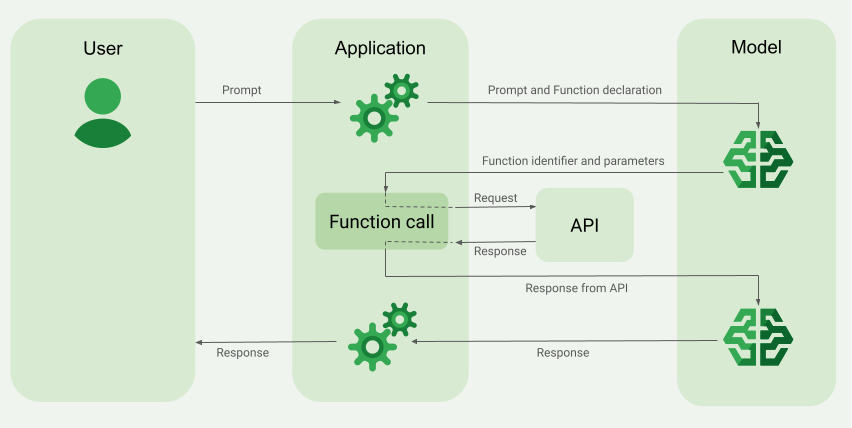
İşlev çağrısını uygulama
Bu kılavuzun sonraki adımlarında, İşlev çağrısı örneğine genel bakış bölümünde (bu sayfanın üst kısmına bakın) açıklanan iş akışına benzer bir işlev çağrısı kurulumunun nasıl uygulanacağı gösterilmektedir.
Desteklenen modeller
gemini-4-argongemini-3.8-flashgemini-3.5-flash-lite(ve daha eskigemini-3.1-flash-lite)
Eski genel kullanımlı Gemini 3.x Flash modelleri bu özelliği destekler ancak yaklaşan kapatma tarihleri ve/veya daha yeni modellere otomatik yönlendirme nedeniyle artık kullanılması önerilmez.
Gemini Live API modelleri de bu özelliği destekler ancak bu kılavuzdaki tüm kod örnekleri genel kullanıma yönelik Gemini modelleri içindir.
Başlamadan önce
|
Bu sayfada sağlayıcıya özel içerikleri ve kodları görüntülemek için Gemini API sağlayıcınızı tıklayın. |
Henüz yapmadıysanız başlangıç kılavuzundaki adımları tamamlayın. Bu kılavuzda Firebase projenizi nasıl oluşturacağınız, uygulamanızı Firebase'e nasıl bağlayacağınız, SDK'yı nasıl ekleyeceğiniz, seçtiğiniz Gemini API sağlayıcısı için arka uç hizmetini nasıl başlatacağınız ve bir GenerativeModel örneğini nasıl oluşturacağınız açıklanmaktadır.
İstemlerinizi test etmek ve yinelemek için Google AI Studio kullanmanızı öneririz.
1. adım: İşlevi yazın
Kullanıcının şu istemi girebileceği bir uygulamanız olduğunu varsayalım:
What was the weather in Boston on October 17, 2024?. Gemini
modelleri bu hava durumu bilgilerini bilmiyor olabilir ancak bu bilgileri sağlayabilecek harici bir hava durumu hizmeti API'si bildiğinizi varsayalım. Bu kılavuzdaki senaryo, bu varsayımsal harici API'yi temel alır.
Uygulamanızda, varsayımsal harici API ile etkileşim kuracak işlevi yazın ve modele, son isteğini oluşturmak için ihtiyaç duyduğu bilgileri sağlayın. Bu hava durumu örneğinde, bu varsayımsal harici API'yi çağıran bir fetchWeather işlevi olacaktır.
Swift
// This function calls a hypothetical external API that returns
// a collection of weather information for a given location on a given date.
func fetchWeather(city: String, state: String, date: String) -> JSONObject {

  // TODO(developer): Write a standard function that would call an external weather API.

  // For demo purposes, this hypothetical response is hardcoded here in the expected format.
  return [
    "temperature": .number(38),
    "chancePrecipitation": .string("56%"),
    "cloudConditions": .string("partlyCloudy"),
  ]
}
Kotlin
// This function calls a hypothetical external API that returns
// a collection of weather information for a given location on a given date.
// `location` is an object of the form { city: string, state: string }
data class Location(val city: String, val state: String)

suspend fun fetchWeather(location: Location, date: String): JsonObject {

    // TODO(developer): Write a standard function that would call to an external weather API.

    // For demo purposes, this hypothetical response is hardcoded here in the expected format.
    return JsonObject(mapOf(
        "temperature" to JsonPrimitive(38),
        "chancePrecipitation" to JsonPrimitive("56%"),
        "cloudConditions" to JsonPrimitive("partlyCloudy")
    ))
}
Java
// This function calls a hypothetical external API that returns
// a collection of weather information for a given location on a given date.
// `location` is an object of the form { city: string, state: string }
public JsonObject fetchWeather(Location location, String date) {

  // TODO(developer): Write a standard function that would call to an external weather API.

  // For demo purposes, this hypothetical response is hardcoded here in the expected format.
  return new JsonObject(Map.of(
        "temperature", JsonPrimitive(38),
        "chancePrecipitation", JsonPrimitive("56%"),
        "cloudConditions", JsonPrimitive("partlyCloudy")));
}
Web
// This function calls a hypothetical external API that returns
// a collection of weather information for a given location on a given date.
// `location` is an object of the form { city: string, state: string }
async function fetchWeather({ location, date }) {

  // TODO(developer): Write a standard function that would call to an external weather API.

  // For demo purposes, this hypothetical response is hardcoded here in the expected format.
  return {
    temperature: 38,
    chancePrecipitation: "56%",
    cloudConditions: "partlyCloudy",
  };
}
Dart
// This function calls a hypothetical external API that returns
// a collection of weather information for a given location on a given date.
// `location` is an object of the form { city: string, state: string }
Future<Map<String, Object?>> fetchWeather(
  Location location, String date
) async {

  // TODO(developer): Write a standard function that would call to an external weather API.

  // For demo purposes, this hypothetical response is hardcoded here in the expected format.
  final apiResponse = {
    'temperature': 38,
    'chancePrecipitation': '56%',
    'cloudConditions': 'partlyCloudy',
  };
  return apiResponse;
}
Unity
// This function calls a hypothetical external API that returns
// a collection of weather information for a given location on a given date.
System.Collections.Generic.Dictionary<string, object> FetchWeather(
    string city, string state, string date) {

  // TODO(developer): Write a standard function that would call an external weather API.

  // For demo purposes, this hypothetical response is hardcoded here in the expected format.
  return new System.Collections.Generic.Dictionary<string, object>() {
    {"temperature", 38},
    {"chancePrecipitation", "56%"},
    {"cloudConditions", "partlyCloudy"},
  };
}
2. adım: İşlev bildirimi oluşturun
Daha sonra modele sağlayacağınız işlev bildirimini oluşturun (bu kılavuzun sonraki adımı).
Beyanınızda, işlev ve parametrelerinin açıklamalarına mümkün olduğunca fazla ayrıntı ekleyin.
Model, hangi işlevin seçileceğini ve işlevin gerçek çağrısı için parametre değerlerinin nasıl sağlanacağını belirlemek üzere işlev bildirimindeki bilgileri kullanır. Modelin işlevler arasında nasıl seçim yapabileceğini ve bu seçimi nasıl kontrol edebileceğinizi öğrenmek için bu sayfanın ilerleyen bölümlerinde yer alan Ek davranışlar ve seçenekler bölümüne bakın.
Sağladığınız şemayla ilgili olarak aşağıdakilere dikkat edin:
İşlev bildirimlerini, OpenAPI şeması ile uyumlu bir şema biçiminde sağlamanız gerekir. Agent Platform, OpenAPI şeması için sınırlı destek sunar.
Şu özellikler desteklenir:
type,nullable,required,format,description,properties,items,enum.Şu özellikler desteklenmez:
default,optional,maximum,oneOf.
Varsayılan olarak, Firebase AI Logic SDK'ları için tüm alanlar, bir
optionalPropertiesdizisinde isteğe bağlı olarak belirtmediğiniz sürece zorunlu olarak kabul edilir. Model, bu isteğe bağlı alanları doldurabilir veya atlayabilir. Sunucu SDK'larını veya API'lerini doğrudan kullanırsanız bu durumun iki sağlayıcının varsayılan davranışının tam tersi olduğunu unutmayın.Gemini API
Adlar ve açıklamalarla ilgili ipuçları da dahil olmak üzere işlev bildirimleriyle ilgili en iyi uygulamalar için Google Cloud belgelerindeki Gemini Developer API belgelerindeki en iyi uygulamalar
İşlev beyanını şu şekilde yazabilirsiniz:
Swift
let fetchWeatherTool = FunctionDeclaration(
  name: "fetchWeather",
  description: "Get the weather conditions for a specific city on a specific date.",
  parameters: [
    "location": .object(
      properties: [
        "city": .string(description: "The city of the location."),
        "state": .string(description: "The US state of the location."),
      ],
      description: """
      The name of the city and its state for which to get the weather. Only cities in the
      USA are supported.
      """
    ),
    "date": .string(
      description: """
      The date for which to get the weather. Date must be in the format: YYYY-MM-DD.
      """
    ),
  ]
)
Kotlin
val fetchWeatherTool = FunctionDeclaration(
    "fetchWeather",
    "Get the weather conditions for a specific city on a specific date.",
    mapOf(
        "location" to Schema.obj(
            mapOf(
                "city" to Schema.string("The city of the location."),
                "state" to Schema.string("The US state of the location."),
            ),
            description = "The name of the city and its state for which " +
                "to get the weather. Only cities in the " +
                "USA are supported."
        ),
        "date" to Schema.string("The date for which to get the weather." +
                                " Date must be in the format: YYYY-MM-DD."
        ),
    ),
)
Java
FunctionDeclaration fetchWeatherTool = new FunctionDeclaration(
        "fetchWeather",
        "Get the weather conditions for a specific city on a specific date.",
        Map.of("location",
                Schema.obj(Map.of(
                        "city", Schema.str("The city of the location."),
                        "state", Schema.str("The US state of the location."))),
                "date",
                Schema.str("The date for which to get the weather. " +
                              "Date must be in the format: YYYY-MM-DD.")),
        Collections.emptyList());
Web
const fetchWeatherTool: FunctionDeclarationsTool = {
  functionDeclarations: [
   {
      name: "fetchWeather",
      description:
        "Get the weather conditions for a specific city on a specific date",
      parameters: Schema.object({
        properties: {
          location: Schema.object({
            description:
              "The name of the city and its state for which to get " +
              "the weather. Only cities in the USA are supported.",
            properties: {
              city: Schema.string({
                description: "The city of the location."
              }),
              state: Schema.string({
                description: "The US state of the location."
              }),
            },
          }),
          date: Schema.string({
            description:
              "The date for which to get the weather. Date must be in the" +
              " format: YYYY-MM-DD.",
          }),
        },
      }),
    },
  ],
};
Dart
final fetchWeatherTool = FunctionDeclaration(
    'fetchWeather',
    'Get the weather conditions for a specific city on a specific date.',
    parameters: {
      'location': Schema.object(
        description:
          'The name of the city and its state for which to get'
          'the weather. Only cities in the USA are supported.',
        properties: {
          'city': Schema.string(
             description: 'The city of the location.'
           ),
          'state': Schema.string(
             description: 'The US state of the location.'
          ),
        },
      ),
      'date': Schema.string(
        description:
          'The date for which to get the weather. Date must be in the format: YYYY-MM-DD.'
      ),
    },
  );
Unity
var fetchWeatherTool = new Tool(new FunctionDeclaration(
  name: "fetchWeather",
  description: "Get the weather conditions for a specific city on a specific date.",
  parameters: new System.Collections.Generic.Dictionary<string, Schema>() {
    { "location", Schema.Object(
      properties: new System.Collections.Generic.Dictionary<string, Schema>() {
        { "city", Schema.String(description: "The city of the location.") },
        { "state", Schema.String(description: "The US state of the location.")}
      },
      description: "The name of the city and its state for which to get the weather. Only cities in the USA are supported."
    ) },
    { "date", Schema.String(
      description: "The date for which to get the weather. Date must be in the format: YYYY-MM-DD."
    )}
  }
));
3. adım: Model başlatma sırasında işlev bildirimini sağlayın
İstekle birlikte sağlayabileceğiniz maksimum işlev beyanı sayısı 128'dir. Modelin işlevler arasından nasıl seçim yapabileceğini ve bu seçimi nasıl kontrol edebileceğinizi (işlev çağrısı modunu ayarlamak için toolConfig kullanarak) öğrenmek için bu sayfanın ilerleyen bölümlerindeki Ek davranışlar ve seçenekler bölümüne bakın.
Swift
import FirebaseAILogic

// Initialize the Gemini Developer API backend service.
// Create a `GenerativeModel` instance with a model that supports your use case.
let model = FirebaseAI.firebaseAI(backend: .googleAI()).generativeModel(
  modelName: "GEMINI_MODEL_NAME",
  // Provide the function declaration to the model.
  tools: [.functionDeclarations([fetchWeatherTool])]
)
Kotlin
// Initialize the Gemini Developer API backend service.
// Create a `GenerativeModel` instance with a model that supports your use case.
val model = Firebase.ai(backend = GenerativeBackend.googleAI()).generativeModel(
    modelName = "<var>GEMINI_MODEL_NAME</var>",
    // Provide the function declaration to the model.
    tools = listOf(Tool.functionDeclarations(listOf(fetchWeatherTool)))
)
Java
// Initialize the Gemini Developer API backend service.
// Create a `GenerativeModel` instance with a model that supports your use case.
GenerativeModelFutures model = GenerativeModelFutures.from(
        FirebaseAI.getInstance(GenerativeBackend.googleAI())
                .generativeModel("<var>GEMINI_MODEL_NAME</var>",
                        null,
                        null,
                        // Provide the function declaration to the model.
                        List.of(Tool.functionDeclarations(List.of(fetchWeatherTool)))));
Web
import { initializeApp } from "firebase/app";
import { getAI, getGenerativeModel, GoogleAIBackend } from "firebase/ai";

// TODO(developer): Replace the following with your app's Firebase configuration
// See: https://firebase.google.com/docs/web/learn-more#config-object
const firebaseConfig = {
  // ...
};

// Initialize FirebaseApp
const firebaseApp = initializeApp(firebaseConfig);

// Initialize the Gemini Developer API backend service.
const firebaseAI = getAI(firebaseApp, { backend: new GoogleAIBackend() });

// Create a `GenerativeModel` instance with a model that supports your use case.
const model = getGenerativeModel(firebaseAI, {
  model: "GEMINI_MODEL_NAME",
  // Provide the function declaration to the model.
  tools: fetchWeatherTool
});
Dart
import 'package:firebase_ai/firebase_ai.dart';
import 'package:firebase_core/firebase_core.dart';
import 'firebase_options.dart';

// Initialize FirebaseApp
await Firebase.initializeApp(
  options: DefaultFirebaseOptions.currentPlatform,
);

// Initialize the Gemini Developer API backend service.
// Create a `GenerativeModel` instance with a model that supports your use case.
_functionCallModel = FirebaseAI.googleAI().generativeModel(
       model: 'GEMINI_MODEL_NAME',
       // Provide the function declaration to the model.
       tools: [
         Tool.functionDeclarations([fetchWeatherTool]),
       ],
     );
Unity
using Firebase;
using Firebase.AI;

// Initialize the Gemini Developer API backend service.
// Create a `GenerativeModel` instance with a model that supports your use case.
var model = FirebaseAI.DefaultInstance.GetGenerativeModel(
  modelName: "GEMINI_MODEL_NAME",
  // Provide the function declaration to the model.
  tools: new Tool[] { fetchWeatherTool }
);
Kullanım alanınıza ve uygulamanıza uygun bir model seçmeyi öğrenin.
4. adım: Harici API'yi çağırmak için işlevi çağırın.
Model, fetchWeather işlevinin nihai yanıt oluşturmasına yardımcı olabileceğine karar verirse uygulamanızın, model tarafından sağlanan yapılandırılmış giriş verilerini kullanarak bu işleve gerçek çağrıyı yapması gerekir.
Bilgilerin model ile uygulama arasında karşılıklı olarak aktarılması gerektiğinden, işlev çağrısını kullanmanın önerilen yolu çok turlu sohbet arayüzüdür.
Aşağıdaki kod snippet'i, uygulamanıza modelin fetchWeather işlevini kullanmak istediğinin nasıl bildirildiğini gösterir. Ayrıca modelin, işlev çağrısı (ve temelindeki harici API) için gerekli giriş parametresi değerlerini sağladığını da gösterir.
Bu örnekte, gelen istekte What was the weather in Boston on October 17, 2024? istemi yer alıyordu. Model, bu istemden fetchWeather işlevinin gerektirdiği giriş parametrelerini (yani city, state ve date) çıkardı.
Swift
let chat = model.startChat()
let prompt = "What was the weather in Boston on October 17, 2024?"

// Send the user's question (the prompt) to the model using multi-turn chat.
let response = try await chat.sendMessage(prompt)

var functionResponses = [FunctionResponsePart]()

// When the model responds with one or more function calls, invoke the function(s).
for functionCall in response.functionCalls {
  if functionCall.name == "fetchWeather" {
    // TODO(developer): Handle invalid arguments.
    guard case let .object(location) = functionCall.args["location"] else { fatalError() }
    guard case let .string(city) = location["city"] else { fatalError() }
    guard case let .string(state) = location["state"] else { fatalError() }
    guard case let .string(date) = functionCall.args["date"] else { fatalError() }

    functionResponses.append(FunctionResponsePart(
      name: functionCall.name,
      // Forward the structured input data prepared by the model
      // to the hypothetical external API.
      response: fetchWeather(city: city, state: state, date: date)
    ))
  }
  // TODO(developer): Handle other potential function calls, if any.
}
Kotlin
val prompt = "What was the weather in Boston on October 17, 2024?"
val chat = model.startChat()
// Send the user's question (the prompt) to the model using multi-turn chat.
val result = chat.sendMessage(prompt)

val functionCalls = result.functionCalls
// When the model responds with one or more function calls, invoke the function(s).
val fetchWeatherCall = functionCalls.find { it.name == "fetchWeather" }

// Forward the structured input data prepared by the model
// to the hypothetical external API.
val functionResponse = fetchWeatherCall?.let {
    // Alternatively, if your `Location` class is marked as @Serializable, you can use
    // val location = Json.decodeFromJsonElement<Location>(it.args["location"]!!)
    val location = Location(
        it.args["location"]!!.jsonObject["city"]!!.jsonPrimitive.content,
        it.args["location"]!!.jsonObject["state"]!!.jsonPrimitive.content
    )
    val date = it.args["date"]!!.jsonPrimitive.content
    fetchWeather(location, date)
}
Java
String prompt = "What was the weather in Boston on October 17, 2024?";
ChatFutures chatFutures = model.startChat();
// Send the user's question (the prompt) to the model using multi-turn chat.
ListenableFuture<GenerateContentResponse> response =
        chatFutures.sendMessage(new Content("user", List.of(new TextPart(prompt))));

ListenableFuture<JsonObject> handleFunctionCallFuture = Futures.transform(response, result -> {
    for (FunctionCallPart functionCall : result.getFunctionCalls()) {
        if (functionCall.getName().equals("fetchWeather")) {
            Map<String, JsonElement> args = functionCall.getArgs();
            JsonObject locationJsonObject =
                    JsonElementKt.getJsonObject(args.get("location"));
            String city =
                    JsonElementKt.getContentOrNull(
                            JsonElementKt.getJsonPrimitive(
                                    locationJsonObject.get("city")));
            String state =
                    JsonElementKt.getContentOrNull(
                            JsonElementKt.getJsonPrimitive(
                                    locationJsonObject.get("state")));
            Location location = new Location(city, state);

            String date = JsonElementKt.getContentOrNull(
                    JsonElementKt.getJsonPrimitive(
                            args.get("date")));
            return fetchWeather(location, date);
        }
    }
    return null;
}, Executors.newSingleThreadExecutor());
Web
const chat = model.startChat();
const prompt = "What was the weather in Boston on October 17, 2024?";

// Send the user's question (the prompt) to the model using multi-turn chat.
let result = await chat.sendMessage(prompt);
const functionCalls = result.response.functionCalls();
let functionCall;
let functionResult;
// When the model responds with one or more function calls, invoke the function(s).
if (functionCalls.length > 0) {
  for (const call of functionCalls) {
    if (call.name === "fetchWeather") {
      // Forward the structured input data prepared by the model
      // to the hypothetical external API.
      functionResult = await fetchWeather(call.args);
      functionCall = call;
    }
  }
}
Dart
final chat = _functionCallModel.startChat();
const prompt = 'What was the weather in Boston on October 17, 2024?';

// Send the user's question (the prompt) to the model using multi-turn chat.
var response = await chat.sendMessage(Content.text(prompt));

final functionCalls = response.functionCalls.toList();
// When the model responds with one or more function calls, invoke the function(s).
if (functionCalls.isNotEmpty) {
  for (final functionCall in functionCalls) {
    if (functionCall.name == 'fetchWeather') {
      Map<String, dynamic> location =
          functionCall.args['location']! as Map<String, dynamic>;
      var date = functionCall.args['date']! as String;
      var city = location['city'] as String;
      var state = location['state'] as String;
      final functionResult =
          await fetchWeather(Location(city, state), date);
      // Send the response to the model so that it can use the result to
      // generate text for the user.
      response = await chat.sendMessage(
        Content.functionResponse(functionCall.name, functionResult),
      );
    }
  }
} else {
  throw UnimplementedError(
    'No function calls returned by the model',
  );
}
Unity
var chat = model.StartChat();
var prompt = "What was the weather in Boston on October 17, 2024?";

// Send the user's question (the prompt) to the model using multi-turn chat.
var response = await chat.SendMessageAsync(prompt);

var functionResponses = new List<ModelContent>();

foreach (var functionCall in response.FunctionCalls) {
  if (functionCall.Name == "fetchWeather") {
    // TODO(developer): Handle invalid arguments.
    var city = functionCall.Args["city"] as string;
    var state = functionCall.Args["state"] as string;
    var date = functionCall.Args["date"] as string;

    functionResponses.Add(ModelContent.FunctionResponse(
      name: functionCall.Name,
      // Forward the structured input data prepared by the model
      // to the hypothetical external API.
      response: FetchWeather(city: city, state: state, date: date)
    ));
  }
  // TODO(developer): Handle other potential function calls, if any.
}
5. adım: Son yanıtı oluşturmak için işlevin çıkışını modele sağlayın.
fetchWeather işlevi hava durumu bilgilerini döndürdükten sonra uygulamanızın bu bilgileri modele geri iletmesi gerekir.
Ardından model, son işlemini gerçekleştirir ve aşağıdaki gibi doğal dilde bir yanıt oluşturur:
On October 17, 2024 in Boston, it was 38 degrees Fahrenheit with partly cloudy skies.
Swift
// Send the response(s) from the function back to the model
// so that the model can use it to generate its final response.
let finalResponse = try await chat.sendMessage(
  [ModelContent(role: "user", parts: functionResponses)]
)

// Log the text response.
print(finalResponse.text ?? "No text in response.")
Kotlin
// Send the response(s) from the function back to the model
// so that the model can use it to generate its final response.
val finalResponse = chat.sendMessage(content("user") {
    part(FunctionResponsePart("fetchWeather", functionResponse!!))
})

// Log the text response.
println(finalResponse.text ?: "No text in response")
Java
ListenableFuture<GenerateContentResponse> modelResponseFuture = Futures.transformAsync(
  handleFunctionCallFuture,
  // Send the response(s) from the function back to the model
  // so that the model can use it to generate its final response.
  functionCallResult -> chatFutures.sendMessage(new Content("user",
  List.of(new FunctionResponsePart(
          "fetchWeather", functionCallResult)))),
  Executors.newSingleThreadExecutor());

Futures.addCallback(modelResponseFuture, new FutureCallback<GenerateContentResponse>() {
@Override
public void onSuccess(GenerateContentResponse result) {
  if (result.getText() != null) {
      // Log the text response.
      System.out.println(result.getText());
  }
}

@Override
public void onFailure(Throwable t) {
  // handle error
}
}, Executors.newSingleThreadExecutor());
Web
// Send the response from the function back to the model
// so that the model can use it to generate its final response.
result = await chat.sendMessage([
  {
    type: "functionResponse",
    functionResponse: {
      name: functionCall.name, // "fetchWeather"
      response: functionResult,
    },
  },
]);
console.log(result.response.text());
Dart
// Send the response from the function back to the model
// so that the model can use it to generate its final response.
response = await chat
     .sendMessage(Content.functionResponse(functionCall.name, functionResult));
Unity
// Send the response(s) from the function back to the model
// so that the model can use it to generate its final response.
var finalResponse = await chat.SendMessageAsync(functionResponses);

// Log the text response.
UnityEngine.Debug.Log(finalResponse.Text ?? "No text in response.");
Ek davranışlar ve seçenekler
İşlev çağrısı için kodunuzda uyum sağlamanız gereken bazı ek davranışlar ve kontrol edebileceğiniz seçenekler aşağıda verilmiştir.
Model, bir işlevi tekrar çağırmayı veya başka bir işlevi çağırmayı isteyebilir.
Bir işlev çağrısından gelen yanıt, modelin nihai yanıtını oluşturması için yeterli değilse model ek bir işlev çağrısı veya tamamen farklı bir işlevin çağrılmasını isteyebilir. İkincisi yalnızca işlev bildirimi listenizde modele birden fazla işlev sağlarsanız gerçekleşebilir.
Uygulamanızın, modelin ek işlev çağrıları isteyebileceğini göz önünde bulundurması gerekir.
Model, aynı anda birden fazla işlevi çağırmak isteyebilir.
İşlev beyanı listenizde modele en fazla 128 işlev sağlayabilirsiniz. Bu nedenle model, nihai yanıtını oluşturmasına yardımcı olması için birden fazla işlevin gerekli olduğuna karar verebilir. Bu işlevlerden bazılarını aynı anda çağırmaya da karar verebilir. Buna paralel fonksiyon çağırma denir.
Uygulamanız, modelin aynı anda çalışan birden fazla işlev isteyebileceğini göz önünde bulundurmalı ve işlevlerden gelen tüm yanıtları modele geri göndermelidir.
Modelin işlevleri çağırmayı nasıl ve ne zaman isteyebileceğini kontrol edebilirsiniz.
Modelin, sağlanan işlev bildirimlerini nasıl ve ne zaman kullanması gerektiğiyle ilgili bazı kısıtlamalar uygulayabilirsiniz. Buna işlev çağrısı modunu ayarlama denir. Aşağıda bazı örnekler verilmiştir:
Modelin anında doğal dilde yanıt ile işlev çağrısı arasında seçim yapmasına izin vermek yerine, her zaman işlev çağrılarını kullanmaya zorlayabilirsiniz. Buna zorunlu işlev çağrısı denir.
Birden fazla işlev bildirimi sağlarsanız modeli, sağlanan işlevlerin yalnızca bir alt kümesini kullanacak şekilde kısıtlayabilirsiniz.
Bu kısıtlamaları (veya modları), istem ve işlev bildirimleriyle birlikte bir araç yapılandırması (toolConfig) ekleyerek uygularsınız. Araç yapılandırmasında aşağıdaki modlardan birini belirtebilirsiniz. En kullanışlı mod ANY modudur.
| Mod | Açıklama |
|---|---|
AUTO |
Varsayılan model davranışı. Model, işlev çağrısı mı yoksa doğal dilde yanıt mı kullanacağına karar verir. |
ANY |
Model, işlev çağrılarını kullanmalıdır ("zorunlu işlev çağrısı"). Modeli bir işlev alt kümesiyle sınırlamak için allowedFunctionNames içinde izin verilen işlev adlarını belirtin.
|
NONE |
Model, işlev çağrılarını kullanmamalıdır. Bu davranış, ilişkili işlev beyanları içermeyen bir model isteğiyle eşdeğerdir. |
Başka ne yapabilirsin?
Diğer özellikleri deneyin
- Çok adımlı görüşmeler (sohbet) oluşturun.
- Yalnızca metin içeren istemlerden metin oluşturma
- Resim, PDF, video ve ses gibi çeşitli dosya türleriyle istem girerek metin oluşturun.
İçerik üretimini nasıl kontrol edeceğinizi öğrenin.
- En iyi uygulamalar, stratejiler ve örnek istemler de dahil olmak üzere istem tasarımını anlama
- Maksimum çıkış jetonu sayısı, tekrarlanan çıkış jetonlarının olasılığı gibi model parametrelerini yapılandırın.
- Zararlı olarak kabul edilebilecek yanıtlar alma olasılığını ayarlamak için güvenlik ayarlarını kullanın.
Desteklenen modeller hakkında daha fazla bilgi
Çeşitli kullanım alanları için kullanılabilen modeller, bunların kotaları ve fiyatlandırması hakkında bilgi edinin.Firebase AI Logic ile ilgili deneyiminiz hakkında geri bildirimde bulunma