

تتميّز النماذج التوليدية بقدرتها على حلّ العديد من أنواع المشاكل. ومع ذلك، فإنها مقيدة بقيود مثل:
- يتم تجميدها بعد التدريب، ما يؤدي إلى معلومات قديمة.
- ولا يمكنهم الاستعلام عن البيانات الخارجية أو تعديلها.
يمكن أن تساعدك ميزة "استدعاء الدوال" في التغلّب على بعض هذه القيود. يُشار أحيانًا إلى استدعاء الدوال باسم استخدام الأدوات لأنّه يسمح للنموذج باستخدام أدوات خارجية، مثل واجهات برمجة التطبيقات والدوال، لإنشاء ردّه النهائي.
يوضّح لك هذا الدليل كيفية تنفيذ إعداد استدعاء دالة مشابه للسيناريو الموضّح في القسم الرئيسي التالي من هذه الصفحة. في ما يلي نظرة عامة على خطوات إعداد ميزة استدعاء الدوال في تطبيقك:
الخطوة 1: كتابة دالة يمكنها تزويد النموذج بالمعلومات التي يحتاجها لإنشاء ردّه النهائي (على سبيل المثال، يمكن للدالة استدعاء واجهة برمجة تطبيقات خارجية).
الخطوة 2: أنشئ تعريف دالة يصف الدالة ومَعلماتها.
الخطوة 3: قدِّم تعريف الدالة أثناء إعداد النموذج ليعرف النموذج كيفية استخدام الدالة، إذا لزم الأمر.
الخطوة 4: عليك إعداد تطبيقك ليتمكّن النموذج من إرسال المعلومات المطلوبة إلى تطبيقك لاستدعاء الدالة.
الخطوة 5: يتم تمرير ردّ الدالة إلى النموذج ليتمكّن من إنشاء ردّه النهائي.
نظرة عامة على مثال لاستدعاء الدوال
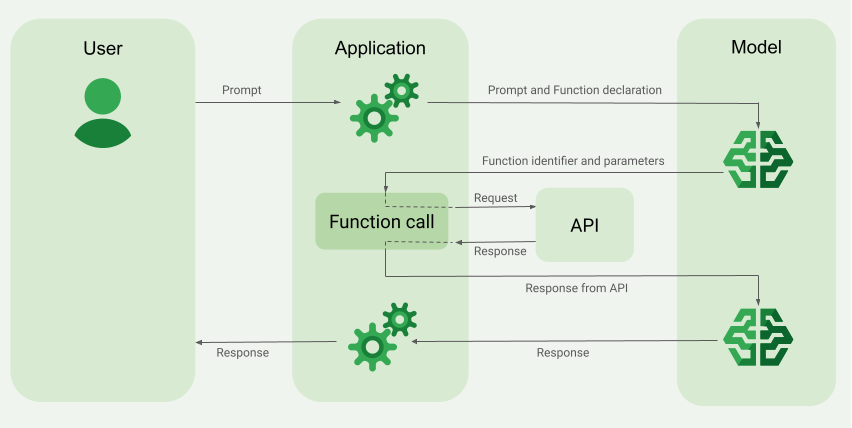
عند إرسال طلب إلى النموذج، يمكنك أيضًا تزويده بمجموعة من "الأدوات" (مثل الدوال) التي يمكنه استخدامها لإنشاء ردّه النهائي. لاستخدام هذه الدوال واستدعائها ("استدعاء الدوال")، يحتاج النموذج وتطبيقك إلى تبادل المعلومات بينهما، لذا فإنّ الطريقة المقترَحة لاستخدام ميزة "استدعاء الدوال" هي من خلال واجهة المحادثة المتعدّدة الأدوار.
لنفترض أنّ لديك تطبيقًا يمكن للمستخدم فيه إدخال طلب مثل:
What was the weather in Boston on October 17, 2024?.
قد لا تعرف نماذج Gemini معلومات الطقس هذه، ولكن لنفترض أنّك تعرف واجهة برمجة تطبيقات خارجية لخدمة الطقس يمكنها توفير هذه المعلومات. يمكنك استخدام ميزة "استدعاء الدوال" لتزويد نموذج Gemini بمسار إلى واجهة برمجة التطبيقات هذه ومعلومات الطقس التي توفّرها.
أولاً، عليك كتابة دالة fetchWeather في تطبيقك تتفاعل مع واجهة برمجة التطبيقات الخارجية الافتراضية هذه، والتي تحتوي على هذه المدخلات والمخرجات:
| المعلَمة | النوع | مطلوب | الوصف |
|---|---|---|---|
| الإدخال | |||
location |
عنصر | نعم | اسم المدينة والولاية التي تريد معرفة حالة الطقس فيها تتوفّر هذه الميزة في مدن الولايات المتحدة فقط. يجب أن يكون دائمًا عنصرًا مدمجًا في city وstate.
|
date |
سلسلة | نعم | التاريخ الذي تريد جلب حالة الطقس فيه (يجب أن يكون دائمًا بالتنسيق YYYY-MM-DD).
|
| الناتج | |||
temperature |
عدد صحيح | نعم | درجة الحرارة (بالفهرنهايت) |
chancePrecipitation |
سلسلة | نعم | احتمال هطول الأمطار (يتم التعبير عنه كنسبة مئوية) |
cloudConditions |
سلسلة | نعم | حالة الغيوم (إحدى القيم التالية: clear أو partlyCloudy أو mostlyCloudy أو cloudy)
|
عند إعداد النموذج، عليك إعلامه بوجود هذه الدالة fetchWeather
وكيفية استخدامها لمعالجة الطلبات الواردة، إذا لزم الأمر.
يُعرف هذا باسم "تعريف الدالة". لا يستدعي النموذج الدالة
مباشرةً. بدلاً من ذلك، أثناء معالجة النموذج للطلب الوارد، يقرّر ما إذا كانت دالة fetchWeather يمكن أن تساعده في الردّ على الطلب. إذا قرّر النموذج أنّ الدالة يمكن أن تكون مفيدة، سينشئ بيانات منظَّمة تساعد تطبيقك في استدعاء الدالة.
يُرجى مراجعة الطلب الوارد مرة أخرى:
What was the weather in Boston on October 17, 2024?. من المرجّح أن يقرّر النموذج أنّ دالة fetchWeather يمكن أن تساعده في إنشاء ردّ. سينظر النموذج في مَعلمات الإدخال المطلوبة لـ fetchWeather، ثم ينشئ بيانات إدخال منظَّمة للدالة تبدو على النحو التالي تقريبًا:
{
  functionName: fetchWeather,
  location: {
    city: Boston,
    state: Massachusetts  // the model can infer the state from the prompt
  },
  date: 2024-10-17
}
ينقل النموذج بيانات الإدخال المنظَّمة هذه إلى تطبيقك ليتمكّن من استدعاء الدالة fetchWeather. عندما يتلقّى تطبيقك أحوال الطقس
من واجهة برمجة التطبيقات، يمرّر المعلومات إلى النموذج. تتيح معلومات الطقس هذه للنموذج إكمال معالجته النهائية وإنشاء ردّه على الطلب الأولي من What was the weather in Boston on October 17, 2024?
قد يقدّم النموذج ردًا نهائيًا بلغة طبيعية مثل:
On October 17, 2024, in Boston, it was 38 degrees Fahrenheit with partly cloudy skies.
تنفيذ استدعاء الدوال
توضّح لك الخطوات التالية في هذا الدليل كيفية تنفيذ إعداد استدعاء الدالة بشكل مشابه لسير العمل الموضّح في نظرة عامة على مثال استدعاء الدالة (راجِع القسم العلوي من هذه الصفحة).
النماذج المتوافقة
gemini-4-argongemini-3.8-flash-
gemini-3.5-flash-lite(والإصدار الأقدمgemini-3.1-flash-lite)
تتيح نماذج Gemini 3.x Flash القديمة ذات الاستخدام العام هذه الإمكانية، ولكن لا يُنصح باستخدامها بعد الآن بسبب تواريخ الإيقاف القادمة و/أو التوجيه التلقائي إلى النماذج الأحدث.
تتيح أيضًا نماذج Gemini Live API هذه الإمكانية، ولكن جميع عينات التعليمات البرمجية في هذا الدليل مخصّصة لنماذج Gemini للاستخدام العام.
قبل البدء
|
انقر على مزوّد خدمة Gemini API للاطّلاع على المحتوى والرمز البرمجي الخاصَّين بمزوّد الخدمة على هذه الصفحة. |
إذا لم يسبق لك إجراء ذلك، أكمِل
دليل البدء الذي يوضّح كيفية
إعداد مشروعك على Firebase وربط تطبيقك بمنصة Firebase وإضافة حزمة تطوير البرامج (SDK)
وإعداد خدمة الخلفية لمقدّم خدمة Gemini API الذي اخترته
وإنشاء مثيل GenerativeModel.
لاختبار الطلبات وتحسينها، ننصحك باستخدام Google AI Studio.
الخطوة 1: كتابة الدالة
لنفترض أنّ لديك تطبيقًا يمكن للمستخدم فيه إدخال طلب مثل:
What was the weather in Boston on October 17, 2024?. قد لا تعرف نماذج Gemini
معلومات الطقس هذه، ولكن تخيَّل أنّك تعرف
واجهة برمجة تطبيقات خارجية لخدمة الطقس يمكنها توفير هذه المعلومات. يعتمد السيناريو في هذا الدليل
على واجهة برمجة التطبيقات الخارجية الافتراضية هذه.
اكتب الدالة في تطبيقك التي ستتفاعل مع واجهة برمجة التطبيقات الخارجية الافتراضية
وقدِّم للنموذج المعلومات التي يحتاجها لإنشاء طلبه
النهائي. في مثال الطقس هذا، ستكون دالة fetchWeather هي التي
تستدعي واجهة برمجة التطبيقات الخارجية الافتراضية هذه.
Swift
// This function calls a hypothetical external API that returns
// a collection of weather information for a given location on a given date.
func fetchWeather(city: String, state: String, date: String) -> JSONObject {

  // TODO(developer): Write a standard function that would call an external weather API.

  // For demo purposes, this hypothetical response is hardcoded here in the expected format.
  return [
    "temperature": .number(38),
    "chancePrecipitation": .string("56%"),
    "cloudConditions": .string("partlyCloudy"),
  ]
}
Kotlin
// This function calls a hypothetical external API that returns
// a collection of weather information for a given location on a given date.
// `location` is an object of the form { city: string, state: string }
data class Location(val city: String, val state: String)

suspend fun fetchWeather(location: Location, date: String): JsonObject {

    // TODO(developer): Write a standard function that would call to an external weather API.

    // For demo purposes, this hypothetical response is hardcoded here in the expected format.
    return JsonObject(mapOf(
        "temperature" to JsonPrimitive(38),
        "chancePrecipitation" to JsonPrimitive("56%"),
        "cloudConditions" to JsonPrimitive("partlyCloudy")
    ))
}
Java
// This function calls a hypothetical external API that returns
// a collection of weather information for a given location on a given date.
// `location` is an object of the form { city: string, state: string }
public JsonObject fetchWeather(Location location, String date) {

  // TODO(developer): Write a standard function that would call to an external weather API.

  // For demo purposes, this hypothetical response is hardcoded here in the expected format.
  return new JsonObject(Map.of(
        "temperature", JsonPrimitive(38),
        "chancePrecipitation", JsonPrimitive("56%"),
        "cloudConditions", JsonPrimitive("partlyCloudy")));
}
Web
// This function calls a hypothetical external API that returns
// a collection of weather information for a given location on a given date.
// `location` is an object of the form { city: string, state: string }
async function fetchWeather({ location, date }) {

  // TODO(developer): Write a standard function that would call to an external weather API.

  // For demo purposes, this hypothetical response is hardcoded here in the expected format.
  return {
    temperature: 38,
    chancePrecipitation: "56%",
    cloudConditions: "partlyCloudy",
  };
}
Dart
// This function calls a hypothetical external API that returns
// a collection of weather information for a given location on a given date.
// `location` is an object of the form { city: string, state: string }
Future<Map<String, Object?>> fetchWeather(
  Location location, String date
) async {

  // TODO(developer): Write a standard function that would call to an external weather API.

  // For demo purposes, this hypothetical response is hardcoded here in the expected format.
  final apiResponse = {
    'temperature': 38,
    'chancePrecipitation': '56%',
    'cloudConditions': 'partlyCloudy',
  };
  return apiResponse;
}
Unity
// This function calls a hypothetical external API that returns
// a collection of weather information for a given location on a given date.
System.Collections.Generic.Dictionary<string, object> FetchWeather(
    string city, string state, string date) {

  // TODO(developer): Write a standard function that would call an external weather API.

  // For demo purposes, this hypothetical response is hardcoded here in the expected format.
  return new System.Collections.Generic.Dictionary<string, object>() {
    {"temperature", 38},
    {"chancePrecipitation", "56%"},
    {"cloudConditions", "partlyCloudy"},
  };
}
الخطوة 2: إنشاء تعريف دالة
أنشئ تعريف الدالة الذي ستقدّمه لاحقًا للنموذج (الخطوة التالية من هذا الدليل).
في البيان، يجب تضمين أكبر قدر ممكن من التفاصيل في أوصاف الدالة ومَعلماتها.
يستخدم النموذج المعلومات الواردة في بيان الدالة لتحديد الدالة التي يجب اختيارها وكيفية تقديم قيم المَعلمات لطلب استدعاء الدالة الفعلي. يمكنك الاطّلاع على السلوكيات والخيارات الإضافية لاحقًا في هذه الصفحة لمعرفة كيف يمكن للنموذج الاختيار من بين الدوال، بالإضافة إلى كيفية التحكّم في هذا الاختيار.
يُرجى مراعاة ما يلي بشأن المخطط الذي تقدّمه:
يجب تقديم تعريفات الدوال بتنسيق مخطط متوافق مع مخطط OpenAPI. يوفّر Agent Platform دعمًا محدودًا لمخطّط OpenAPI.
السمات التالية متوافقة:
typeوnullableوrequiredوformatوdescriptionوpropertiesوitemsوenum.السمات التالية غير متاحة:
defaultوoptionalوmaximumوoneOf.
بشكل تلقائي، بالنسبة إلى حِزم تطوير البرامج (SDK) في Firebase AI Logic، يتم اعتبار جميع الحقول مطلوبة ما لم تحدّدها على أنّها اختيارية في مصفوفة
optionalProperties. بالنسبة إلى هذه الحقول الاختيارية، يمكن للنموذج ملء الحقول أو تخطّيها. يُرجى العِلم أنّ هذا الإجراء يخالف الإعدادات التلقائية لمقدِّمَي الخدمة Gemini API في حال استخدام حِزم تطوير البرامج (SDK) الخاصة بالخادم أو واجهة برمجة التطبيقات مباشرةً.
للاطّلاع على أفضل الممارسات المتعلّقة بتعريفات الدوال، بما في ذلك نصائح حول الأسماء والأوصاف، يُرجى مراجعة أفضل الممارسات في مستندات Gemini Developer API
إليك كيفية كتابة تعريف دالة:
Swift
let fetchWeatherTool = FunctionDeclaration(
  name: "fetchWeather",
  description: "Get the weather conditions for a specific city on a specific date.",
  parameters: [
    "location": .object(
      properties: [
        "city": .string(description: "The city of the location."),
        "state": .string(description: "The US state of the location."),
      ],
      description: """
      The name of the city and its state for which to get the weather. Only cities in the
      USA are supported.
      """
    ),
    "date": .string(
      description: """
      The date for which to get the weather. Date must be in the format: YYYY-MM-DD.
      """
    ),
  ]
)
Kotlin
val fetchWeatherTool = FunctionDeclaration(
    "fetchWeather",
    "Get the weather conditions for a specific city on a specific date.",
    mapOf(
        "location" to Schema.obj(
            mapOf(
                "city" to Schema.string("The city of the location."),
                "state" to Schema.string("The US state of the location."),
            ),
            description = "The name of the city and its state for which " +
                "to get the weather. Only cities in the " +
                "USA are supported."
        ),
        "date" to Schema.string("The date for which to get the weather." +
                                " Date must be in the format: YYYY-MM-DD."
        ),
    ),
)
Java
FunctionDeclaration fetchWeatherTool = new FunctionDeclaration(
        "fetchWeather",
        "Get the weather conditions for a specific city on a specific date.",
        Map.of("location",
                Schema.obj(Map.of(
                        "city", Schema.str("The city of the location."),
                        "state", Schema.str("The US state of the location."))),
                "date",
                Schema.str("The date for which to get the weather. " +
                              "Date must be in the format: YYYY-MM-DD.")),
        Collections.emptyList());
Web
const fetchWeatherTool: FunctionDeclarationsTool = {
  functionDeclarations: [
   {
      name: "fetchWeather",
      description:
        "Get the weather conditions for a specific city on a specific date",
      parameters: Schema.object({
        properties: {
          location: Schema.object({
            description:
              "The name of the city and its state for which to get " +
              "the weather. Only cities in the USA are supported.",
            properties: {
              city: Schema.string({
                description: "The city of the location."
              }),
              state: Schema.string({
                description: "The US state of the location."
              }),
            },
          }),
          date: Schema.string({
            description:
              "The date for which to get the weather. Date must be in the" +
              " format: YYYY-MM-DD.",
          }),
        },
      }),
    },
  ],
};
Dart
final fetchWeatherTool = FunctionDeclaration(
    'fetchWeather',
    'Get the weather conditions for a specific city on a specific date.',
    parameters: {
      'location': Schema.object(
        description:
          'The name of the city and its state for which to get'
          'the weather. Only cities in the USA are supported.',
        properties: {
          'city': Schema.string(
             description: 'The city of the location.'
           ),
          'state': Schema.string(
             description: 'The US state of the location.'
          ),
        },
      ),
      'date': Schema.string(
        description:
          'The date for which to get the weather. Date must be in the format: YYYY-MM-DD.'
      ),
    },
  );
Unity
var fetchWeatherTool = new Tool(new FunctionDeclaration(
  name: "fetchWeather",
  description: "Get the weather conditions for a specific city on a specific date.",
  parameters: new System.Collections.Generic.Dictionary<string, Schema>() {
    { "location", Schema.Object(
      properties: new System.Collections.Generic.Dictionary<string, Schema>() {
        { "city", Schema.String(description: "The city of the location.") },
        { "state", Schema.String(description: "The US state of the location.")}
      },
      description: "The name of the city and its state for which to get the weather. Only cities in the USA are supported."
    ) },
    { "date", Schema.String(
      description: "The date for which to get the weather. Date must be in the format: YYYY-MM-DD."
    )}
  }
));
الخطوة 3: تقديم تعريف الدالة أثناء إعداد النموذج
الحد الأقصى لعدد تعريفات الدوال التي يمكنك تقديمها مع الطلب هو 128. يمكنك الاطّلاع على
السلوكيات والخيارات الإضافية
لاحقًا في هذه الصفحة لمعرفة كيف يمكن للنموذج الاختيار من بين الدوال، بالإضافة إلى
كيفية التحكّم في هذا الاختيار (باستخدام toolConfig لضبط
وضع استدعاء الدوال).
Swift
import FirebaseAILogic

// Initialize the Gemini Developer API backend service.
// Create a `GenerativeModel` instance with a model that supports your use case.
let model = FirebaseAI.firebaseAI(backend: .googleAI()).generativeModel(
  modelName: "GEMINI_MODEL_NAME",
  // Provide the function declaration to the model.
  tools: [.functionDeclarations([fetchWeatherTool])]
)
Kotlin
// Initialize the Gemini Developer API backend service.
// Create a `GenerativeModel` instance with a model that supports your use case.
val model = Firebase.ai(backend = GenerativeBackend.googleAI()).generativeModel(
    modelName = "<var>GEMINI_MODEL_NAME</var>",
    // Provide the function declaration to the model.
    tools = listOf(Tool.functionDeclarations(listOf(fetchWeatherTool)))
)
Java
// Initialize the Gemini Developer API backend service.
// Create a `GenerativeModel` instance with a model that supports your use case.
GenerativeModelFutures model = GenerativeModelFutures.from(
        FirebaseAI.getInstance(GenerativeBackend.googleAI())
                .generativeModel("<var>GEMINI_MODEL_NAME</var>",
                        null,
                        null,
                        // Provide the function declaration to the model.
                        List.of(Tool.functionDeclarations(List.of(fetchWeatherTool)))));
Web
import { initializeApp } from "firebase/app";
import { getAI, getGenerativeModel, GoogleAIBackend } from "firebase/ai";

// TODO(developer): Replace the following with your app's Firebase configuration
// See: https://firebase.google.com/docs/web/learn-more#config-object
const firebaseConfig = {
  // ...
};

// Initialize FirebaseApp
const firebaseApp = initializeApp(firebaseConfig);

// Initialize the Gemini Developer API backend service.
const firebaseAI = getAI(firebaseApp, { backend: new GoogleAIBackend() });

// Create a `GenerativeModel` instance with a model that supports your use case.
const model = getGenerativeModel(firebaseAI, {
  model: "GEMINI_MODEL_NAME",
  // Provide the function declaration to the model.
  tools: fetchWeatherTool
});
Dart
import 'package:firebase_ai/firebase_ai.dart';
import 'package:firebase_core/firebase_core.dart';
import 'firebase_options.dart';

// Initialize FirebaseApp
await Firebase.initializeApp(
  options: DefaultFirebaseOptions.currentPlatform,
);

// Initialize the Gemini Developer API backend service.
// Create a `GenerativeModel` instance with a model that supports your use case.
_functionCallModel = FirebaseAI.googleAI().generativeModel(
       model: 'GEMINI_MODEL_NAME',
       // Provide the function declaration to the model.
       tools: [
         Tool.functionDeclarations([fetchWeatherTool]),
       ],
     );
Unity
using Firebase;
using Firebase.AI;

// Initialize the Gemini Developer API backend service.
// Create a `GenerativeModel` instance with a model that supports your use case.
var model = FirebaseAI.DefaultInstance.GetGenerativeModel(
  modelName: "GEMINI_MODEL_NAME",
  // Provide the function declaration to the model.
  tools: new Tool[] { fetchWeatherTool }
);
تعرَّف على كيفية اختيار نموذج مناسبَين لحالة الاستخدام والتطبيق.
الخطوة 4: استدعاء الدالة لاستدعاء واجهة برمجة التطبيقات الخارجية
إذا قرّر النموذج أنّ دالة fetchWeather يمكنها مساعدته في إنشاء ردّ نهائي، يحتاج تطبيقك إلى إجراء الاستدعاء الفعلي لتلك الدالة باستخدام بيانات الإدخال المنظَّمة التي يوفّرها النموذج.
بما أنّ المعلومات يجب أن يتم نقلها ذهابًا وإيابًا بين النموذج والتطبيق، فإنّ الطريقة المقترَحة لاستخدام ميزة استدعاء الدوال هي من خلال واجهة المحادثة المتعدّدة الأدوار.
يوضّح مقتطف الرمز التالي كيفية إعلام تطبيقك بأنّ النموذج يريد استخدام دالة fetchWeather. ويوضّح أيضًا أنّ النموذج قد قدّم قيم مَعلمات الإدخال اللازمة لاستدعاء الدالة (وواجهة برمجة التطبيقات الخارجية الأساسية).
في هذا المثال، تضمّن الطلب الوارد الطلب
What was the weather in Boston on October 17, 2024?. من خلال هذا الطلب، استنتج النموذج مَعلمات الإدخال المطلوبة للدالة fetchWeather (أي city وstate وdate).
Swift
let chat = model.startChat()
let prompt = "What was the weather in Boston on October 17, 2024?"

// Send the user's question (the prompt) to the model using multi-turn chat.
let response = try await chat.sendMessage(prompt)

var functionResponses = [FunctionResponsePart]()

// When the model responds with one or more function calls, invoke the function(s).
for functionCall in response.functionCalls {
  if functionCall.name == "fetchWeather" {
    // TODO(developer): Handle invalid arguments.
    guard case let .object(location) = functionCall.args["location"] else { fatalError() }
    guard case let .string(city) = location["city"] else { fatalError() }
    guard case let .string(state) = location["state"] else { fatalError() }
    guard case let .string(date) = functionCall.args["date"] else { fatalError() }

    functionResponses.append(FunctionResponsePart(
      name: functionCall.name,
      // Forward the structured input data prepared by the model
      // to the hypothetical external API.
      response: fetchWeather(city: city, state: state, date: date)
    ))
  }
  // TODO(developer): Handle other potential function calls, if any.
}
Kotlin
val prompt = "What was the weather in Boston on October 17, 2024?"
val chat = model.startChat()
// Send the user's question (the prompt) to the model using multi-turn chat.
val result = chat.sendMessage(prompt)

val functionCalls = result.functionCalls
// When the model responds with one or more function calls, invoke the function(s).
val fetchWeatherCall = functionCalls.find { it.name == "fetchWeather" }

// Forward the structured input data prepared by the model
// to the hypothetical external API.
val functionResponse = fetchWeatherCall?.let {
    // Alternatively, if your `Location` class is marked as @Serializable, you can use
    // val location = Json.decodeFromJsonElement<Location>(it.args["location"]!!)
    val location = Location(
        it.args["location"]!!.jsonObject["city"]!!.jsonPrimitive.content,
        it.args["location"]!!.jsonObject["state"]!!.jsonPrimitive.content
    )
    val date = it.args["date"]!!.jsonPrimitive.content
    fetchWeather(location, date)
}
Java
String prompt = "What was the weather in Boston on October 17, 2024?";
ChatFutures chatFutures = model.startChat();
// Send the user's question (the prompt) to the model using multi-turn chat.
ListenableFuture<GenerateContentResponse> response =
        chatFutures.sendMessage(new Content("user", List.of(new TextPart(prompt))));

ListenableFuture<JsonObject> handleFunctionCallFuture = Futures.transform(response, result -> {
    for (FunctionCallPart functionCall : result.getFunctionCalls()) {
        if (functionCall.getName().equals("fetchWeather")) {
            Map<String, JsonElement> args = functionCall.getArgs();
            JsonObject locationJsonObject =
                    JsonElementKt.getJsonObject(args.get("location"));
            String city =
                    JsonElementKt.getContentOrNull(
                            JsonElementKt.getJsonPrimitive(
                                    locationJsonObject.get("city")));
            String state =
                    JsonElementKt.getContentOrNull(
                            JsonElementKt.getJsonPrimitive(
                                    locationJsonObject.get("state")));
            Location location = new Location(city, state);

            String date = JsonElementKt.getContentOrNull(
                    JsonElementKt.getJsonPrimitive(
                            args.get("date")));
            return fetchWeather(location, date);
        }
    }
    return null;
}, Executors.newSingleThreadExecutor());
Web
const chat = model.startChat();
const prompt = "What was the weather in Boston on October 17, 2024?";

// Send the user's question (the prompt) to the model using multi-turn chat.
let result = await chat.sendMessage(prompt);
const functionCalls = result.response.functionCalls();
let functionCall;
let functionResult;
// When the model responds with one or more function calls, invoke the function(s).
if (functionCalls.length > 0) {
  for (const call of functionCalls) {
    if (call.name === "fetchWeather") {
      // Forward the structured input data prepared by the model
      // to the hypothetical external API.
      functionResult = await fetchWeather(call.args);
      functionCall = call;
    }
  }
}
Dart
final chat = _functionCallModel.startChat();
const prompt = 'What was the weather in Boston on October 17, 2024?';

// Send the user's question (the prompt) to the model using multi-turn chat.
var response = await chat.sendMessage(Content.text(prompt));

final functionCalls = response.functionCalls.toList();
// When the model responds with one or more function calls, invoke the function(s).
if (functionCalls.isNotEmpty) {
  for (final functionCall in functionCalls) {
    if (functionCall.name == 'fetchWeather') {
      Map<String, dynamic> location =
          functionCall.args['location']! as Map<String, dynamic>;
      var date = functionCall.args['date']! as String;
      var city = location['city'] as String;
      var state = location['state'] as String;
      final functionResult =
          await fetchWeather(Location(city, state), date);
      // Send the response to the model so that it can use the result to
      // generate text for the user.
      response = await chat.sendMessage(
        Content.functionResponse(functionCall.name, functionResult),
      );
    }
  }
} else {
  throw UnimplementedError(
    'No function calls returned by the model',
  );
}
Unity
var chat = model.StartChat();
var prompt = "What was the weather in Boston on October 17, 2024?";

// Send the user's question (the prompt) to the model using multi-turn chat.
var response = await chat.SendMessageAsync(prompt);

var functionResponses = new List<ModelContent>();

foreach (var functionCall in response.FunctionCalls) {
  if (functionCall.Name == "fetchWeather") {
    // TODO(developer): Handle invalid arguments.
    var city = functionCall.Args["city"] as string;
    var state = functionCall.Args["state"] as string;
    var date = functionCall.Args["date"] as string;

    functionResponses.Add(ModelContent.FunctionResponse(
      name: functionCall.Name,
      // Forward the structured input data prepared by the model
      // to the hypothetical external API.
      response: FetchWeather(city: city, state: state, date: date)
    ));
  }
  // TODO(developer): Handle other potential function calls, if any.
}
الخطوة 5: تقديم ناتج الدالة إلى النموذج لإنشاء الردّ النهائي
بعد أن تعرض دالة fetchWeather معلومات الطقس، يحتاج تطبيقك
إلى إرسالها مرة أخرى إلى النموذج.
بعد ذلك، يُجري النموذج معالجته النهائية، وينشئ ردًا نهائيًا بلغة طبيعية مثل:
On October 17, 2024 in Boston, it was 38 degrees Fahrenheit with partly cloudy skies.
Swift
// Send the response(s) from the function back to the model
// so that the model can use it to generate its final response.
let finalResponse = try await chat.sendMessage(
  [ModelContent(role: "user", parts: functionResponses)]
)

// Log the text response.
print(finalResponse.text ?? "No text in response.")
Kotlin
// Send the response(s) from the function back to the model
// so that the model can use it to generate its final response.
val finalResponse = chat.sendMessage(content("user") {
    part(FunctionResponsePart("fetchWeather", functionResponse!!))
})

// Log the text response.
println(finalResponse.text ?: "No text in response")
Java
ListenableFuture<GenerateContentResponse> modelResponseFuture = Futures.transformAsync(
  handleFunctionCallFuture,
  // Send the response(s) from the function back to the model
  // so that the model can use it to generate its final response.
  functionCallResult -> chatFutures.sendMessage(new Content("user",
  List.of(new FunctionResponsePart(
          "fetchWeather", functionCallResult)))),
  Executors.newSingleThreadExecutor());

Futures.addCallback(modelResponseFuture, new FutureCallback<GenerateContentResponse>() {
@Override
public void onSuccess(GenerateContentResponse result) {
  if (result.getText() != null) {
      // Log the text response.
      System.out.println(result.getText());
  }
}

@Override
public void onFailure(Throwable t) {
  // handle error
}
}, Executors.newSingleThreadExecutor());
Web
// Send the response from the function back to the model
// so that the model can use it to generate its final response.
result = await chat.sendMessage([
  {
    type: "functionResponse",
    functionResponse: {
      name: functionCall.name, // "fetchWeather"
      response: functionResult,
    },
  },
]);
console.log(result.response.text());
Dart
// Send the response from the function back to the model
// so that the model can use it to generate its final response.
response = await chat
     .sendMessage(Content.functionResponse(functionCall.name, functionResult));
Unity
// Send the response(s) from the function back to the model
// so that the model can use it to generate its final response.
var finalResponse = await chat.SendMessageAsync(functionResponses);

// Log the text response.
UnityEngine.Debug.Log(finalResponse.Text ?? "No text in response.");
السلوكيات والخيارات الإضافية
في ما يلي بعض السلوكيات الإضافية لاستدعاء الدوال التي يجب مراعاتها في الرمز البرمجي والخيارات التي يمكنك التحكّم فيها.
قد يطلب النموذج استدعاء دالة مرة أخرى أو دالة أخرى.
إذا كان الردّ من استدعاء دالة واحدة غير كافٍ لإنشاء الردّ النهائي، قد يطلب النموذج استدعاء دالة إضافية أو استدعاء دالة مختلفة تمامًا. لا يمكن أن يحدث هذا الأخير إلا إذا قدّمت أكثر من دالة واحدة للنموذج في قائمة تعريف الدوال.
يجب أن يتوافق تطبيقك مع إمكانية أن يطلب النموذج استدعاءات دوال إضافية.
قد يطلب النموذج استدعاء دوال متعددة في الوقت نفسه.
يمكنك تقديم ما يصل إلى 128 دالة في قائمة تعريف الدوال إلى النموذج. بناءً على ذلك، قد يقرّر النموذج أنّه بحاجة إلى دوال متعددة لمساعدته في إنشاء ردّه النهائي. وقد يقرّر استدعاء بعض هذه الدوال في الوقت نفسه، وهو ما يُعرف باسم استدعاء الدوال المتوازية.
يجب أن يكون تطبيقك قادرًا على التعامل مع طلبات النموذج لتشغيل دوال متعددة في الوقت نفسه، وأن يقدّم جميع الردود من الدوال إلى النموذج.
يمكنك التحكّم في ما إذا كان بإمكان النموذج طلب استدعاء الدوال وكيفية ذلك.
يمكنك وضع بعض القيود على كيفية استخدام النموذج لتعريفات الدوال المقدَّمة وما إذا كان يجب استخدامها. يُعرف ذلك باسم ضبط وضع استدعاء الدوال. وإليك بعض الأمثلة:
بدلاً من السماح للنموذج بالاختيار بين ردّ فوري بلغة طبيعية واستدعاء دالة، يمكنك فرض استخدام استدعاءات الدوال دائمًا. يُعرف ذلك باسم استدعاء الدالة الإجباري.
إذا قدّمت تعريفات دوال متعددة، يمكنك حصر النموذج على استخدام مجموعة فرعية فقط من الدوال المقدَّمة.
يمكنك تنفيذ هذه القيود (أو الأوضاع) من خلال إضافة إعدادات الأداة
(toolConfig) مع الطلب وتعريفات الدوال. في إعدادات الأداة، يمكنك تحديد أحد الأوضاع التالية. الوضع الأكثر فائدة
هو ANY.
| الوضع | الوصف |
|---|---|
AUTO |
السلوك التلقائي للنموذج يقرّر النموذج ما إذا كان سيستخدم استدعاء دالة أو ردًا بلغة طبيعية. |
ANY |
يجب أن يستخدم النموذج استدعاءات الدوال ("استدعاء الدوال الإجباري"). ولحصر
النموذج بمجموعة فرعية من الدوال، حدِّد أسماء الدوال المسموح بها في
allowedFunctionNames.
|
NONE |
يجب ألا يستخدم النموذج استدعاءات الدوال. هذا السلوك يعادل طلب نموذج بدون أي تعريفات دوال مرتبطة به. |
ما هي المهام الأخرى التي يمكنني تنفيذها؟
تجربة إمكانات أخرى
- إنشاء محادثات متعدّدة الجولات (محادثة)
- إنشاء نصّ من إنشاء الذكاء الاصطناعي من طلبات نصية فقط
- يمكنك إنشاء نصّ من إنشاء الذكاء الاصطناعي من خلال توجيه طلبات باستخدام أنواع ملفات مختلفة، مثل الصور وملفات PDF والفيديوهات والملفات الصوتية.
كيفية التحكّم في إنشاء المحتوى
- فهم تصميم الطلبات، بما في ذلك أفضل الممارسات والاستراتيجيات وأمثلة على الطلبات
- ضبط مَعلمات النموذج، مثل الحد الأقصى لعدد الرموز المميزة في الناتج، واحتمال تكرار الرموز المميزة في الناتج، وما إلى ذلك
- استخدِم إعدادات الأمان لضبط احتمالية الحصول على ردود قد تُعتبر ضارة.
مزيد من المعلومات عن النماذج المتوافقة
يمكنك الاطّلاع على النماذج المتاحة لحالات الاستخدام المختلفة والحصص والأسعار.تقديم ملاحظات حول تجربتك مع "Firebase AI Logic"