

Kod yürütme, modelin Python kodu oluşturup çalıştırmasını sağlayan bir araçtır. Model, nihai bir sonuca ulaşana kadar kod yürütme sonuçlarından yinelemeli olarak öğrenebilir.
Kod yürütme özelliğini kullanarak koda dayalı akıl yürütmeden yararlanan ve metin çıkışı oluşturan özellikler geliştirebilirsiniz. Örneğin, denklemleri çözmek veya metinleri işlemek için kod yürütme özelliğini kullanabilirsiniz. Daha özel görevler gerçekleştirmek için kod yürütme ortamında bulunan kitaplıkları da kullanabilirsiniz.
Modele sağladığınız tüm araçlarda olduğu gibi, kod yürütmenin ne zaman kullanılacağına model karar verir.
Kod yürütme ile işlev çağrısının karşılaştırması
Kod yürütme ve işlev çağrısı benzer özelliklerdir. Genel olarak, model kullanım alanınızı destekliyorsa kod yürütme özelliğini kullanmayı tercih etmeniz önerilir. Kod yürütme özelliğini etkinleştirmeniz yeterli olduğu için kullanımı da daha kolaydır.
Kod yürütme ile işlev çağrısı arasındaki diğer farklardan bazıları şunlardır:
| Kod yürütme | İşlev çağırma |
|---|---|
| Modelin sizin için Python kodu yazıp çalıştırmasını ve sonucu döndürmesini istiyorsanız kod yürütme özelliğini kullanın. | Yerel olarak çalıştırmak istediğiniz kendi işlevleriniz varsa işlev çağrısını kullanın. |
| Kod yürütme, modelin API arka ucunda sabit ve izole bir ortamda kod çalıştırmasına olanak tanır. | İşlev çağrısı, modelin istediği işlevleri istediğiniz ortamda çalıştırmanıza olanak tanır. |
| Kod yürütme tek bir istekte çözülür. Sohbet özelliğiyle kod yürütmeyi isteğe bağlı olarak kullanabilirsiniz ancak bu zorunlu değildir. | İşlev çağrısı, her işlev çağrısının çıkışını geri göndermek için ek bir istek gerektirir. Bu nedenle, sohbet özelliğini kullanmanız gerekir. |
Desteklenen modeller
gemini-4-argongemini-3.8-flashgemini-3.5-flash-lite(ve daha eskigemini-3.1-flash-lite)
Eski genel kullanımlı Gemini 3.x Flash modelleri bu özelliği destekler ancak yaklaşan kapatma tarihleri ve/veya daha yeni modellere otomatik yönlendirme nedeniyle artık kullanılması önerilmez.
Kod yürütme özelliğini kullanma
Kod yürütme özelliğini hem yalnızca metin içeren hem de çok formatlı girişlerle kullanabilirsiniz ancak yanıt her zaman yalnızca metin veya kod olur.
Başlamadan önce
|
Bu sayfada sağlayıcıya özel içerikleri ve kodları görüntülemek için Gemini API sağlayıcınızı tıklayın. |
Henüz yapmadıysanız başlangıç kılavuzundaki adımları tamamlayın. Bu kılavuzda Firebase projenizi nasıl oluşturacağınız, uygulamanızı Firebase'e nasıl bağlayacağınız, SDK'yı nasıl ekleyeceğiniz, seçtiğiniz Gemini API sağlayıcısı için arka uç hizmetini nasıl başlatacağınız ve bir GenerativeModel örneğini nasıl oluşturacağınız açıklanmaktadır.
İstemlerinizi test etmek ve yinelemek için Google AI Studio kullanmanızı öneririz.
Kod yürütmeyi etkinleştirme
|
Bu örneği denemeden önce projenizi ve uygulamanızı ayarlamak için bu kılavuzun Başlamadan önce bölümünü tamamlayın. Bu bölümde, seçtiğiniz Gemini API sağlayıcıya ait düğmeyi tıklayarak bu sayfada sağlayıcıya özel içerikleri görebilirsiniz. |
GenerativeModel örneğini oluştururken modelin yanıtını oluşturmak için kullanabileceği bir araç olarak CodeExecution değerini sağlayın. Bu sayede model, Python kodu
oluşturup çalıştırabilir.
Swift
import FirebaseAILogic

// Initialize the Gemini Developer API backend service.
let ai = FirebaseAI.firebaseAI(backend: .googleAI())

// Create a `GenerativeModel` instance with a model that supports your use case
let model = ai.generativeModel(
  modelName: "GEMINI_MODEL_NAME",
  // Provide code execution as a tool that the model can use to generate its response.
  tools: [.codeExecution()]
)

let prompt = """
What is the sum of the first 50 prime numbers?
Generate and run code for the calculation, and make sure you get all 50.
"""

let response = try await model.generateContent(prompt)

guard let candidate = response.candidates.first else {
  print("No candidates in response.")
  return
}
for part in candidate.content.parts {
  if let textPart = part as? TextPart {
    print("Text = \(textPart.text)")
  } else if let executableCode = part as? ExecutableCodePart {
    print("Code = \(executableCode.code), Language = \(executableCode.language)")
  } else if let executionResult = part as? CodeExecutionResultPart {
    print("Outcome = \(executionResult.outcome), Result = \(executionResult.output ?? "no output")")
  }
}
Kotlin
// Initialize the Gemini Developer API backend service.
// Create a `GenerativeModel` instance with a model that supports your use case.
val model = Firebase.ai(backend = GenerativeBackend.googleAI()).generativeModel(
    modelName = "GEMINI_MODEL_NAME",
    // Provide code execution as a tool that the model can use to generate its response.
    tools = listOf(Tool.codeExecution())
)

val prompt =  "What is the sum of the first 50 prime numbers? " +
        "Generate and run code for the calculation, and make sure you get all 50."

val response = model.generateContent(prompt)

response.candidates.first().content.parts.forEach {
    if(it is TextPart) {
        println("Text = ${it.text}")
    }
    if(it is ExecutableCodePart) {
        println("Code = ${it.code}, Language = ${it.language}")
    }
    if(it is CodeExecutionResultPart) {
       println("Outcome = ${it.outcome}, Result = ${it.output}")
    }
}
Java
// Initialize the Gemini Developer API backend service.
// Create a `GenerativeModel` instance with a model that supports your use case.
GenerativeModel ai = FirebaseAI.getInstance(GenerativeBackend.googleAI())
                .generativeModel("GEMINI_MODEL_NAME",
                        null,
                        null,
                        // Provide code execution as a tool that the model can use to generate its response.
                        List.of(Tool.codeExecution()));

// Use the GenerativeModelFutures Java compatibility layer which offers
// support for ListenableFuture and Publisher APIs
GenerativeModelFutures model = GenerativeModelFutures.from(ai);

String text = "What is the sum of the first 50 prime numbers? " +
        "Generate and run code for the calculation, and make sure you get all 50.";

Content prompt = new Content.Builder()
    .addText(text)
    .build();

ListenableFuture response = model.generateContent(prompt);

Futures.addCallback(response, new FutureCallback() {
   @Override
public void onSuccess(GenerateContentResponse response)   {
    // Access the first candidate's content parts
    List parts = response.getCandidates().get(0).getContent().getParts();
    for (Part part : parts) {
        if (part instanceof TextPart) {
            TextPart textPart = (TextPart) part;
            System.out.println("Text = " + textPart.getText());
        } else if (part instanceof ExecutableCodePart) {
            ExecutableCodePart codePart = (ExecutableCodePart) part;
            System.out.println("Code = " + codePart.getCode() + ", Language = " + codePart.getLanguage());
        } else if (part instanceof CodeExecutionResultPart) {
            CodeExecutionResultPart resultPart = (CodeExecutionResultPart) part;
            System.out.println("Outcome = " + resultPart.getOutcome() + ", Result = " + resultPart.getOutput());
        }
    }
}

    @Override
    public void onFailure(Throwable t) {
        t.printStackTrace();
    }
}, executor);
Web
import { initializeApp } from "firebase/app";
import { getAI, getGenerativeModel, GoogleAIBackend } from "firebase/ai";

// TODO(developer): Replace the following with your app's Firebase configuration
// See: https://firebase.google.com/docs/web/learn-more#config-object
const firebaseConfig = {
  // ...
};

// Initialize FirebaseApp
const firebaseApp = initializeApp(firebaseConfig);

// Initialize the Gemini Developer API backend service.
const ai = getAI(firebaseApp, { backend: new GoogleAIBackend() });

// Create a `GenerativeModel` instance with a model that supports your use case.
const model = getGenerativeModel(
  ai,
  {
    model: "GEMINI_MODEL_NAME",
    // Provide code execution as a tool that the model can use to generate its response.
    tools: [{ codeExecution: {} }]
  }
);

const prompt =  "What is the sum of the first 50 prime numbers? " +
        "Generate and run code for the calculation, and make sure you get all 50."

const result = await model.generateContent(prompt);
const response = await result.response;

const parts = response.candidates?.[0].content.parts;

if (parts) {
  parts.forEach((part) => {
    if (part.type === "text") {
      console.log(`Text: ${part.text}`);
    } else if (part.type === "executableCode") {
      console.log(
        `Code: ${part.executableCode.code}, Language: ${part.executableCode.language}`
      );
    } else if (part.type === "codeExecutionResult") {
      console.log(
        `Outcome: ${part.codeExecutionResult.outcome}, Result: ${part.codeExecutionResult.output}`
      );
    }
  });
}
Dart
import 'package:firebase_core/firebase_core.dart';
import 'package:firebase_ai/firebase_ai.dart';
import 'firebase_options.dart';

// Initialize FirebaseApp
await Firebase.initializeApp(
  options: DefaultFirebaseOptions.currentPlatform,
);

// Initialize the Gemini Developer API backend service.
// Create a `GenerativeModel` instance with a model that supports your use case.
final model = FirebaseAI.googleAI().generativeModel(
  model: 'GEMINI_MODEL_NAME',
  // Provide code execution as a tool that the model can use to generate its response.
  tools: [
    Tool.codeExecution(),
  ],
);

const prompt = 'What is the sum of the first 50 prime numbers? '
    'Generate and run code for the calculation, and make sure you get all 50.';

final response = await model.generateContent([Content.text(prompt)]);

final buffer = StringBuffer();
    for (final part in response.candidates.first.content.parts) {
      if (part is TextPart) {
        buffer.writeln(part.text);
      } else if (part is ExecutableCodePart) {
        buffer.writeln('Executable Code:');
        buffer.writeln('Language: ${part.language}');
        buffer.writeln('Code:');
        buffer.writeln(part.code);
      } else if (part is CodeExecutionResultPart) {
        buffer.writeln('Code Execution Result:');
        buffer.writeln('Outcome: ${part.outcome}');
        buffer.writeln('Output:');
        buffer.writeln(part.output);
      }
    }
Unity
using Firebase;
using Firebase.AI;

// Initialize the Gemini Developer API backend service.
var ai = FirebaseAI.GetInstance(FirebaseAI.Backend.GoogleAI());

// Create a `GenerativeModel` instance with a model that supports your use case.
var model = ai.GetGenerativeModel(
  modelName: "GEMINI_MODEL_NAME",
  // Provide code execution as a tool that the model can use to generate its response.
  tools: new Tool[] { new Tool(new CodeExecution()) }
);

var prompt = "What is the sum of the first 50 prime numbers? " +
        "Generate and run code for the calculation, and make sure you get all 50.";

var response = await model.GenerateContentAsync(prompt);

foreach (var part in response.Candidates.First().Content.Parts) {
  if (part is ModelContent.TextPart tp) {
    UnityEngine.Debug.Log($"Text = {tp.Text}");
  } else if (part is ModelContent.ExecutableCodePart esp) {
    UnityEngine.Debug.Log($"Code = {esp.Code}, Language = {esp.Language}");
  } else if (part is ModelContent.CodeExecutionResultPart cerp) {
    UnityEngine.Debug.Log($"Outcome = {cerp.Outcome}, Output = {cerp.Output}");
  }
}
Kullanım alanınıza ve uygulamanıza uygun bir model seçmeyi öğrenin.
Sohbette kod yürütme özelliğini kullanma
Kod yürütme özelliğini sohbetlerde de kullanabilirsiniz:
Swift
import FirebaseAILogic

// Initialize the Gemini Developer API backend service.
let ai = FirebaseAI.firebaseAI(backend: .googleAI())

// Create a `GenerativeModel` instance with a model that supports your use case
let model = ai.generativeModel(
  modelName: "GEMINI_MODEL_NAME",
  // Provide code execution as a tool that the model can use to generate its response.
  tools: [.codeExecution()]
)

let prompt = """
What is the sum of the first 50 prime numbers?
Generate and run code for the calculation, and make sure you get all 50.
"""
let chat = model.startChat()

let response = try await chat.sendMessage(prompt)

guard let candidate = response.candidates.first else {
  print("No candidates in response.")
  return
}
for part in candidate.content.parts {
  if let textPart = part as? TextPart {
    print("Text = \(textPart.text)")
  } else if let executableCode = part as? ExecutableCodePart {
    print("Code = \(executableCode.code), Language = \(executableCode.language)")
  } else if let executionResult = part as? CodeExecutionResultPart {
    print("Outcome = \(executionResult.outcome), Result = \(executionResult.output ?? "no output")")
  }
}
Kotlin
// Initialize the Gemini Developer API backend service.
// Create a `GenerativeModel` instance with a model that supports your use case.
val model = Firebase.ai(backend = GenerativeBackend.googleAI()).generativeModel(
    modelName = "GEMINI_MODEL_NAME",
    // Provide code execution as a tool that the model can use to generate its response.
    tools = listOf(Tool.codeExecution())
)

val prompt =  "What is the sum of the first 50 prime numbers? " +
        "Generate and run code for the calculation, and make sure you get all 50."
val chat = model.startChat()
val response = chat.sendMessage(prompt)

response.candidates.first().content.parts.forEach {
    if(it is TextPart) {
        println("Text = ${it.text}")
    }
    if(it is ExecutableCodePart) {
        println("Code = ${it.code}, Language = ${it.language}")
    }
    if(it is CodeExecutionResultPart) {
       println("Outcome = ${it.outcome}, Result = ${it.output}")
    }
}
Java
// Initialize the Gemini Developer API backend service.
// Create a `GenerativeModel` instance with a model that supports your use case.
GenerativeModel ai = FirebaseAI.getInstance(GenerativeBackend.googleAI())
                .generativeModel("GEMINI_MODEL_NAME",
                        null,
                        null,
                        // Provide code execution as a tool that the model can use to generate its response.
                        List.of(Tool.codeExecution()));

// Use the GenerativeModelFutures Java compatibility layer which offers
// support for ListenableFuture and Publisher APIs
GenerativeModelFutures model = GenerativeModelFutures.from(ai);
String text = "What is the sum of the first 50 prime numbers? " +
        "Generate and run code for the calculation, and make sure you get all 50.";

Content prompt = new Content.Builder()
    .addText(text)
    .build();

ChatFutures chat = model.startChat();
ListenableFuture response = chat.sendMessage(prompt);

Futures.addCallback(response, new FutureCallback() {
   @Override
public void onSuccess(GenerateContentResponse response)   {
    // Access the first candidate's content parts
    List parts = response.getCandidates().get(0).getContent().getParts();
    for (Part part : parts) {
        if (part instanceof TextPart) {
            TextPart textPart = (TextPart) part;
            System.out.println("Text = " + textPart.getText());
        } else if (part instanceof ExecutableCodePart) {
            ExecutableCodePart codePart = (ExecutableCodePart) part;
            System.out.println("Code = " + codePart.getCode() + ", Language = " + codePart.getLanguage());
        } else if (part instanceof CodeExecutionResultPart) {
            CodeExecutionResultPart resultPart = (CodeExecutionResultPart) part;
            System.out.println("Outcome = " + resultPart.getOutcome() + ", Result = " + resultPart.getOutput());
        }
    }
}

    @Override
    public void onFailure(Throwable t) {
        t.printStackTrace();
    }
}, executor);
Web
import { initializeApp } from "firebase/app";
import { getAI, getGenerativeModel, GoogleAIBackend } from "firebase/ai";

// TODO(developer): Replace the following with your app's Firebase configuration
// See: https://firebase.google.com/docs/web/learn-more#config-object
const firebaseConfig = {
  // ...
};

// Initialize FirebaseApp
const firebaseApp = initializeApp(firebaseConfig);

// Initialize the Gemini Developer API backend service.
const ai = getAI(firebaseApp, { backend: new GoogleAIBackend() });

// Create a `GenerativeModel` instance with a model that supports your use case.
const model = getGenerativeModel(
  ai,
  {
    model: "GEMINI_MODEL_NAME",
    // Provide code execution as a tool that the model can use to generate its response.
    tools: [{ codeExecution: {} }]
  }
);

const prompt =  "What is the sum of the first 50 prime numbers? " +
        "Generate and run code for the calculation, and make sure you get all 50."
const chat = model.startChat()
const result = await chat.sendMessage(prompt);

const parts = result.response.candidates?.[0].content.parts;

if (parts) {
  parts.forEach((part) => {
    if (part.type === "text") {
      console.log(`Text: ${part.text}`);
    } else if (part.type === "executableCode") {
      console.log(
        `Code: ${part.executableCode.code}, Language: ${part.executableCode.language}`
      );
    } else if (part.type === "codeExecutionResult") {
      console.log(
        `Outcome: ${part.codeExecutionResult.outcome}, Result: ${part.codeExecutionResult.output}`
      );
    }
  });
}
Dart
import 'package:firebase_core/firebase_core.dart';
import 'package:firebase_ai/firebase_ai.dart';
import 'firebase_options.dart';

// Initialize FirebaseApp
await Firebase.initializeApp(
  options: DefaultFirebaseOptions.currentPlatform,
);

// Initialize the Gemini Developer API backend service.
// Create a `GenerativeModel` instance with a model that supports your use case.
final model = FirebaseAI.googleAI().generativeModel(
  model: 'GEMINI_MODEL_NAME',
  // Provide code execution as a tool that the model can use to generate its response.
  tools: [
    Tool.codeExecution(),
  ],
);

final codeExecutionChat = await model.startChat();

const prompt = 'What is the sum of the first 50 prime numbers? '
    'Generate and run code for the calculation, and make sure you get all 50.';
final response = await codeExecutionChat.sendMessage(Content.text(prompt));

final buffer = StringBuffer();
    for (final part in response.candidates.first.content.parts) {
      if (part is TextPart) {
        buffer.writeln(part.text);
      } else if (part is ExecutableCodePart) {
        buffer.writeln('Executable Code:');
        buffer.writeln('Language: ${part.language}');
        buffer.writeln('Code:');
        buffer.writeln(part.code);
      } else if (part is CodeExecutionResultPart) {
        buffer.writeln('Code Execution Result:');
        buffer.writeln('Outcome: ${part.outcome}');
        buffer.writeln('Output:');
        buffer.writeln(part.output);
      }
    }
Unity
using Firebase;
using Firebase.AI;

// Initialize the Gemini Developer API backend service.
var ai = FirebaseAI.GetInstance(FirebaseAI.Backend.GoogleAI());

// Create a `GenerativeModel` instance with a model that supports your use case.
var model = ai.GetGenerativeModel(
  modelName: "GEMINI_MODEL_NAME",
  // Provide code execution as a tool that the model can use to generate its response.
  tools: new Tool[] { new Tool(new CodeExecution()) }
);

var prompt = "What is the sum of the first 50 prime numbers? " +
        "Generate and run code for the calculation, and make sure you get all 50.";
var chat = model.StartChat();
var response = await chat.SendMessageAsync(prompt);

foreach (var part in response.Candidates.First().Content.Parts) {
  if (part is ModelContent.TextPart tp) {
    UnityEngine.Debug.Log($"Text = {tp.Text}");
  } else if (part is ModelContent.ExecutableCodePart esp) {
    UnityEngine.Debug.Log($"Code = {esp.Code}, Language = {esp.Language}");
  } else if (part is ModelContent.CodeExecutionResultPart cerp) {
    UnityEngine.Debug.Log($"Outcome = {cerp.Outcome}, Output = {cerp.Output}");
  }
}
Kullanım alanınıza ve uygulamanıza uygun bir model seçmeyi öğrenin.
Fiyatlandırma
Kod yürütmeyi etkinleştirmek ve modele araç olarak sunmak için ek ücret alınmaz. Model, kod yürütme özelliğini kullanmaya karar verirse kullandığınız Gemini modeline göre mevcut giriş ve çıkış jetonları ücreti üzerinden faturalandırılırsınız.
Aşağıdaki şemada, kod yürütme için faturalandırma modeli gösterilmektedir:
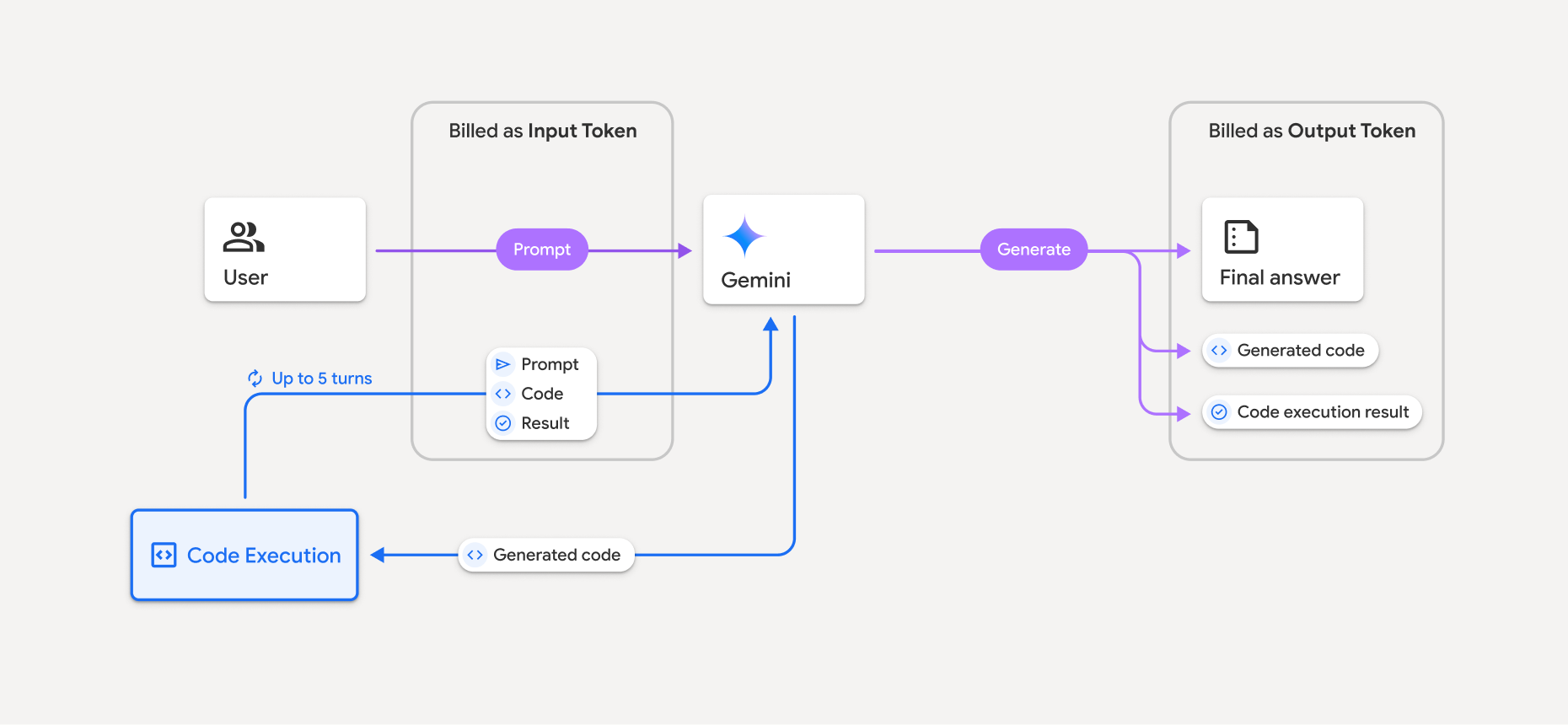
Bir model kod yürütme özelliğini kullandığında jetonların nasıl faturalandırıldığına dair bir özeti aşağıda bulabilirsiniz:
Orijinal istem bir kez faturalandırılır. Bu modelin token'ları, ara token olarak etiketlenir ve giriş token'ı olarak faturalandırılır.
Oluşturulan kod ve yürütülen kodun sonucu şu şekilde faturalandırılır:
Kod yürütme sırasında kullanıldıklarında ara token olarak etiketlenir ve giriş token'ı olarak faturalandırılırlar.
Nihai yanıta dahil edildiklerinde çıkış jetonları olarak faturalandırılırlar.
Nihai yanıttaki nihai özet, çıkış jetonları olarak faturalandırılır.
Gemini API, API yanıtında ara token sayısını içerir. Bu sayede, ilk isteminizin ötesinde giriş token'ları için neden ücretlendirildiğinizi öğrenebilirsiniz.
Oluşturulan kodun hem metin hem de resim gibi çok formatlı çıktılar içerebileceğini unutmayın.
Sınırlamalar ve en iyi uygulamalar
Model yalnızca Python kodu oluşturup çalıştırabilir. Medya dosyaları gibi diğer yapıları döndüremez.
Kod yürütme, zaman aşımına uğramadan önce en fazla 30 saniye çalışabilir.
Bazı durumlarda, kod yürütmeyi etkinleştirmek model çıktısının diğer alanlarında (ör. hikaye yazma) gerilemelere yol açabilir.
Kod yürütme aracı, giriş/çıkış olarak dosya URI'lerini desteklemez. Ancak kod yürütme aracı, satır içi bayt olarak dosya girişini ve grafik çıkışını destekler. Bu giriş ve çıkış özelliklerini kullanarak CSV ve metin dosyaları yükleyebilir, dosyalar hakkında soru sorabilir ve kod yürütme sonucunun bir parçası olarak Matplotlib grafikleri oluşturabilirsiniz. Satır içi baytlar için desteklenen MIME türleri:
.cpp,.csv,.java,.jpeg,.js,.png,.py,.tsve.xml.
Desteklenen kitaplıklar
Kod yürütme ortamı aşağıdaki kitaplıkları içerir. Kendi kitaplıklarınızı yükleyemezsiniz.
Firebase AI Logic ile ilgili deneyiminiz hakkında geri bildirimde bulunma