

জেনারেটিভ মডেল অনেক ধরনের সমস্যার সমাধান করতে পারে। তবে, এগুলি এই ধরনের সীমাবদ্ধতার দ্বারা সীমিত:
- ট্রেনিংয়ের পরে এগুলি ফ্রিজ হয়ে যায়, যার ফলে পুরনো জ্ঞান থেকে যায়।
- তারা এক্সটার্নাল ডেটা কোয়েরি বা পরিবর্তন করতে পারবেন না।
ফাংশন কলিং আপনাকে এইসব সীমাবদ্ধতা কাটিয়ে উঠতে সাহায্য করতে পারে। ফাংশন কলিংকে কখনও কখনও টুল ব্যবহার হিসেবে উল্লেখ করা হয় কারণ এটি কোনও মডেলকে চূড়ান্ত উত্তর তৈরি করার জন্য API ও ফাংশনের মতো এক্সটার্নাল টুল ব্যবহার করার অনুমতি দেয়।
এই পৃষ্ঠার পরবর্তী প্রধান বিভাগে বর্ণিত পরিস্থিতির মতো আপনি কীভাবে ফাংশন কল সেট-আপ প্রয়োগ করতে পারেন, এই নির্দেশিকা থেকে তা জানতে পারবেন। এক নজরে, আপনার অ্যাপে ফাংশন কলিং সেট-আপ করার ধাপগুলি এখানে দেওয়া হল:
ধাপ ১: এমন একটি ফাংশন লিখুন যা মডেলকে তার চূড়ান্ত উত্তর তৈরি করার জন্য প্রয়োজনীয় তথ্য প্রদান করতে পারে (যেমন, ফাংশনটি একটি এক্সটার্নাল API কল করতে পারে)।
ধাপ ২: ফাংশন ডিক্লারেশন তৈরি করুন যা ফাংশন ও তার প্যারামিটার বর্ণনা করে।
ধাপ ৩: মডেল ইনিশিয়ালাইজ করার সময় ফাংশন ডিক্লারেশন প্রদান করুন যাতে মডেল জানতে পারে যে প্রয়োজন হলে কীভাবে ফাংশনটি ব্যবহার করতে হবে।
ধাপ ৪: আপনার অ্যাপ সেট-আপ করুন যাতে মডেলটি ফাংশন কল করার জন্য আপনার অ্যাপের জন্য প্রয়োজনীয় তথ্য পাঠাতে পারে।
ধাপ ৫: ফাংশনের উত্তর মডেলকে ফেরত পাঠান যাতে মডেল তার চূড়ান্ত উত্তর জেনারেট করতে পারে।
ফাংশন কলিংয়ের উদাহরণের ওভারভিউ
মডেলকে কোনও অনুরোধ পাঠানোর সময়, আপনি মডেলকে "টুল" (যেমন ফাংশন) সেটও প্রদান করতে পারেন, যা এটি চূড়ান্ত উত্তর তৈরি করতে ব্যবহার করতে পারে। এইসব ফাংশন ব্যবহার ও কল ("ফাংশন কলিং") করার জন্য, মডেল ও আপনার অ্যাপকে একে অপরের সাথে তথ্য আদান-প্রদান করতে হয়, তাই ফাংশন কলিং ব্যবহার করার জন্য মাল্টি-টার্ন চ্যাট ইন্টারফেস ব্যবহার করার সাজেশন দেওয়া হয়।
ধরুন, আপনার কাছে এমন একটি অ্যাপ আছে যেখানে ব্যবহারকারী এই ধরনের প্রম্পট লিখতে পারেন:
What was the weather in Boston on October 17, 2024?।
Gemini মডেল হয়ত এই আবহাওয়ার তথ্য জানে না; তবে, কল্পনা করুন যে আপনি একটি এক্সটার্নাল আবহাওয়ার পরিষেবা API সম্পর্কে জানেন যা এটি প্রদান করতে পারে। আপনি ফাংশন কলিং ব্যবহার করে Gemini মডেলকে সেই API এবং তার আবহাওয়ার তথ্যের পাথওয়ে দিতে পারেন।
প্রথমে, আপনি আপনার অ্যাপে একটি ফাংশন fetchWeather লেখেন যা এই কাল্পনিক এক্সটার্নাল API-এর সাথে ইন্টার্যাক্ট করে, যার এই ইনপুট এবং আউটপুট রয়েছে:
| প্যারামিটার | ধরন | যেসব বিষয় করা প্রয়োজন | বিবরণ |
|---|---|---|---|
| ইনপুট | |||
location |
অবজেক্ট: | হ্যাঁ | যে শহর ও রাজ্যের আবহাওয়ার তথ্য পেতে চান তার নাম। শুধুমাত্র মার্কিন যুক্তরাষ্ট্রের শহরগুলি কাজ করে। সবসময় city এবং state-এর
নেস্টেড অবজেক্ট হতে হবে।
|
date |
স্ট্রিং | হ্যাঁ | যে তারিখের আবহাওয়ার তথ্য পেতে চান (সবসময় YYYY-MM-DD ফর্ম্যাটে
হতে হবে)।
|
| আউটপুট | |||
temperature |
পূর্ণসংখ্যা | হ্যাঁ | তাপমাত্রা (ফারেনহাইটে) |
chancePrecipitation |
স্ট্রিং | হ্যাঁ | বৃষ্টিপাতের সম্ভাবনা (শতাংশ হিসেবে দেখানো হয়েছে) |
cloudConditions |
স্ট্রিং | হ্যাঁ | মেঘের অবস্থা (clear, partlyCloudy,
mostlyCloudy, cloudy-এর মধ্যে যেকোনও একটি)
|
মডেল শুরু করার সময়, আপনি মডেলকে জানান যে এই fetchWeather
ফাংশনটি আছে এবং প্রয়োজন হলে, ইনকামিং অনুরোধ প্রসেস করার জন্য এটি কীভাবে ব্যবহার করা যেতে পারে।
একে "ফাংশন ডিক্লারেশন" বলা হয়। মডেলটি ফাংশনটিকে
সরাসরি কল করে না। পরিবর্তে, মডেলটি ইনকামিং অনুরোধ প্রসেস করার সময়, এটি
সিদ্ধান্ত নেয় যে fetchWeather ফাংশনটি অনুরোধের উত্তর দিতে সাহায্য করতে পারে কিনা। মডেলটি
যদি সিদ্ধান্ত নেয় যে ফাংশনটি সত্যিই কার্যকর হতে পারে, তাহলে মডেলটি
স্ট্রাকচার্ড ডেটা তৈরি করে যা আপনার অ্যাপকে ফাংশনটি কল করতে সাহায্য করবে।
ইনকামিং অনুরোধ আবার দেখুন:
What was the weather in Boston on October 17, 2024?. মডেলটি সম্ভবত
সিদ্ধান্ত নেবে যে fetchWeather ফাংশনটি এটিকে একটি উত্তর তৈরি করতে সাহায্য করতে পারে। মডেল
fetchWeather-এর জন্য কোন ইনপুট প্যারামিটার প্রয়োজন তা দেখবে এবং তারপর
ফাংশনের জন্য স্ট্রাকচার্ড ইনপুট ডেটা তৈরি করবে যা মোটামুটি এইরকম দেখতে হবে:
{
  functionName: fetchWeather,
  location: {
    city: Boston,
    state: Massachusetts  // the model can infer the state from the prompt
  },
  date: 2024-10-17
}
মডেল এই স্ট্রাকচার্ড ইনপুট ডেটা আপনার অ্যাপে পাস করে যাতে আপনার অ্যাপ
fetchWeather ফাংশন কল করতে পারে। আপনার অ্যাপ API থেকে আবহাওয়ার পরিস্থিতি সংক্রান্ত তথ্য
পেলে, এটি মডেলের কাছে সেই তথ্য পাঠিয়ে দেয়। এই আবহাওয়ার
তথ্য মডেলকে তার চূড়ান্ত প্রসেসিং সম্পূর্ণ করতে এবং
What was the weather in Boston on October 17, 2024?-এর প্রাথমিক অনুরোধের
উত্তর জেনারেট করতে সাহায্য করে
মডেলটি এই ধরনের একটি চূড়ান্ত ন্যাচারাল ল্যাঙ্গুয়েজ উত্তর প্রদান করতে পারে:
On October 17, 2024, in Boston, it was 38 degrees Fahrenheit with partly cloudy skies.
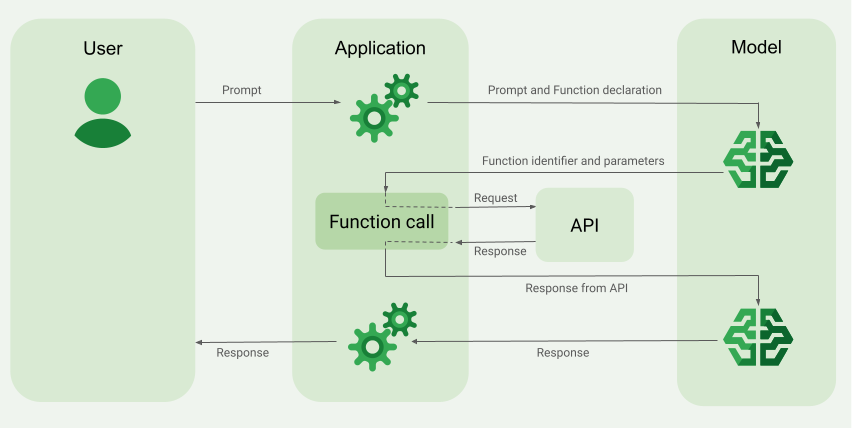
ফাংশন কলিং প্রয়োগ করা
এই গাইডের নিম্নলিখিত ধাপগুলি আপনাকে দেখায় যে কীভাবে একটি ফাংশন কল সেটআপ প্রয়োগ করতে হয় যা ফাংশন কলিং উদাহরণের ওভারভিউ (এই পৃষ্ঠার উপরের বিভাগটি দেখুন) বিভাগে বর্ণিত ওয়ার্কফ্লোর মতো।
যেসব মডেলে কাজ করে
gemini-4-argongemini-3.8-flash(এবং পুরনোgemini-3.7-flash,gemini-3.6-flashওgemini-3.5-flash)gemini-3.5-flash-lite(এবং পুরনোgemini-3.1-flash-lite)
gemini-3.1-pro-preview এবং সাধারণ-ব্যবহারের Gemini 2.5 মডেল (যা
বন্ধ করা হয়েছে) এই ক্ষমতাকে সাপোর্ট করে।
Gemini Live API মডেল ব্যবহার করেও এই কাজ করা যায়, তবে এই গাইডের সব কোড স্যাম্পেল সাধারণ-ব্যবহারের জন্য Gemini মডেলের জন্য।
শুরু করার আগে
|
এই পৃষ্ঠায় প্রদানকারী-নির্দিষ্ট কন্টেন্ট এবং কোড দেখতে আপনার Gemini API প্রদানকারীর উপর ক্লিক করুন। |
আপনি এখনও না করে থাকলে,
শুরু করার নির্দেশিকা সম্পূর্ণ করুন, যেখানে বর্ণনা করা আছে কীভাবে
আপনার Firebase প্রোজেক্ট সেট-আপ করবেন, Firebase-এর সাথে আপনার অ্যাপ কানেক্ট করবেন, SDK যোগ করবেন,
আপনার বেছে নেওয়া Gemini API পরিষেবা প্রদানকারীর জন্য ব্যাকএন্ড পরিষেবা শুরু করবেন এবং
একটি GenerativeModel ইনস্ট্যান্স তৈরি করবেন।
আপনার প্রম্পট পরীক্ষা ও ইটারেট করার জন্য, আমরা Google AI Studio ব্যবহার করার সাজেশন দিই।
ধাপ ১: ফাংশনটি লেখো
ধরুন, আপনার কাছে এমন একটি অ্যাপ আছে যেখানে ব্যবহারকারী এই ধরনের প্রম্পট লিখতে পারেন:
What was the weather in Boston on October 17, 2024?। Gemini
মডেল হয়ত এই আবহাওয়ার তথ্য জানে না; তবে, কল্পনা করুন যে আপনি
একটি এক্সটার্নাল আবহাওয়া পরিষেবা API সম্পর্কে জানেন যা এটি প্রদান করতে পারে। এই গাইডের পরিস্থিতি
এই কাল্পনিক এক্সটার্নাল API-এর উপর নির্ভর করে।
আপনার অ্যাপে ফাংশনটি লিখুন যা কাল্পনিক এক্সটার্নাল API-এর সাথে ইন্টার্যাক্ট করবে এবং মডেলকে তার চূড়ান্ত অনুরোধ তৈরি করার জন্য প্রয়োজনীয় তথ্য প্রদান করবে। আবহাওয়ার এই উদাহরণে, এটি একটি fetchWeather ফাংশন হবে যা
এই কাল্পনিক এক্সটার্নাল API-তে কল করে।
Swift
// This function calls a hypothetical external API that returns
// a collection of weather information for a given location on a given date.
func fetchWeather(city: String, state: String, date: String) -> JSONObject {

  // TODO(developer): Write a standard function that would call an external weather API.

  // For demo purposes, this hypothetical response is hardcoded here in the expected format.
  return [
    "temperature": .number(38),
    "chancePrecipitation": .string("56%"),
    "cloudConditions": .string("partlyCloudy"),
  ]
}
Kotlin
// This function calls a hypothetical external API that returns
// a collection of weather information for a given location on a given date.
// `location` is an object of the form { city: string, state: string }
data class Location(val city: String, val state: String)

suspend fun fetchWeather(location: Location, date: String): JsonObject {

    // TODO(developer): Write a standard function that would call to an external weather API.

    // For demo purposes, this hypothetical response is hardcoded here in the expected format.
    return JsonObject(mapOf(
        "temperature" to JsonPrimitive(38),
        "chancePrecipitation" to JsonPrimitive("56%"),
        "cloudConditions" to JsonPrimitive("partlyCloudy")
    ))
}
Java
// This function calls a hypothetical external API that returns
// a collection of weather information for a given location on a given date.
// `location` is an object of the form { city: string, state: string }
public JsonObject fetchWeather(Location location, String date) {

  // TODO(developer): Write a standard function that would call to an external weather API.

  // For demo purposes, this hypothetical response is hardcoded here in the expected format.
  return new JsonObject(Map.of(
        "temperature", JsonPrimitive(38),
        "chancePrecipitation", JsonPrimitive("56%"),
        "cloudConditions", JsonPrimitive("partlyCloudy")));
}
Web
// This function calls a hypothetical external API that returns
// a collection of weather information for a given location on a given date.
// `location` is an object of the form { city: string, state: string }
async function fetchWeather({ location, date }) {

  // TODO(developer): Write a standard function that would call to an external weather API.

  // For demo purposes, this hypothetical response is hardcoded here in the expected format.
  return {
    temperature: 38,
    chancePrecipitation: "56%",
    cloudConditions: "partlyCloudy",
  };
}
Dart
// This function calls a hypothetical external API that returns
// a collection of weather information for a given location on a given date.
// `location` is an object of the form { city: string, state: string }
Future<Map<String, Object?>> fetchWeather(
  Location location, String date
) async {

  // TODO(developer): Write a standard function that would call to an external weather API.

  // For demo purposes, this hypothetical response is hardcoded here in the expected format.
  final apiResponse = {
    'temperature': 38,
    'chancePrecipitation': '56%',
    'cloudConditions': 'partlyCloudy',
  };
  return apiResponse;
}
Unity
// This function calls a hypothetical external API that returns
// a collection of weather information for a given location on a given date.
System.Collections.Generic.Dictionary<string, object> FetchWeather(
    string city, string state, string date) {

  // TODO(developer): Write a standard function that would call an external weather API.

  // For demo purposes, this hypothetical response is hardcoded here in the expected format.
  return new System.Collections.Generic.Dictionary<string, object>() {
    {"temperature", 38},
    {"chancePrecipitation", "56%"},
    {"cloudConditions", "partlyCloudy"},
  };
}
ধাপ ২: ফাংশন ডিক্লারেশন তৈরি করুন
ফাংশন ডিক্লারেশন তৈরি করুন যা আপনি পরে মডেলকে প্রদান করবেন (এই গাইডের পরবর্তী ধাপ)।
আপনার ঘোষণায়, ফাংশন ও তার প্যারামিটারের বিবরণে যতটা সম্ভব বিস্তারিত তথ্য অন্তর্ভুক্ত করুন।
কোন ফাংশন বেছে নিতে হবে এবং ফাংশনে আসল কলের জন্য কীভাবে প্যারামিটারের ভ্যালু প্রদান করতে হবে তা নির্ধারণ করতে, মডেলটি ফাংশন ডিক্লারেশনের তথ্য ব্যবহার করে। মডেল কীভাবে ফাংশনগুলির মধ্যে থেকে বেছে নিতে পারে এবং আপনি কীভাবে সেই পছন্দ নিয়ন্ত্রণ করতে পারেন তা জানতে এই পৃষ্ঠার পরে অতিরিক্ত আচরণ এবং বিকল্প দেখুন।
আপনার দেওয়া স্কিমা সম্পর্কে নিম্নলিখিত বিষয়গুলি মনে রাখবেন:
আপনাকে অবশ্যই এমন একটি স্কিমা ফর্ম্যাটে ফাংশন ডিক্লারেশন প্রদান করতে হবে যা OpenAPI স্কিমার সাথে মানানসই। Agent Platform-এ OpenAPI স্কিমার সীমিত সাপোর্ট রয়েছে।
নিম্নলিখিত অ্যাট্রিবিউটগুলি কাজ করে:
type,nullable,required,format,description,properties,items,enum.নিম্নলিখিত অ্যাট্রিবিউটগুলি কাজ করে না:
default,optional,maximum,oneOf।
ডিফল্ট হিসেবে, Firebase AI Logic SDK-এর জন্য, সব ফিল্ডকে প্রয়োজনীয় হিসেবে বিবেচনা করা হয়, যদি না আপনি সেগুলিকে
optionalPropertiesঅ্যারেতে ঐচ্ছিক হিসেবে উল্লেখ করেন। এইসব ঐচ্ছিক ফিল্ডের জন্য, মডেল ফিল্ডগুলি পূরণ করতে পারে বা সেগুলি এড়িয়ে যেতে পারে। মনে রাখবেন, আপনি যদি দুটি Gemini API পরিষেবা প্রদানকারীর সার্ভার SDK বা API সরাসরি ব্যবহার করেন, তাহলে তাদের ডিফল্ট অ্যাকশনের থেকে এটি আলাদা হবে।
নাম ও বিবরণের জন্য পরামর্শ সহ ফাংশন ডিক্লারেশন সম্পর্কিত পেশাদার পদ্ধতি সম্পর্কে জানতে, Gemini Developer API ডকুমেন্টেশনে পেশাদার পদ্ধতি।
আপনি কীভাবে ফাংশন ডিক্লারেশন লিখতে পারেন তা এখানে দেওয়া হল:
Swift
let fetchWeatherTool = FunctionDeclaration(
  name: "fetchWeather",
  description: "Get the weather conditions for a specific city on a specific date.",
  parameters: [
    "location": .object(
      properties: [
        "city": .string(description: "The city of the location."),
        "state": .string(description: "The US state of the location."),
      ],
      description: """
      The name of the city and its state for which to get the weather. Only cities in the
      USA are supported.
      """
    ),
    "date": .string(
      description: """
      The date for which to get the weather. Date must be in the format: YYYY-MM-DD.
      """
    ),
  ]
)
Kotlin
val fetchWeatherTool = FunctionDeclaration(
    "fetchWeather",
    "Get the weather conditions for a specific city on a specific date.",
    mapOf(
        "location" to Schema.obj(
            mapOf(
                "city" to Schema.string("The city of the location."),
                "state" to Schema.string("The US state of the location."),
            ),
            description = "The name of the city and its state for which " +
                "to get the weather. Only cities in the " +
                "USA are supported."
        ),
        "date" to Schema.string("The date for which to get the weather." +
                                " Date must be in the format: YYYY-MM-DD."
        ),
    ),
)
Java
FunctionDeclaration fetchWeatherTool = new FunctionDeclaration(
        "fetchWeather",
        "Get the weather conditions for a specific city on a specific date.",
        Map.of("location",
                Schema.obj(Map.of(
                        "city", Schema.str("The city of the location."),
                        "state", Schema.str("The US state of the location."))),
                "date",
                Schema.str("The date for which to get the weather. " +
                              "Date must be in the format: YYYY-MM-DD.")),
        Collections.emptyList());
Web
const fetchWeatherTool: FunctionDeclarationsTool = {
  functionDeclarations: [
   {
      name: "fetchWeather",
      description:
        "Get the weather conditions for a specific city on a specific date",
      parameters: Schema.object({
        properties: {
          location: Schema.object({
            description:
              "The name of the city and its state for which to get " +
              "the weather. Only cities in the USA are supported.",
            properties: {
              city: Schema.string({
                description: "The city of the location."
              }),
              state: Schema.string({
                description: "The US state of the location."
              }),
            },
          }),
          date: Schema.string({
            description:
              "The date for which to get the weather. Date must be in the" +
              " format: YYYY-MM-DD.",
          }),
        },
      }),
    },
  ],
};
Dart
final fetchWeatherTool = FunctionDeclaration(
    'fetchWeather',
    'Get the weather conditions for a specific city on a specific date.',
    parameters: {
      'location': Schema.object(
        description:
          'The name of the city and its state for which to get'
          'the weather. Only cities in the USA are supported.',
        properties: {
          'city': Schema.string(
             description: 'The city of the location.'
           ),
          'state': Schema.string(
             description: 'The US state of the location.'
          ),
        },
      ),
      'date': Schema.string(
        description:
          'The date for which to get the weather. Date must be in the format: YYYY-MM-DD.'
      ),
    },
  );
Unity
var fetchWeatherTool = new Tool(new FunctionDeclaration(
  name: "fetchWeather",
  description: "Get the weather conditions for a specific city on a specific date.",
  parameters: new System.Collections.Generic.Dictionary<string, Schema>() {
    { "location", Schema.Object(
      properties: new System.Collections.Generic.Dictionary<string, Schema>() {
        { "city", Schema.String(description: "The city of the location.") },
        { "state", Schema.String(description: "The US state of the location.")}
      },
      description: "The name of the city and its state for which to get the weather. Only cities in the USA are supported."
    ) },
    { "date", Schema.String(
      description: "The date for which to get the weather. Date must be in the format: YYYY-MM-DD."
    )}
  }
));
ধাপ ৩: মডেল ইনিশিয়ালাইজ করার সময় ফাংশন ডিক্লারেশন প্রদান করুন
অনুরোধের সাথে আপনি সর্বাধিক ১২৮টি ফাংশন ডিক্লারেশন প্রদান করতে পারবেন। মডেল কীভাবে ফাংশনগুলির মধ্যে থেকে বেছে নিতে পারে, সেইসাথে আপনি কীভাবে সেই পছন্দটি নিয়ন্ত্রণ করতে পারেন (ফাংশন কলিং মোড সেট করতে একটি toolConfig ব্যবহার করে) তা জানতে এই পৃষ্ঠার পরে
অতিরিক্ত আচরণ এবং বিকল্প
দেখুন।
Swift
import FirebaseAILogic

// Initialize the Gemini Developer API backend service.
// Create a `GenerativeModel` instance with a model that supports your use case.
let model = FirebaseAI.firebaseAI(backend: .googleAI()).generativeModel(
  modelName: "GEMINI_MODEL_NAME",
  // Provide the function declaration to the model.
  tools: [.functionDeclarations([fetchWeatherTool])]
)
Kotlin
// Initialize the Gemini Developer API backend service.
// Create a `GenerativeModel` instance with a model that supports your use case.
val model = Firebase.ai(backend = GenerativeBackend.googleAI()).generativeModel(
    modelName = "<var>GEMINI_MODEL_NAME</var>",
    // Provide the function declaration to the model.
    tools = listOf(Tool.functionDeclarations(listOf(fetchWeatherTool)))
)
Java
// Initialize the Gemini Developer API backend service.
// Create a `GenerativeModel` instance with a model that supports your use case.
GenerativeModelFutures model = GenerativeModelFutures.from(
        FirebaseAI.getInstance(GenerativeBackend.googleAI())
                .generativeModel("<var>GEMINI_MODEL_NAME</var>",
                        null,
                        null,
                        // Provide the function declaration to the model.
                        List.of(Tool.functionDeclarations(List.of(fetchWeatherTool)))));
Web
import { initializeApp } from "firebase/app";
import { getAI, getGenerativeModel, GoogleAIBackend } from "firebase/ai";

// TODO(developer): Replace the following with your app's Firebase configuration
// See: https://firebase.google.com/docs/web/learn-more#config-object
const firebaseConfig = {
  // ...
};

// Initialize FirebaseApp
const firebaseApp = initializeApp(firebaseConfig);

// Initialize the Gemini Developer API backend service.
const firebaseAI = getAI(firebaseApp, { backend: new GoogleAIBackend() });

// Create a `GenerativeModel` instance with a model that supports your use case.
const model = getGenerativeModel(firebaseAI, {
  model: "GEMINI_MODEL_NAME",
  // Provide the function declaration to the model.
  tools: fetchWeatherTool
});
Dart
import 'package:firebase_ai/firebase_ai.dart';
import 'package:firebase_core/firebase_core.dart';
import 'firebase_options.dart';

// Initialize FirebaseApp
await Firebase.initializeApp(
  options: DefaultFirebaseOptions.currentPlatform,
);

// Initialize the Gemini Developer API backend service.
// Create a `GenerativeModel` instance with a model that supports your use case.
_functionCallModel = FirebaseAI.googleAI().generativeModel(
       model: 'GEMINI_MODEL_NAME',
       // Provide the function declaration to the model.
       tools: [
         Tool.functionDeclarations([fetchWeatherTool]),
       ],
     );
Unity
using Firebase;
using Firebase.AI;

// Initialize the Gemini Developer API backend service.
// Create a `GenerativeModel` instance with a model that supports your use case.
var model = FirebaseAI.DefaultInstance.GetGenerativeModel(
  modelName: "GEMINI_MODEL_NAME",
  // Provide the function declaration to the model.
  tools: new Tool[] { fetchWeatherTool }
);
আপনার ব্যবহারের ক্ষেত্র ও অ্যাপের জন্য উপযুক্ত মডেল কীভাবে বেছে নেবেন তা জানুন।
ধাপ ৪: এক্সটার্নাল API চালু করার জন্য ফাংশন কল করুন
মডেল যদি সিদ্ধান্ত নেয় যে fetchWeather ফাংশনটি সত্যিই এটিকে একটি চূড়ান্ত উত্তর তৈরি করতে সাহায্য করতে পারে, তাহলে আপনার অ্যাপকে মডেলের প্রদান করা স্ট্রাকচার্ড ইনপুট ডেটা ব্যবহার করে সেই ফাংশনে আসল কল করতে হবে।
যেহেতু মডেল ও অ্যাপের মধ্যে তথ্য আদান-প্রদান করতে হয়, তাই ফাংশন কলিং ব্যবহার করার জন্য মাল্টি-টার্ন চ্যাট ইন্টারফেস ব্যবহার করা হল সবচেয়ে ভালো উপায়।
নিম্নলিখিত কোড স্নিপেট থেকে বোঝা যায় যে মডেলটি কীভাবে আপনার অ্যাপকে জানায় যে এটি fetchWeather ফাংশনটি ব্যবহার করতে চায়। এটি আরও দেখায় যে মডেলটি ফাংশন কলের (এবং এর অন্তর্নিহিত বাহ্যিক API) জন্য প্রয়োজনীয় ইনপুট প্যারামিটার মান প্রদান করেছে।
এই উদাহরণে, ইনকামিং অনুরোধে প্রম্পট ছিল
What was the weather in Boston on October 17, 2024?। এই প্রম্পট থেকে,
মডেল ইনপুট প্যারামিটার অনুমান করেছে যা fetchWeather
ফাংশনের (অর্থাৎ, city, state এবং date) জন্য প্রয়োজন।
Swift
let chat = model.startChat()
let prompt = "What was the weather in Boston on October 17, 2024?"

// Send the user's question (the prompt) to the model using multi-turn chat.
let response = try await chat.sendMessage(prompt)

var functionResponses = [FunctionResponsePart]()

// When the model responds with one or more function calls, invoke the function(s).
for functionCall in response.functionCalls {
  if functionCall.name == "fetchWeather" {
    // TODO(developer): Handle invalid arguments.
    guard case let .object(location) = functionCall.args["location"] else { fatalError() }
    guard case let .string(city) = location["city"] else { fatalError() }
    guard case let .string(state) = location["state"] else { fatalError() }
    guard case let .string(date) = functionCall.args["date"] else { fatalError() }

    functionResponses.append(FunctionResponsePart(
      name: functionCall.name,
      // Forward the structured input data prepared by the model
      // to the hypothetical external API.
      response: fetchWeather(city: city, state: state, date: date)
    ))
  }
  // TODO(developer): Handle other potential function calls, if any.
}
Kotlin
val prompt = "What was the weather in Boston on October 17, 2024?"
val chat = model.startChat()
// Send the user's question (the prompt) to the model using multi-turn chat.
val result = chat.sendMessage(prompt)

val functionCalls = result.functionCalls
// When the model responds with one or more function calls, invoke the function(s).
val fetchWeatherCall = functionCalls.find { it.name == "fetchWeather" }

// Forward the structured input data prepared by the model
// to the hypothetical external API.
val functionResponse = fetchWeatherCall?.let {
    // Alternatively, if your `Location` class is marked as @Serializable, you can use
    // val location = Json.decodeFromJsonElement<Location>(it.args["location"]!!)
    val location = Location(
        it.args["location"]!!.jsonObject["city"]!!.jsonPrimitive.content,
        it.args["location"]!!.jsonObject["state"]!!.jsonPrimitive.content
    )
    val date = it.args["date"]!!.jsonPrimitive.content
    fetchWeather(location, date)
}
Java
String prompt = "What was the weather in Boston on October 17, 2024?";
ChatFutures chatFutures = model.startChat();
// Send the user's question (the prompt) to the model using multi-turn chat.
ListenableFuture<GenerateContentResponse> response =
        chatFutures.sendMessage(new Content("user", List.of(new TextPart(prompt))));

ListenableFuture<JsonObject> handleFunctionCallFuture = Futures.transform(response, result -> {
    for (FunctionCallPart functionCall : result.getFunctionCalls()) {
        if (functionCall.getName().equals("fetchWeather")) {
            Map<String, JsonElement> args = functionCall.getArgs();
            JsonObject locationJsonObject =
                    JsonElementKt.getJsonObject(args.get("location"));
            String city =
                    JsonElementKt.getContentOrNull(
                            JsonElementKt.getJsonPrimitive(
                                    locationJsonObject.get("city")));
            String state =
                    JsonElementKt.getContentOrNull(
                            JsonElementKt.getJsonPrimitive(
                                    locationJsonObject.get("state")));
            Location location = new Location(city, state);

            String date = JsonElementKt.getContentOrNull(
                    JsonElementKt.getJsonPrimitive(
                            args.get("date")));
            return fetchWeather(location, date);
        }
    }
    return null;
}, Executors.newSingleThreadExecutor());
Web
const chat = model.startChat();
const prompt = "What was the weather in Boston on October 17, 2024?";

// Send the user's question (the prompt) to the model using multi-turn chat.
let result = await chat.sendMessage(prompt);
const functionCalls = result.response.functionCalls();
let functionCall;
let functionResult;
// When the model responds with one or more function calls, invoke the function(s).
if (functionCalls.length > 0) {
  for (const call of functionCalls) {
    if (call.name === "fetchWeather") {
      // Forward the structured input data prepared by the model
      // to the hypothetical external API.
      functionResult = await fetchWeather(call.args);
      functionCall = call;
    }
  }
}
Dart
final chat = _functionCallModel.startChat();
const prompt = 'What was the weather in Boston on October 17, 2024?';

// Send the user's question (the prompt) to the model using multi-turn chat.
var response = await chat.sendMessage(Content.text(prompt));

final functionCalls = response.functionCalls.toList();
// When the model responds with one or more function calls, invoke the function(s).
if (functionCalls.isNotEmpty) {
  for (final functionCall in functionCalls) {
    if (functionCall.name == 'fetchWeather') {
      Map<String, dynamic> location =
          functionCall.args['location']! as Map<String, dynamic>;
      var date = functionCall.args['date']! as String;
      var city = location['city'] as String;
      var state = location['state'] as String;
      final functionResult =
          await fetchWeather(Location(city, state), date);
      // Send the response to the model so that it can use the result to
      // generate text for the user.
      response = await chat.sendMessage(
        Content.functionResponse(functionCall.name, functionResult),
      );
    }
  }
} else {
  throw UnimplementedError(
    'No function calls returned by the model',
  );
}
Unity
var chat = model.StartChat();
var prompt = "What was the weather in Boston on October 17, 2024?";

// Send the user's question (the prompt) to the model using multi-turn chat.
var response = await chat.SendMessageAsync(prompt);

var functionResponses = new List<ModelContent>();

foreach (var functionCall in response.FunctionCalls) {
  if (functionCall.Name == "fetchWeather") {
    // TODO(developer): Handle invalid arguments.
    var city = functionCall.Args["city"] as string;
    var state = functionCall.Args["state"] as string;
    var date = functionCall.Args["date"] as string;

    functionResponses.Add(ModelContent.FunctionResponse(
      name: functionCall.Name,
      // Forward the structured input data prepared by the model
      // to the hypothetical external API.
      response: FetchWeather(city: city, state: state, date: date)
    ));
  }
  // TODO(developer): Handle other potential function calls, if any.
}
ধাপ ৫: চূড়ান্ত উত্তর জেনারেট করার জন্য মডেলকে ফাংশনের আউটপুট প্রদান করুন
fetchWeather ফাংশন আবহাওয়ার তথ্য রিটার্ন করার পরে, আপনার অ্যাপকে
এটি আবার মডেলে পাস করতে হবে।
তারপর, মডেলটি তার চূড়ান্ত প্রসেসিং করে এবং একটি চূড়ান্ত
ন্যাচারাল ল্যাঙ্গুয়েজ উত্তর তৈরি করে, যেমন:
On October 17, 2024 in Boston, it was 38 degrees Fahrenheit with partly cloudy skies.
Swift
// Send the response(s) from the function back to the model
// so that the model can use it to generate its final response.
let finalResponse = try await chat.sendMessage(
  [ModelContent(role: "user", parts: functionResponses)]
)

// Log the text response.
print(finalResponse.text ?? "No text in response.")
Kotlin
// Send the response(s) from the function back to the model
// so that the model can use it to generate its final response.
val finalResponse = chat.sendMessage(content("user") {
    part(FunctionResponsePart("fetchWeather", functionResponse!!))
})

// Log the text response.
println(finalResponse.text ?: "No text in response")
Java
ListenableFuture<GenerateContentResponse> modelResponseFuture = Futures.transformAsync(
  handleFunctionCallFuture,
  // Send the response(s) from the function back to the model
  // so that the model can use it to generate its final response.
  functionCallResult -> chatFutures.sendMessage(new Content("user",
  List.of(new FunctionResponsePart(
          "fetchWeather", functionCallResult)))),
  Executors.newSingleThreadExecutor());

Futures.addCallback(modelResponseFuture, new FutureCallback<GenerateContentResponse>() {
@Override
public void onSuccess(GenerateContentResponse result) {
  if (result.getText() != null) {
      // Log the text response.
      System.out.println(result.getText());
  }
}

@Override
public void onFailure(Throwable t) {
  // handle error
}
}, Executors.newSingleThreadExecutor());
Web
// Send the response from the function back to the model
// so that the model can use it to generate its final response.
result = await chat.sendMessage([
  {
    type: "functionResponse",
    functionResponse: {
      name: functionCall.name, // "fetchWeather"
      response: functionResult,
    },
  },
]);
console.log(result.response.text());
Dart
// Send the response from the function back to the model
// so that the model can use it to generate its final response.
response = await chat
     .sendMessage(Content.functionResponse(functionCall.name, functionResult));
Unity
// Send the response(s) from the function back to the model
// so that the model can use it to generate its final response.
var finalResponse = await chat.SendMessageAsync(functionResponses);

// Log the text response.
UnityEngine.Debug.Log(finalResponse.Text ?? "No text in response.");
অতিরিক্ত আচরণ ও বিকল্প
ফাংশন কলিংয়ের জন্য এখানে কিছু অতিরিক্ত আচরণ দেওয়া হল যা আপনাকে কোডে যোগ করতে হবে এবং আপনি কন্ট্রোল করতে পারবেন এমন বিকল্প।
মডেলটি আবার কোনও ফাংশন বা অন্য কোনও ফাংশন কল করতে বলতে পারে।
মডেলের চূড়ান্ত উত্তর তৈরি করার জন্য একটি ফাংশন কল থেকে পাওয়া উত্তর যথেষ্ট না হলে, মডেলটি অতিরিক্ত ফাংশন কলের জন্য অনুরোধ করতে পারে অথবা সম্পূর্ণ ভিন্ন ফাংশনে কলের জন্য অনুরোধ করতে পারে। আপনি ফাংশন ডিক্লারেশন তালিকায় মডেলের জন্য একাধিক ফাংশন প্রদান করলে তবেই পরেরটি ঘটতে পারে।
মডেলটি অতিরিক্ত ফাংশন কলের জন্য জিজ্ঞাসা করতে পারে, আপনার অ্যাপকে সেই অনুযায়ী কাজ করতে হবে।
মডেলটি একই সময়ে একাধিক ফাংশন কল করতে বলতে পারে।
আপনি মডেলের ফাংশন ডিক্লারেশন তালিকায় সর্বাধিক ১২৮টি ফাংশন প্রদান করতে পারবেন। এই কারণে, মডেল সিদ্ধান্ত নিতে পারে যে চূড়ান্ত উত্তর জেনারেট করার জন্য একাধিক ফাংশন প্রয়োজন। এবং এটি একই সময়ে এইসব ফাংশনের মধ্যে কিছু কল করার সিদ্ধান্ত নিতে পারে – একে প্যারালাল ফাংশন কলিং বলা হয়।
আপনার অ্যাপকে এমনভাবে তৈরি করতে হবে যাতে মডেল একই সাথে একাধিক ফাংশন চালানোর জন্য অনুরোধ করতে পারে এবং আপনার অ্যাপকে ফাংশন থেকে সমস্ত উত্তর মডেলকে ফেরত দিতে হবে।
মডেল কীভাবে এবং কখন ফাংশন কল করার জন্য অনুরোধ করতে পারে তা আপনি কন্ট্রোল করতে পারবেন।
মডেল কীভাবে এবং আদৌ প্রদত্ত ফাংশন ডিক্লারেশন ব্যবহার করবে কিনা, সেই বিষয়ে আপনি কিছু সীমাবদ্ধতা আরোপ করতে পারেন। একে ফাংশন কলিং মোড সেট করা বলা হয়। কয়েকটি উদাহরণ দেখুন:
মডেলকে তাৎক্ষণিক ন্যাচারাল ল্যাঙ্গুয়েজ উত্তর এবং ফাংশন কলের মধ্যে বেছে নেওয়ার অনুমতি দেওয়ার পরিবর্তে, আপনি এটিকে সবসময় ফাংশন কল ব্যবহার করতে বাধ্য করতে পারেন। একে ফোর্সড ফাংশন কলিং বলা হয়।
আপনি একাধিক ফাংশন ডিক্লারেশন প্রদান করলে, মডেলকে শুধুমাত্র প্রদত্ত ফাংশনের সাবসেট ব্যবহার করার জন্য সীমাবদ্ধ করতে পারেন।
আপনি টুল কনফিগারেশন (toolConfig) সহ প্রম্পট ও ফাংশন ডিক্লারেশন যোগ করে
এইসব সীমাবদ্ধতা (বা মোড) প্রয়োগ করেন। টুল কনফিগারেশনে, আপনি নিম্নলিখিত মোডগুলির মধ্যে একটি নির্দিষ্ট করতে পারেন। সবচেয়ে উপযোগী
মোড হল ANY।
| মোড | বিবরণ |
|---|---|
AUTO |
ডিফল্ট মডেলের আচরণ। মডেল সিদ্ধান্ত নেয় যে ফাংশন কল ব্যবহার করা হবে নাকি ন্যাচারাল ল্যাঙ্গুয়েজ উত্তর ব্যবহার করা হবে। |
ANY |
মডেলকে অবশ্যই ফাংশন কল ব্যবহার করতে হবে ("বাধ্যতামূলক ফাংশন কলিং")। ফাংশনের সাবসেটে
মডেল সীমিত করতে, allowedFunctionNames-এ অনুমোদিত ফাংশনের নাম
নির্দিষ্ট করুন।
|
NONE |
মডেলকে অবশ্যই ফাংশন কল ব্যবহার করলে চলবে না। এই আচরণটি কোনও সংশ্লিষ্ট ফাংশন ঘোষণা ছাড়াই মডেল অনুরোধের সমতুল্য। |
তুমি আর কী কী করতে পারো?
অন্যান্য ক্ষমতা ব্যবহার করে দেখুন
- মাল্টি-টার্ন কথোপকথন (চ্যাট) তৈরি করুন।
- শুধু টেক্সট প্রম্পট থেকে টেক্সট জেনারেট করুন।
- বিভিন্ন ধরনের ফাইলের মাধ্যমে প্রম্পট দিয়ে টেক্সট জেনারেট করুন, যেমন ছবি, PDF, ভিডিও এবং অডিও।
কন্টেন্ট তৈরি করা কীভাবে নিয়ন্ত্রণ করবেন তা জানুন
- পেশাদার পদ্ধতি, স্ট্র্যাটেজি ও উদাহরণ প্রম্পট সহ প্রম্পট ডিজাইন সম্পর্কে বোঝা।
- মডেল প্যারামিটার কনফিগার করুন যেমন সর্বাধিক আউটপুট টোকেন, বারবার আউটপুট টোকেন দেখানোর সম্ভাবনা ইত্যাদি।
- নিরাপত্তা সেটিংস ব্যবহার করে ক্ষতিকর বলে বিবেচিত হতে পারে এমন উত্তর পাওয়ার সম্ভাবনা অ্যাডজাস্ট করুন।
কাজ করে এমন মডেল সম্পর্কে আরও জানুন
বিভিন্ন ব্যবহারের ক্ষেত্রে উপলভ্য মডেল এবং সেগুলির কোটা ও দাম সম্পর্কে জানুন।Firebase AI Logic-এর সাথে আপনার অভিজ্ঞতা সম্পর্কে মতামত জানান