

Generative Modelle eignen sich hervorragend für die Lösung vieler Probleme. Sie sind jedoch durch folgende Einschränkungen eingeschränkt:
- Nach dem Training werden sie eingefroren, was zu veraltetem Wissen führt.
- Sie können keine externen Daten abfragen oder ändern.
Funktionsaufrufe können Ihnen helfen, einige dieser Einschränkungen zu umgehen. Funktionsaufrufe werden manchmal als Toolnutzung bezeichnet, da ein Modell damit externe Tools wie APIs und Funktionen verwenden kann, um seine endgültige Antwort zu generieren.
In diesem Leitfaden wird gezeigt, wie Sie eine Funktionsaufruf-Einrichtung ähnlich dem Szenario implementieren können, das im nächsten Hauptabschnitt dieser Seite beschrieben wird. Hier sind die allgemeinen Schritte zum Einrichten von Funktionsaufrufen in Ihrer Anwendung:
Schritt 1: Schreiben Sie eine Funktion, die dem Modell die Informationen bereitstellen kann, die es zum Generieren der endgültigen Antwort benötigt. Die Funktion kann beispielsweise eine externe API aufrufen.
Schritt 2: Erstellen Sie eine Funktionsdeklaration, die die Funktion und ihre Parameter beschreibt.
Schritt 3: Stellen Sie die Funktionsdeklaration während der Modellinitialisierung bereit, damit das Modell weiß, wie es die Funktion bei Bedarf verwenden kann.
Schritt 4: Richten Sie Ihre Anwendung so ein, dass das Modell die erforderlichen Informationen senden kann, damit Ihre Anwendung die Funktion aufrufen kann.
Schritt 5: Geben Sie die Antwort der Funktion an das Modell zurück, damit das Modell die endgültige Antwort generieren kann.
Zur Code-Implementierung springen
Beispiel für einen Funktionsaufruf
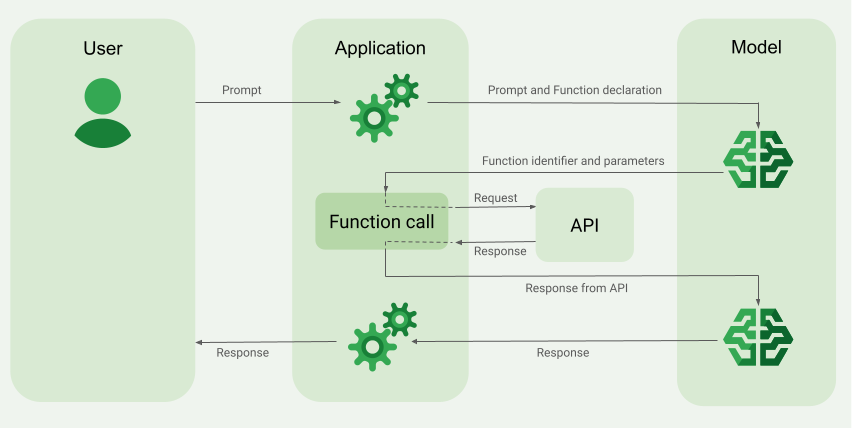
Wenn Sie eine Anfrage an das Modell senden, können Sie dem Modell auch eine Reihe von „Tools“ (z. B. Funktionen) zur Verfügung stellen, mit denen es seine endgültige Antwort generieren kann. Damit diese Funktionen genutzt und aufgerufen werden können („Funktionsaufrufe“), müssen das Modell und Ihre Anwendung Informationen hin- und herleiten. Daher wird empfohlen, Funktionsaufrufe über die Multi-Turn-Unterhaltungsschnittstelle zu verwenden.
Stellen Sie sich vor, Sie haben eine App, in der ein Nutzer einen Prompt wie diesen eingeben kann:
What was the weather in Boston on October 17, 2024?.
Die Gemini-Modelle kennen diese Wetterinformationen möglicherweise nicht. Stellen Sie sich jedoch vor, dass Sie eine externe Wetterdienst-API kennen, die diese Informationen bereitstellen kann. Mit Funktionsaufrufen können Sie dem Gemini-Modell einen Pfad zu dieser API und den Wetterinformationen bereitstellen.
Zuerst schreiben Sie in Ihrer Anwendung eine Funktion fetchWeather, die mit dieser hypothetischen externen API interagiert, die diese Eingabe und Ausgabe hat:
| Parameter | Typ | Erforderlich | Beschreibung |
|---|---|---|---|
| Eingabe | |||
location |
Objekt | Ja | Der Name der Stadt und des Bundesstaates, für die das Wetter abgerufen werden soll. Es werden nur Städte in den USA unterstützt. Muss immer ein verschachteltes Objekt von city und state sein.
|
date |
String | Ja | Datum, für das das Wetter abgerufen werden soll (muss immer im Format YYYY-MM-DD angegeben werden).
|
| Ausgabe | |||
temperature |
Ganzzahl | Ja | Temperatur (in Fahrenheit) |
chancePrecipitation |
String | Ja | Niederschlagswahrscheinlichkeit (in Prozent) |
cloudConditions |
String | Ja | Bewölkung (clear, partlyCloudy, mostlyCloudy oder cloudy)
|
Beim Initialisieren des Modells teilen Sie dem Modell mit, dass diese fetchWeather-Funktion existiert und wie sie bei Bedarf zum Verarbeiten eingehender Anfragen verwendet werden kann.
Dies wird als „Funktionsdeklaration“ bezeichnet. Das Modell ruft die Funktion nicht direkt auf. Stattdessen entscheidet das Modell während der Verarbeitung der eingehenden Anfrage, ob die Funktion fetchWeather ihm helfen kann, auf die Anfrage zu antworten. Wenn das Modell entscheidet, dass die Funktion tatsächlich nützlich sein kann, generiert es strukturierte Daten, die Ihre Anwendung beim Aufrufen der Funktion unterstützen.
Sehen Sie sich die eingehende Anfrage noch einmal an:
What was the weather in Boston on October 17, 2024?. Das Modell würde wahrscheinlich entscheiden, dass die Funktion fetchWeather ihm helfen kann, eine Antwort zu generieren. Das Modell prüft, welche Eingabeparameter für fetchWeather erforderlich sind, und generiert dann strukturierte Eingabedaten für die Funktion, die in etwa so aussehen:
{
  functionName: fetchWeather,
  location: {
    city: Boston,
    state: Massachusetts  // the model can infer the state from the prompt
  },
  date: 2024-10-17
}
Das Modell übergibt diese strukturierten Eingabedaten an Ihre Anwendung, damit diese die Funktion fetchWeather aufrufen kann. Wenn Ihre App die Wetterbedingungen von der API zurückerhält, gibt sie die Informationen an das Modell weiter. Mit diesen Wetterinformationen kann das Modell die endgültige Verarbeitung abschließen und die Antwort auf die ursprüngliche Anfrage von What was the weather in Boston on October 17, 2024? generieren.
Das Modell könnte eine endgültige Antwort in natürlicher Sprache wie die folgende liefern:
On October 17, 2024, in Boston, it was 38 degrees Fahrenheit with partly cloudy skies.
Funktionsaufrufe implementieren
In den folgenden Schritten dieser Anleitung wird beschrieben, wie Sie eine Funktionsaufruf-Einrichtung implementieren, die dem Workflow ähnelt, der im Abschnitt Übersicht über ein Beispiel für Funktionsaufrufe (siehe oben auf dieser Seite) beschrieben wird.
Unterstützte Modelle
gemini-4-argongemini-3.8-flashgemini-3.5-flash-lite(und die älteregemini-3.1-flash-lite)
Ältere Gemini 3.x Flash-Modelle für die allgemeine Verwendung unterstützen diese Funktion, werden aber aufgrund bevorstehender Abschaltungstermine und/oder des automatischen Routings zu neueren Modellen nicht mehr empfohlen.
Die Gemini Live API-Modelle unterstützen diese Funktion ebenfalls, aber alle Codebeispiele in diesem Leitfaden beziehen sich auf die Gemini-Modelle für die allgemeine Verwendung.
Hinweis
|
Klicken Sie auf Ihren Gemini API-Anbieter, um anbieterspezifische Inhalte und Code auf dieser Seite aufzurufen. |
Falls noch nicht geschehen, lesen Sie den Startleitfaden. Dort wird beschrieben, wie Sie Ihr Firebase-Projekt einrichten, Ihre App mit Firebase verbinden, das SDK hinzufügen, den Backend-Dienst für den ausgewählten Gemini API-Anbieter initialisieren und eine GenerativeModel-Instanz erstellen.
Zum Testen und Iterieren Ihrer Prompts empfehlen wir die Verwendung von Google AI Studio.
Schritt 1: Funktion schreiben
Stellen Sie sich vor, Sie haben eine App, in der ein Nutzer einen Prompt wie diesen eingeben kann:
What was the weather in Boston on October 17, 2024?. Die Gemini-Modelle kennen diese Wetterinformationen möglicherweise nicht. Stellen Sie sich jedoch vor, dass Sie eine externe Wetterdienst-API kennen, die diese Informationen bereitstellen kann. Das Szenario in diesem Leitfaden basiert auf dieser hypothetischen externen API.
Schreiben Sie die Funktion in Ihrer Anwendung, die mit der hypothetischen externen API interagiert und dem Modell die Informationen bereitstellt, die es zum Generieren der endgültigen Anfrage benötigt. In diesem Wetterbeispiel ist es eine fetchWeather-Funktion, die den Aufruf an diese hypothetische externe API sendet.
Swift
// This function calls a hypothetical external API that returns
// a collection of weather information for a given location on a given date.
func fetchWeather(city: String, state: String, date: String) -> JSONObject {

  // TODO(developer): Write a standard function that would call an external weather API.

  // For demo purposes, this hypothetical response is hardcoded here in the expected format.
  return [
    "temperature": .number(38),
    "chancePrecipitation": .string("56%"),
    "cloudConditions": .string("partlyCloudy"),
  ]
}
Kotlin
// This function calls a hypothetical external API that returns
// a collection of weather information for a given location on a given date.
// `location` is an object of the form { city: string, state: string }
data class Location(val city: String, val state: String)

suspend fun fetchWeather(location: Location, date: String): JsonObject {

    // TODO(developer): Write a standard function that would call to an external weather API.

    // For demo purposes, this hypothetical response is hardcoded here in the expected format.
    return JsonObject(mapOf(
        "temperature" to JsonPrimitive(38),
        "chancePrecipitation" to JsonPrimitive("56%"),
        "cloudConditions" to JsonPrimitive("partlyCloudy")
    ))
}
Java
// This function calls a hypothetical external API that returns
// a collection of weather information for a given location on a given date.
// `location` is an object of the form { city: string, state: string }
public JsonObject fetchWeather(Location location, String date) {

  // TODO(developer): Write a standard function that would call to an external weather API.

  // For demo purposes, this hypothetical response is hardcoded here in the expected format.
  return new JsonObject(Map.of(
        "temperature", JsonPrimitive(38),
        "chancePrecipitation", JsonPrimitive("56%"),
        "cloudConditions", JsonPrimitive("partlyCloudy")));
}
Web
// This function calls a hypothetical external API that returns
// a collection of weather information for a given location on a given date.
// `location` is an object of the form { city: string, state: string }
async function fetchWeather({ location, date }) {

  // TODO(developer): Write a standard function that would call to an external weather API.

  // For demo purposes, this hypothetical response is hardcoded here in the expected format.
  return {
    temperature: 38,
    chancePrecipitation: "56%",
    cloudConditions: "partlyCloudy",
  };
}
Dart
// This function calls a hypothetical external API that returns
// a collection of weather information for a given location on a given date.
// `location` is an object of the form { city: string, state: string }
Future<Map<String, Object?>> fetchWeather(
  Location location, String date
) async {

  // TODO(developer): Write a standard function that would call to an external weather API.

  // For demo purposes, this hypothetical response is hardcoded here in the expected format.
  final apiResponse = {
    'temperature': 38,
    'chancePrecipitation': '56%',
    'cloudConditions': 'partlyCloudy',
  };
  return apiResponse;
}
Einheit
// This function calls a hypothetical external API that returns
// a collection of weather information for a given location on a given date.
System.Collections.Generic.Dictionary<string, object> FetchWeather(
    string city, string state, string date) {

  // TODO(developer): Write a standard function that would call an external weather API.

  // For demo purposes, this hypothetical response is hardcoded here in the expected format.
  return new System.Collections.Generic.Dictionary<string, object>() {
    {"temperature", 38},
    {"chancePrecipitation", "56%"},
    {"cloudConditions", "partlyCloudy"},
  };
}
Schritt 2: Funktionsdeklaration erstellen
Erstellen Sie die Funktionsdeklaration, die Sie später dem Modell zur Verfügung stellen (nächster Schritt in diesem Leitfaden).
Geben Sie in Ihrer Deklaration so viele Details wie möglich in den Beschreibungen für die Funktion und ihre Parameter an.
Das Modell verwendet die Informationen in der Funktionsdeklaration, um zu bestimmen, welche Funktion ausgewählt werden soll und wie Parameterwerte für den tatsächlichen Aufruf der Funktion bereitgestellt werden sollen. Unter Zusätzliche Verhaltensweisen und Optionen weiter unten auf dieser Seite erfahren Sie, wie das Modell zwischen den Funktionen wählen kann und wie Sie diese Auswahl steuern können.
Beachten Sie Folgendes in Bezug auf das von Ihnen bereitgestellte Schema:
Sie müssen Funktionsdeklarationen in einem Schemaformat bereitstellen, das mit dem OpenAPI-Schema kompatibel ist. Agent Platform bietet eingeschränkte Unterstützung für das OpenAPI-Schema.
Die folgenden Attribute sind zulässig:
type,nullable,required,format,description,properties,items,enum.Die folgenden Attribute werden nicht unterstützt:
default,optional,maximum,oneOf.
Standardmäßig werden für Firebase AI Logic-SDKs alle Felder als erforderlich betrachtet, sofern Sie sie nicht in einem
optionalProperties-Array als optional angeben. Bei diesen optionalen Feldern kann das Modell die Felder ausfüllen oder überspringen. Beachten Sie, dass dies das Gegenteil des Standardverhaltens der beiden Gemini API-Anbieter ist, wenn Sie deren Server-SDKs oder deren API direkt verwenden.
Best Practices für Funktionsdeklarationen, einschließlich Tipps für Namen und Beschreibungen, finden Sie in der Google Cloud-Dokumentation unter Best Practices in der Gemini Developer API-Dokumentation.
So können Sie eine Funktionsdeklaration schreiben:
Swift
let fetchWeatherTool = FunctionDeclaration(
  name: "fetchWeather",
  description: "Get the weather conditions for a specific city on a specific date.",
  parameters: [
    "location": .object(
      properties: [
        "city": .string(description: "The city of the location."),
        "state": .string(description: "The US state of the location."),
      ],
      description: """
      The name of the city and its state for which to get the weather. Only cities in the
      USA are supported.
      """
    ),
    "date": .string(
      description: """
      The date for which to get the weather. Date must be in the format: YYYY-MM-DD.
      """
    ),
  ]
)
Kotlin
val fetchWeatherTool = FunctionDeclaration(
    "fetchWeather",
    "Get the weather conditions for a specific city on a specific date.",
    mapOf(
        "location" to Schema.obj(
            mapOf(
                "city" to Schema.string("The city of the location."),
                "state" to Schema.string("The US state of the location."),
            ),
            description = "The name of the city and its state for which " +
                "to get the weather. Only cities in the " +
                "USA are supported."
        ),
        "date" to Schema.string("The date for which to get the weather." +
                                " Date must be in the format: YYYY-MM-DD."
        ),
    ),
)
Java
FunctionDeclaration fetchWeatherTool = new FunctionDeclaration(
        "fetchWeather",
        "Get the weather conditions for a specific city on a specific date.",
        Map.of("location",
                Schema.obj(Map.of(
                        "city", Schema.str("The city of the location."),
                        "state", Schema.str("The US state of the location."))),
                "date",
                Schema.str("The date for which to get the weather. " +
                              "Date must be in the format: YYYY-MM-DD.")),
        Collections.emptyList());
Web
const fetchWeatherTool: FunctionDeclarationsTool = {
  functionDeclarations: [
   {
      name: "fetchWeather",
      description:
        "Get the weather conditions for a specific city on a specific date",
      parameters: Schema.object({
        properties: {
          location: Schema.object({
            description:
              "The name of the city and its state for which to get " +
              "the weather. Only cities in the USA are supported.",
            properties: {
              city: Schema.string({
                description: "The city of the location."
              }),
              state: Schema.string({
                description: "The US state of the location."
              }),
            },
          }),
          date: Schema.string({
            description:
              "The date for which to get the weather. Date must be in the" +
              " format: YYYY-MM-DD.",
          }),
        },
      }),
    },
  ],
};
Dart
final fetchWeatherTool = FunctionDeclaration(
    'fetchWeather',
    'Get the weather conditions for a specific city on a specific date.',
    parameters: {
      'location': Schema.object(
        description:
          'The name of the city and its state for which to get'
          'the weather. Only cities in the USA are supported.',
        properties: {
          'city': Schema.string(
             description: 'The city of the location.'
           ),
          'state': Schema.string(
             description: 'The US state of the location.'
          ),
        },
      ),
      'date': Schema.string(
        description:
          'The date for which to get the weather. Date must be in the format: YYYY-MM-DD.'
      ),
    },
  );
Einheit
var fetchWeatherTool = new Tool(new FunctionDeclaration(
  name: "fetchWeather",
  description: "Get the weather conditions for a specific city on a specific date.",
  parameters: new System.Collections.Generic.Dictionary<string, Schema>() {
    { "location", Schema.Object(
      properties: new System.Collections.Generic.Dictionary<string, Schema>() {
        { "city", Schema.String(description: "The city of the location.") },
        { "state", Schema.String(description: "The US state of the location.")}
      },
      description: "The name of the city and its state for which to get the weather. Only cities in the USA are supported."
    ) },
    { "date", Schema.String(
      description: "The date for which to get the weather. Date must be in the format: YYYY-MM-DD."
    )}
  }
));
Schritt 3: Funktionsdeklaration bei der Modellinitialisierung angeben
Die maximale Anzahl von Funktionsdeklarationen, die Sie mit der Anfrage angeben können, beträgt 128. Unter Zusätzliche Verhaltensweisen und Optionen weiter unten auf dieser Seite erfahren Sie, wie das Modell zwischen den Funktionen wählen kann und wie Sie diese Auswahl steuern können (mit einem toolConfig, um den Funktionsaufrufmodus festzulegen).
Swift
import FirebaseAILogic

// Initialize the Gemini Developer API backend service.
// Create a `GenerativeModel` instance with a model that supports your use case.
let model = FirebaseAI.firebaseAI(backend: .googleAI()).generativeModel(
  modelName: "GEMINI_MODEL_NAME",
  // Provide the function declaration to the model.
  tools: [.functionDeclarations([fetchWeatherTool])]
)
Kotlin
// Initialize the Gemini Developer API backend service.
// Create a `GenerativeModel` instance with a model that supports your use case.
val model = Firebase.ai(backend = GenerativeBackend.googleAI()).generativeModel(
    modelName = "<var>GEMINI_MODEL_NAME</var>",
    // Provide the function declaration to the model.
    tools = listOf(Tool.functionDeclarations(listOf(fetchWeatherTool)))
)
Java
// Initialize the Gemini Developer API backend service.
// Create a `GenerativeModel` instance with a model that supports your use case.
GenerativeModelFutures model = GenerativeModelFutures.from(
        FirebaseAI.getInstance(GenerativeBackend.googleAI())
                .generativeModel("<var>GEMINI_MODEL_NAME</var>",
                        null,
                        null,
                        // Provide the function declaration to the model.
                        List.of(Tool.functionDeclarations(List.of(fetchWeatherTool)))));
Web
import { initializeApp } from "firebase/app";
import { getAI, getGenerativeModel, GoogleAIBackend } from "firebase/ai";

// TODO(developer): Replace the following with your app's Firebase configuration
// See: https://firebase.google.com/docs/web/learn-more#config-object
const firebaseConfig = {
  // ...
};

// Initialize FirebaseApp
const firebaseApp = initializeApp(firebaseConfig);

// Initialize the Gemini Developer API backend service.
const firebaseAI = getAI(firebaseApp, { backend: new GoogleAIBackend() });

// Create a `GenerativeModel` instance with a model that supports your use case.
const model = getGenerativeModel(firebaseAI, {
  model: "GEMINI_MODEL_NAME",
  // Provide the function declaration to the model.
  tools: fetchWeatherTool
});
Dart
import 'package:firebase_ai/firebase_ai.dart';
import 'package:firebase_core/firebase_core.dart';
import 'firebase_options.dart';

// Initialize FirebaseApp
await Firebase.initializeApp(
  options: DefaultFirebaseOptions.currentPlatform,
);

// Initialize the Gemini Developer API backend service.
// Create a `GenerativeModel` instance with a model that supports your use case.
_functionCallModel = FirebaseAI.googleAI().generativeModel(
       model: 'GEMINI_MODEL_NAME',
       // Provide the function declaration to the model.
       tools: [
         Tool.functionDeclarations([fetchWeatherTool]),
       ],
     );
Einheit
using Firebase;
using Firebase.AI;

// Initialize the Gemini Developer API backend service.
// Create a `GenerativeModel` instance with a model that supports your use case.
var model = FirebaseAI.DefaultInstance.GetGenerativeModel(
  modelName: "GEMINI_MODEL_NAME",
  // Provide the function declaration to the model.
  tools: new Tool[] { fetchWeatherTool }
);
Hier erfahren Sie, wie Sie ein Modell auswählen, die für Ihren Anwendungsfall und Ihre App geeignet sind.
Schritt 4: Funktion aufrufen, um die externe API aufzurufen
Wenn das Modell entscheidet, dass die Funktion fetchWeather tatsächlich beim Generieren einer endgültigen Antwort helfen kann, muss Ihre Anwendung die Funktion mit den vom Modell bereitgestellten strukturierten Eingabedaten aufrufen.
Da Informationen zwischen dem Modell und der Anwendung hin- und hergeleitet werden müssen, wird empfohlen, Funktionsaufrufe über die Multi-Turn-Unterhaltungsschnittstelle zu verwenden.
Das folgende Code-Snippet zeigt, wie Ihre App darüber informiert wird, dass das Modell die Funktion fetchWeather verwenden möchte. Außerdem wird angezeigt, dass das Modell die erforderlichen Eingabeparameterwerte für den Funktionsaufruf (und die zugrunde liegende externe API) bereitgestellt hat.
In diesem Beispiel enthielt die eingehende Anfrage den Prompt What was the weather in Boston on October 17, 2024?. Aus diesem Prompt hat das Modell die Eingabeparameter abgeleitet, die für die Funktion fetchWeather erforderlich sind (also city, state und date).
Swift
let chat = model.startChat()
let prompt = "What was the weather in Boston on October 17, 2024?"

// Send the user's question (the prompt) to the model using multi-turn chat.
let response = try await chat.sendMessage(prompt)

var functionResponses = [FunctionResponsePart]()

// When the model responds with one or more function calls, invoke the function(s).
for functionCall in response.functionCalls {
  if functionCall.name == "fetchWeather" {
    // TODO(developer): Handle invalid arguments.
    guard case let .object(location) = functionCall.args["location"] else { fatalError() }
    guard case let .string(city) = location["city"] else { fatalError() }
    guard case let .string(state) = location["state"] else { fatalError() }
    guard case let .string(date) = functionCall.args["date"] else { fatalError() }

    functionResponses.append(FunctionResponsePart(
      name: functionCall.name,
      // Forward the structured input data prepared by the model
      // to the hypothetical external API.
      response: fetchWeather(city: city, state: state, date: date)
    ))
  }
  // TODO(developer): Handle other potential function calls, if any.
}
Kotlin
val prompt = "What was the weather in Boston on October 17, 2024?"
val chat = model.startChat()
// Send the user's question (the prompt) to the model using multi-turn chat.
val result = chat.sendMessage(prompt)

val functionCalls = result.functionCalls
// When the model responds with one or more function calls, invoke the function(s).
val fetchWeatherCall = functionCalls.find { it.name == "fetchWeather" }

// Forward the structured input data prepared by the model
// to the hypothetical external API.
val functionResponse = fetchWeatherCall?.let {
    // Alternatively, if your `Location` class is marked as @Serializable, you can use
    // val location = Json.decodeFromJsonElement<Location>(it.args["location"]!!)
    val location = Location(
        it.args["location"]!!.jsonObject["city"]!!.jsonPrimitive.content,
        it.args["location"]!!.jsonObject["state"]!!.jsonPrimitive.content
    )
    val date = it.args["date"]!!.jsonPrimitive.content
    fetchWeather(location, date)
}
Java
String prompt = "What was the weather in Boston on October 17, 2024?";
ChatFutures chatFutures = model.startChat();
// Send the user's question (the prompt) to the model using multi-turn chat.
ListenableFuture<GenerateContentResponse> response =
        chatFutures.sendMessage(new Content("user", List.of(new TextPart(prompt))));

ListenableFuture<JsonObject> handleFunctionCallFuture = Futures.transform(response, result -> {
    for (FunctionCallPart functionCall : result.getFunctionCalls()) {
        if (functionCall.getName().equals("fetchWeather")) {
            Map<String, JsonElement> args = functionCall.getArgs();
            JsonObject locationJsonObject =
                    JsonElementKt.getJsonObject(args.get("location"));
            String city =
                    JsonElementKt.getContentOrNull(
                            JsonElementKt.getJsonPrimitive(
                                    locationJsonObject.get("city")));
            String state =
                    JsonElementKt.getContentOrNull(
                            JsonElementKt.getJsonPrimitive(
                                    locationJsonObject.get("state")));
            Location location = new Location(city, state);

            String date = JsonElementKt.getContentOrNull(
                    JsonElementKt.getJsonPrimitive(
                            args.get("date")));
            return fetchWeather(location, date);
        }
    }
    return null;
}, Executors.newSingleThreadExecutor());
Web
const chat = model.startChat();
const prompt = "What was the weather in Boston on October 17, 2024?";

// Send the user's question (the prompt) to the model using multi-turn chat.
let result = await chat.sendMessage(prompt);
const functionCalls = result.response.functionCalls();
let functionCall;
let functionResult;
// When the model responds with one or more function calls, invoke the function(s).
if (functionCalls.length > 0) {
  for (const call of functionCalls) {
    if (call.name === "fetchWeather") {
      // Forward the structured input data prepared by the model
      // to the hypothetical external API.
      functionResult = await fetchWeather(call.args);
      functionCall = call;
    }
  }
}
Dart
final chat = _functionCallModel.startChat();
const prompt = 'What was the weather in Boston on October 17, 2024?';

// Send the user's question (the prompt) to the model using multi-turn chat.
var response = await chat.sendMessage(Content.text(prompt));

final functionCalls = response.functionCalls.toList();
// When the model responds with one or more function calls, invoke the function(s).
if (functionCalls.isNotEmpty) {
  for (final functionCall in functionCalls) {
    if (functionCall.name == 'fetchWeather') {
      Map<String, dynamic> location =
          functionCall.args['location']! as Map<String, dynamic>;
      var date = functionCall.args['date']! as String;
      var city = location['city'] as String;
      var state = location['state'] as String;
      final functionResult =
          await fetchWeather(Location(city, state), date);
      // Send the response to the model so that it can use the result to
      // generate text for the user.
      response = await chat.sendMessage(
        Content.functionResponse(functionCall.name, functionResult),
      );
    }
  }
} else {
  throw UnimplementedError(
    'No function calls returned by the model',
  );
}
Einheit
var chat = model.StartChat();
var prompt = "What was the weather in Boston on October 17, 2024?";

// Send the user's question (the prompt) to the model using multi-turn chat.
var response = await chat.SendMessageAsync(prompt);

var functionResponses = new List<ModelContent>();

foreach (var functionCall in response.FunctionCalls) {
  if (functionCall.Name == "fetchWeather") {
    // TODO(developer): Handle invalid arguments.
    var city = functionCall.Args["city"] as string;
    var state = functionCall.Args["state"] as string;
    var date = functionCall.Args["date"] as string;

    functionResponses.Add(ModelContent.FunctionResponse(
      name: functionCall.Name,
      // Forward the structured input data prepared by the model
      // to the hypothetical external API.
      response: FetchWeather(city: city, state: state, date: date)
    ));
  }
  // TODO(developer): Handle other potential function calls, if any.
}
Schritt 5: Funktionsausgabe für das Modell übergeben, um die endgültige Antwort zu generieren
Nachdem die Funktion fetchWeather die Wetterinformationen zurückgegeben hat, muss Ihre Anwendung sie an das Modell zurückgeben.
Anschließend führt das Modell die endgültige Verarbeitung durch und generiert eine endgültige Antwort in natürlicher Sprache, z. B.:
On October 17, 2024 in Boston, it was 38 degrees Fahrenheit with partly cloudy skies.
Swift
// Send the response(s) from the function back to the model
// so that the model can use it to generate its final response.
let finalResponse = try await chat.sendMessage(
  [ModelContent(role: "user", parts: functionResponses)]
)

// Log the text response.
print(finalResponse.text ?? "No text in response.")
Kotlin
// Send the response(s) from the function back to the model
// so that the model can use it to generate its final response.
val finalResponse = chat.sendMessage(content("user") {
    part(FunctionResponsePart("fetchWeather", functionResponse!!))
})

// Log the text response.
println(finalResponse.text ?: "No text in response")
Java
ListenableFuture<GenerateContentResponse> modelResponseFuture = Futures.transformAsync(
  handleFunctionCallFuture,
  // Send the response(s) from the function back to the model
  // so that the model can use it to generate its final response.
  functionCallResult -> chatFutures.sendMessage(new Content("user",
  List.of(new FunctionResponsePart(
          "fetchWeather", functionCallResult)))),
  Executors.newSingleThreadExecutor());

Futures.addCallback(modelResponseFuture, new FutureCallback<GenerateContentResponse>() {
@Override
public void onSuccess(GenerateContentResponse result) {
  if (result.getText() != null) {
      // Log the text response.
      System.out.println(result.getText());
  }
}

@Override
public void onFailure(Throwable t) {
  // handle error
}
}, Executors.newSingleThreadExecutor());
Web
// Send the response from the function back to the model
// so that the model can use it to generate its final response.
result = await chat.sendMessage([
  {
    type: "functionResponse",
    functionResponse: {
      name: functionCall.name, // "fetchWeather"
      response: functionResult,
    },
  },
]);
console.log(result.response.text());
Dart
// Send the response from the function back to the model
// so that the model can use it to generate its final response.
response = await chat
     .sendMessage(Content.functionResponse(functionCall.name, functionResult));
Einheit
// Send the response(s) from the function back to the model
// so that the model can use it to generate its final response.
var finalResponse = await chat.SendMessageAsync(functionResponses);

// Log the text response.
UnityEngine.Debug.Log(finalResponse.Text ?? "No text in response.");
Zusätzliche Verhaltensweisen und Optionen
Hier sind einige zusätzliche Verhaltensweisen für Funktionsaufrufe, die Sie in Ihrem Code berücksichtigen müssen, und Optionen, die Sie steuern können.
Das Modell kann den Aufruf einer Funktion wiederholen oder eine andere Funktion aufrufen.
Wenn die Antwort eines Funktionsaufrufs nicht ausreicht, damit das Modell seine endgültige Antwort generieren kann, fordert das Modell möglicherweise einen zusätzlichen Funktionsaufruf oder einen Aufruf einer völlig anderen Funktion an. Letzteres kann nur passieren, wenn Sie dem Modell in der Liste der Funktionsdeklarationen mehr als eine Funktion zur Verfügung stellen.
Ihre Anwendung muss darauf vorbereitet sein, dass das Modell möglicherweise zusätzliche Funktionsaufrufe anfordert.
Das Modell kann mehrere Funktionen gleichzeitig aufrufen.
Sie können dem Modell bis zu 128 Funktionen in Ihrer Funktionsdeklarationsliste zur Verfügung stellen. In diesem Fall kann das Modell entscheiden, dass mehrere Funktionen erforderlich sind, um die endgültige Antwort zu generieren. Es kann auch entscheiden, einige dieser Funktionen gleichzeitig aufzurufen. Das wird als parallele Funktionsaufrufe bezeichnet.
Ihre Anwendung muss berücksichtigen, dass das Modell möglicherweise mehrere Funktionen gleichzeitig anfordert. Außerdem muss Ihre Anwendung alle Antworten der Funktionen an das Modell zurückgeben.
Sie können festlegen, wie und ob das Modell Funktionsaufrufe anfordern kann.
Sie können einige Einschränkungen festlegen, wie und ob das Modell die bereitgestellten Funktionsdeklarationen verwenden soll. Dies wird als Festlegen des Funktionsaufrufmodus bezeichnet. Hier einige Beispiele:
Anstatt dem Modell zu erlauben, zwischen einer sofortigen Antwort in natürlicher Sprache und einem Funktionsaufruf zu wählen, können Sie erzwingen, dass immer Funktionsaufrufe verwendet werden. Dies wird als erzwungener Funktionsaufruf bezeichnet.
Wenn Sie mehrere Funktionsdeklarationen angeben, können Sie das Modell auf die Verwendung einer Teilmenge der bereitgestellten Funktionen beschränken.
Sie implementieren diese Einschränkungen (oder Modi), indem Sie eine Toolkonfiguration (toolConfig) zusammen mit dem Prompt und den Funktionsdeklarationen hinzufügen. In der Toolkonfiguration können Sie einen der folgenden Modi angeben. Der nützlichste Modus ist ANY.
| Modus | Beschreibung |
|---|---|
AUTO |
Das Standardverhalten des Modells. Das Modell entscheidet, ob ein Funktionsaufruf oder eine Antwort in natürlicher Sprache verwendet werden soll. |
ANY |
Das Modell muss Funktionsaufrufe verwenden („erzwungene Funktionsaufrufe“). Wenn Sie das Modell auf eine Teilmenge von Funktionen beschränken möchten, geben Sie die zulässigen Funktionsnamen in allowedFunctionNames an.
|
NONE |
Das Modell darf keine Funktionsaufrufe verwenden. Dieses Verhalten entspricht einer Modellanfrage ohne zugehörige Funktionsdeklarationen. |
Was kannst du sonst noch alles für mich tun?
Andere Funktionen ausprobieren
- Multi-Turn-Unterhaltungen (Chat) erstellen
- Text aus reinen Text-Prompts generieren.
- Text generieren, indem Sie Prompts mit verschiedenen Dateitypen wie Bildern, PDFs, Videos und Audio verwenden.
Informationen zum Steuern der Inhaltserstellung
- Prompt-Design verstehen, einschließlich Best Practices, Strategien und Beispiel-Prompts.
- Modellparameter konfigurieren, z. B. maximale Ausgabetokens, die Wahrscheinlichkeit wiederholter Ausgabetokens usw.
- Sicherheitseinstellungen verwenden, um die Wahrscheinlichkeit anzupassen, dass Antworten ausgegeben werden, die als schädlich eingestuft werden könnten.
Weitere Informationen zu den unterstützten Modellen
Modelle für verschiedene Anwendungsfälle, Kontingente und PreiseFeedback zu Ihrer Erfahrung mit Firebase AI Logic geben