

Die Code-Ausführung ist ein Tool, mit dem das Modell Python-Code generieren und ausführen kann. Das Modell kann iterativ aus den Ergebnissen der Codeausführung lernen, bis es eine endgültige Ausgabe erstellt hat.
Mit der Codeausführung können Sie Funktionen erstellen, die von codebasierten Schlussfolgerungen profitieren und Textausgaben generieren. Die Codeausführung können Sie beispielsweise verwenden, um Gleichungen zu lösen oder Text zu verarbeiten. Sie können auch die in der Code-Ausführungsumgebung enthaltenen Bibliotheken verwenden, um spezialisiertere Aufgaben auszuführen.
Wie bei allen Tools, die Sie dem Modell zur Verfügung stellen, entscheidet das Modell, wann die Code-Ausführung verwendet werden soll.
Zur Code-Implementierung springen
Vergleich von Code-Ausführung und Funktionsaufrufen
Code-Ausführung und Funktionsaufrufe sind ähnliche Funktionen. Im Allgemeinen sollten Sie die Codeausführung bevorzugen, wenn das Modell Ihren Anwendungsfall verarbeiten kann. Die Codeausführung ist auch einfacher zu verwenden, da Sie sie nur aktivieren müssen.
Hier sind einige weitere Unterschiede zwischen Code-Ausführung und Funktionsaufrufen:
| Code-Ausführung | Funktionsaufrufe |
|---|---|
| Verwenden Sie die Code-Ausführung, wenn das Modell Python-Code für Sie schreiben und ausführen und das Ergebnis zurückgeben soll. | Verwenden Sie Funktionsaufrufe, wenn Sie bereits eigene Funktionen haben, die Sie lokal ausführen möchten. |
| Mit der Code-Ausführung kann das Modell Code im API-Backend in einer festen, isolierten Umgebung ausführen. | Mit Funktionsaufrufen können Sie die vom Modell angeforderten Funktionen in einer beliebigen Umgebung ausführen. |
| Die Codeausführung wird in einer einzigen Anfrage abgeschlossen. Sie können die Codeausführung optional mit der Chatfunktion verwenden, dies ist jedoch nicht erforderlich. | Für Funktionsaufrufe ist eine zusätzliche Anfrage erforderlich, um die Ausgabe jedes Funktionsaufrufs zurückzusenden. Daher müssen Sie die Chatfunktion verwenden. |
Unterstützte Modelle
gemini-4-argongemini-3.8-flashgemini-3.5-flash-lite(und die älteregemini-3.1-flash-lite)
Ältere Gemini 3.x Flash-Modelle für die allgemeine Verwendung unterstützen diese Funktion, werden aber aufgrund bevorstehender Abschaltungstermine und/oder des automatischen Routings zu neueren Modellen nicht mehr empfohlen.
Code-Ausführung verwenden
Sie können die Code-Ausführung sowohl mit reiner Texteingabe als auch mit multimodaler Eingabe verwenden. Die Antwort besteht jedoch immer nur aus Text oder Code.
Hinweis
|
Klicken Sie auf Ihren Gemini API-Anbieter, um anbieterspezifische Inhalte und Code auf dieser Seite aufzurufen. |
Falls noch nicht geschehen, lesen Sie den Startleitfaden. Dort wird beschrieben, wie Sie Ihr Firebase-Projekt einrichten, Ihre App mit Firebase verbinden, das SDK hinzufügen, den Backend-Dienst für den ausgewählten Gemini API-Anbieter initialisieren und eine GenerativeModel-Instanz erstellen.
Zum Testen und Iterieren Ihrer Prompts empfehlen wir die Verwendung von Google AI Studio.
Code-Ausführung aktivieren
|
Bevor Sie dieses Beispiel ausprobieren, müssen Sie den Abschnitt Vorbereitung dieses Leitfadens durchgehen, um Ihr Projekt und Ihre App einzurichten. In diesem Abschnitt klicken Sie auch auf eine Schaltfläche für den ausgewählten Gemini API-Anbieter, damit Sie auf dieser Seite anbieterspezifische Inhalte sehen. |
Wenn Sie die GenerativeModel-Instanz erstellen, geben Sie CodeExecution als Tool an, das das Modell zum Generieren der Antwort verwenden kann. So kann das Modell Python-Code generieren und ausführen.
Swift
import FirebaseAILogic

// Initialize the Gemini Developer API backend service.
let ai = FirebaseAI.firebaseAI(backend: .googleAI())

// Create a `GenerativeModel` instance with a model that supports your use case
let model = ai.generativeModel(
  modelName: "GEMINI_MODEL_NAME",
  // Provide code execution as a tool that the model can use to generate its response.
  tools: [.codeExecution()]
)

let prompt = """
What is the sum of the first 50 prime numbers?
Generate and run code for the calculation, and make sure you get all 50.
"""

let response = try await model.generateContent(prompt)

guard let candidate = response.candidates.first else {
  print("No candidates in response.")
  return
}
for part in candidate.content.parts {
  if let textPart = part as? TextPart {
    print("Text = \(textPart.text)")
  } else if let executableCode = part as? ExecutableCodePart {
    print("Code = \(executableCode.code), Language = \(executableCode.language)")
  } else if let executionResult = part as? CodeExecutionResultPart {
    print("Outcome = \(executionResult.outcome), Result = \(executionResult.output ?? "no output")")
  }
}
Kotlin
// Initialize the Gemini Developer API backend service.
// Create a `GenerativeModel` instance with a model that supports your use case.
val model = Firebase.ai(backend = GenerativeBackend.googleAI()).generativeModel(
    modelName = "GEMINI_MODEL_NAME",
    // Provide code execution as a tool that the model can use to generate its response.
    tools = listOf(Tool.codeExecution())
)

val prompt =  "What is the sum of the first 50 prime numbers? " +
        "Generate and run code for the calculation, and make sure you get all 50."

val response = model.generateContent(prompt)

response.candidates.first().content.parts.forEach {
    if(it is TextPart) {
        println("Text = ${it.text}")
    }
    if(it is ExecutableCodePart) {
        println("Code = ${it.code}, Language = ${it.language}")
    }
    if(it is CodeExecutionResultPart) {
       println("Outcome = ${it.outcome}, Result = ${it.output}")
    }
}
Java
// Initialize the Gemini Developer API backend service.
// Create a `GenerativeModel` instance with a model that supports your use case.
GenerativeModel ai = FirebaseAI.getInstance(GenerativeBackend.googleAI())
                .generativeModel("GEMINI_MODEL_NAME",
                        null,
                        null,
                        // Provide code execution as a tool that the model can use to generate its response.
                        List.of(Tool.codeExecution()));

// Use the GenerativeModelFutures Java compatibility layer which offers
// support for ListenableFuture and Publisher APIs
GenerativeModelFutures model = GenerativeModelFutures.from(ai);

String text = "What is the sum of the first 50 prime numbers? " +
        "Generate and run code for the calculation, and make sure you get all 50.";

Content prompt = new Content.Builder()
    .addText(text)
    .build();

ListenableFuture response = model.generateContent(prompt);

Futures.addCallback(response, new FutureCallback() {
   @Override
public void onSuccess(GenerateContentResponse response)   {
    // Access the first candidate's content parts
    List parts = response.getCandidates().get(0).getContent().getParts();
    for (Part part : parts) {
        if (part instanceof TextPart) {
            TextPart textPart = (TextPart) part;
            System.out.println("Text = " + textPart.getText());
        } else if (part instanceof ExecutableCodePart) {
            ExecutableCodePart codePart = (ExecutableCodePart) part;
            System.out.println("Code = " + codePart.getCode() + ", Language = " + codePart.getLanguage());
        } else if (part instanceof CodeExecutionResultPart) {
            CodeExecutionResultPart resultPart = (CodeExecutionResultPart) part;
            System.out.println("Outcome = " + resultPart.getOutcome() + ", Result = " + resultPart.getOutput());
        }
    }
}

    @Override
    public void onFailure(Throwable t) {
        t.printStackTrace();
    }
}, executor);
Web
import { initializeApp } from "firebase/app";
import { getAI, getGenerativeModel, GoogleAIBackend } from "firebase/ai";

// TODO(developer): Replace the following with your app's Firebase configuration
// See: https://firebase.google.com/docs/web/learn-more#config-object
const firebaseConfig = {
  // ...
};

// Initialize FirebaseApp
const firebaseApp = initializeApp(firebaseConfig);

// Initialize the Gemini Developer API backend service.
const ai = getAI(firebaseApp, { backend: new GoogleAIBackend() });

// Create a `GenerativeModel` instance with a model that supports your use case.
const model = getGenerativeModel(
  ai,
  {
    model: "GEMINI_MODEL_NAME",
    // Provide code execution as a tool that the model can use to generate its response.
    tools: [{ codeExecution: {} }]
  }
);

const prompt =  "What is the sum of the first 50 prime numbers? " +
        "Generate and run code for the calculation, and make sure you get all 50."

const result = await model.generateContent(prompt);
const response = await result.response;

const parts = response.candidates?.[0].content.parts;

if (parts) {
  parts.forEach((part) => {
    if (part.type === "text") {
      console.log(`Text: ${part.text}`);
    } else if (part.type === "executableCode") {
      console.log(
        `Code: ${part.executableCode.code}, Language: ${part.executableCode.language}`
      );
    } else if (part.type === "codeExecutionResult") {
      console.log(
        `Outcome: ${part.codeExecutionResult.outcome}, Result: ${part.codeExecutionResult.output}`
      );
    }
  });
}
Dart
import 'package:firebase_core/firebase_core.dart';
import 'package:firebase_ai/firebase_ai.dart';
import 'firebase_options.dart';

// Initialize FirebaseApp
await Firebase.initializeApp(
  options: DefaultFirebaseOptions.currentPlatform,
);

// Initialize the Gemini Developer API backend service.
// Create a `GenerativeModel` instance with a model that supports your use case.
final model = FirebaseAI.googleAI().generativeModel(
  model: 'GEMINI_MODEL_NAME',
  // Provide code execution as a tool that the model can use to generate its response.
  tools: [
    Tool.codeExecution(),
  ],
);

const prompt = 'What is the sum of the first 50 prime numbers? '
    'Generate and run code for the calculation, and make sure you get all 50.';

final response = await model.generateContent([Content.text(prompt)]);

final buffer = StringBuffer();
    for (final part in response.candidates.first.content.parts) {
      if (part is TextPart) {
        buffer.writeln(part.text);
      } else if (part is ExecutableCodePart) {
        buffer.writeln('Executable Code:');
        buffer.writeln('Language: ${part.language}');
        buffer.writeln('Code:');
        buffer.writeln(part.code);
      } else if (part is CodeExecutionResultPart) {
        buffer.writeln('Code Execution Result:');
        buffer.writeln('Outcome: ${part.outcome}');
        buffer.writeln('Output:');
        buffer.writeln(part.output);
      }
    }
Einheit
using Firebase;
using Firebase.AI;

// Initialize the Gemini Developer API backend service.
var ai = FirebaseAI.GetInstance(FirebaseAI.Backend.GoogleAI());

// Create a `GenerativeModel` instance with a model that supports your use case.
var model = ai.GetGenerativeModel(
  modelName: "GEMINI_MODEL_NAME",
  // Provide code execution as a tool that the model can use to generate its response.
  tools: new Tool[] { new Tool(new CodeExecution()) }
);

var prompt = "What is the sum of the first 50 prime numbers? " +
        "Generate and run code for the calculation, and make sure you get all 50.";

var response = await model.GenerateContentAsync(prompt);

foreach (var part in response.Candidates.First().Content.Parts) {
  if (part is ModelContent.TextPart tp) {
    UnityEngine.Debug.Log($"Text = {tp.Text}");
  } else if (part is ModelContent.ExecutableCodePart esp) {
    UnityEngine.Debug.Log($"Code = {esp.Code}, Language = {esp.Language}");
  } else if (part is ModelContent.CodeExecutionResultPart cerp) {
    UnityEngine.Debug.Log($"Outcome = {cerp.Outcome}, Output = {cerp.Output}");
  }
}
Hier erfahren Sie, wie Sie ein Modell auswählen, die für Ihren Anwendungsfall und Ihre App geeignet sind.
Code-Ausführung im Chat verwenden
Sie können die Codeausführung auch im Rahmen eines Chats verwenden:
Swift
import FirebaseAILogic

// Initialize the Gemini Developer API backend service.
let ai = FirebaseAI.firebaseAI(backend: .googleAI())

// Create a `GenerativeModel` instance with a model that supports your use case
let model = ai.generativeModel(
  modelName: "GEMINI_MODEL_NAME",
  // Provide code execution as a tool that the model can use to generate its response.
  tools: [.codeExecution()]
)

let prompt = """
What is the sum of the first 50 prime numbers?
Generate and run code for the calculation, and make sure you get all 50.
"""
let chat = model.startChat()

let response = try await chat.sendMessage(prompt)

guard let candidate = response.candidates.first else {
  print("No candidates in response.")
  return
}
for part in candidate.content.parts {
  if let textPart = part as? TextPart {
    print("Text = \(textPart.text)")
  } else if let executableCode = part as? ExecutableCodePart {
    print("Code = \(executableCode.code), Language = \(executableCode.language)")
  } else if let executionResult = part as? CodeExecutionResultPart {
    print("Outcome = \(executionResult.outcome), Result = \(executionResult.output ?? "no output")")
  }
}
Kotlin
// Initialize the Gemini Developer API backend service.
// Create a `GenerativeModel` instance with a model that supports your use case.
val model = Firebase.ai(backend = GenerativeBackend.googleAI()).generativeModel(
    modelName = "GEMINI_MODEL_NAME",
    // Provide code execution as a tool that the model can use to generate its response.
    tools = listOf(Tool.codeExecution())
)

val prompt =  "What is the sum of the first 50 prime numbers? " +
        "Generate and run code for the calculation, and make sure you get all 50."
val chat = model.startChat()
val response = chat.sendMessage(prompt)

response.candidates.first().content.parts.forEach {
    if(it is TextPart) {
        println("Text = ${it.text}")
    }
    if(it is ExecutableCodePart) {
        println("Code = ${it.code}, Language = ${it.language}")
    }
    if(it is CodeExecutionResultPart) {
       println("Outcome = ${it.outcome}, Result = ${it.output}")
    }
}
Java
// Initialize the Gemini Developer API backend service.
// Create a `GenerativeModel` instance with a model that supports your use case.
GenerativeModel ai = FirebaseAI.getInstance(GenerativeBackend.googleAI())
                .generativeModel("GEMINI_MODEL_NAME",
                        null,
                        null,
                        // Provide code execution as a tool that the model can use to generate its response.
                        List.of(Tool.codeExecution()));

// Use the GenerativeModelFutures Java compatibility layer which offers
// support for ListenableFuture and Publisher APIs
GenerativeModelFutures model = GenerativeModelFutures.from(ai);
String text = "What is the sum of the first 50 prime numbers? " +
        "Generate and run code for the calculation, and make sure you get all 50.";

Content prompt = new Content.Builder()
    .addText(text)
    .build();

ChatFutures chat = model.startChat();
ListenableFuture response = chat.sendMessage(prompt);

Futures.addCallback(response, new FutureCallback() {
   @Override
public void onSuccess(GenerateContentResponse response)   {
    // Access the first candidate's content parts
    List parts = response.getCandidates().get(0).getContent().getParts();
    for (Part part : parts) {
        if (part instanceof TextPart) {
            TextPart textPart = (TextPart) part;
            System.out.println("Text = " + textPart.getText());
        } else if (part instanceof ExecutableCodePart) {
            ExecutableCodePart codePart = (ExecutableCodePart) part;
            System.out.println("Code = " + codePart.getCode() + ", Language = " + codePart.getLanguage());
        } else if (part instanceof CodeExecutionResultPart) {
            CodeExecutionResultPart resultPart = (CodeExecutionResultPart) part;
            System.out.println("Outcome = " + resultPart.getOutcome() + ", Result = " + resultPart.getOutput());
        }
    }
}

    @Override
    public void onFailure(Throwable t) {
        t.printStackTrace();
    }
}, executor);
Web
import { initializeApp } from "firebase/app";
import { getAI, getGenerativeModel, GoogleAIBackend } from "firebase/ai";

// TODO(developer): Replace the following with your app's Firebase configuration
// See: https://firebase.google.com/docs/web/learn-more#config-object
const firebaseConfig = {
  // ...
};

// Initialize FirebaseApp
const firebaseApp = initializeApp(firebaseConfig);

// Initialize the Gemini Developer API backend service.
const ai = getAI(firebaseApp, { backend: new GoogleAIBackend() });

// Create a `GenerativeModel` instance with a model that supports your use case.
const model = getGenerativeModel(
  ai,
  {
    model: "GEMINI_MODEL_NAME",
    // Provide code execution as a tool that the model can use to generate its response.
    tools: [{ codeExecution: {} }]
  }
);

const prompt =  "What is the sum of the first 50 prime numbers? " +
        "Generate and run code for the calculation, and make sure you get all 50."
const chat = model.startChat()
const result = await chat.sendMessage(prompt);

const parts = result.response.candidates?.[0].content.parts;

if (parts) {
  parts.forEach((part) => {
    if (part.type === "text") {
      console.log(`Text: ${part.text}`);
    } else if (part.type === "executableCode") {
      console.log(
        `Code: ${part.executableCode.code}, Language: ${part.executableCode.language}`
      );
    } else if (part.type === "codeExecutionResult") {
      console.log(
        `Outcome: ${part.codeExecutionResult.outcome}, Result: ${part.codeExecutionResult.output}`
      );
    }
  });
}
Dart
import 'package:firebase_core/firebase_core.dart';
import 'package:firebase_ai/firebase_ai.dart';
import 'firebase_options.dart';

// Initialize FirebaseApp
await Firebase.initializeApp(
  options: DefaultFirebaseOptions.currentPlatform,
);

// Initialize the Gemini Developer API backend service.
// Create a `GenerativeModel` instance with a model that supports your use case.
final model = FirebaseAI.googleAI().generativeModel(
  model: 'GEMINI_MODEL_NAME',
  // Provide code execution as a tool that the model can use to generate its response.
  tools: [
    Tool.codeExecution(),
  ],
);

final codeExecutionChat = await model.startChat();

const prompt = 'What is the sum of the first 50 prime numbers? '
    'Generate and run code for the calculation, and make sure you get all 50.';
final response = await codeExecutionChat.sendMessage(Content.text(prompt));

final buffer = StringBuffer();
    for (final part in response.candidates.first.content.parts) {
      if (part is TextPart) {
        buffer.writeln(part.text);
      } else if (part is ExecutableCodePart) {
        buffer.writeln('Executable Code:');
        buffer.writeln('Language: ${part.language}');
        buffer.writeln('Code:');
        buffer.writeln(part.code);
      } else if (part is CodeExecutionResultPart) {
        buffer.writeln('Code Execution Result:');
        buffer.writeln('Outcome: ${part.outcome}');
        buffer.writeln('Output:');
        buffer.writeln(part.output);
      }
    }
Einheit
using Firebase;
using Firebase.AI;

// Initialize the Gemini Developer API backend service.
var ai = FirebaseAI.GetInstance(FirebaseAI.Backend.GoogleAI());

// Create a `GenerativeModel` instance with a model that supports your use case.
var model = ai.GetGenerativeModel(
  modelName: "GEMINI_MODEL_NAME",
  // Provide code execution as a tool that the model can use to generate its response.
  tools: new Tool[] { new Tool(new CodeExecution()) }
);

var prompt = "What is the sum of the first 50 prime numbers? " +
        "Generate and run code for the calculation, and make sure you get all 50.";
var chat = model.StartChat();
var response = await chat.SendMessageAsync(prompt);

foreach (var part in response.Candidates.First().Content.Parts) {
  if (part is ModelContent.TextPart tp) {
    UnityEngine.Debug.Log($"Text = {tp.Text}");
  } else if (part is ModelContent.ExecutableCodePart esp) {
    UnityEngine.Debug.Log($"Code = {esp.Code}, Language = {esp.Language}");
  } else if (part is ModelContent.CodeExecutionResultPart cerp) {
    UnityEngine.Debug.Log($"Outcome = {cerp.Outcome}, Output = {cerp.Output}");
  }
}
Hier erfahren Sie, wie Sie ein Modell auswählen, die für Ihren Anwendungsfall und Ihre App geeignet sind.
Preise
Für das Aktivieren der Code-Ausführung und das Bereitstellen als Tool für das Modell fallen keine zusätzlichen Kosten an. Wenn das Modell die Code-Ausführung verwendet, werden Ihnen die Eingabe- und Ausgabetokens gemäß dem aktuellen Tarif des von Ihnen verwendeten Gemini-Modells in Rechnung gestellt.
Das folgende Diagramm zeigt das Abrechnungsmodell für die Codeausführung:
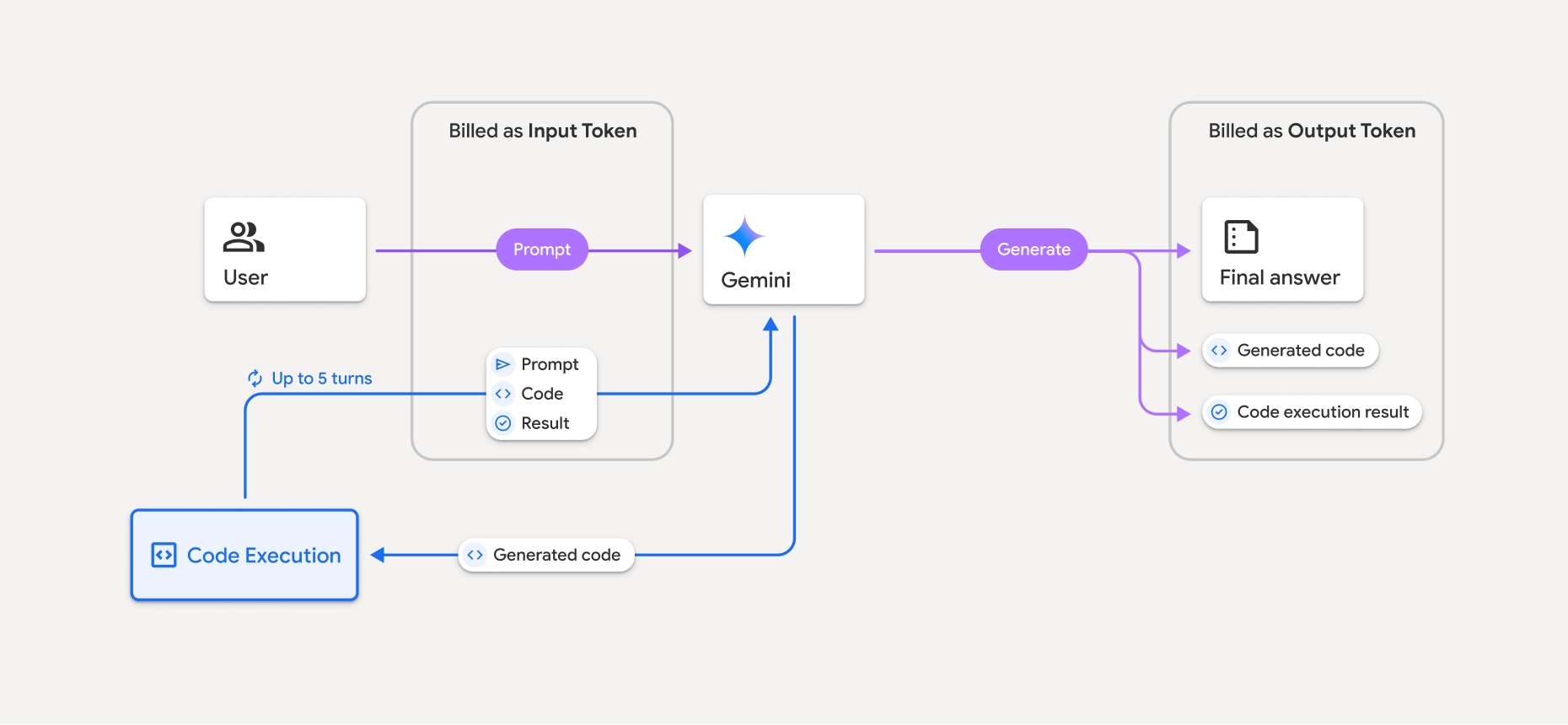
Hier ist eine Zusammenfassung, wie Tokens abgerechnet werden, wenn ein Modell die Code-Ausführung verwendet:
Der ursprüngliche Prompt wird einmal in Rechnung gestellt. Die Tokens werden als Zwischentokens bezeichnet und als Eingabetokens abgerechnet.
Der generierte Code und das Ergebnis des ausgeführten Codes werden so abgerechnet:
Wenn sie während der Codeausführung verwendet werden, werden sie als Zwischentokens bezeichnet und als Eingabetokens abgerechnet.
Wenn sie in der endgültigen Antwort enthalten sind, werden sie als Ausgabetokens abgerechnet.
Die endgültige Zusammenfassung in der endgültigen Antwort wird als Ausgabetokens abgerechnet.
Die Gemini API enthält in der API-Antwort eine Anzahl von Zwischentokens, damit Sie wissen, warum Ihnen Eingabetokens über Ihren ursprünglichen Prompt hinaus in Rechnung gestellt werden.
Der generierte Code kann sowohl Text als auch multimodale Ausgaben wie Bilder enthalten.
Beschränkungen und Best Practices
Das Modell kann nur Python-Code generieren und ausführen. Andere Artefakte wie Mediendateien können nicht zurückgegeben werden.
Die Code-Ausführung kann maximal 30 Sekunden dauern, bevor eine Zeitüberschreitung auftritt.
In einigen Fällen kann die Aktivierung der Code-Ausführung zu Regressionen in anderen Bereichen der Modellausgabe führen (z. B. beim Schreiben einer Geschichte).
Das Code-Ausführungstool unterstützt keine Datei-URIs als Eingabe/Ausgabe. Das Code-Ausführungstool unterstützt jedoch Dateieingaben und Diagrammausgaben als Inline-Bytes. Mit diesen Eingabe- und Ausgabefunktionen können Sie CSV- und Textdateien hochladen, Fragen zu den Dateien stellen und Matplotlib-Diagramme als Teil des Ergebnisses der Codeausführung generieren lassen. Die unterstützten MIME-Typen für Inline-Bytes sind
.cpp,.csv,.java,.jpeg,.js,.png,.py,.tsund.xml.
Unterstützte Bibliotheken
Die Code-Ausführungsumgebung enthält die folgenden Bibliotheken. Sie können keine eigenen Bibliotheken installieren.
Feedback zu Ihrer Erfahrung mit Firebase AI Logic geben