

কোড এক্সিকিউশন হল এমন একটি টুল যা মডেলকে Python কোড তৈরি ও রান করতে দেয়। চূড়ান্ত আউটপুটে পৌঁছানো পর্যন্ত মডেলটি কোড এক্সিকিউশনের ফলাফল থেকে বারবার শিখতে পারে।
কোড-ভিত্তিক যুক্তি থেকে উপকৃত হয় এবং টেক্সট আউটপুট তৈরি করে এমন ফিচার তৈরি করতে আপনি কোড এক্সিকিউশন ব্যবহার করতে পারেন। যেমন, সমীকরণ সমাধান করতে বা টেক্সট প্রসেস করতে আপনি কোড এক্সিকিউশন ব্যবহার করতে পারেন। এছাড়াও, আপনি আরও বিশেষ ধরনের টাস্ক পারফর্ম করতে কোড এক্সিকিউশন এনভায়রনমেন্টে অন্তর্ভুক্ত লাইব্রেরি ব্যবহার করতে পারেন।
মডেলকে দেওয়া অন্যান্য টুলের মতোই, মডেল নিজেই সিদ্ধান্ত নেয় যে কখন কোড এক্সিকিউশন ব্যবহার করতে হবে।
কোড প্রয়োগ করার পদ্ধতিতে সরাসরি যান
কোড এক্সিকিউশন বনাম ফাংশন কলিংয়ের তুলনা
কোড এক্সিকিউশন ও ফাংশন কলিং হল একই ধরনের ফিচার। সাধারণত, মডেল আপনার ব্যবহারের কেস ম্যানেজ করতে পারলে, আপনার কোড এক্সিকিউশন ব্যবহার করা উচিত। কোড এক্সিকিউশন ব্যবহার করাও সহজ কারণ আপনাকে শুধু এটি চালু করতে হয়।
কোড এক্সিকিউশন ও ফাংশন কলিংয়ের মধ্যে আরও কিছু পার্থক্য এখানে উল্লেখ করা হল:
| কোড এক্সিকিউশন | ফাংশন কলিং |
|---|---|
| মডেল আপনার জন্য Python কোড লিখুক ও রান করুক এবং ফলাফল দেখাক, আপনি যদি এমনটা চান, তাহলে কোড এক্সিকিউশন ব্যবহার করুন। | আপনার যদি আগে থেকেই নিজস্ব ফাংশন থাকে যা আপনি লোকালি চালাতে চান, তাহলে ফাংশন কলিং ব্যবহার করুন। |
| কোড এক্সিকিউশন মডেলকে API ব্যাকএন্ডে একটি নির্দিষ্ট, আলাদা এনভায়রনমেন্টে কোড রান করতে দেয়। | ফাংশন কলিংয়ের মাধ্যমে আপনি মডেলের অনুরোধ করা ফাংশন রান করতে পারবেন, আপনি যে পরিবেশে চান সেই পরিবেশেই। |
| কোড এক্সিকিউশন একটি অনুরোধেই সমাধান করে। যদিও আপনি চ্যাট করার ক্ষমতার সাথে কোড এক্সিকিউশন ব্যবহার করতে পারেন, তবে এটি বাধ্যতামূলক নয়। | ফাংশন কলিংয়ের জন্য প্রতিটি ফাংশন কল থেকে আউটপুট ফেরত পাঠানোর জন্য একটি অতিরিক্ত অনুরোধের প্রয়োজন হয়। তাই, আপনাকে চ্যাট করার ক্ষমতা ব্যবহার করতে হবে। |
যেসব মডেলে কাজ করে
gemini-4-argongemini-3.8-flashgemini-3.5-flash-lite(এবং পুরনোgemini-3.1-flash-lite)
পুরনো সাধারণ-ব্যবহারের Gemini 3.x Flash মডেল এই ক্ষমতাকে সমর্থন করে, কিন্তু আসন্ন বন্ধের তারিখ এবং/অথবা নতুন মডেলে অটোমেটিক রাউটিংয়ের কারণে সেগুলি আর ব্যবহারের জন্য সাজেস্ট করা হয় না।
কোড এক্সিকিউশন ব্যবহার করুন
আপনি শুধুমাত্র টেক্সট ও মাল্টিমোডাল ইনপুট, দুটির সাথেই কোড এক্সিকিউশন ব্যবহার করতে পারবেন, তবে উত্তর সবসময় শুধু টেক্সট বা কোড হিসেবেই পাবেন।
শুরু করার আগে
|
এই পৃষ্ঠায় পরিষেবা প্রদানকারী-নির্দিষ্ট কন্টেন্ট ও কোড দেখতে আপনার Gemini API পরিষেবা প্রদানকারীর উপর ক্লিক করুন। |
আপনি এখনও না করে থাকলে,
শুরু করার নির্দেশিকা সম্পূর্ণ করুন, যেখানে আপনার Firebase প্রোজেক্ট সেট-আপ করা,
Firebase-এর সাথে আপনার অ্যাপ কানেক্ট করা, SDK যোগ করা,
আপনার বেছে নেওয়া Gemini API পরিষেবা প্রদানকারীর জন্য ব্যাকএন্ড পরিষেবা শুরু করা এবং
GenerativeModel ইনস্ট্যান্স তৈরি করার পদ্ধতি বর্ণনা করা হয়েছে।
আপনার প্রম্পট পরীক্ষা ও পুনরাবৃত্তি করার জন্য, আমরা Google AI Studio ব্যবহার করার সাজেশন দিই।
কোড এক্সিকিউশন চালু করুন
|
এই স্যাম্পেল ব্যবহার করার আগে, আপনার প্রোজেক্ট ও অ্যাপ সেট-আপ করতে
এই গাইডের শুরু করার আগে বিভাগটি
সম্পূর্ণ করুন। সেই বিভাগে, আপনার বেছে নেওয়া Gemini API প্রোভাইডারের জন্য একটি বোতামেও ক্লিক করবেন যাতে এই পৃষ্ঠায় প্রোভাইডার-নির্দিষ্ট কন্টেন্ট দেখতে পান। |
আপনি GenerativeModel ইনস্ট্যান্স তৈরি করার সময়, CodeExecution-কে এমন একটি টুল হিসেবে প্রদান করুন
যা মডেলটি তার উত্তর তৈরি করতে ব্যবহার করতে পারে। এর ফলে মডেলটি Python কোড
জেনারেট ও রান করতে পারে।
Swift
import FirebaseAILogic

// Initialize the Gemini Developer API backend service.
let ai = FirebaseAI.firebaseAI(backend: .googleAI())

// Create a `GenerativeModel` instance with a model that supports your use case
let model = ai.generativeModel(
  modelName: "GEMINI_MODEL_NAME",
  // Provide code execution as a tool that the model can use to generate its response.
  tools: [.codeExecution()]
)

let prompt = """
What is the sum of the first 50 prime numbers?
Generate and run code for the calculation, and make sure you get all 50.
"""

let response = try await model.generateContent(prompt)

guard let candidate = response.candidates.first else {
  print("No candidates in response.")
  return
}
for part in candidate.content.parts {
  if let textPart = part as? TextPart {
    print("Text = \(textPart.text)")
  } else if let executableCode = part as? ExecutableCodePart {
    print("Code = \(executableCode.code), Language = \(executableCode.language)")
  } else if let executionResult = part as? CodeExecutionResultPart {
    print("Outcome = \(executionResult.outcome), Result = \(executionResult.output ?? "no output")")
  }
}
Kotlin
// Initialize the Gemini Developer API backend service.
// Create a `GenerativeModel` instance with a model that supports your use case.
val model = Firebase.ai(backend = GenerativeBackend.googleAI()).generativeModel(
    modelName = "GEMINI_MODEL_NAME",
    // Provide code execution as a tool that the model can use to generate its response.
    tools = listOf(Tool.codeExecution())
)

val prompt =  "What is the sum of the first 50 prime numbers? " +
        "Generate and run code for the calculation, and make sure you get all 50."

val response = model.generateContent(prompt)

response.candidates.first().content.parts.forEach {
    if(it is TextPart) {
        println("Text = ${it.text}")
    }
    if(it is ExecutableCodePart) {
        println("Code = ${it.code}, Language = ${it.language}")
    }
    if(it is CodeExecutionResultPart) {
       println("Outcome = ${it.outcome}, Result = ${it.output}")
    }
}
Java
// Initialize the Gemini Developer API backend service.
// Create a `GenerativeModel` instance with a model that supports your use case.
GenerativeModel ai = FirebaseAI.getInstance(GenerativeBackend.googleAI())
                .generativeModel("GEMINI_MODEL_NAME",
                        null,
                        null,
                        // Provide code execution as a tool that the model can use to generate its response.
                        List.of(Tool.codeExecution()));

// Use the GenerativeModelFutures Java compatibility layer which offers
// support for ListenableFuture and Publisher APIs
GenerativeModelFutures model = GenerativeModelFutures.from(ai);

String text = "What is the sum of the first 50 prime numbers? " +
        "Generate and run code for the calculation, and make sure you get all 50.";

Content prompt = new Content.Builder()
    .addText(text)
    .build();

ListenableFuture response = model.generateContent(prompt);

Futures.addCallback(response, new FutureCallback() {
   @Override
public void onSuccess(GenerateContentResponse response)   {
    // Access the first candidate's content parts
    List parts = response.getCandidates().get(0).getContent().getParts();
    for (Part part : parts) {
        if (part instanceof TextPart) {
            TextPart textPart = (TextPart) part;
            System.out.println("Text = " + textPart.getText());
        } else if (part instanceof ExecutableCodePart) {
            ExecutableCodePart codePart = (ExecutableCodePart) part;
            System.out.println("Code = " + codePart.getCode() + ", Language = " + codePart.getLanguage());
        } else if (part instanceof CodeExecutionResultPart) {
            CodeExecutionResultPart resultPart = (CodeExecutionResultPart) part;
            System.out.println("Outcome = " + resultPart.getOutcome() + ", Result = " + resultPart.getOutput());
        }
    }
}

    @Override
    public void onFailure(Throwable t) {
        t.printStackTrace();
    }
}, executor);
Web
import { initializeApp } from "firebase/app";
import { getAI, getGenerativeModel, GoogleAIBackend } from "firebase/ai";

// TODO(developer): Replace the following with your app's Firebase configuration
// See: https://firebase.google.com/docs/web/learn-more#config-object
const firebaseConfig = {
  // ...
};

// Initialize FirebaseApp
const firebaseApp = initializeApp(firebaseConfig);

// Initialize the Gemini Developer API backend service.
const ai = getAI(firebaseApp, { backend: new GoogleAIBackend() });

// Create a `GenerativeModel` instance with a model that supports your use case.
const model = getGenerativeModel(
  ai,
  {
    model: "GEMINI_MODEL_NAME",
    // Provide code execution as a tool that the model can use to generate its response.
    tools: [{ codeExecution: {} }]
  }
);

const prompt =  "What is the sum of the first 50 prime numbers? " +
        "Generate and run code for the calculation, and make sure you get all 50."

const result = await model.generateContent(prompt);
const response = await result.response;

const parts = response.candidates?.[0].content.parts;

if (parts) {
  parts.forEach((part) => {
    if (part.type === "text") {
      console.log(`Text: ${part.text}`);
    } else if (part.type === "executableCode") {
      console.log(
        `Code: ${part.executableCode.code}, Language: ${part.executableCode.language}`
      );
    } else if (part.type === "codeExecutionResult") {
      console.log(
        `Outcome: ${part.codeExecutionResult.outcome}, Result: ${part.codeExecutionResult.output}`
      );
    }
  });
}
Dart
import 'package:firebase_core/firebase_core.dart';
import 'package:firebase_ai/firebase_ai.dart';
import 'firebase_options.dart';

// Initialize FirebaseApp
await Firebase.initializeApp(
  options: DefaultFirebaseOptions.currentPlatform,
);

// Initialize the Gemini Developer API backend service.
// Create a `GenerativeModel` instance with a model that supports your use case.
final model = FirebaseAI.googleAI().generativeModel(
  model: 'GEMINI_MODEL_NAME',
  // Provide code execution as a tool that the model can use to generate its response.
  tools: [
    Tool.codeExecution(),
  ],
);

const prompt = 'What is the sum of the first 50 prime numbers? '
    'Generate and run code for the calculation, and make sure you get all 50.';

final response = await model.generateContent([Content.text(prompt)]);

final buffer = StringBuffer();
    for (final part in response.candidates.first.content.parts) {
      if (part is TextPart) {
        buffer.writeln(part.text);
      } else if (part is ExecutableCodePart) {
        buffer.writeln('Executable Code:');
        buffer.writeln('Language: ${part.language}');
        buffer.writeln('Code:');
        buffer.writeln(part.code);
      } else if (part is CodeExecutionResultPart) {
        buffer.writeln('Code Execution Result:');
        buffer.writeln('Outcome: ${part.outcome}');
        buffer.writeln('Output:');
        buffer.writeln(part.output);
      }
    }
Unity
using Firebase;
using Firebase.AI;

// Initialize the Gemini Developer API backend service.
var ai = FirebaseAI.GetInstance(FirebaseAI.Backend.GoogleAI());

// Create a `GenerativeModel` instance with a model that supports your use case.
var model = ai.GetGenerativeModel(
  modelName: "GEMINI_MODEL_NAME",
  // Provide code execution as a tool that the model can use to generate its response.
  tools: new Tool[] { new Tool(new CodeExecution()) }
);

var prompt = "What is the sum of the first 50 prime numbers? " +
        "Generate and run code for the calculation, and make sure you get all 50.";

var response = await model.GenerateContentAsync(prompt);

foreach (var part in response.Candidates.First().Content.Parts) {
  if (part is ModelContent.TextPart tp) {
    UnityEngine.Debug.Log($"Text = {tp.Text}");
  } else if (part is ModelContent.ExecutableCodePart esp) {
    UnityEngine.Debug.Log($"Code = {esp.Code}, Language = {esp.Language}");
  } else if (part is ModelContent.CodeExecutionResultPart cerp) {
    UnityEngine.Debug.Log($"Outcome = {cerp.Outcome}, Output = {cerp.Output}");
  }
}
আপনার ব্যবহারের ক্ষেত্র ও অ্যাপের জন্য উপযুক্ত মডেল কীভাবে বেছে নেবেন তা জানুন।
চ্যাটে কোড এক্সিকিউশন ব্যবহার করুন
এছাড়াও, আপনি চ্যাটের অংশ হিসেবে কোড এক্সিকিউশন ব্যবহার করতে পারেন:
Swift
import FirebaseAILogic

// Initialize the Gemini Developer API backend service.
let ai = FirebaseAI.firebaseAI(backend: .googleAI())

// Create a `GenerativeModel` instance with a model that supports your use case
let model = ai.generativeModel(
  modelName: "GEMINI_MODEL_NAME",
  // Provide code execution as a tool that the model can use to generate its response.
  tools: [.codeExecution()]
)

let prompt = """
What is the sum of the first 50 prime numbers?
Generate and run code for the calculation, and make sure you get all 50.
"""
let chat = model.startChat()

let response = try await chat.sendMessage(prompt)

guard let candidate = response.candidates.first else {
  print("No candidates in response.")
  return
}
for part in candidate.content.parts {
  if let textPart = part as? TextPart {
    print("Text = \(textPart.text)")
  } else if let executableCode = part as? ExecutableCodePart {
    print("Code = \(executableCode.code), Language = \(executableCode.language)")
  } else if let executionResult = part as? CodeExecutionResultPart {
    print("Outcome = \(executionResult.outcome), Result = \(executionResult.output ?? "no output")")
  }
}
Kotlin
// Initialize the Gemini Developer API backend service.
// Create a `GenerativeModel` instance with a model that supports your use case.
val model = Firebase.ai(backend = GenerativeBackend.googleAI()).generativeModel(
    modelName = "GEMINI_MODEL_NAME",
    // Provide code execution as a tool that the model can use to generate its response.
    tools = listOf(Tool.codeExecution())
)

val prompt =  "What is the sum of the first 50 prime numbers? " +
        "Generate and run code for the calculation, and make sure you get all 50."
val chat = model.startChat()
val response = chat.sendMessage(prompt)

response.candidates.first().content.parts.forEach {
    if(it is TextPart) {
        println("Text = ${it.text}")
    }
    if(it is ExecutableCodePart) {
        println("Code = ${it.code}, Language = ${it.language}")
    }
    if(it is CodeExecutionResultPart) {
       println("Outcome = ${it.outcome}, Result = ${it.output}")
    }
}
Java
// Initialize the Gemini Developer API backend service.
// Create a `GenerativeModel` instance with a model that supports your use case.
GenerativeModel ai = FirebaseAI.getInstance(GenerativeBackend.googleAI())
                .generativeModel("GEMINI_MODEL_NAME",
                        null,
                        null,
                        // Provide code execution as a tool that the model can use to generate its response.
                        List.of(Tool.codeExecution()));

// Use the GenerativeModelFutures Java compatibility layer which offers
// support for ListenableFuture and Publisher APIs
GenerativeModelFutures model = GenerativeModelFutures.from(ai);
String text = "What is the sum of the first 50 prime numbers? " +
        "Generate and run code for the calculation, and make sure you get all 50.";

Content prompt = new Content.Builder()
    .addText(text)
    .build();

ChatFutures chat = model.startChat();
ListenableFuture response = chat.sendMessage(prompt);

Futures.addCallback(response, new FutureCallback() {
   @Override
public void onSuccess(GenerateContentResponse response)   {
    // Access the first candidate's content parts
    List parts = response.getCandidates().get(0).getContent().getParts();
    for (Part part : parts) {
        if (part instanceof TextPart) {
            TextPart textPart = (TextPart) part;
            System.out.println("Text = " + textPart.getText());
        } else if (part instanceof ExecutableCodePart) {
            ExecutableCodePart codePart = (ExecutableCodePart) part;
            System.out.println("Code = " + codePart.getCode() + ", Language = " + codePart.getLanguage());
        } else if (part instanceof CodeExecutionResultPart) {
            CodeExecutionResultPart resultPart = (CodeExecutionResultPart) part;
            System.out.println("Outcome = " + resultPart.getOutcome() + ", Result = " + resultPart.getOutput());
        }
    }
}

    @Override
    public void onFailure(Throwable t) {
        t.printStackTrace();
    }
}, executor);
Web
import { initializeApp } from "firebase/app";
import { getAI, getGenerativeModel, GoogleAIBackend } from "firebase/ai";

// TODO(developer): Replace the following with your app's Firebase configuration
// See: https://firebase.google.com/docs/web/learn-more#config-object
const firebaseConfig = {
  // ...
};

// Initialize FirebaseApp
const firebaseApp = initializeApp(firebaseConfig);

// Initialize the Gemini Developer API backend service.
const ai = getAI(firebaseApp, { backend: new GoogleAIBackend() });

// Create a `GenerativeModel` instance with a model that supports your use case.
const model = getGenerativeModel(
  ai,
  {
    model: "GEMINI_MODEL_NAME",
    // Provide code execution as a tool that the model can use to generate its response.
    tools: [{ codeExecution: {} }]
  }
);

const prompt =  "What is the sum of the first 50 prime numbers? " +
        "Generate and run code for the calculation, and make sure you get all 50."
const chat = model.startChat()
const result = await chat.sendMessage(prompt);

const parts = result.response.candidates?.[0].content.parts;

if (parts) {
  parts.forEach((part) => {
    if (part.type === "text") {
      console.log(`Text: ${part.text}`);
    } else if (part.type === "executableCode") {
      console.log(
        `Code: ${part.executableCode.code}, Language: ${part.executableCode.language}`
      );
    } else if (part.type === "codeExecutionResult") {
      console.log(
        `Outcome: ${part.codeExecutionResult.outcome}, Result: ${part.codeExecutionResult.output}`
      );
    }
  });
}
Dart
import 'package:firebase_core/firebase_core.dart';
import 'package:firebase_ai/firebase_ai.dart';
import 'firebase_options.dart';

// Initialize FirebaseApp
await Firebase.initializeApp(
  options: DefaultFirebaseOptions.currentPlatform,
);

// Initialize the Gemini Developer API backend service.
// Create a `GenerativeModel` instance with a model that supports your use case.
final model = FirebaseAI.googleAI().generativeModel(
  model: 'GEMINI_MODEL_NAME',
  // Provide code execution as a tool that the model can use to generate its response.
  tools: [
    Tool.codeExecution(),
  ],
);

final codeExecutionChat = await model.startChat();

const prompt = 'What is the sum of the first 50 prime numbers? '
    'Generate and run code for the calculation, and make sure you get all 50.';
final response = await codeExecutionChat.sendMessage(Content.text(prompt));

final buffer = StringBuffer();
    for (final part in response.candidates.first.content.parts) {
      if (part is TextPart) {
        buffer.writeln(part.text);
      } else if (part is ExecutableCodePart) {
        buffer.writeln('Executable Code:');
        buffer.writeln('Language: ${part.language}');
        buffer.writeln('Code:');
        buffer.writeln(part.code);
      } else if (part is CodeExecutionResultPart) {
        buffer.writeln('Code Execution Result:');
        buffer.writeln('Outcome: ${part.outcome}');
        buffer.writeln('Output:');
        buffer.writeln(part.output);
      }
    }
Unity
using Firebase;
using Firebase.AI;

// Initialize the Gemini Developer API backend service.
var ai = FirebaseAI.GetInstance(FirebaseAI.Backend.GoogleAI());

// Create a `GenerativeModel` instance with a model that supports your use case.
var model = ai.GetGenerativeModel(
  modelName: "GEMINI_MODEL_NAME",
  // Provide code execution as a tool that the model can use to generate its response.
  tools: new Tool[] { new Tool(new CodeExecution()) }
);

var prompt = "What is the sum of the first 50 prime numbers? " +
        "Generate and run code for the calculation, and make sure you get all 50.";
var chat = model.StartChat();
var response = await chat.SendMessageAsync(prompt);

foreach (var part in response.Candidates.First().Content.Parts) {
  if (part is ModelContent.TextPart tp) {
    UnityEngine.Debug.Log($"Text = {tp.Text}");
  } else if (part is ModelContent.ExecutableCodePart esp) {
    UnityEngine.Debug.Log($"Code = {esp.Code}, Language = {esp.Language}");
  } else if (part is ModelContent.CodeExecutionResultPart cerp) {
    UnityEngine.Debug.Log($"Outcome = {cerp.Outcome}, Output = {cerp.Output}");
  }
}
আপনার ব্যবহারের ক্ষেত্র ও অ্যাপের জন্য উপযুক্ত মডেল কীভাবে বেছে নেবেন তা জানুন।
মূল্য
কোড এক্সিকিউশন চালু করা এবং মডেলের জন্য টুল হিসেবে এটি প্রদান করার জন্য কোনও অতিরিক্ত চার্জ নেই। মডেলটি যদি কোড এক্সিকিউশন ব্যবহার করার সিদ্ধান্ত নেয়, তাহলে আপনি যে Gemini মডেল ব্যবহার করছেন তার উপর ভিত্তি করে ইনপুট এবং আউটপুট টোকেনের বর্তমান রেটে আপনাকে বিল করা হবে।
নিম্নলিখিত ডায়াগ্রামটি কোড এক্সিকিউশনের জন্য বিলিং মডেল দেখায়:
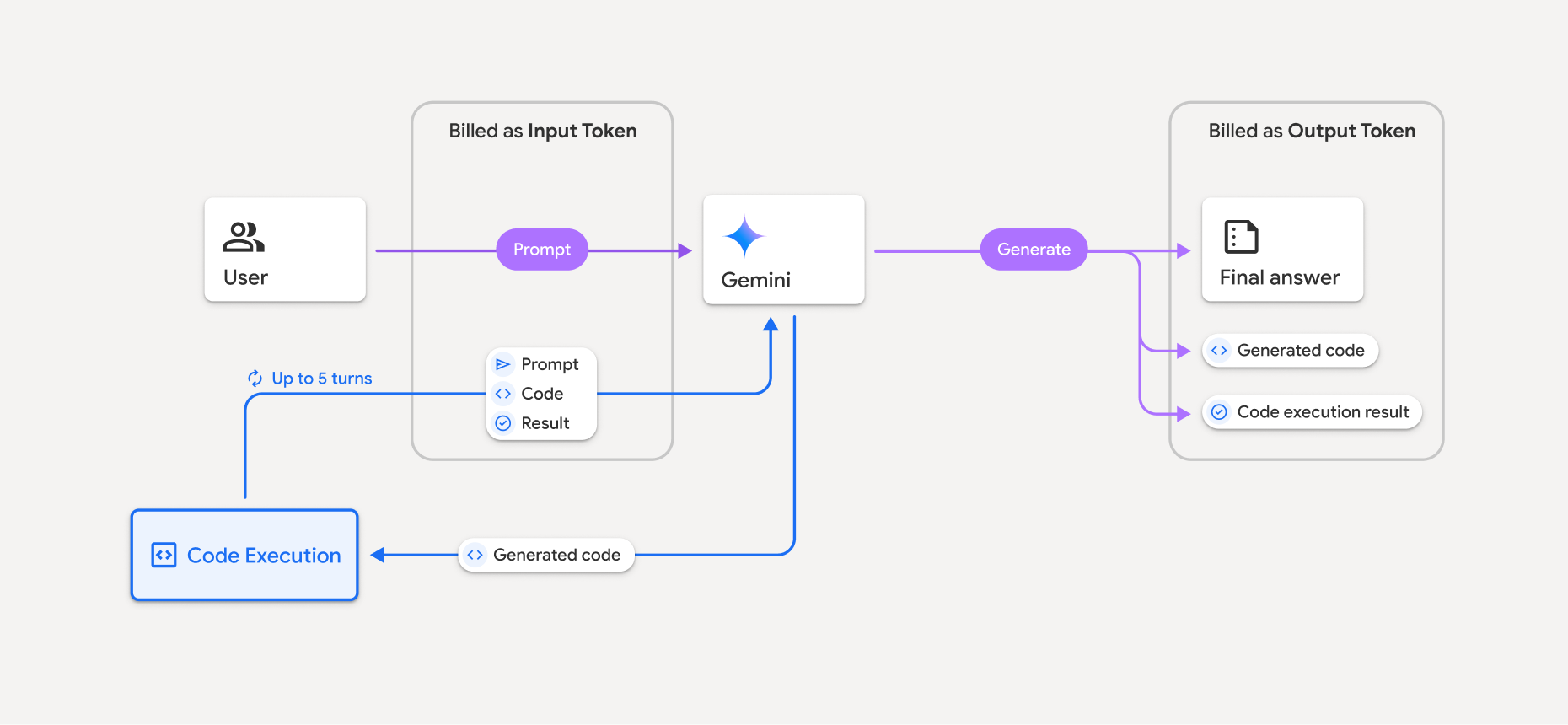
কোনও মডেল কোড এক্সিকিউশন ব্যবহার করলে টোকেনের জন্য কীভাবে বিল করা হয় তার একটি সারসংক্ষেপ এখানে দেওয়া হল:
আসল প্রম্পটের জন্য একবার বিল করা হয়। এর টোকেনগুলি ইন্টারমিডিয়েট টোকেন হিসেবে লেবেল করা হয়, যা ইনপুট টোকেন হিসেবে বিল করা হয়।
জেনারেট করা কোড এবং এক্সিকিউট করা কোডের ফলাফলের জন্য এইভাবে বিল করা হয়:
কোড এক্সিকিউশনের সময় এগুলি ব্যবহার করা হলে – এগুলিকে ইন্টারমিডিয়েট টোকেন হিসেবে লেবেল করা হয় এবং ইনপুট টোকেন হিসেবে বিল করা হয়।
চূড়ান্ত উত্তরের অংশ হিসেবে এগুলি অন্তর্ভুক্ত করা হলে – এগুলি আউটপুট টোকেন হিসেবে বিল করা হয়।
চূড়ান্ত উত্তরে দেখানো চূড়ান্ত সারসংক্ষেপ আউটপুট টোকেন হিসেবে বিল করা হয়।
Gemini API API রেসপন্সে ইন্টারমিডিয়েট টোকেন কাউন্ট অন্তর্ভুক্ত করে, যাতে আপনি জানতে পারেন যে প্রাথমিক প্রম্পটের বাইরে ইনপুট টোকেনের জন্য আপনাকে কেন চার্জ করা হচ্ছে।
মনে রাখবেন, জেনারেট করা কোডে টেক্সট ও মাল্টিমোডাল আউটপুট, যেমন ছবি, উভয়ই থাকতে পারে।
সীমাবদ্ধতা ও পেশাদার পদ্ধতি
মডেলটি শুধুমাত্র Python কোড তৈরি এবং এক্সিকিউট করতে পারে। এটি মিডিয়া ফাইলের মতো অন্যান্য আর্টিফ্যাক্ট ফিরিয়ে দিতে পারে না।
টাইম আউট হওয়ার আগে কোড এক্সিকিউশন সর্বাধিক ৩০ সেকেন্ডের জন্য রান করতে পারে।
কিছু ক্ষেত্রে, কোড এক্সিকিউশন চালু করলে মডেল আউটপুটের অন্যান্য ক্ষেত্রে (যেমন, গল্প লেখা) রিগ্রেশন হতে পারে।
কোড এক্সিকিউশন টুল ইনপুট/আউটপুট হিসেবে ফাইল URI-তে কাজ করে না। তবে, কোড এক্সিকিউশন টুল ইনলাইনড বাইট হিসেবে ফাইল ইনপুট ও গ্রাফ আউটপুট সাপোর্ট করে। এই ইনপুট ও আউটপুট ক্ষমতা ব্যবহার করে, আপনি CSV ও টেক্সট ফাইল আপলোড করতে, ফাইল সম্পর্কে প্রশ্ন করতে এবং কোড এক্সিকিউশন ফলাফলের অংশ হিসেবে Matplotlib গ্রাফ তৈরি করতে পারবেন। ইনলাইনড বাইটের জন্য কাজ করে এমন MIME-এর প্রকার হল
.cpp,.csv,.java,.jpeg,.js,.png,.py,.tsএবং.xml।
যেসব লাইব্রেরিতে কাজ করে
কোড এক্সিকিউশন এনভায়রনমেন্টে নিম্নলিখিত লাইব্রেরি অন্তর্ভুক্ত থাকে। আপনি নিজের লাইব্রেরি ইনস্টল করতে পারবেন না।
Firebase AI Logic-এর সাথে আপনার অভিজ্ঞতা সম্পর্কে মতামত দিন