

מודלים גנרטיביים יכולים לפתור הרבה סוגים של בעיות. עם זאת, יש להם מגבלות כמו:
- הם מוקפאים אחרי האימון, מה שמוביל לידע מיושן.
- הם לא יכולים לשלוח שאילתות לנתונים חיצוניים או לשנות אותם.
קריאה להפעלת פונקציות יכולה לעזור לכם להתגבר על חלק מהמגבלות האלה. היכולת הזו נקראת לפעמים גם שימוש בכלים, כי היא מאפשרת למודל להשתמש בכלים חיצוניים כמו ממשקי API ופונקציות כדי ליצור את התשובה הסופית.
במדריך הזה מוסבר איך להגדיר בקשה להפעלת פונקציה, בדומה לתרחיש שמתואר בקטע הראשי הבא בדף. ככלל, אלה השלבים להגדרת קריאה לפונקציות באפליקציה:
שלב 1: כותבים פונקציה שיכולה לספק למודל את המידע שהוא צריך כדי ליצור את התשובה הסופית (לדוגמה, הפונקציה יכולה לקרוא ל-API חיצוני).
שלב 2: יוצרים הצהרת פונקציה שמתארת את הפונקציה ואת הפרמטרים שלה.
שלב 3: מספקים את הצהרת הפונקציה במהלך אתחול המודל, כדי שהמודל יידע איך להשתמש בפונקציה, אם צריך.
שלב 4: מגדירים את האפליקציה כך שהמודל יוכל לשלוח את המידע הנדרש כדי שהאפליקציה תפעיל את הפונקציה.
שלב 5: מעבירים את התשובה של הפונקציה בחזרה למודל כדי שהוא יוכל ליצור את התשובה הסופית.
סקירה כללית של דוגמה לקריאה להפעלת פונקציות
כששולחים בקשה למודל, אפשר גם לספק לו קבוצה של "כלים" (כמו פונקציות) שבהם הוא יכול להשתמש כדי ליצור את התשובה הסופית. כדי להשתמש בפונקציות האלה ולקרוא להן ("קריאה להפעלת פונקציות"), המודל והאפליקציה צריכים להעביר מידע זה לזה, ולכן הדרך המומלצת להשתמש בקריאה להפעלת פונקציות היא באמצעות ממשק השיחה עם הזיכרון.
נניח שיש לכם אפליקציה שבה המשתמש יכול להזין הנחיה כמו:
What was the weather in Boston on October 17, 2024?.
יכול להיות שהמודלים של Gemini לא יודעים את המידע הזה על מזג האוויר, אבל נניח שאתם מכירים API של שירות מזג אוויר חיצוני שיכול לספק אותו. אתם יכולים להשתמש בקריאה להפעלת פונקציות כדי לתת למודל Gemini גישה ל-API הזה ולמידע על מזג האוויר.
קודם כל, כותבים באפליקציה פונקציה fetchWeather שמקיימת אינטראקציה עם ה-API החיצוני ההיפותטי הזה, שיש לו את הקלט והפלט הבאים:
| פרמטר | סוג | חובה | תיאור |
|---|---|---|---|
| קלט | |||
location |
אובייקט | כן | שם העיר והמדינה שבה רוצים לבדוק את מזג האוויר. רק ערים בארה"ב נתמכות. חייב תמיד להיות אובייקט בתצוגת עץ של city ו-state.
|
date |
מחרוזת | כן | התאריך שבו רוצים לאחזר את מזג האוויר (חייב להיות תמיד בפורמט YYYY-MM-DD).
|
| פלט | |||
temperature |
מספר שלם | כן | טמפרטורה (בפרנהייט) |
chancePrecipitation |
מחרוזת | כן | הסיכוי למשקעים (מבוטא באחוזים) |
cloudConditions |
מחרוזת | כן | מצב העננים (אחד מהערכים clear, partlyCloudy, mostlyCloudy, cloudy)
|
כשמאתחלים את המודל, מציינים שהפונקציה fetchWeather קיימת ואיך אפשר להשתמש בה כדי לעבד בקשות נכנסות, אם צריך.
זה נקרא "הצהרת פונקציה". המודל לא קורא לפונקציה באופן ישיר. במקום זאת, כשהמודל מעבד את הבקשה שנכנסת, הוא מחליט אם הפונקציה fetchWeather יכולה לעזור לו להגיב לבקשה. אם המודל מחליט שהפונקציה אכן יכולה להיות שימושית, הוא יוצר נתונים מובְנים שיעזרו לאפליקציה לקרוא לפונקציה.
בודקים שוב את הבקשה הנכנסת:
What was the weather in Boston on October 17, 2024?. המודל כנראה יחליט שהפונקציה fetchWeather יכולה לעזור לו ליצור תשובה. המודל יבדוק אילו פרמטרים של קלט נדרשים לפונקציה fetchWeather, ואז ייצור נתוני קלט מובְנים לפונקציה, שנראים בערך כך:
{
  functionName: fetchWeather,
  location: {
    city: Boston,
    state: Massachusetts  // the model can infer the state from the prompt
  },
  date: 2024-10-17
}
המודל מעביר את נתוני הקלט המובְנים האלה לאפליקציה כדי שהיא תוכל להפעיל את הפונקציה fetchWeather. כשהאפליקציה מקבלת את תנאי מזג האוויר בחזרה מה-API, היא מעבירה את המידע למודל. המידע הזה על מזג האוויר מאפשר למודל להשלים את העיבוד הסופי וליצור את התשובה לבקשה הראשונית של What was the weather in Boston on October 17, 2024?.
המודל עשוי לספק תשובה סופית בשפה טבעית, כמו:
On October 17, 2024, in Boston, it was 38 degrees Fahrenheit with partly cloudy skies.
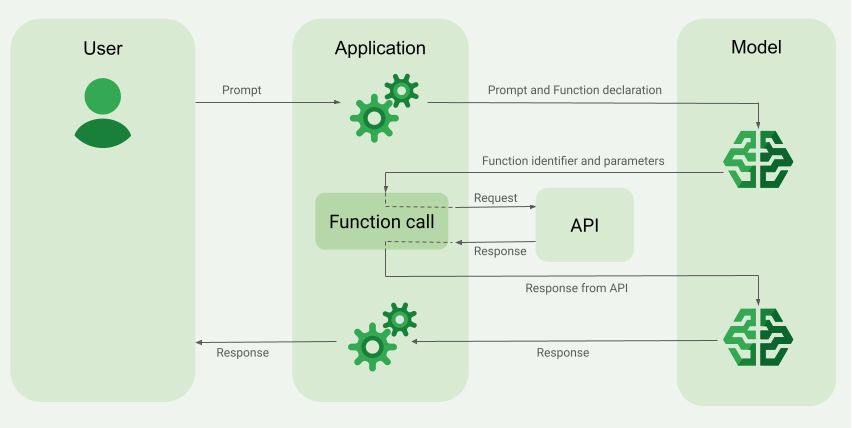
הטמעה של קריאה להפעלת פונקציות
בשלבים הבאים במדריך מוסבר איך להגדיר קריאה לפונקציה באופן שדומה לתהליך העבודה שמתואר בקטע סקירה כללית של דוגמה לקריאה לפונקציה (בחלק העליון של הדף הזה).
מודלים נתמכים
gemini-4-argon-
gemini-3.8-flash(והגרסאות הישנות יותרgemini-3.7-flash,gemini-3.6-flashו-gemini-3.5-flash) -
gemini-3.5-flash-lite(וגםgemini-3.1-flash-liteהישן יותר)
גם המודלים gemini-3.1-pro-preview ו-Gemini 2.5 לשימוש כללי (שיצאו משימוש) תומכים ביכולת הזו.
גם המודלים של Gemini Live API תומכים ביכולת הזו, אבל כל דוגמאות הקוד במדריך הזה הן למודלים של Gemini לשימוש כללי.
לפני שמתחילים
|
כדי לראות תוכן וקוד שספציפיים לספק, לוחצים על הספק Gemini API בדף הזה. |
אם עדיין לא עשיתם את זה, אתם צריכים לפעול לפי המדריך לתחילת העבודה, שבו מוסבר איך להגדיר את הפרויקט ב-Firebase, לקשר את האפליקציה ל-Firebase, להוסיף את ה-SDK, להפעיל את שירות הקצה העורפי של ספק ה-Gemini API שבחרתם וליצור מכונה של GenerativeModel.
כדי לבדוק את ההנחיות ולשפר אותן, מומלץ להשתמש ב-Google AI Studio.
שלב 1: כותבים את הפונקציה
נניח שיש לכם אפליקציה שבה המשתמש יכול להזין הנחיה כמו:
What was the weather in Boston on October 17, 2024?. יכול להיות שהמודלים של Gemini לא יודעים את המידע הזה על מזג האוויר, אבל נניח שאתם מכירים API של שירות מזג אוויר חיצוני שיכול לספק אותו. התרחיש במדריך הזה מסתמך על ה-API החיצוני ההיפותטי הזה.
כותבים באפליקציה את הפונקציה שתקיים אינטראקציה עם ה-API החיצוני ההיפותטי, ותספק למודל את המידע שהוא צריך כדי ליצור את הבקשה הסופית. בדוגמה הזו של מזג האוויר, פונקציית fetchWeather היא זו שתבצע את הקריאה ל-API החיצוני ההיפותטי הזה.
Swift
// This function calls a hypothetical external API that returns
// a collection of weather information for a given location on a given date.
func fetchWeather(city: String, state: String, date: String) -> JSONObject {

  // TODO(developer): Write a standard function that would call an external weather API.

  // For demo purposes, this hypothetical response is hardcoded here in the expected format.
  return [
    "temperature": .number(38),
    "chancePrecipitation": .string("56%"),
    "cloudConditions": .string("partlyCloudy"),
  ]
}
Kotlin
// This function calls a hypothetical external API that returns
// a collection of weather information for a given location on a given date.
// `location` is an object of the form { city: string, state: string }
data class Location(val city: String, val state: String)

suspend fun fetchWeather(location: Location, date: String): JsonObject {

    // TODO(developer): Write a standard function that would call to an external weather API.

    // For demo purposes, this hypothetical response is hardcoded here in the expected format.
    return JsonObject(mapOf(
        "temperature" to JsonPrimitive(38),
        "chancePrecipitation" to JsonPrimitive("56%"),
        "cloudConditions" to JsonPrimitive("partlyCloudy")
    ))
}
Java
// This function calls a hypothetical external API that returns
// a collection of weather information for a given location on a given date.
// `location` is an object of the form { city: string, state: string }
public JsonObject fetchWeather(Location location, String date) {

  // TODO(developer): Write a standard function that would call to an external weather API.

  // For demo purposes, this hypothetical response is hardcoded here in the expected format.
  return new JsonObject(Map.of(
        "temperature", JsonPrimitive(38),
        "chancePrecipitation", JsonPrimitive("56%"),
        "cloudConditions", JsonPrimitive("partlyCloudy")));
}
Web
// This function calls a hypothetical external API that returns
// a collection of weather information for a given location on a given date.
// `location` is an object of the form { city: string, state: string }
async function fetchWeather({ location, date }) {

  // TODO(developer): Write a standard function that would call to an external weather API.

  // For demo purposes, this hypothetical response is hardcoded here in the expected format.
  return {
    temperature: 38,
    chancePrecipitation: "56%",
    cloudConditions: "partlyCloudy",
  };
}
Dart
// This function calls a hypothetical external API that returns
// a collection of weather information for a given location on a given date.
// `location` is an object of the form { city: string, state: string }
Future<Map<String, Object?>> fetchWeather(
  Location location, String date
) async {

  // TODO(developer): Write a standard function that would call to an external weather API.

  // For demo purposes, this hypothetical response is hardcoded here in the expected format.
  final apiResponse = {
    'temperature': 38,
    'chancePrecipitation': '56%',
    'cloudConditions': 'partlyCloudy',
  };
  return apiResponse;
}
Unity
// This function calls a hypothetical external API that returns
// a collection of weather information for a given location on a given date.
System.Collections.Generic.Dictionary<string, object> FetchWeather(
    string city, string state, string date) {

  // TODO(developer): Write a standard function that would call an external weather API.

  // For demo purposes, this hypothetical response is hardcoded here in the expected format.
  return new System.Collections.Generic.Dictionary<string, object>() {
    {"temperature", 38},
    {"chancePrecipitation", "56%"},
    {"cloudConditions", "partlyCloudy"},
  };
}
שלב 2: יוצרים הצהרת פונקציה
יוצרים את הצהרת הפונקציה שתספקו למודל בהמשך (השלב הבא במדריך הזה).
בהצהרה, כללו כמה שיותר פרטים בתיאורים של הפונקציה והפרמטרים שלה.
המודל משתמש במידע שבהצהרת הפונקציה כדי לקבוע איזו פונקציה לבחור ואיך לספק ערכי פרמטרים לקריאה בפועל לפונקציה. בקטע התנהגויות ואפשרויות נוספות בהמשך הדף מוסבר איך המודל בוחר בין הפונקציות ואיך אתם יכולים לשלוט בבחירה הזו.
שימו לב לפרטים הבאים לגבי הסכימה שאתם מספקים:
אתם צריכים לספק הצהרות על פונקציות בפורמט סכימה שתואם לסכימת OpenAPI. Agent Platform מציע תמיכה מוגבלת בסכימה של OpenAPI.
אפשר להשתמש במאפיינים הבאים:
type, nullable, required,format, description, properties, items, enum.המאפיינים הבאים לא נתמכים:
default, optional,maximum, oneOf.
כברירת מחדל, בערכות ה-SDK של Firebase AI Logic, כל השדות נחשבים חובה, אלא אם מציינים אותם כאופציונליים במערך
optionalProperties. בשדות האופציונליים האלה, המודל יכול לאכלס את השדות או לדלג עליהם. חשוב לזכור שזה הפוך מפעולת ברירת המחדל של שני הספקים של Gemini API אם משתמשים ב-SDK של השרת שלהם או ב-API שלהם ישירות.
במאמר שיטות מומלצות במסמכי התיעוד של Gemini Developer API.
כך כותבים הצהרת פונקציה:
Swift
let fetchWeatherTool = FunctionDeclaration(
  name: "fetchWeather",
  description: "Get the weather conditions for a specific city on a specific date.",
  parameters: [
    "location": .object(
      properties: [
        "city": .string(description: "The city of the location."),
        "state": .string(description: "The US state of the location."),
      ],
      description: """
      The name of the city and its state for which to get the weather. Only cities in the
      USA are supported.
      """
    ),
    "date": .string(
      description: """
      The date for which to get the weather. Date must be in the format: YYYY-MM-DD.
      """
    ),
  ]
)
Kotlin
val fetchWeatherTool = FunctionDeclaration(
    "fetchWeather",
    "Get the weather conditions for a specific city on a specific date.",
    mapOf(
        "location" to Schema.obj(
            mapOf(
                "city" to Schema.string("The city of the location."),
                "state" to Schema.string("The US state of the location."),
            ),
            description = "The name of the city and its state for which " +
                "to get the weather. Only cities in the " +
                "USA are supported."
        ),
        "date" to Schema.string("The date for which to get the weather." +
                                " Date must be in the format: YYYY-MM-DD."
        ),
    ),
)
Java
FunctionDeclaration fetchWeatherTool = new FunctionDeclaration(
        "fetchWeather",
        "Get the weather conditions for a specific city on a specific date.",
        Map.of("location",
                Schema.obj(Map.of(
                        "city", Schema.str("The city of the location."),
                        "state", Schema.str("The US state of the location."))),
                "date",
                Schema.str("The date for which to get the weather. " +
                              "Date must be in the format: YYYY-MM-DD.")),
        Collections.emptyList());
Web
const fetchWeatherTool: FunctionDeclarationsTool = {
  functionDeclarations: [
   {
      name: "fetchWeather",
      description:
        "Get the weather conditions for a specific city on a specific date",
      parameters: Schema.object({
        properties: {
          location: Schema.object({
            description:
              "The name of the city and its state for which to get " +
              "the weather. Only cities in the USA are supported.",
            properties: {
              city: Schema.string({
                description: "The city of the location."
              }),
              state: Schema.string({
                description: "The US state of the location."
              }),
            },
          }),
          date: Schema.string({
            description:
              "The date for which to get the weather. Date must be in the" +
              " format: YYYY-MM-DD.",
          }),
        },
      }),
    },
  ],
};
Dart
final fetchWeatherTool = FunctionDeclaration(
    'fetchWeather',
    'Get the weather conditions for a specific city on a specific date.',
    parameters: {
      'location': Schema.object(
        description:
          'The name of the city and its state for which to get'
          'the weather. Only cities in the USA are supported.',
        properties: {
          'city': Schema.string(
             description: 'The city of the location.'
           ),
          'state': Schema.string(
             description: 'The US state of the location.'
          ),
        },
      ),
      'date': Schema.string(
        description:
          'The date for which to get the weather. Date must be in the format: YYYY-MM-DD.'
      ),
    },
  );
Unity
var fetchWeatherTool = new Tool(new FunctionDeclaration(
  name: "fetchWeather",
  description: "Get the weather conditions for a specific city on a specific date.",
  parameters: new System.Collections.Generic.Dictionary<string, Schema>() {
    { "location", Schema.Object(
      properties: new System.Collections.Generic.Dictionary<string, Schema>() {
        { "city", Schema.String(description: "The city of the location.") },
        { "state", Schema.String(description: "The US state of the location.")}
      },
      description: "The name of the city and its state for which to get the weather. Only cities in the USA are supported."
    ) },
    { "date", Schema.String(
      description: "The date for which to get the weather. Date must be in the format: YYYY-MM-DD."
    )}
  }
));
שלב 3: מספקים את הצהרת הפונקציה במהלך אתחול המודל
אפשר לספק עד 128 הצהרות פונקציות בבקשה. בהמשך הדף, בקטע התנהגויות ואפשרויות נוספות, מוסבר איך המודל בוחר בין הפונקציות ואיך אתם יכולים לשלוט בבחירה הזו (באמצעות toolConfig להגדרת מצב קריאה להפעלת פונקציות).
Swift
import FirebaseAILogic

// Initialize the Gemini Developer API backend service.
// Create a `GenerativeModel` instance with a model that supports your use case.
let model = FirebaseAI.firebaseAI(backend: .googleAI()).generativeModel(
  modelName: "GEMINI_MODEL_NAME",
  // Provide the function declaration to the model.
  tools: [.functionDeclarations([fetchWeatherTool])]
)
Kotlin
// Initialize the Gemini Developer API backend service.
// Create a `GenerativeModel` instance with a model that supports your use case.
val model = Firebase.ai(backend = GenerativeBackend.googleAI()).generativeModel(
    modelName = "<var>GEMINI_MODEL_NAME</var>",
    // Provide the function declaration to the model.
    tools = listOf(Tool.functionDeclarations(listOf(fetchWeatherTool)))
)
Java
// Initialize the Gemini Developer API backend service.
// Create a `GenerativeModel` instance with a model that supports your use case.
GenerativeModelFutures model = GenerativeModelFutures.from(
        FirebaseAI.getInstance(GenerativeBackend.googleAI())
                .generativeModel("<var>GEMINI_MODEL_NAME</var>",
                        null,
                        null,
                        // Provide the function declaration to the model.
                        List.of(Tool.functionDeclarations(List.of(fetchWeatherTool)))));
Web
import { initializeApp } from "firebase/app";
import { getAI, getGenerativeModel, GoogleAIBackend } from "firebase/ai";

// TODO(developer): Replace the following with your app's Firebase configuration
// See: https://firebase.google.com/docs/web/learn-more#config-object
const firebaseConfig = {
  // ...
};

// Initialize FirebaseApp
const firebaseApp = initializeApp(firebaseConfig);

// Initialize the Gemini Developer API backend service.
const firebaseAI = getAI(firebaseApp, { backend: new GoogleAIBackend() });

// Create a `GenerativeModel` instance with a model that supports your use case.
const model = getGenerativeModel(firebaseAI, {
  model: "GEMINI_MODEL_NAME",
  // Provide the function declaration to the model.
  tools: fetchWeatherTool
});
Dart
import 'package:firebase_ai/firebase_ai.dart';
import 'package:firebase_core/firebase_core.dart';
import 'firebase_options.dart';

// Initialize FirebaseApp
await Firebase.initializeApp(
  options: DefaultFirebaseOptions.currentPlatform,
);

// Initialize the Gemini Developer API backend service.
// Create a `GenerativeModel` instance with a model that supports your use case.
_functionCallModel = FirebaseAI.googleAI().generativeModel(
       model: 'GEMINI_MODEL_NAME',
       // Provide the function declaration to the model.
       tools: [
         Tool.functionDeclarations([fetchWeatherTool]),
       ],
     );
Unity
using Firebase;
using Firebase.AI;

// Initialize the Gemini Developer API backend service.
// Create a `GenerativeModel` instance with a model that supports your use case.
var model = FirebaseAI.DefaultInstance.GetGenerativeModel(
  modelName: "GEMINI_MODEL_NAME",
  // Provide the function declaration to the model.
  tools: new Tool[] { fetchWeatherTool }
);
איך בוחרים מודל שמתאימים לתרחיש לדוגמה ולאפליקציה.
שלב 4: קוראים לפונקציה כדי להפעיל את ה-API החיצוני
אם המודל מחליט שהפונקציה fetchWeather יכולה לעזור לו ליצור תשובה סופית, האפליקציה צריכה לבצע את הקריאה בפועל לפונקציה הזו באמצעות נתוני הקלט המובְנים שהמודל סיפק.
כדי להעביר מידע בין המודל לאפליקציה, מומלץ להשתמש בקריאה להפעלת פונקציות דרך ממשק השיחה עם הזיכרון.
בקטע הקוד הבא מוצג איך האפליקציה מקבלת הודעה שהמודל רוצה להשתמש בפונקציה fetchWeather. הוא גם מראה שהמודל סיפק את ערכי הפרמטרים של הקלט שנדרשים לבקשה להפעלת פונקציה (ול-API החיצוני שעליו היא מבוססת).
בדוגמה הזו, הבקשה הנכנסת הכילה את ההנחיה What was the weather in Boston on October 17, 2024?. מההנחיה הזו, המודל הסיק את הפרמטרים של הקלט שנדרשים לפונקציה fetchWeather (כלומר, city, state ו-date).
Swift
let chat = model.startChat()
let prompt = "What was the weather in Boston on October 17, 2024?"

// Send the user's question (the prompt) to the model using multi-turn chat.
let response = try await chat.sendMessage(prompt)

var functionResponses = [FunctionResponsePart]()

// When the model responds with one or more function calls, invoke the function(s).
for functionCall in response.functionCalls {
  if functionCall.name == "fetchWeather" {
    // TODO(developer): Handle invalid arguments.
    guard case let .object(location) = functionCall.args["location"] else { fatalError() }
    guard case let .string(city) = location["city"] else { fatalError() }
    guard case let .string(state) = location["state"] else { fatalError() }
    guard case let .string(date) = functionCall.args["date"] else { fatalError() }

    functionResponses.append(FunctionResponsePart(
      name: functionCall.name,
      // Forward the structured input data prepared by the model
      // to the hypothetical external API.
      response: fetchWeather(city: city, state: state, date: date)
    ))
  }
  // TODO(developer): Handle other potential function calls, if any.
}
Kotlin
val prompt = "What was the weather in Boston on October 17, 2024?"
val chat = model.startChat()
// Send the user's question (the prompt) to the model using multi-turn chat.
val result = chat.sendMessage(prompt)

val functionCalls = result.functionCalls
// When the model responds with one or more function calls, invoke the function(s).
val fetchWeatherCall = functionCalls.find { it.name == "fetchWeather" }

// Forward the structured input data prepared by the model
// to the hypothetical external API.
val functionResponse = fetchWeatherCall?.let {
    // Alternatively, if your `Location` class is marked as @Serializable, you can use
    // val location = Json.decodeFromJsonElement<Location>(it.args["location"]!!)
    val location = Location(
        it.args["location"]!!.jsonObject["city"]!!.jsonPrimitive.content,
        it.args["location"]!!.jsonObject["state"]!!.jsonPrimitive.content
    )
    val date = it.args["date"]!!.jsonPrimitive.content
    fetchWeather(location, date)
}
Java
String prompt = "What was the weather in Boston on October 17, 2024?";
ChatFutures chatFutures = model.startChat();
// Send the user's question (the prompt) to the model using multi-turn chat.
ListenableFuture<GenerateContentResponse> response =
        chatFutures.sendMessage(new Content("user", List.of(new TextPart(prompt))));

ListenableFuture<JsonObject> handleFunctionCallFuture = Futures.transform(response, result -> {
    for (FunctionCallPart functionCall : result.getFunctionCalls()) {
        if (functionCall.getName().equals("fetchWeather")) {
            Map<String, JsonElement> args = functionCall.getArgs();
            JsonObject locationJsonObject =
                    JsonElementKt.getJsonObject(args.get("location"));
            String city =
                    JsonElementKt.getContentOrNull(
                            JsonElementKt.getJsonPrimitive(
                                    locationJsonObject.get("city")));
            String state =
                    JsonElementKt.getContentOrNull(
                            JsonElementKt.getJsonPrimitive(
                                    locationJsonObject.get("state")));
            Location location = new Location(city, state);

            String date = JsonElementKt.getContentOrNull(
                    JsonElementKt.getJsonPrimitive(
                            args.get("date")));
            return fetchWeather(location, date);
        }
    }
    return null;
}, Executors.newSingleThreadExecutor());
Web
const chat = model.startChat();
const prompt = "What was the weather in Boston on October 17, 2024?";

// Send the user's question (the prompt) to the model using multi-turn chat.
let result = await chat.sendMessage(prompt);
const functionCalls = result.response.functionCalls();
let functionCall;
let functionResult;
// When the model responds with one or more function calls, invoke the function(s).
if (functionCalls.length > 0) {
  for (const call of functionCalls) {
    if (call.name === "fetchWeather") {
      // Forward the structured input data prepared by the model
      // to the hypothetical external API.
      functionResult = await fetchWeather(call.args);
      functionCall = call;
    }
  }
}
Dart
final chat = _functionCallModel.startChat();
const prompt = 'What was the weather in Boston on October 17, 2024?';

// Send the user's question (the prompt) to the model using multi-turn chat.
var response = await chat.sendMessage(Content.text(prompt));

final functionCalls = response.functionCalls.toList();
// When the model responds with one or more function calls, invoke the function(s).
if (functionCalls.isNotEmpty) {
  for (final functionCall in functionCalls) {
    if (functionCall.name == 'fetchWeather') {
      Map<String, dynamic> location =
          functionCall.args['location']! as Map<String, dynamic>;
      var date = functionCall.args['date']! as String;
      var city = location['city'] as String;
      var state = location['state'] as String;
      final functionResult =
          await fetchWeather(Location(city, state), date);
      // Send the response to the model so that it can use the result to
      // generate text for the user.
      response = await chat.sendMessage(
        Content.functionResponse(functionCall.name, functionResult),
      );
    }
  }
} else {
  throw UnimplementedError(
    'No function calls returned by the model',
  );
}
Unity
var chat = model.StartChat();
var prompt = "What was the weather in Boston on October 17, 2024?";

// Send the user's question (the prompt) to the model using multi-turn chat.
var response = await chat.SendMessageAsync(prompt);

var functionResponses = new List<ModelContent>();

foreach (var functionCall in response.FunctionCalls) {
  if (functionCall.Name == "fetchWeather") {
    // TODO(developer): Handle invalid arguments.
    var city = functionCall.Args["city"] as string;
    var state = functionCall.Args["state"] as string;
    var date = functionCall.Args["date"] as string;

    functionResponses.Add(ModelContent.FunctionResponse(
      name: functionCall.Name,
      // Forward the structured input data prepared by the model
      // to the hypothetical external API.
      response: FetchWeather(city: city, state: state, date: date)
    ));
  }
  // TODO(developer): Handle other potential function calls, if any.
}
שלב 5: מספקים את הפלט של הפונקציה למודל כדי ליצור את התשובה הסופית
אחרי שהפונקציה fetchWeather מחזירה את פרטי מזג האוויר, האפליקציה צריכה להעביר אותם בחזרה למודל.
לאחר מכן, המודל מבצע את העיבוד הסופי ויוצר תשובה סופית בשפה טבעית, כמו:
On October 17, 2024 in Boston, it was 38 degrees Fahrenheit with partly cloudy skies.
Swift
// Send the response(s) from the function back to the model
// so that the model can use it to generate its final response.
let finalResponse = try await chat.sendMessage(
  [ModelContent(role: "user", parts: functionResponses)]
)

// Log the text response.
print(finalResponse.text ?? "No text in response.")
Kotlin
// Send the response(s) from the function back to the model
// so that the model can use it to generate its final response.
val finalResponse = chat.sendMessage(content("user") {
    part(FunctionResponsePart("fetchWeather", functionResponse!!))
})

// Log the text response.
println(finalResponse.text ?: "No text in response")
Java
ListenableFuture<GenerateContentResponse> modelResponseFuture = Futures.transformAsync(
  handleFunctionCallFuture,
  // Send the response(s) from the function back to the model
  // so that the model can use it to generate its final response.
  functionCallResult -> chatFutures.sendMessage(new Content("user",
  List.of(new FunctionResponsePart(
          "fetchWeather", functionCallResult)))),
  Executors.newSingleThreadExecutor());

Futures.addCallback(modelResponseFuture, new FutureCallback<GenerateContentResponse>() {
@Override
public void onSuccess(GenerateContentResponse result) {
  if (result.getText() != null) {
      // Log the text response.
      System.out.println(result.getText());
  }
}

@Override
public void onFailure(Throwable t) {
  // handle error
}
}, Executors.newSingleThreadExecutor());
Web
// Send the response from the function back to the model
// so that the model can use it to generate its final response.
result = await chat.sendMessage([
  {
    type: "functionResponse",
    functionResponse: {
      name: functionCall.name, // "fetchWeather"
      response: functionResult,
    },
  },
]);
console.log(result.response.text());
Dart
// Send the response from the function back to the model
// so that the model can use it to generate its final response.
response = await chat
     .sendMessage(Content.functionResponse(functionCall.name, functionResult));
Unity
// Send the response(s) from the function back to the model
// so that the model can use it to generate its final response.
var finalResponse = await chat.SendMessageAsync(functionResponses);

// Log the text response.
UnityEngine.Debug.Log(finalResponse.Text ?? "No text in response.");
התנהגויות ואפשרויות נוספות
בהמשך מפורטות עוד כמה התנהגויות של קריאה להפעלת פונקציות שצריך להתאים בקוד, ואפשרויות שאתם יכולים לשלוט בהן.
המודל עשוי לבקש להפעיל שוב את הפונקציה או להפעיל פונקציה אחרת.
אם התשובה מבקשה אחת להפעלת פונקציה לא מספיקה למודל כדי ליצור את התשובה הסופית, יכול להיות שהמודל יבקש להפעיל פונקציה נוספת או פונקציה אחרת לגמרי. האפשרות השנייה יכולה לקרות רק אם אתם מספקים למודל יותר מפונקציה אחת ברשימת הצהרות הפונקציות.
האפליקציה צריכה להיות מסוגלת להתמודד עם מצב שבו המודל מבקש קריאות נוספות לפונקציות.
יכול להיות שהמודל יבקש להפעיל כמה פונקציות בו-זמנית.
אפשר לספק למודל עד 128 פונקציות ברשימת הצהרות הפונקציות. לכן, המודל עשוי להחליט שהוא צריך כמה פונקציות כדי ליצור את התשובה הסופית. הוא גם יכול להחליט להפעיל כמה מהפונקציות האלה בו-זמנית – זה נקרא קריאה להפעלת פונקציות במקביל.
האפליקציה צריכה להיות מסוגלת להתמודד עם מצב שבו המודל מבקש להפעיל כמה פונקציות בו-זמנית, ולהחזיר למודל את כל התשובות מהפונקציות.
אתם יכולים לקבוע אם ואיך המודל יכול לבקש להפעיל פונקציות.
אתם יכולים להגדיר אילוצים מסוימים על האופן שבו המודל ישתמש בהצהרות הפונקציות שסופקו, ואם הוא ישתמש בהן בכלל. הפעולה הזו נקראת הגדרת מצב קריאה להפעלת פונקציות. הנה כמה דוגמאות:
במקום לאפשר למודל לבחור בין תשובה מיידית בשפה טבעית לבין בקשה להפעלת פונקציה, אתם יכולים לאלץ אותו להשתמש תמיד בבקשות להפעלת פונקציות. הפעולה הזו נקראת קריאה מאולצת להפעלת פונקציות.
אם אתם מספקים כמה הצהרות על פונקציות, אתם יכולים להגביל את המודל כך שישתמש רק בקבוצת משנה של הפונקציות שסופקו.
כדי להטמיע את המגבלות (או המצבים) האלה, מוסיפים הגדרת כלי (toolConfig) יחד עם ההנחיה והצהרות הפונקציות. בהגדרות הכלי, אתם יכולים לציין אחד מהמצבים הבאים. המצב הכי שימושי הוא ANY.
| מצב | תיאור |
|---|---|
AUTO |
התנהגות ברירת המחדל של המודל. המודל מחליט אם להשתמש בקריאה לפונקציה או בתשובה בשפה טבעית. |
ANY |
המודל חייב להשתמש בקריאה להפעלת פונקציות ("קריאה מאולצת להפעלת פונקציות"). כדי להגביל את המודל לקבוצת משנה של פונקציות, מציינים את שמות הפונקציות המותרות ב-allowedFunctionNames.
|
NONE |
המודל לא יכול להשתמש בקריאות להפעלת פונקציות. ההתנהגות הזו זהה לבקשת מודל בלי הצהרות פונקציה משויכות. |
מה עוד אפשר לעשות?
לנסות יכולות אחרות
- לפתח שיחות עם זיכרון (צ'אט).
- ליצור טקסט דינמי מבוסס-AI מהנחיות טקסט בלבד.
- ליצור טקסט באמצעות הנחיות עם סוגי קבצים שונים, כמו תמונות, קובצי PDF, סרטונים ואודיו.
איך לשלוט ביצירת התוכן
- הסבר על עיצוב הנחיות, כולל שיטות מומלצות, אסטרטגיות ודוגמאות להנחיות.
- להגדיר פרמטרים של המודל, כמו המספר המקסימלי של טוקנים בפלט, הסבירות של טוקנים חוזרים בפלט וכו'.
- להשתמש בהגדרות הבטיחות כדי לשנות את הסבירות לקבלת תשובות שעלולות להיחשב כמזיקות.
מידע נוסף על המודלים הנתמכים
מידע ולמידה על המודלים שזמינים לתרחישי שימוש שונים, המכסות והתמחור שלהם.שליחת משוב על חוויית השימוש ב-Firebase AI Logic