

הכלי להרצת קוד מאפשר למודל ליצור ולהריץ קוד Python. המודל יכול ללמוד באופן איטרטיבי מתוצאות הביצוע של הקוד עד שהוא מגיע לפלט סופי.
אתם יכולים להשתמש בהרצת קוד כדי ליצור תכונות שמבוססות על ניתוח מבוסס-קוד ומפיקות פלט טקסט. לדוגמה, אתם יכולים להשתמש בהרצת קוד כדי לפתור משוואות או לעבד טקסט. אתם יכולים גם להשתמש בספריות שכלולות בסביבת הרצת הקוד כדי לבצע משימות מיוחדות יותר.
בדומה לכל הכלים שאתם מספקים למודל, המודל מחליט מתי להשתמש בהרצת קוד.
השוואה בין ביצוע קוד לבין הפעלת פונקציות
התכונות 'הרצת קוד' וקריאה לפונקציה דומות. באופן כללי, מומלץ להשתמש בהרצת קוד אם המודל יכול לטפל בתרחיש השימוש שלכם. גם השימוש בהרצת קוד פשוט יותר, כי צריך רק להפעיל אותה.
הנה כמה הבדלים נוספים בין הרצת קוד לבין קריאה לפונקציה:
| הרצת קוד | בקשה להפעלת פונקציה |
|---|---|
| משתמשים בהרצת קוד אם רוצים שהמודל יכתוב ויריץ קוד Python בשבילכם ויחזיר את התוצאה. | אם כבר יש לכם פונקציות משלכם שאתם רוצים להריץ באופן מקומי, אתם יכולים להשתמש בהפעלת פונקציות. |
| הפעלת קוד מאפשרת למודל להריץ קוד בקצה העורפי של ה-API בסביבה קבועה ומבודדת. | בקשה להפעלת פונקציה מאפשרת להפעיל את הפונקציות שהמודל מבקש, בכל סביבה שרוצים. |
| ביצוע הקוד מסתיים בבקשה אחת. אפשר להשתמש בהרצת קוד עם יכולות הצ'אט, אבל זה לא חובה. | כדי להשתמש בקריאה לפונקציה, צריך לשלוח בקשה נוספת כדי להחזיר את הפלט מכל קריאה לפונקציה. לכן, אתם נדרשים להשתמש ביכולת הצ'אט. |
מודלים נתמכים
gemini-3.1-pro-previewgemini-3.5-flashgemini-3.1-flash-litegemini-2.5-progemini-2.5-flashgemini-2.5-flash-lite
שימוש בהרצת קוד
אתם יכולים להשתמש בהרצת קוד גם עם קלט טקסט בלבד וגם עם קלט מולטימודאלי, אבל התשובה תמיד תהיה טקסט או קוד בלבד.
לפני שמתחילים
|
לוחצים על הספק Gemini API כדי לראות בדף הזה תוכן וקוד שספציפיים לספק. |
אם עדיין לא עשיתם זאת, עליכם לפעול לפי השלבים במדריך תחילת העבודה, שבו מוסבר איך להגדיר את פרויקט Firebase, לקשר את האפליקציה ל-Firebase, להוסיף את ה-SDK, לאתחל את שירות ה-Backend עבור ספק Gemini API שבחרתם וליצור מופע GenerativeModel.
כדי לבדוק את ההנחיות ולשפר אותן, מומלץ להשתמש בGoogle AI Studio.
הפעלת ביצוע קוד
|
לפני שמנסים את הדוגמה הזו, צריך להשלים את השלבים שבקטע לפני שמתחילים במדריך הזה כדי להגדיר את הפרויקט והאפליקציה. בקטע הזה, צריך גם ללחוץ על לחצן של ספק Gemini API שבחרתם כדי שיוצג בדף הזה תוכן שספציפי לספק. |
כשיוצרים את מופע GenerativeModel, מציינים את CodeExecution ככלי שהמודל יכול להשתמש בו כדי ליצור את התשובה. כך המודל יכול ליצור ולהריץ קוד Python.
Swift
import FirebaseAILogic

// Initialize the Gemini Developer API backend service.
let ai = FirebaseAI.firebaseAI(backend: .googleAI())

// Create a `GenerativeModel` instance with a model that supports your use case
let model = ai.generativeModel(
  modelName: "GEMINI_MODEL_NAME",
  // Provide code execution as a tool that the model can use to generate its response.
  tools: [.codeExecution()]
)

let prompt = """
What is the sum of the first 50 prime numbers?
Generate and run code for the calculation, and make sure you get all 50.
"""

let response = try await model.generateContent(prompt)

guard let candidate = response.candidates.first else {
  print("No candidates in response.")
  return
}
for part in candidate.content.parts {
  if let textPart = part as? TextPart {
    print("Text = \(textPart.text)")
  } else if let executableCode = part as? ExecutableCodePart {
    print("Code = \(executableCode.code), Language = \(executableCode.language)")
  } else if let executionResult = part as? CodeExecutionResultPart {
    print("Outcome = \(executionResult.outcome), Result = \(executionResult.output ?? "no output")")
  }
}
Kotlin
// Initialize the Gemini Developer API backend service.
// Create a `GenerativeModel` instance with a model that supports your use case.
val model = Firebase.ai(backend = GenerativeBackend.googleAI()).generativeModel(
    modelName = "GEMINI_MODEL_NAME",
    // Provide code execution as a tool that the model can use to generate its response.
    tools = listOf(Tool.codeExecution())
)

val prompt =  "What is the sum of the first 50 prime numbers? " +
        "Generate and run code for the calculation, and make sure you get all 50."

val response = model.generateContent(prompt)

response.candidates.first().content.parts.forEach {
    if(it is TextPart) {
        println("Text = ${it.text}")
    }
    if(it is ExecutableCodePart) {
        println("Code = ${it.code}, Language = ${it.language}")
    }
    if(it is CodeExecutionResultPart) {
       println("Outcome = ${it.outcome}, Result = ${it.output}")
    }
}
Java
// Initialize the Gemini Developer API backend service.
// Create a `GenerativeModel` instance with a model that supports your use case.
GenerativeModel ai = FirebaseAI.getInstance(GenerativeBackend.googleAI())
                .generativeModel("GEMINI_MODEL_NAME",
                        null,
                        null,
                        // Provide code execution as a tool that the model can use to generate its response.
                        List.of(Tool.codeExecution()));

// Use the GenerativeModelFutures Java compatibility layer which offers
// support for ListenableFuture and Publisher APIs
GenerativeModelFutures model = GenerativeModelFutures.from(ai);

String text = "What is the sum of the first 50 prime numbers? " +
        "Generate and run code for the calculation, and make sure you get all 50.";

Content prompt = new Content.Builder()
    .addText(text)
    .build();

ListenableFuture response = model.generateContent(prompt);

Futures.addCallback(response, new FutureCallback() {
   @Override
public void onSuccess(GenerateContentResponse response)   {
    // Access the first candidate's content parts
    List parts = response.getCandidates().get(0).getContent().getParts();
    for (Part part : parts) {
        if (part instanceof TextPart) {
            TextPart textPart = (TextPart) part;
            System.out.println("Text = " + textPart.getText());
        } else if (part instanceof ExecutableCodePart) {
            ExecutableCodePart codePart = (ExecutableCodePart) part;
            System.out.println("Code = " + codePart.getCode() + ", Language = " + codePart.getLanguage());
        } else if (part instanceof CodeExecutionResultPart) {
            CodeExecutionResultPart resultPart = (CodeExecutionResultPart) part;
            System.out.println("Outcome = " + resultPart.getOutcome() + ", Result = " + resultPart.getOutput());
        }
    }
}

    @Override
    public void onFailure(Throwable t) {
        t.printStackTrace();
    }
}, executor);
Web
import { initializeApp } from "firebase/app";
import { getAI, getGenerativeModel, GoogleAIBackend } from "firebase/ai";

// TODO(developer) Replace the following with your app's Firebase configuration
// See: https://firebase.google.com/docs/web/learn-more#config-object
const firebaseConfig = {
  // ...
};

// Initialize FirebaseApp
const firebaseApp = initializeApp(firebaseConfig);

// Initialize the Gemini Developer API backend service.
const ai = getAI(firebaseApp, { backend: new GoogleAIBackend() });

// Create a `GenerativeModel` instance with a model that supports your use case.
const model = getGenerativeModel(
  ai,
  {
    model: "GEMINI_MODEL_NAME",
    // Provide code execution as a tool that the model can use to generate its response.
    tools: [{ codeExecution: {} }]
  }
);

const prompt =  "What is the sum of the first 50 prime numbers? " +
        "Generate and run code for the calculation, and make sure you get all 50."

const result = await model.generateContent(prompt);
const response = await result.response;

const parts = response.candidates?.[0].content.parts;

if (parts) {
  parts.forEach((part) => {
    if (part.text) {
        console.log(`Text: ${part.text}`);
    } else if (part.executableCode) {
      console.log(
        `Code: ${part.executableCode.code}, Language: ${part.executableCode.language}`
      );
    } else if (part.codeExecutionResult) {
      console.log(
        `Outcome: ${part.codeExecutionResult.outcome}, Result: ${part.codeExecutionResult.output}`
      );
    }
  });
}
Dart
import 'package:firebase_core/firebase_core.dart';
import 'package:firebase_ai/firebase_ai.dart';
import 'firebase_options.dart';

// Initialize FirebaseApp
await Firebase.initializeApp(
  options: DefaultFirebaseOptions.currentPlatform,
);

// Initialize the Gemini Developer API backend service.
// Create a `GenerativeModel` instance with a model that supports your use case.
final model = FirebaseAI.googleAI().generativeModel(
  model: 'GEMINI_MODEL_NAME',
  // Provide code execution as a tool that the model can use to generate its response.
  tools: [
    Tool.codeExecution(),
  ],
);

const prompt = 'What is the sum of the first 50 prime numbers? '
    'Generate and run code for the calculation, and make sure you get all 50.';

final response = await model.generateContent([Content.text(prompt)]);

final buffer = StringBuffer();
    for (final part in response.candidates.first.content.parts) {
      if (part is TextPart) {
        buffer.writeln(part.text);
      } else if (part is ExecutableCodePart) {
        buffer.writeln('Executable Code:');
        buffer.writeln('Language: ${part.language}');
        buffer.writeln('Code:');
        buffer.writeln(part.code);
      } else if (part is CodeExecutionResultPart) {
        buffer.writeln('Code Execution Result:');
        buffer.writeln('Outcome: ${part.outcome}');
        buffer.writeln('Output:');
        buffer.writeln(part.output);
      }
    }
Unity
using Firebase;
using Firebase.AI;

// Initialize the Gemini Developer API backend service.
var ai = FirebaseAI.GetInstance(FirebaseAI.Backend.GoogleAI());

// Create a `GenerativeModel` instance with a model that supports your use case.
var model = ai.GetGenerativeModel(
  modelName: "GEMINI_MODEL_NAME",
  // Provide code execution as a tool that the model can use to generate its response.
  tools: new Tool[] { new Tool(new CodeExecution()) }
);

var prompt = "What is the sum of the first 50 prime numbers? " +
        "Generate and run code for the calculation, and make sure you get all 50.";

var response = await model.GenerateContentAsync(prompt);

foreach (var part in response.Candidates.First().Content.Parts) {
  if (part is ModelContent.TextPart tp) {
    UnityEngine.Debug.Log($"Text = {tp.Text}");
  } else if (part is ModelContent.ExecutableCodePart esp) {
    UnityEngine.Debug.Log($"Code = {esp.Code}, Language = {esp.Language}");
  } else if (part is ModelContent.CodeExecutionResultPart cerp) {
    UnityEngine.Debug.Log($"Outcome = {cerp.Outcome}, Output = {cerp.Output}");
  }
}
כאן מוסבר איך בוחרים מודל שמתאימים לתרחיש השימוש ולאפליקציה שלכם.
איך משתמשים בהרצת קוד בצ'אט
אפשר גם להשתמש בהרצת קוד כחלק משיחה:
Swift
import FirebaseAILogic

// Initialize the Gemini Developer API backend service.
let ai = FirebaseAI.firebaseAI(backend: .googleAI())

// Create a `GenerativeModel` instance with a model that supports your use case
let model = ai.generativeModel(
  modelName: "GEMINI_MODEL_NAME",
  // Provide code execution as a tool that the model can use to generate its response.
  tools: [.codeExecution()]
)

let prompt = """
What is the sum of the first 50 prime numbers?
Generate and run code for the calculation, and make sure you get all 50.
"""
let chat = model.startChat()

let response = try await chat.sendMessage(prompt)

guard let candidate = response.candidates.first else {
  print("No candidates in response.")
  return
}
for part in candidate.content.parts {
  if let textPart = part as? TextPart {
    print("Text = \(textPart.text)")
  } else if let executableCode = part as? ExecutableCodePart {
    print("Code = \(executableCode.code), Language = \(executableCode.language)")
  } else if let executionResult = part as? CodeExecutionResultPart {
    print("Outcome = \(executionResult.outcome), Result = \(executionResult.output ?? "no output")")
  }
}
Kotlin
// Initialize the Gemini Developer API backend service.
// Create a `GenerativeModel` instance with a model that supports your use case.
val model = Firebase.ai(backend = GenerativeBackend.googleAI()).generativeModel(
    modelName = "GEMINI_MODEL_NAME",
    // Provide code execution as a tool that the model can use to generate its response.
    tools = listOf(Tool.codeExecution())
)

val prompt =  "What is the sum of the first 50 prime numbers? " +
        "Generate and run code for the calculation, and make sure you get all 50."
val chat = model.startChat()
val response = chat.sendMessage(prompt)

response.candidates.first().content.parts.forEach {
    if(it is TextPart) {
        println("Text = ${it.text}")
    }
    if(it is ExecutableCodePart) {
        println("Code = ${it.code}, Language = ${it.language}")
    }
    if(it is CodeExecutionResultPart) {
       println("Outcome = ${it.outcome}, Result = ${it.output}")
    }
}
Java
// Initialize the Gemini Developer API backend service.
// Create a `GenerativeModel` instance with a model that supports your use case.
GenerativeModel ai = FirebaseAI.getInstance(GenerativeBackend.googleAI())
                .generativeModel("GEMINI_MODEL_NAME",
                        null,
                        null,
                        // Provide code execution as a tool that the model can use to generate its response.
                        List.of(Tool.codeExecution()));

// Use the GenerativeModelFutures Java compatibility layer which offers
// support for ListenableFuture and Publisher APIs
GenerativeModelFutures model = GenerativeModelFutures.from(ai);
String text = "What is the sum of the first 50 prime numbers? " +
        "Generate and run code for the calculation, and make sure you get all 50.";

Content prompt = new Content.Builder()
    .addText(text)
    .build();

ChatFutures chat = model.startChat();
ListenableFuture response = chat.sendMessage(prompt);

Futures.addCallback(response, new FutureCallback() {
   @Override
public void onSuccess(GenerateContentResponse response)   {
    // Access the first candidate's content parts
    List parts = response.getCandidates().get(0).getContent().getParts();
    for (Part part : parts) {
        if (part instanceof TextPart) {
            TextPart textPart = (TextPart) part;
            System.out.println("Text = " + textPart.getText());
        } else if (part instanceof ExecutableCodePart) {
            ExecutableCodePart codePart = (ExecutableCodePart) part;
            System.out.println("Code = " + codePart.getCode() + ", Language = " + codePart.getLanguage());
        } else if (part instanceof CodeExecutionResultPart) {
            CodeExecutionResultPart resultPart = (CodeExecutionResultPart) part;
            System.out.println("Outcome = " + resultPart.getOutcome() + ", Result = " + resultPart.getOutput());
        }
    }
}

    @Override
    public void onFailure(Throwable t) {
        t.printStackTrace();
    }
}, executor);
Web
import { initializeApp } from "firebase/app";
import { getAI, getGenerativeModel, GoogleAIBackend } from "firebase/ai";

// TODO(developer) Replace the following with your app's Firebase configuration
// See: https://firebase.google.com/docs/web/learn-more#config-object
const firebaseConfig = {
  // ...
};

// Initialize FirebaseApp
const firebaseApp = initializeApp(firebaseConfig);

// Initialize the Gemini Developer API backend service.
const ai = getAI(firebaseApp, { backend: new GoogleAIBackend() });

// Create a `GenerativeModel` instance with a model that supports your use case.
const model = getGenerativeModel(
  ai,
  {
    model: "GEMINI_MODEL_NAME",
    // Provide code execution as a tool that the model can use to generate its response.
    tools: [{ codeExecution: {} }]
  }
);

const prompt =  "What is the sum of the first 50 prime numbers? " +
        "Generate and run code for the calculation, and make sure you get all 50."
const chat = model.startChat()
const result = await chat.sendMessage(prompt);

const parts = result.response.candidates?.[0].content.parts;

if (parts) {
  parts.forEach((part) => {
    if (part.text) {
        console.log(`Text: ${part.text}`);
    } else if (part.executableCode) {
      console.log(
        `Code: ${part.executableCode.code}, Language: ${part.executableCode.language}`
      );
    } else if (part.codeExecutionResult) {
      console.log(
        `Outcome: ${part.codeExecutionResult.outcome}, Result: ${part.codeExecutionResult.output}`
      );
    }
  });
}
Dart
import 'package:firebase_core/firebase_core.dart';
import 'package:firebase_ai/firebase_ai.dart';
import 'firebase_options.dart';

// Initialize FirebaseApp
await Firebase.initializeApp(
  options: DefaultFirebaseOptions.currentPlatform,
);

// Initialize the Gemini Developer API backend service.
// Create a `GenerativeModel` instance with a model that supports your use case.
final model = FirebaseAI.googleAI().generativeModel(
  model: 'GEMINI_MODEL_NAME',
  // Provide code execution as a tool that the model can use to generate its response.
  tools: [
    Tool.codeExecution(),
  ],
);

final codeExecutionChat = await model.startChat();

const prompt = 'What is the sum of the first 50 prime numbers? '
    'Generate and run code for the calculation, and make sure you get all 50.';
final response = await codeExecutionChat.sendMessage(Content.text(prompt));

final buffer = StringBuffer();
    for (final part in response.candidates.first.content.parts) {
      if (part is TextPart) {
        buffer.writeln(part.text);
      } else if (part is ExecutableCodePart) {
        buffer.writeln('Executable Code:');
        buffer.writeln('Language: ${part.language}');
        buffer.writeln('Code:');
        buffer.writeln(part.code);
      } else if (part is CodeExecutionResultPart) {
        buffer.writeln('Code Execution Result:');
        buffer.writeln('Outcome: ${part.outcome}');
        buffer.writeln('Output:');
        buffer.writeln(part.output);
      }
    }
Unity
using Firebase;
using Firebase.AI;

// Initialize the Gemini Developer API backend service.
var ai = FirebaseAI.GetInstance(FirebaseAI.Backend.GoogleAI());

// Create a `GenerativeModel` instance with a model that supports your use case.
var model = ai.GetGenerativeModel(
  modelName: "GEMINI_MODEL_NAME",
  // Provide code execution as a tool that the model can use to generate its response.
  tools: new Tool[] { new Tool(new CodeExecution()) }
);

var prompt = "What is the sum of the first 50 prime numbers? " +
        "Generate and run code for the calculation, and make sure you get all 50.";
var chat = model.StartChat();
var response = await chat.SendMessageAsync(prompt);

foreach (var part in response.Candidates.First().Content.Parts) {
  if (part is ModelContent.TextPart tp) {
    UnityEngine.Debug.Log($"Text = {tp.Text}");
  } else if (part is ModelContent.ExecutableCodePart esp) {
    UnityEngine.Debug.Log($"Code = {esp.Code}, Language = {esp.Language}");
  } else if (part is ModelContent.CodeExecutionResultPart cerp) {
    UnityEngine.Debug.Log($"Outcome = {cerp.Outcome}, Output = {cerp.Output}");
  }
}
כאן מוסבר איך בוחרים מודל שמתאימים לתרחיש השימוש ולאפליקציה שלכם.
תמחור
אין עלות נוספת להפעלת התכונה 'הרצת קוד' ולשימוש בה ככלי עבור המודל. אם המודל יחליט להשתמש בהרצת קוד, תחויבו לפי התעריף הנוכחי של טוקנים של קלט ופלט, בהתאם למודל Gemini שבו אתם משתמשים.
בתרשים הבא מוצג מודל החיוב על ביצוע קוד:
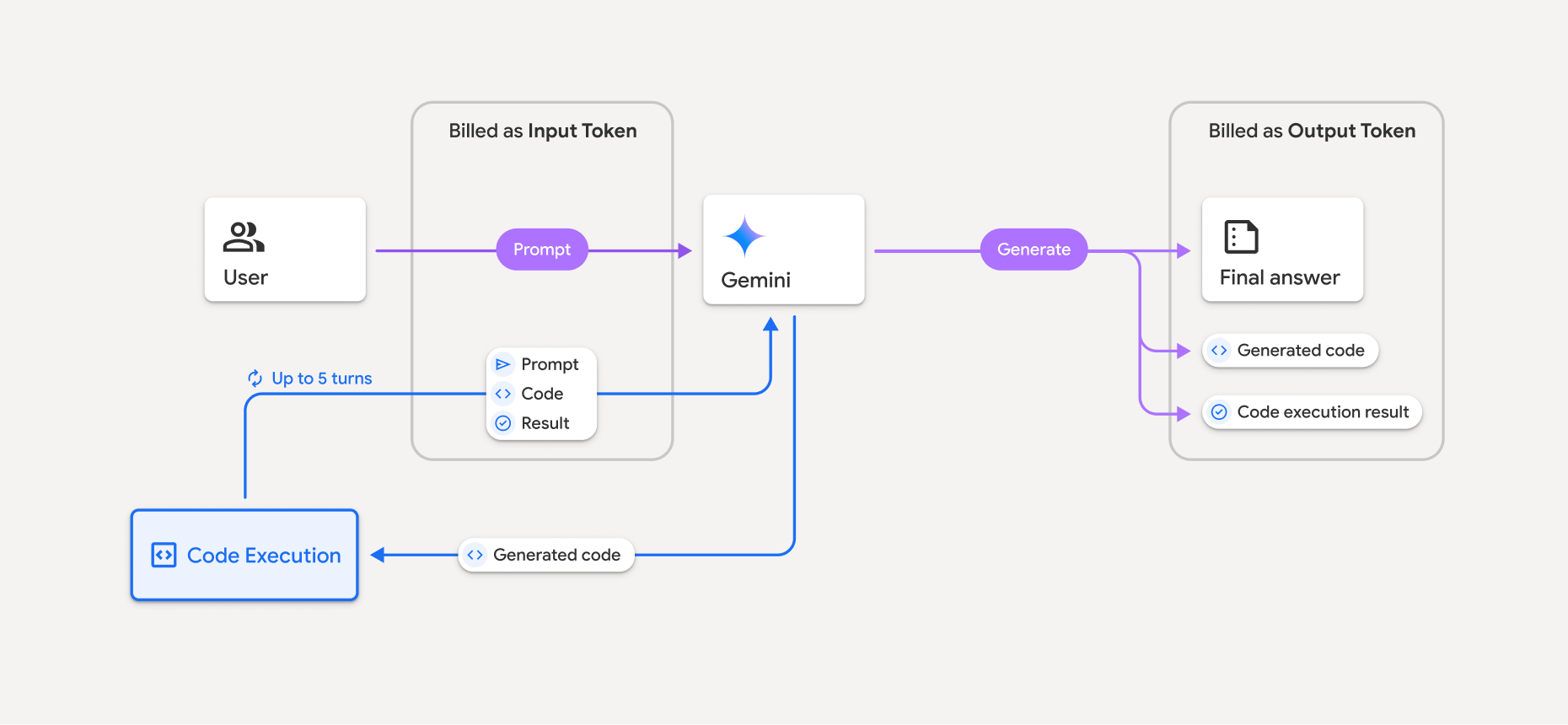
הנה סיכום של אופן החיוב על אסימונים כשמשתמשים במודל עם הפעלת קוד:
החיוב על ההנחיה המקורית מתבצע פעם אחת. האסימונים שלו מסומנים כאסימוני ביניים, שמחויבים בתור אסימוני קלט.
החיוב על הקוד שנוצר ועל התוצאה של הקוד שהורץ מתבצע באופן הבא:
כשמשתמשים בהם במהלך הרצת הקוד – הם מסומנים כאסימונים ביניים ומחויבים בתור אסימוני קלט.
אם הם נכללים בתשובה הסופית, הם מחויבים כטוקנים של פלט.
הסיכום הסופי בתשובה הסופית מחויב כטוקנים של פלט.
התגובה של ה-API כוללת את מספר האסימונים הביניים Gemini API, כדי שתדעו למה אתם מחויבים על אסימוני קלט מעבר להנחיה הראשונית.
חשוב לזכור שקוד שנוצר יכול לכלול גם טקסט וגם פלט מולטימודאלי, כמו תמונות.
מגבלות ושיטות מומלצות
המודל יכול רק ליצור ולהריץ קוד Python. הוא לא יכול להחזיר פריטים אחרים, כמו קובצי מדיה.
הביצוע של הקוד יכול להימשך עד 30 שניות לפני שחלף הזמן הקצוב לתפוגה.
במקרים מסוימים, הפעלת ביצוע קוד עלולה להוביל לרגרסיות בתחומים אחרים של פלט המודל (לדוגמה, כתיבת סיפור).
כלי הרצת הקוד לא תומך ב-URI של קבצים כקלט או כפלט. עם זאת, הוא תומך בקלט של קבצים ובפלט של תרשימים כבייטים מוטבעים. באמצעות יכולות הקלט והפלט האלה, אתם יכולים להעלות קובצי CSV וקובצי טקסט, לשאול שאלות לגבי הקבצים ולקבל תרשימי Matplotlib שנוצרים כחלק מתוצאת הרצת הקוד. סוגי ה-MIME הנתמכים לבייטים מוטבעים הם
.cpp,.csv,.java,.jpeg,.js,.png,.py,.tsו-.xml.
ספריות נתמכות
סביבת ההפעלה של הקוד כוללת את הספריות הבאות. אי אפשר להתקין ספריות משלכם.
רוצה לתת משוב על חוויית השימוש ב-Firebase AI Logic?