

تنفيذ الرموز البرمجية هو أداة تتيح للنموذج إنشاء رموز Python البرمجية وتنفيذها. ويمكن للنموذج أن يتعلّم بشكل متكرر من نتائج تنفيذ الرموز البرمجية إلى أن يصل إلى الناتج النهائي.
يمكنك استخدام ميزة تطبيق الرموز البرمجية لإنشاء ميزات تستفيد من الاستدلال المستند إلى الرمز وتنشئ ناتجًا نصيًا. على سبيل المثال، يمكنك استخدام تنفيذ الرمز البرمجي لحل المعادلات أو معالجة النصوص. يمكنك أيضًا استخدام المكتبات المضمّنة في بيئة تنفيذ الرمز البرمجي لإجراء مهام أكثر تخصصًا.
وكما هو الحال مع جميع الأدوات التي تقدّمها للنموذج، يقرّر النموذج متى يستخدم ميزة تنفيذ الرمز البرمجي.
مقارنة بين تنفيذ الرمز البرمجي واستدعاء الدالة
تنفيذ الرمز البرمجي واستدعاء الدالة هما ميزتان متشابهتان. بشكل عام، من الأفضل استخدام تنفيذ الرمز البرمجي إذا كان النموذج قادرًا على التعامل مع حالة الاستخدام. كما أنّ تنفيذ الرموز البرمجية أسهل استخدامًا لأنّ ما عليك سوى تفعيله.
في ما يلي بعض الاختلافات الإضافية بين تنفيذ التعليمات البرمجية واستدعاء الدالة:
| تنفيذ الرمز البرمجي | استدعاء الدالة |
|---|---|
| استخدِم ميزة "تنفيذ الرمز البرمجي" إذا كنت تريد أن يكتب النموذج رمز Python ويشغّله نيابةً عنك ويعرض النتيجة. | استخدِم ميزة "استدعاء الدوال" إذا كانت لديك دوال خاصة بك تريد تنفيذها محليًا. |
| تتيح ميزة "تنفيذ الرموز البرمجية" للنموذج تشغيل الرموز البرمجية في الخلفية لواجهة برمجة التطبيقات في بيئة ثابتة ومعزولة. | تتيح لك ميزة "استدعاء الدوال" تنفيذ الدوال التي يطلبها النموذج في أي بيئة تريدها. |
| يتم تنفيذ الرمز البرمجي في طلب واحد. على الرغم من أنّه يمكنك اختياريًا استخدام تنفيذ الرمز مع ميزة المحادثة، إلا أنّ ذلك ليس شرطًا. | تتطلّب ميزة "استدعاء الدوال" طلبًا إضافيًا لإعادة الإخراج من كل استدعاء دالة، لذا عليك استخدام إمكانية الدردشة. |
النماذج المتوافقة
gemini-3.1-pro-previewgemini-3.5-flashgemini-3.1-flash-litegemini-2.5-progemini-2.5-flashgemini-2.5-flash-lite
استخدام ميزة "تنفيذ الرموز البرمجية"
يمكنك استخدام ميزة تنفيذ التعليمات البرمجية مع كلّ من الإدخال النصي فقط والإدخال المتعدّد الوسائط، ولكن ستكون الاستجابة دائمًا نصًا أو تعليمات برمجية فقط.
قبل البدء
|
انقر على مقدّم خدمة Gemini API لعرض المحتوى والرمز الخاصين بمقدّم الخدمة على هذه الصفحة. |
إذا لم يسبق لك إجراء ذلك، عليك إكمال دليل بدء الاستخدام الذي يوضّح كيفية إعداد مشروعك على Firebase وربط تطبيقك بـ Firebase وإضافة حزمة تطوير البرامج (SDK) وتهيئة خدمة الخلفية لمزوّد Gemini API الذي اخترته وإنشاء مثيل GenerativeModel.
لاختبار طلباتك وتكرارها، ننصحك باستخدام Google AI Studio.
تفعيل تنفيذ الرموز البرمجية
|
قبل تجربة هذا النموذج، أكمل القسم
قبل البدء من هذا الدليل
لإعداد مشروعك وتطبيقك. في هذا القسم، ستنقر أيضًا على زر لمقدّم الخدمة الذي اخترته Gemini API حتى يظهر لك محتوى خاص بمقدّم الخدمة في هذه الصفحة. |
عند إنشاء مثيل GenerativeModel، قدِّم CodeExecution كأداة يمكن للنموذج استخدامها لإنشاء الردّ، ما يتيح للنموذج إنشاء رمز Python وتشغيله.
Swift
import FirebaseAILogic

// Initialize the Gemini Developer API backend service.
let ai = FirebaseAI.firebaseAI(backend: .googleAI())

// Create a `GenerativeModel` instance with a model that supports your use case
let model = ai.generativeModel(
  modelName: "GEMINI_MODEL_NAME",
  // Provide code execution as a tool that the model can use to generate its response.
  tools: [.codeExecution()]
)

let prompt = """
What is the sum of the first 50 prime numbers?
Generate and run code for the calculation, and make sure you get all 50.
"""

let response = try await model.generateContent(prompt)

guard let candidate = response.candidates.first else {
  print("No candidates in response.")
  return
}
for part in candidate.content.parts {
  if let textPart = part as? TextPart {
    print("Text = \(textPart.text)")
  } else if let executableCode = part as? ExecutableCodePart {
    print("Code = \(executableCode.code), Language = \(executableCode.language)")
  } else if let executionResult = part as? CodeExecutionResultPart {
    print("Outcome = \(executionResult.outcome), Result = \(executionResult.output ?? "no output")")
  }
}
Kotlin
// Initialize the Gemini Developer API backend service.
// Create a `GenerativeModel` instance with a model that supports your use case.
val model = Firebase.ai(backend = GenerativeBackend.googleAI()).generativeModel(
    modelName = "GEMINI_MODEL_NAME",
    // Provide code execution as a tool that the model can use to generate its response.
    tools = listOf(Tool.codeExecution())
)

val prompt =  "What is the sum of the first 50 prime numbers? " +
        "Generate and run code for the calculation, and make sure you get all 50."

val response = model.generateContent(prompt)

response.candidates.first().content.parts.forEach {
    if(it is TextPart) {
        println("Text = ${it.text}")
    }
    if(it is ExecutableCodePart) {
        println("Code = ${it.code}, Language = ${it.language}")
    }
    if(it is CodeExecutionResultPart) {
       println("Outcome = ${it.outcome}, Result = ${it.output}")
    }
}
Java
// Initialize the Gemini Developer API backend service.
// Create a `GenerativeModel` instance with a model that supports your use case.
GenerativeModel ai = FirebaseAI.getInstance(GenerativeBackend.googleAI())
                .generativeModel("GEMINI_MODEL_NAME",
                        null,
                        null,
                        // Provide code execution as a tool that the model can use to generate its response.
                        List.of(Tool.codeExecution()));

// Use the GenerativeModelFutures Java compatibility layer which offers
// support for ListenableFuture and Publisher APIs
GenerativeModelFutures model = GenerativeModelFutures.from(ai);

String text = "What is the sum of the first 50 prime numbers? " +
        "Generate and run code for the calculation, and make sure you get all 50.";

Content prompt = new Content.Builder()
    .addText(text)
    .build();

ListenableFuture response = model.generateContent(prompt);

Futures.addCallback(response, new FutureCallback() {
   @Override
public void onSuccess(GenerateContentResponse response)   {
    // Access the first candidate's content parts
    List parts = response.getCandidates().get(0).getContent().getParts();
    for (Part part : parts) {
        if (part instanceof TextPart) {
            TextPart textPart = (TextPart) part;
            System.out.println("Text = " + textPart.getText());
        } else if (part instanceof ExecutableCodePart) {
            ExecutableCodePart codePart = (ExecutableCodePart) part;
            System.out.println("Code = " + codePart.getCode() + ", Language = " + codePart.getLanguage());
        } else if (part instanceof CodeExecutionResultPart) {
            CodeExecutionResultPart resultPart = (CodeExecutionResultPart) part;
            System.out.println("Outcome = " + resultPart.getOutcome() + ", Result = " + resultPart.getOutput());
        }
    }
}

    @Override
    public void onFailure(Throwable t) {
        t.printStackTrace();
    }
}, executor);
Web
import { initializeApp } from "firebase/app";
import { getAI, getGenerativeModel, GoogleAIBackend } from "firebase/ai";

// TODO(developer) Replace the following with your app's Firebase configuration
// See: https://firebase.google.com/docs/web/learn-more#config-object
const firebaseConfig = {
  // ...
};

// Initialize FirebaseApp
const firebaseApp = initializeApp(firebaseConfig);

// Initialize the Gemini Developer API backend service.
const ai = getAI(firebaseApp, { backend: new GoogleAIBackend() });

// Create a `GenerativeModel` instance with a model that supports your use case.
const model = getGenerativeModel(
  ai,
  {
    model: "GEMINI_MODEL_NAME",
    // Provide code execution as a tool that the model can use to generate its response.
    tools: [{ codeExecution: {} }]
  }
);

const prompt =  "What is the sum of the first 50 prime numbers? " +
        "Generate and run code for the calculation, and make sure you get all 50."

const result = await model.generateContent(prompt);
const response = await result.response;

const parts = response.candidates?.[0].content.parts;

if (parts) {
  parts.forEach((part) => {
    if (part.text) {
        console.log(`Text: ${part.text}`);
    } else if (part.executableCode) {
      console.log(
        `Code: ${part.executableCode.code}, Language: ${part.executableCode.language}`
      );
    } else if (part.codeExecutionResult) {
      console.log(
        `Outcome: ${part.codeExecutionResult.outcome}, Result: ${part.codeExecutionResult.output}`
      );
    }
  });
}
Dart
import 'package:firebase_core/firebase_core.dart';
import 'package:firebase_ai/firebase_ai.dart';
import 'firebase_options.dart';

// Initialize FirebaseApp
await Firebase.initializeApp(
  options: DefaultFirebaseOptions.currentPlatform,
);

// Initialize the Gemini Developer API backend service.
// Create a `GenerativeModel` instance with a model that supports your use case.
final model = FirebaseAI.googleAI().generativeModel(
  model: 'GEMINI_MODEL_NAME',
  // Provide code execution as a tool that the model can use to generate its response.
  tools: [
    Tool.codeExecution(),
  ],
);

const prompt = 'What is the sum of the first 50 prime numbers? '
    'Generate and run code for the calculation, and make sure you get all 50.';

final response = await model.generateContent([Content.text(prompt)]);

final buffer = StringBuffer();
    for (final part in response.candidates.first.content.parts) {
      if (part is TextPart) {
        buffer.writeln(part.text);
      } else if (part is ExecutableCodePart) {
        buffer.writeln('Executable Code:');
        buffer.writeln('Language: ${part.language}');
        buffer.writeln('Code:');
        buffer.writeln(part.code);
      } else if (part is CodeExecutionResultPart) {
        buffer.writeln('Code Execution Result:');
        buffer.writeln('Outcome: ${part.outcome}');
        buffer.writeln('Output:');
        buffer.writeln(part.output);
      }
    }
Unity
using Firebase;
using Firebase.AI;

// Initialize the Gemini Developer API backend service.
var ai = FirebaseAI.GetInstance(FirebaseAI.Backend.GoogleAI());

// Create a `GenerativeModel` instance with a model that supports your use case.
var model = ai.GetGenerativeModel(
  modelName: "GEMINI_MODEL_NAME",
  // Provide code execution as a tool that the model can use to generate its response.
  tools: new Tool[] { new Tool(new CodeExecution()) }
);

var prompt = "What is the sum of the first 50 prime numbers? " +
        "Generate and run code for the calculation, and make sure you get all 50.";

var response = await model.GenerateContentAsync(prompt);

foreach (var part in response.Candidates.First().Content.Parts) {
  if (part is ModelContent.TextPart tp) {
    UnityEngine.Debug.Log($"Text = {tp.Text}");
  } else if (part is ModelContent.ExecutableCodePart esp) {
    UnityEngine.Debug.Log($"Code = {esp.Code}, Language = {esp.Language}");
  } else if (part is ModelContent.CodeExecutionResultPart cerp) {
    UnityEngine.Debug.Log($"Outcome = {cerp.Outcome}, Output = {cerp.Output}");
  }
}
تعرَّف على كيفية اختيار نموذج اختياري مناسبَين لحالة الاستخدام والتطبيق.
استخدام ميزة "تنفيذ الرمز البرمجي" في المحادثة
يمكنك أيضًا استخدام تنفيذ التعليمات البرمجية كجزء من محادثة:
Swift
import FirebaseAILogic

// Initialize the Gemini Developer API backend service.
let ai = FirebaseAI.firebaseAI(backend: .googleAI())

// Create a `GenerativeModel` instance with a model that supports your use case
let model = ai.generativeModel(
  modelName: "GEMINI_MODEL_NAME",
  // Provide code execution as a tool that the model can use to generate its response.
  tools: [.codeExecution()]
)

let prompt = """
What is the sum of the first 50 prime numbers?
Generate and run code for the calculation, and make sure you get all 50.
"""
let chat = model.startChat()

let response = try await chat.sendMessage(prompt)

guard let candidate = response.candidates.first else {
  print("No candidates in response.")
  return
}
for part in candidate.content.parts {
  if let textPart = part as? TextPart {
    print("Text = \(textPart.text)")
  } else if let executableCode = part as? ExecutableCodePart {
    print("Code = \(executableCode.code), Language = \(executableCode.language)")
  } else if let executionResult = part as? CodeExecutionResultPart {
    print("Outcome = \(executionResult.outcome), Result = \(executionResult.output ?? "no output")")
  }
}
Kotlin
// Initialize the Gemini Developer API backend service.
// Create a `GenerativeModel` instance with a model that supports your use case.
val model = Firebase.ai(backend = GenerativeBackend.googleAI()).generativeModel(
    modelName = "GEMINI_MODEL_NAME",
    // Provide code execution as a tool that the model can use to generate its response.
    tools = listOf(Tool.codeExecution())
)

val prompt =  "What is the sum of the first 50 prime numbers? " +
        "Generate and run code for the calculation, and make sure you get all 50."
val chat = model.startChat()
val response = chat.sendMessage(prompt)

response.candidates.first().content.parts.forEach {
    if(it is TextPart) {
        println("Text = ${it.text}")
    }
    if(it is ExecutableCodePart) {
        println("Code = ${it.code}, Language = ${it.language}")
    }
    if(it is CodeExecutionResultPart) {
       println("Outcome = ${it.outcome}, Result = ${it.output}")
    }
}
Java
// Initialize the Gemini Developer API backend service.
// Create a `GenerativeModel` instance with a model that supports your use case.
GenerativeModel ai = FirebaseAI.getInstance(GenerativeBackend.googleAI())
                .generativeModel("GEMINI_MODEL_NAME",
                        null,
                        null,
                        // Provide code execution as a tool that the model can use to generate its response.
                        List.of(Tool.codeExecution()));

// Use the GenerativeModelFutures Java compatibility layer which offers
// support for ListenableFuture and Publisher APIs
GenerativeModelFutures model = GenerativeModelFutures.from(ai);
String text = "What is the sum of the first 50 prime numbers? " +
        "Generate and run code for the calculation, and make sure you get all 50.";

Content prompt = new Content.Builder()
    .addText(text)
    .build();

ChatFutures chat = model.startChat();
ListenableFuture response = chat.sendMessage(prompt);

Futures.addCallback(response, new FutureCallback() {
   @Override
public void onSuccess(GenerateContentResponse response)   {
    // Access the first candidate's content parts
    List parts = response.getCandidates().get(0).getContent().getParts();
    for (Part part : parts) {
        if (part instanceof TextPart) {
            TextPart textPart = (TextPart) part;
            System.out.println("Text = " + textPart.getText());
        } else if (part instanceof ExecutableCodePart) {
            ExecutableCodePart codePart = (ExecutableCodePart) part;
            System.out.println("Code = " + codePart.getCode() + ", Language = " + codePart.getLanguage());
        } else if (part instanceof CodeExecutionResultPart) {
            CodeExecutionResultPart resultPart = (CodeExecutionResultPart) part;
            System.out.println("Outcome = " + resultPart.getOutcome() + ", Result = " + resultPart.getOutput());
        }
    }
}

    @Override
    public void onFailure(Throwable t) {
        t.printStackTrace();
    }
}, executor);
Web
import { initializeApp } from "firebase/app";
import { getAI, getGenerativeModel, GoogleAIBackend } from "firebase/ai";

// TODO(developer) Replace the following with your app's Firebase configuration
// See: https://firebase.google.com/docs/web/learn-more#config-object
const firebaseConfig = {
  // ...
};

// Initialize FirebaseApp
const firebaseApp = initializeApp(firebaseConfig);

// Initialize the Gemini Developer API backend service.
const ai = getAI(firebaseApp, { backend: new GoogleAIBackend() });

// Create a `GenerativeModel` instance with a model that supports your use case.
const model = getGenerativeModel(
  ai,
  {
    model: "GEMINI_MODEL_NAME",
    // Provide code execution as a tool that the model can use to generate its response.
    tools: [{ codeExecution: {} }]
  }
);

const prompt =  "What is the sum of the first 50 prime numbers? " +
        "Generate and run code for the calculation, and make sure you get all 50."
const chat = model.startChat()
const result = await chat.sendMessage(prompt);

const parts = result.response.candidates?.[0].content.parts;

if (parts) {
  parts.forEach((part) => {
    if (part.text) {
        console.log(`Text: ${part.text}`);
    } else if (part.executableCode) {
      console.log(
        `Code: ${part.executableCode.code}, Language: ${part.executableCode.language}`
      );
    } else if (part.codeExecutionResult) {
      console.log(
        `Outcome: ${part.codeExecutionResult.outcome}, Result: ${part.codeExecutionResult.output}`
      );
    }
  });
}
Dart
import 'package:firebase_core/firebase_core.dart';
import 'package:firebase_ai/firebase_ai.dart';
import 'firebase_options.dart';

// Initialize FirebaseApp
await Firebase.initializeApp(
  options: DefaultFirebaseOptions.currentPlatform,
);

// Initialize the Gemini Developer API backend service.
// Create a `GenerativeModel` instance with a model that supports your use case.
final model = FirebaseAI.googleAI().generativeModel(
  model: 'GEMINI_MODEL_NAME',
  // Provide code execution as a tool that the model can use to generate its response.
  tools: [
    Tool.codeExecution(),
  ],
);

final codeExecutionChat = await model.startChat();

const prompt = 'What is the sum of the first 50 prime numbers? '
    'Generate and run code for the calculation, and make sure you get all 50.';
final response = await codeExecutionChat.sendMessage(Content.text(prompt));

final buffer = StringBuffer();
    for (final part in response.candidates.first.content.parts) {
      if (part is TextPart) {
        buffer.writeln(part.text);
      } else if (part is ExecutableCodePart) {
        buffer.writeln('Executable Code:');
        buffer.writeln('Language: ${part.language}');
        buffer.writeln('Code:');
        buffer.writeln(part.code);
      } else if (part is CodeExecutionResultPart) {
        buffer.writeln('Code Execution Result:');
        buffer.writeln('Outcome: ${part.outcome}');
        buffer.writeln('Output:');
        buffer.writeln(part.output);
      }
    }
Unity
using Firebase;
using Firebase.AI;

// Initialize the Gemini Developer API backend service.
var ai = FirebaseAI.GetInstance(FirebaseAI.Backend.GoogleAI());

// Create a `GenerativeModel` instance with a model that supports your use case.
var model = ai.GetGenerativeModel(
  modelName: "GEMINI_MODEL_NAME",
  // Provide code execution as a tool that the model can use to generate its response.
  tools: new Tool[] { new Tool(new CodeExecution()) }
);

var prompt = "What is the sum of the first 50 prime numbers? " +
        "Generate and run code for the calculation, and make sure you get all 50.";
var chat = model.StartChat();
var response = await chat.SendMessageAsync(prompt);

foreach (var part in response.Candidates.First().Content.Parts) {
  if (part is ModelContent.TextPart tp) {
    UnityEngine.Debug.Log($"Text = {tp.Text}");
  } else if (part is ModelContent.ExecutableCodePart esp) {
    UnityEngine.Debug.Log($"Code = {esp.Code}, Language = {esp.Language}");
  } else if (part is ModelContent.CodeExecutionResultPart cerp) {
    UnityEngine.Debug.Log($"Outcome = {cerp.Outcome}, Output = {cerp.Output}");
  }
}
تعرَّف على كيفية اختيار نموذج اختياري مناسبَين لحالة الاستخدام والتطبيق.
الأسعار
لا يتم تحصيل أي رسوم إضافية مقابل تفعيل ميزة تنفيذ الرموز البرمجية وتوفيرها كأداة للنموذج. وإذا قرر النموذج استخدام هذه الميزة، سيتم تحصيل الرسوم منك وفقًا للسعر الحالي لرموز الإدخال والإخراج استنادًا إلى نموذج Gemini الذي تستخدمه.
يوضّح المخطّط البياني التالي نموذج الفوترة لتطبيق الرموز البرمجية:
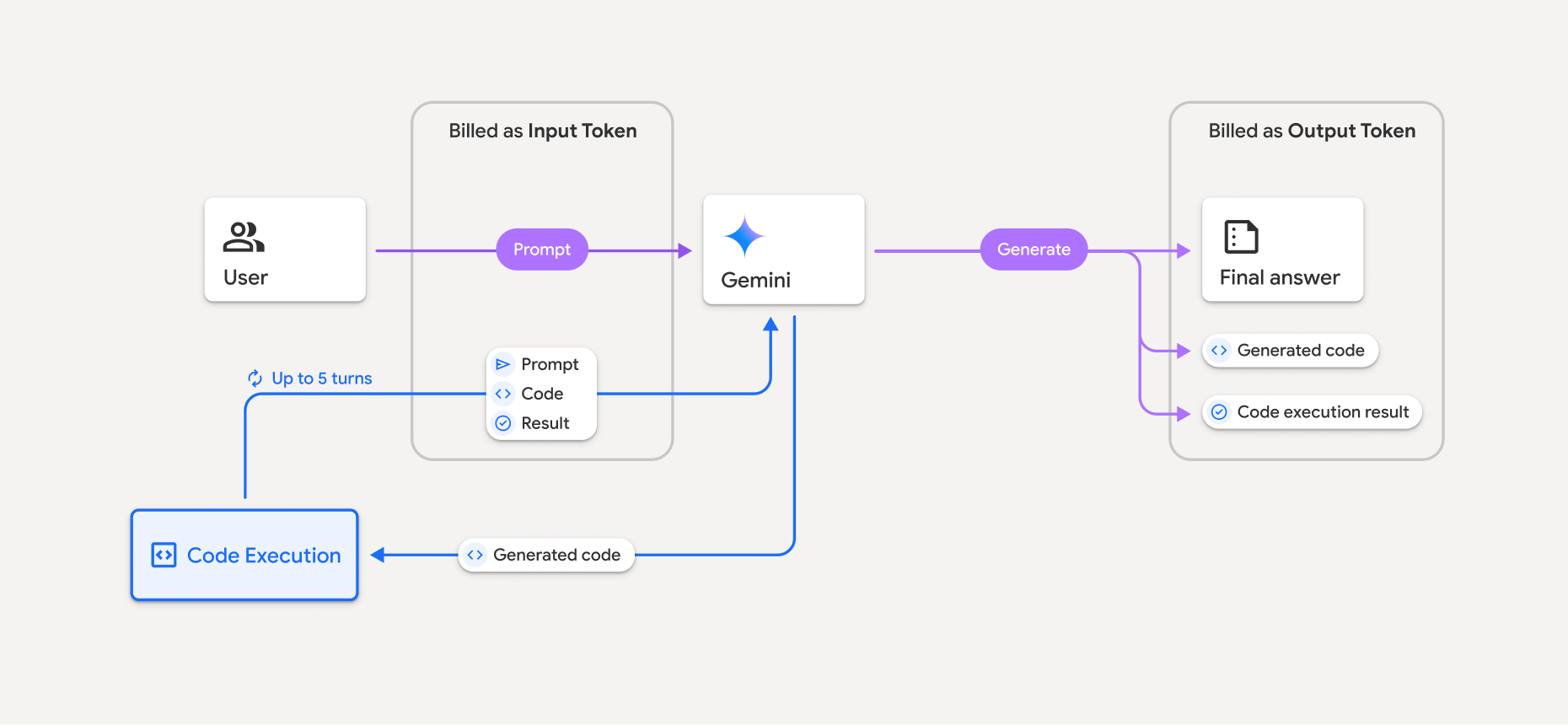
في ما يلي ملخّص حول كيفية احتساب تكلفة الرموز المميزة عندما يستخدم نموذج تنفيذ التعليمات البرمجية:
تتم محاسبتك على الطلب الأصلي مرة واحدة، ويتم تصنيف الرموز المميزة الخاصة به على أنّها رموز مميزة وسيطة، ويتم تحصيل الرسوم منها باعتبارها رموزًا مميزة للإدخال.
يتم تحصيل رسوم مقابل الرمز البرمجي الذي تم إنشاؤه ونتيجة الرمز البرمجي الذي تم تنفيذه على النحو التالي:
عند استخدامها أثناء تنفيذ الرمز البرمجي، يتم تصنيفها على أنّها رموز مميّزة وسيطة ويتم تحصيل الرسوم منها باعتبارها رموزًا مميّزة للإدخال.
عندما يتم تضمينها كجزء من الرد النهائي، يتم تحصيل الرسوم منها باعتبارها رموزًا مميزة للناتج.
يتم تحصيل رسوم الملخّص النهائي في الردّ الأخير على شكل رموز مميزة للناتج.
يتضمّن Gemini API عدد الرموز المميزة الوسيطة في الردّ من واجهة برمجة التطبيقات، ما يتيح لك معرفة سبب تحصيل رسوم منك مقابل الرموز المميزة للإدخال التي تتجاوز طلبك الأولي.
يُرجى العِلم أنّ الرمز البرمجي الذي يتم إنشاؤه يمكن أن يتضمّن نصًا ومخرجات متعدّدة الوسائط، مثل الصور.
القيود وأفضل الممارسات
يمكن للنموذج إنشاء رموز Python وتنفيذها فقط، ولا يمكنه عرض عناصر أخرى، مثل ملفات الوسائط.
يمكن أن يستغرق تنفيذ الرمز البرمجي 30 ثانية كحدّ أقصى قبل انتهاء المهلة.
في بعض الحالات، يمكن أن يؤدي تفعيل تطبيق الرموز البرمجية إلى حدوث تراجع في جوانب أخرى من مخرجات النموذج (على سبيل المثال، كتابة قصة).
لا تتيح أداة تطبيق الرموز البرمجية استخدام معرّفات الموارد الموحّدة للملفات كمدخلات أو مخرجات، ولكنّها تتيح إدخال الملفات وإخراج الرسوم البيانية كبايتات مضمّنة. وباستخدام إمكانات الإدخال والإخراج هذه، يمكنك تحميل ملفات CSV وملفات نصية وطرح أسئلة حول الملفات، كما يمكنك إنشاء رسوم بيانية باستخدام Matplotlib كجزء من نتيجة تطبيق الرموز البرمجية. وأنواع MIME المتوافقة مع البايتات المضمّنة هي
.cppو.csvو.javaو.jpegو.jsو.pngو.pyو.tsو.xml.
المكتبات المتوافقة
يتضمّن بيئة تنفيذ الرمز البرمجي المكتبات التالية، ولا يمكنك تثبيت مكتباتك الخاصة.
تقديم ملاحظات حول تجربتك مع Firebase AI Logic