

การเรียกใช้โค้ดเป็นเครื่องมือที่ช่วยให้โมเดลสร้างและเรียกใช้โค้ด Python ได้ โมเดลสามารถเรียนรู้ซ้ำๆ จากผลการเรียกใช้โค้ดจนกว่าจะได้เอาต์พุตสุดท้าย
คุณสามารถใช้การเรียกใช้โค้ดเพื่อสร้างฟีเจอร์ที่ได้รับประโยชน์จากการให้เหตุผลตามโค้ดและสร้างเอาต์พุตข้อความ ตัวอย่างเช่น คุณสามารถใช้การเรียกใช้โค้ดเพื่อแก้สมการหรือประมวลผลข้อความ นอกจากนี้ คุณยังใช้ ไลบรารีที่รวมอยู่ในสภาพแวดล้อมการเรียกใช้โค้ดเพื่อ ทำงานที่เฉพาะเจาะจงมากขึ้นได้ด้วย
เช่นเดียวกับเครื่องมือทั้งหมดที่คุณมอบให้ โมเดลจะเป็นผู้กำหนดว่าจะใช้การเรียกใช้โค้ดเมื่อใด
การเปรียบเทียบการเรียกใช้โค้ดกับการเรียกใช้ฟังก์ชัน
การเรียกใช้โค้ดและการเรียกใช้ฟังก์ชันเป็น ฟีเจอร์ที่คล้ายกัน โดยทั่วไป คุณควรเลือกใช้การเรียกใช้โค้ดหากโมเดลจัดการกรณีการใช้งานของคุณได้ นอกจากนี้ การเรียกใช้โค้ดยังใช้งานง่ายกว่าด้วย เนื่องจากคุณเพียงแค่เปิดใช้ฟีเจอร์นี้
ความแตกต่างเพิ่มเติมระหว่างการเรียกใช้โค้ดกับการเรียกใช้ฟังก์ชันมีดังนี้
| การเรียกใช้โค้ด | การเรียกใช้ฟังก์ชัน |
|---|---|
| ใช้การเรียกใช้โค้ดหากต้องการให้โมเดลเขียนและเรียกใช้โค้ด Python ให้คุณ แล้วแสดงผลลัพธ์ | ใช้การเรียกใช้ฟังก์ชันหากคุณมีฟังก์ชันของคุณเองที่ ต้องการเรียกใช้ในเครื่อง |
| การเรียกใช้โค้ดช่วยให้โมเดลเรียกใช้โค้ดในแบ็กเอนด์ของ API ในสภาพแวดล้อมที่คงที่ แยกจากกัน | การเรียกใช้ฟังก์ชันช่วยให้คุณเรียกใช้ฟังก์ชันที่โมเดลขอ ในสภาพแวดล้อมใดก็ได้ที่คุณต้องการ |
| การเรียกใช้โค้ดจะแก้ไขได้ด้วยคำขอเดียว แม้ว่าคุณจะใช้การเรียกใช้โค้ดกับความสามารถในการแชทได้ แต่ก็ไม่จำเป็น | การเรียกใช้ฟังก์ชันต้องใช้คำขอเพิ่มเติมเพื่อส่งเอาต์พุตจากการเรียกใช้ฟังก์ชันแต่ละครั้งกลับ ดังนั้น คุณจึงต้องใช้ความสามารถในการแชท |
โมเดลที่รองรับ
gemini-3.1-pro-previewgemini-3.5-flashgemini-3.1-flash-litegemini-2.5-progemini-2.5-flashgemini-2.5-flash-lite
ใช้การเรียกใช้โค้ด
คุณสามารถใช้การเรียกใช้โค้ดกับอินพุตที่เป็นข้อความเท่านั้นและอินพุตมัลติโมดัลได้ แต่การตอบกลับจะเป็นข้อความหรือโค้ดเท่านั้นเสมอ
ก่อนเริ่มต้น
|
คลิกผู้ให้บริการ Gemini API เพื่อดูเนื้อหาที่เฉพาะเจาะจงของผู้ให้บริการ และโค้ดในหน้านี้ |
หากยังไม่ได้ดำเนินการ ให้ทำตาม
คู่มือเริ่มต้นใช้งาน ซึ่งอธิบายวิธี
ตั้งค่าโปรเจ็กต์ Firebase, เชื่อมต่อแอปกับ Firebase, เพิ่ม SDK,
เริ่มต้นบริการแบ็กเอนด์สำหรับผู้ให้บริการ Gemini API ที่คุณเลือก และ
สร้างอินสแตนซ์ GenerativeModel
เราขอแนะนำให้ใช้ สำหรับการทดสอบและทำซ้ำพรอมต์Google AI Studio
เปิดใช้การเรียกใช้โค้ด
|
ก่อนที่จะลองใช้ตัวอย่างนี้ ให้ทำตามส่วน
ก่อนเริ่มต้น ของคู่มือนี้
เพื่อตั้งค่าโปรเจ็กต์และแอป ในส่วนนั้น คุณจะต้องคลิกปุ่มสำหรับ Gemini API ที่คุณเลือกด้วย เพื่อให้เห็นเนื้อหาที่เฉพาะเจาะจงของผู้ให้บริการ ในหน้านี้ |
เมื่อสร้างอินสแตนซ์ GenerativeModel ให้ระบุ CodeExecution เป็นเครื่องมือที่โมเดลใช้สร้างการตอบกลับได้ ซึ่งจะช่วยให้โมเดลสร้างและเรียกใช้โค้ด Python ได้
Swift
import FirebaseAILogic

// Initialize the Gemini Developer API backend service.
let ai = FirebaseAI.firebaseAI(backend: .googleAI())

// Create a `GenerativeModel` instance with a model that supports your use case
let model = ai.generativeModel(
  modelName: "GEMINI_MODEL_NAME",
  // Provide code execution as a tool that the model can use to generate its response.
  tools: [.codeExecution()]
)

let prompt = """
What is the sum of the first 50 prime numbers?
Generate and run code for the calculation, and make sure you get all 50.
"""

let response = try await model.generateContent(prompt)

guard let candidate = response.candidates.first else {
  print("No candidates in response.")
  return
}
for part in candidate.content.parts {
  if let textPart = part as? TextPart {
    print("Text = \(textPart.text)")
  } else if let executableCode = part as? ExecutableCodePart {
    print("Code = \(executableCode.code), Language = \(executableCode.language)")
  } else if let executionResult = part as? CodeExecutionResultPart {
    print("Outcome = \(executionResult.outcome), Result = \(executionResult.output ?? "no output")")
  }
}
Kotlin
// Initialize the Gemini Developer API backend service.
// Create a `GenerativeModel` instance with a model that supports your use case.
val model = Firebase.ai(backend = GenerativeBackend.googleAI()).generativeModel(
    modelName = "GEMINI_MODEL_NAME",
    // Provide code execution as a tool that the model can use to generate its response.
    tools = listOf(Tool.codeExecution())
)

val prompt =  "What is the sum of the first 50 prime numbers? " +
        "Generate and run code for the calculation, and make sure you get all 50."

val response = model.generateContent(prompt)

response.candidates.first().content.parts.forEach {
    if(it is TextPart) {
        println("Text = ${it.text}")
    }
    if(it is ExecutableCodePart) {
        println("Code = ${it.code}, Language = ${it.language}")
    }
    if(it is CodeExecutionResultPart) {
       println("Outcome = ${it.outcome}, Result = ${it.output}")
    }
}
Java
// Initialize the Gemini Developer API backend service.
// Create a `GenerativeModel` instance with a model that supports your use case.
GenerativeModel ai = FirebaseAI.getInstance(GenerativeBackend.googleAI())
                .generativeModel("GEMINI_MODEL_NAME",
                        null,
                        null,
                        // Provide code execution as a tool that the model can use to generate its response.
                        List.of(Tool.codeExecution()));

// Use the GenerativeModelFutures Java compatibility layer which offers
// support for ListenableFuture and Publisher APIs
GenerativeModelFutures model = GenerativeModelFutures.from(ai);

String text = "What is the sum of the first 50 prime numbers? " +
        "Generate and run code for the calculation, and make sure you get all 50.";

Content prompt = new Content.Builder()
    .addText(text)
    .build();

ListenableFuture response = model.generateContent(prompt);

Futures.addCallback(response, new FutureCallback() {
   @Override
public void onSuccess(GenerateContentResponse response)   {
    // Access the first candidate's content parts
    List parts = response.getCandidates().get(0).getContent().getParts();
    for (Part part : parts) {
        if (part instanceof TextPart) {
            TextPart textPart = (TextPart) part;
            System.out.println("Text = " + textPart.getText());
        } else if (part instanceof ExecutableCodePart) {
            ExecutableCodePart codePart = (ExecutableCodePart) part;
            System.out.println("Code = " + codePart.getCode() + ", Language = " + codePart.getLanguage());
        } else if (part instanceof CodeExecutionResultPart) {
            CodeExecutionResultPart resultPart = (CodeExecutionResultPart) part;
            System.out.println("Outcome = " + resultPart.getOutcome() + ", Result = " + resultPart.getOutput());
        }
    }
}

    @Override
    public void onFailure(Throwable t) {
        t.printStackTrace();
    }
}, executor);
Web
import { initializeApp } from "firebase/app";
import { getAI, getGenerativeModel, GoogleAIBackend } from "firebase/ai";

// TODO(developer) Replace the following with your app's Firebase configuration
// See: https://firebase.google.com/docs/web/learn-more#config-object
const firebaseConfig = {
  // ...
};

// Initialize FirebaseApp
const firebaseApp = initializeApp(firebaseConfig);

// Initialize the Gemini Developer API backend service.
const ai = getAI(firebaseApp, { backend: new GoogleAIBackend() });

// Create a `GenerativeModel` instance with a model that supports your use case.
const model = getGenerativeModel(
  ai,
  {
    model: "GEMINI_MODEL_NAME",
    // Provide code execution as a tool that the model can use to generate its response.
    tools: [{ codeExecution: {} }]
  }
);

const prompt =  "What is the sum of the first 50 prime numbers? " +
        "Generate and run code for the calculation, and make sure you get all 50."

const result = await model.generateContent(prompt);
const response = await result.response;

const parts = response.candidates?.[0].content.parts;

if (parts) {
  parts.forEach((part) => {
    if (part.text) {
        console.log(`Text: ${part.text}`);
    } else if (part.executableCode) {
      console.log(
        `Code: ${part.executableCode.code}, Language: ${part.executableCode.language}`
      );
    } else if (part.codeExecutionResult) {
      console.log(
        `Outcome: ${part.codeExecutionResult.outcome}, Result: ${part.codeExecutionResult.output}`
      );
    }
  });
}
Dart
import 'package:firebase_core/firebase_core.dart';
import 'package:firebase_ai/firebase_ai.dart';
import 'firebase_options.dart';

// Initialize FirebaseApp
await Firebase.initializeApp(
  options: DefaultFirebaseOptions.currentPlatform,
);

// Initialize the Gemini Developer API backend service.
// Create a `GenerativeModel` instance with a model that supports your use case.
final model = FirebaseAI.googleAI().generativeModel(
  model: 'GEMINI_MODEL_NAME',
  // Provide code execution as a tool that the model can use to generate its response.
  tools: [
    Tool.codeExecution(),
  ],
);

const prompt = 'What is the sum of the first 50 prime numbers? '
    'Generate and run code for the calculation, and make sure you get all 50.';

final response = await model.generateContent([Content.text(prompt)]);

final buffer = StringBuffer();
    for (final part in response.candidates.first.content.parts) {
      if (part is TextPart) {
        buffer.writeln(part.text);
      } else if (part is ExecutableCodePart) {
        buffer.writeln('Executable Code:');
        buffer.writeln('Language: ${part.language}');
        buffer.writeln('Code:');
        buffer.writeln(part.code);
      } else if (part is CodeExecutionResultPart) {
        buffer.writeln('Code Execution Result:');
        buffer.writeln('Outcome: ${part.outcome}');
        buffer.writeln('Output:');
        buffer.writeln(part.output);
      }
    }
Unity
using Firebase;
using Firebase.AI;

// Initialize the Gemini Developer API backend service.
var ai = FirebaseAI.GetInstance(FirebaseAI.Backend.GoogleAI());

// Create a `GenerativeModel` instance with a model that supports your use case.
var model = ai.GetGenerativeModel(
  modelName: "GEMINI_MODEL_NAME",
  // Provide code execution as a tool that the model can use to generate its response.
  tools: new Tool[] { new Tool(new CodeExecution()) }
);

var prompt = "What is the sum of the first 50 prime numbers? " +
        "Generate and run code for the calculation, and make sure you get all 50.";

var response = await model.GenerateContentAsync(prompt);

foreach (var part in response.Candidates.First().Content.Parts) {
  if (part is ModelContent.TextPart tp) {
    UnityEngine.Debug.Log($"Text = {tp.Text}");
  } else if (part is ModelContent.ExecutableCodePart esp) {
    UnityEngine.Debug.Log($"Code = {esp.Code}, Language = {esp.Language}");
  } else if (part is ModelContent.CodeExecutionResultPart cerp) {
    UnityEngine.Debug.Log($"Outcome = {cerp.Outcome}, Output = {cerp.Output}");
  }
}
ดูวิธีเลือกรุ่น (ไม่บังคับ) ที่เหมาะกับกรณีการใช้งานและแอปของคุณ
ใช้การเรียกใช้โค้ดในการแชท
คุณยังใช้การเรียกใช้โค้ดเป็นส่วนหนึ่งของการแชทได้ด้วย
Swift
import FirebaseAILogic

// Initialize the Gemini Developer API backend service.
let ai = FirebaseAI.firebaseAI(backend: .googleAI())

// Create a `GenerativeModel` instance with a model that supports your use case
let model = ai.generativeModel(
  modelName: "GEMINI_MODEL_NAME",
  // Provide code execution as a tool that the model can use to generate its response.
  tools: [.codeExecution()]
)

let prompt = """
What is the sum of the first 50 prime numbers?
Generate and run code for the calculation, and make sure you get all 50.
"""
let chat = model.startChat()

let response = try await chat.sendMessage(prompt)

guard let candidate = response.candidates.first else {
  print("No candidates in response.")
  return
}
for part in candidate.content.parts {
  if let textPart = part as? TextPart {
    print("Text = \(textPart.text)")
  } else if let executableCode = part as? ExecutableCodePart {
    print("Code = \(executableCode.code), Language = \(executableCode.language)")
  } else if let executionResult = part as? CodeExecutionResultPart {
    print("Outcome = \(executionResult.outcome), Result = \(executionResult.output ?? "no output")")
  }
}
Kotlin
// Initialize the Gemini Developer API backend service.
// Create a `GenerativeModel` instance with a model that supports your use case.
val model = Firebase.ai(backend = GenerativeBackend.googleAI()).generativeModel(
    modelName = "GEMINI_MODEL_NAME",
    // Provide code execution as a tool that the model can use to generate its response.
    tools = listOf(Tool.codeExecution())
)

val prompt =  "What is the sum of the first 50 prime numbers? " +
        "Generate and run code for the calculation, and make sure you get all 50."
val chat = model.startChat()
val response = chat.sendMessage(prompt)

response.candidates.first().content.parts.forEach {
    if(it is TextPart) {
        println("Text = ${it.text}")
    }
    if(it is ExecutableCodePart) {
        println("Code = ${it.code}, Language = ${it.language}")
    }
    if(it is CodeExecutionResultPart) {
       println("Outcome = ${it.outcome}, Result = ${it.output}")
    }
}
Java
// Initialize the Gemini Developer API backend service.
// Create a `GenerativeModel` instance with a model that supports your use case.
GenerativeModel ai = FirebaseAI.getInstance(GenerativeBackend.googleAI())
                .generativeModel("GEMINI_MODEL_NAME",
                        null,
                        null,
                        // Provide code execution as a tool that the model can use to generate its response.
                        List.of(Tool.codeExecution()));

// Use the GenerativeModelFutures Java compatibility layer which offers
// support for ListenableFuture and Publisher APIs
GenerativeModelFutures model = GenerativeModelFutures.from(ai);
String text = "What is the sum of the first 50 prime numbers? " +
        "Generate and run code for the calculation, and make sure you get all 50.";

Content prompt = new Content.Builder()
    .addText(text)
    .build();

ChatFutures chat = model.startChat();
ListenableFuture response = chat.sendMessage(prompt);

Futures.addCallback(response, new FutureCallback() {
   @Override
public void onSuccess(GenerateContentResponse response)   {
    // Access the first candidate's content parts
    List parts = response.getCandidates().get(0).getContent().getParts();
    for (Part part : parts) {
        if (part instanceof TextPart) {
            TextPart textPart = (TextPart) part;
            System.out.println("Text = " + textPart.getText());
        } else if (part instanceof ExecutableCodePart) {
            ExecutableCodePart codePart = (ExecutableCodePart) part;
            System.out.println("Code = " + codePart.getCode() + ", Language = " + codePart.getLanguage());
        } else if (part instanceof CodeExecutionResultPart) {
            CodeExecutionResultPart resultPart = (CodeExecutionResultPart) part;
            System.out.println("Outcome = " + resultPart.getOutcome() + ", Result = " + resultPart.getOutput());
        }
    }
}

    @Override
    public void onFailure(Throwable t) {
        t.printStackTrace();
    }
}, executor);
Web
import { initializeApp } from "firebase/app";
import { getAI, getGenerativeModel, GoogleAIBackend } from "firebase/ai";

// TODO(developer) Replace the following with your app's Firebase configuration
// See: https://firebase.google.com/docs/web/learn-more#config-object
const firebaseConfig = {
  // ...
};

// Initialize FirebaseApp
const firebaseApp = initializeApp(firebaseConfig);

// Initialize the Gemini Developer API backend service.
const ai = getAI(firebaseApp, { backend: new GoogleAIBackend() });

// Create a `GenerativeModel` instance with a model that supports your use case.
const model = getGenerativeModel(
  ai,
  {
    model: "GEMINI_MODEL_NAME",
    // Provide code execution as a tool that the model can use to generate its response.
    tools: [{ codeExecution: {} }]
  }
);

const prompt =  "What is the sum of the first 50 prime numbers? " +
        "Generate and run code for the calculation, and make sure you get all 50."
const chat = model.startChat()
const result = await chat.sendMessage(prompt);

const parts = result.response.candidates?.[0].content.parts;

if (parts) {
  parts.forEach((part) => {
    if (part.text) {
        console.log(`Text: ${part.text}`);
    } else if (part.executableCode) {
      console.log(
        `Code: ${part.executableCode.code}, Language: ${part.executableCode.language}`
      );
    } else if (part.codeExecutionResult) {
      console.log(
        `Outcome: ${part.codeExecutionResult.outcome}, Result: ${part.codeExecutionResult.output}`
      );
    }
  });
}
Dart
import 'package:firebase_core/firebase_core.dart';
import 'package:firebase_ai/firebase_ai.dart';
import 'firebase_options.dart';

// Initialize FirebaseApp
await Firebase.initializeApp(
  options: DefaultFirebaseOptions.currentPlatform,
);

// Initialize the Gemini Developer API backend service.
// Create a `GenerativeModel` instance with a model that supports your use case.
final model = FirebaseAI.googleAI().generativeModel(
  model: 'GEMINI_MODEL_NAME',
  // Provide code execution as a tool that the model can use to generate its response.
  tools: [
    Tool.codeExecution(),
  ],
);

final codeExecutionChat = await model.startChat();

const prompt = 'What is the sum of the first 50 prime numbers? '
    'Generate and run code for the calculation, and make sure you get all 50.';
final response = await codeExecutionChat.sendMessage(Content.text(prompt));

final buffer = StringBuffer();
    for (final part in response.candidates.first.content.parts) {
      if (part is TextPart) {
        buffer.writeln(part.text);
      } else if (part is ExecutableCodePart) {
        buffer.writeln('Executable Code:');
        buffer.writeln('Language: ${part.language}');
        buffer.writeln('Code:');
        buffer.writeln(part.code);
      } else if (part is CodeExecutionResultPart) {
        buffer.writeln('Code Execution Result:');
        buffer.writeln('Outcome: ${part.outcome}');
        buffer.writeln('Output:');
        buffer.writeln(part.output);
      }
    }
Unity
using Firebase;
using Firebase.AI;

// Initialize the Gemini Developer API backend service.
var ai = FirebaseAI.GetInstance(FirebaseAI.Backend.GoogleAI());

// Create a `GenerativeModel` instance with a model that supports your use case.
var model = ai.GetGenerativeModel(
  modelName: "GEMINI_MODEL_NAME",
  // Provide code execution as a tool that the model can use to generate its response.
  tools: new Tool[] { new Tool(new CodeExecution()) }
);

var prompt = "What is the sum of the first 50 prime numbers? " +
        "Generate and run code for the calculation, and make sure you get all 50.";
var chat = model.StartChat();
var response = await chat.SendMessageAsync(prompt);

foreach (var part in response.Candidates.First().Content.Parts) {
  if (part is ModelContent.TextPart tp) {
    UnityEngine.Debug.Log($"Text = {tp.Text}");
  } else if (part is ModelContent.ExecutableCodePart esp) {
    UnityEngine.Debug.Log($"Code = {esp.Code}, Language = {esp.Language}");
  } else if (part is ModelContent.CodeExecutionResultPart cerp) {
    UnityEngine.Debug.Log($"Outcome = {cerp.Outcome}, Output = {cerp.Output}");
  }
}
ดูวิธีเลือกรุ่น (ไม่บังคับ) ที่เหมาะกับกรณีการใช้งานและแอปของคุณ
ราคา
ไม่มีค่าใช้จ่ายเพิ่มเติมสำหรับการเปิดใช้การเรียกใช้โค้ดและระบุการเรียกใช้โค้ดเป็นเครื่องมือสำหรับโมเดล หากโมเดลตัดสินใจใช้การเรียกใช้โค้ด ระบบจะเรียกเก็บเงินจากคุณตามอัตราปัจจุบันของโทเค็นอินพุตและเอาต์พุตโดยอิงตามโมเดล Gemini ที่คุณใช้
แผนภาพต่อไปนี้แสดงโมเดลการเรียกเก็บเงินสำหรับการเรียกใช้โค้ด
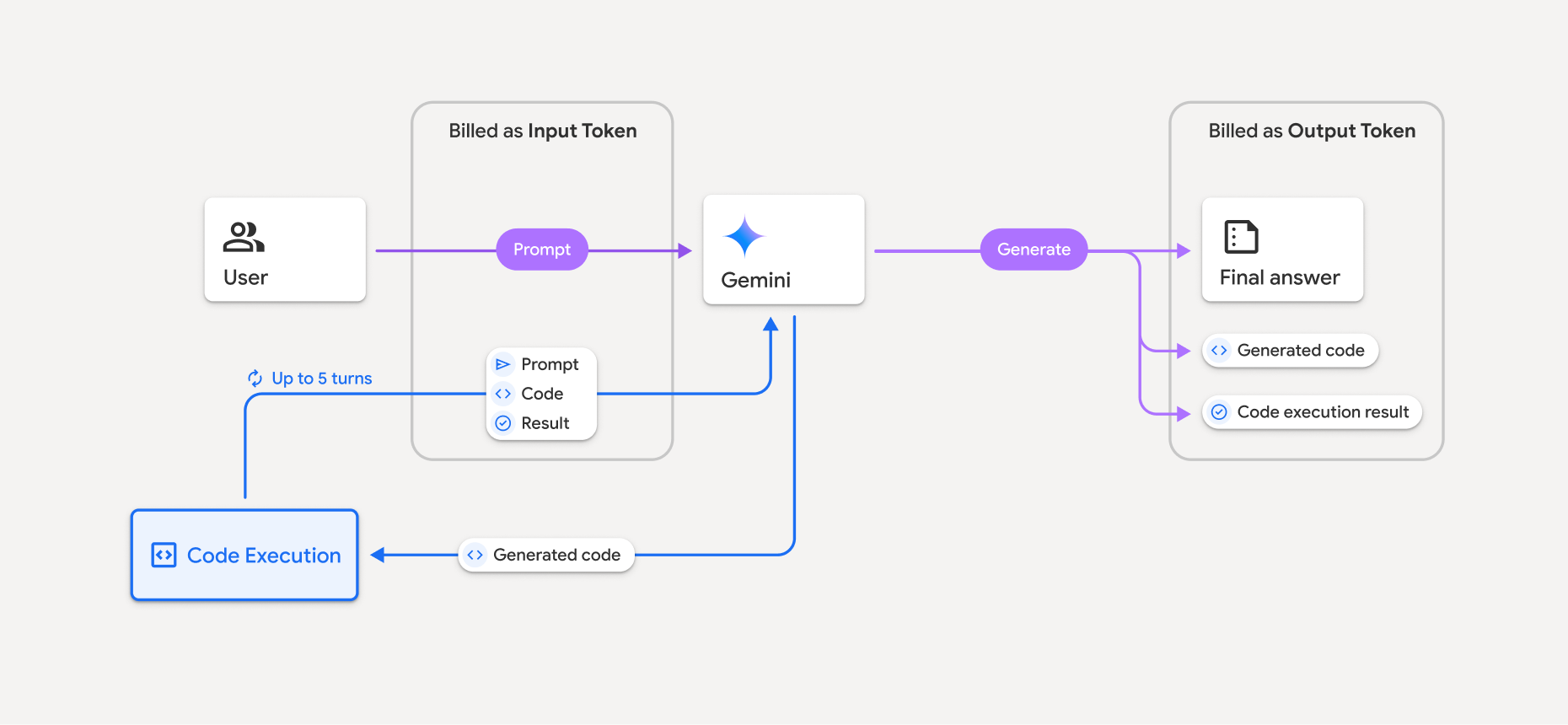
ข้อมูลสรุปเกี่ยวกับวิธีเรียกเก็บเงินโทเค็นเมื่อโมเดลใช้การเรียกใช้โค้ดมีดังนี้
ระบบจะเรียกเก็บเงินพรอมต์เดิม 1 ครั้ง โทเค็นของพรอมต์จะติดป้ายกำกับเป็นโทเค็น ระดับกลาง ซึ่งจะเรียกเก็บเงินเป็น โทเค็นอินพุต
ระบบจะเรียกเก็บเงินโค้ดที่สร้างขึ้นและผลลัพธ์ของโค้ดที่เรียกใช้ดังนี้
เมื่อใช้ระหว่างการเรียกใช้โค้ด ระบบจะติดป้ายกำกับเป็นโทเค็น ระดับกลาง ซึ่งจะเรียกเก็บเงินเป็น โทเค็นอินพุต
เมื่อรวมเป็นส่วนหนึ่งของการตอบกลับสุดท้าย ระบบจะเรียกเก็บเงินเป็น โทเค็นเอาต์พุต
ข้อมูลสรุปสุดท้ายในการตอบกลับสุดท้ายจะเรียกเก็บเงินเป็น โทเค็นเอาต์พุต
Gemini API จะรวมจำนวนโทเค็นระดับกลางไว้ในการตอบกลับจาก API เพื่อให้ คุณทราบว่าเหตุใดระบบจึงเรียกเก็บเงินโทเค็นอินพุตจากคุณนอกเหนือจากพรอมต์เริ่มต้น
โปรดทราบว่าโค้ดที่สร้างขึ้นอาจมีทั้งข้อความและเอาต์พุตมัลติโมดัล เช่น รูปภาพ
ข้อจำกัดและแนวทางปฏิบัติแนะนำ
โมเดลสามารถสร้างและเรียกใช้โค้ด Python เท่านั้น โดยไม่สามารถแสดงผลอาร์ติแฟกต์อื่นๆ เช่น ไฟล์สื่อ
การเรียกใช้โค้ดสามารถทำงานได้นานสูงสุด 30 วินาทีก่อนที่จะหมดเวลา
ในบางกรณี การเปิดใช้การเรียกใช้โค้ดอาจทำให้เกิดการถดถอยในส่วนอื่นๆ ของเอาต์พุตโมเดล (เช่น การเขียนเรื่องราว)
เครื่องมือการเรียกใช้โค้ดไม่รองรับ URI ของไฟล์เป็นอินพุต/เอาต์พุต อย่างไรก็ตาม เครื่องมือการเรียกใช้โค้ดรองรับอินพุตไฟล์และเอาต์พูตกราฟเป็นไบต์แบบอินไลน์ การใช้ความสามารถด้านอินพุตและเอาต์พุตเหล่านี้จะช่วยให้คุณอัปโหลดไฟล์ CSV และไฟล์ข้อความ ถามคำถามเกี่ยวกับไฟล์ และสร้างกราฟ Matplotlib เป็นส่วนหนึ่งของผลลัพธ์การเรียกใช้โค้ดได้ MIME ประเภทที่รองรับสำหรับไบต์แบบอินไลน์ ได้แก่
.cpp,.csv,.java,.jpeg,.js,.png,.py,.tsและ.xml
ไลบรารีที่รองรับ
สภาพแวดล้อมการเรียกใช้โค้ดมีไลบรารีต่อไปนี้ คุณติดตั้งไลบรารีของคุณเองไม่ได้
แสดงความคิดเห็น เกี่ยวกับประสบการณ์การใช้งาน Firebase AI Logic