
生成式模型擅长解决许多类型的问题。不过,它们会受到以下限制:
- 模型在训练后被冻结,导致知识过时。
- 无法查询或修改外部数据。
函数调用可以帮助您克服其中的一些限制。 函数调用有时也称为“工具使用”,因为它允许模型使用外部工具(例如 API 和函数)来生成最终回答。
本指南将向您展示如何实现与本页下一主要部分中所述场景类似的函数调用设置。概括来讲,在应用中设置函数调用需要执行的步骤如下:
第 1 步:编写一个函数,该函数可以向模型提供生成最终回答所需的信息(例如,该函数可以调用外部 API)。
第 2 步:创建函数声明,用于描述函数及其 参数。
第 3 步:在模型初始化期间提供函数声明,以便模型知道如何在需要时使用该函数。
第 4 步:设置应用,以便模型可以发送必要的 信息,供应用调用该函数。
第 5 步:将函数的回答传递回模型,以便模型 可以生成最终回答。
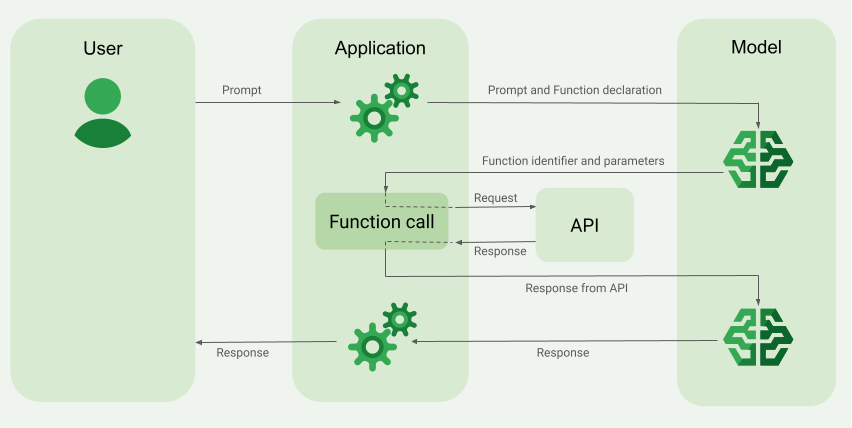
函数调用示例概览
向模型发送请求时,您还可以向模型提供一组“工具”(例如函数),以便模型可以使用这些工具来生成最终回答。为了利用这些函数并调用它们(“函数调用”),模型和应用需要相互传递信息,因此建议通过多轮对话界面使用函数调用。
假设您有一个应用,用户可以在其中输入如下提示:What was the weather in Boston on October 17, 2024?(2024 年 10 月 17 日波士顿的天气如何?)。
Gemini 模型可能不知道此天气信息;不过, 假设您知道有一个外部天气服务 API 可以提供此信息。 您可以使用函数调用为 Gemini 模型提供访问该 API 及其天气信息的途径。
首先,您在应用中编写一个与此假设的外部 API 交互的函数 fetchWeather,该函数具有以下输入和输出:
| 参数 | 类型 | 必需 | 说明 |
|---|---|---|---|
| 输入 | |||
location |
对象 | 是 | 要获取天气的城市及其所在州的名称。 仅支持美国境内的城市。必须始终是 city 和 state 的嵌套对象。
|
date |
字符串 | 是 | 要获取天气的日期(必须始终采用
YYYY-MM-DD 格式)。
|
| 输出 | |||
temperature |
整数 | 是 | 温度(华氏度) |
chancePrecipitation |
字符串 | 是 | 降水概率(以百分比表示) |
cloudConditions |
字符串 | 是 | 云况(clear、partlyCloudy、mostlyCloudy、cloudy 之一) |
在初始化模型时,您需要告知模型存在此 fetchWeather 函数,以及如何在需要时使用该函数来处理传入的请求。
这称为“函数声明”。模型不会
直接 调用该函数。相反,当模型处理传入的请求时,它会确定 fetchWeather 函数是否可以帮助它响应请求。如果模型确定该函数确实有用,则模型会生成结构化数据,以帮助应用调用该函数。
再次查看传入的请求:What was the weather in Boston on October 17, 2024?(2024 年 10 月 17 日波士顿的天气如何?)。模型可能会确定 fetchWeather 函数可以帮助它生成回答。模型会查看 fetchWeather 需要哪些输入参数,然后为该函数生成结构化输入数据,大致如下所示:
{
  functionName: fetchWeather,
  location: {
    city: Boston,
    state: Massachusetts  // the model can infer the state from the prompt
  },
  date: 2024-10-17
}
模型会将此结构化输入数据传递给应用,以便应用可以调用 fetchWeather 函数。当应用从 API 收到天气状况后,会将该信息传递给模型。借助此天气信息,模型可以完成最终处理,并针对初始请求 What was the weather in Boston on October 17, 2024?(2024 年 10 月 17 日波士顿的天气如何?)生成回答。
模型可能会提供如下的最终自然语言回答:On October 17, 2024, in Boston, it was 38 degrees Fahrenheit with partly cloudy skies.(2024 年 10 月 17 日,波士顿的天气为 38 华氏度,多云)。
实现函数调用
本指南中的以下步骤将向您展示如何实现与 函数调用示例概览 (请参阅本页顶部部分)中所述工作流类似的函数调用 设置。
准备工作
|
点击您的 Gemini API 提供商,以查看此页面上特定于提供商的内容和代码。 |
如果您尚未完成
入门指南,请先完成该指南。该指南介绍了如何
设置 Firebase 项目、将应用连接到 Firebase、添加 SDK、
为所选的 Gemini API 提供方初始化后端服务,以及
创建 GenerativeModel 实例。
如需测试和迭代提示,我们建议使用 Google AI Studio。
第 1 步:编写函数
假设您有一个应用,用户可以在其中输入如下提示:What was the weather in Boston on October 17, 2024?(2024 年 10 月 17 日波士顿的天气如何?)。Gemini
模型可能不知道此天气信息;不过,假设您知道有一个外部天气服务 API 可以提供此信息。本指南中的场景依赖于此假设的外部 API。
在应用中编写将与假设的外部 API 交互并向模型提供生成最终请求所需信息的函数。在此天气示例中,该函数将是调用此假设的外部 API 的 fetchWeather 函数。
Swift
// This function calls a hypothetical external API that returns
// a collection of weather information for a given location on a given date.
func fetchWeather(city: String, state: String, date: String) -> JSONObject {

  // TODO(developer): Write a standard function that would call an external weather API.

  // For demo purposes, this hypothetical response is hardcoded here in the expected format.
  return [
    "temperature": .number(38),
    "chancePrecipitation": .string("56%"),
    "cloudConditions": .string("partlyCloudy"),
  ]
}
Kotlin
// This function calls a hypothetical external API that returns
// a collection of weather information for a given location on a given date.
// `location` is an object of the form { city: string, state: string }
data class Location(val city: String, val state: String)

suspend fun fetchWeather(location: Location, date: String): JsonObject {

    // TODO(developer): Write a standard function that would call to an external weather API.

    // For demo purposes, this hypothetical response is hardcoded here in the expected format.
    return JsonObject(mapOf(
        "temperature" to JsonPrimitive(38),
        "chancePrecipitation" to JsonPrimitive("56%"),
        "cloudConditions" to JsonPrimitive("partlyCloudy")
    ))
}
Java
// This function calls a hypothetical external API that returns
// a collection of weather information for a given location on a given date.
// `location` is an object of the form { city: string, state: string }
public JsonObject fetchWeather(Location location, String date) {

  // TODO(developer): Write a standard function that would call to an external weather API.

  // For demo purposes, this hypothetical response is hardcoded here in the expected format.
  return new JsonObject(Map.of(
        "temperature", JsonPrimitive(38),
        "chancePrecipitation", JsonPrimitive("56%"),
        "cloudConditions", JsonPrimitive("partlyCloudy")));
}
Web
// This function calls a hypothetical external API that returns
// a collection of weather information for a given location on a given date.
// `location` is an object of the form { city: string, state: string }
async function fetchWeather({ location, date }) {

  // TODO(developer): Write a standard function that would call to an external weather API.

  // For demo purposes, this hypothetical response is hardcoded here in the expected format.
  return {
    temperature: 38,
    chancePrecipitation: "56%",
    cloudConditions: "partlyCloudy",
  };
}
Dart
// This function calls a hypothetical external API that returns
// a collection of weather information for a given location on a given date.
// `location` is an object of the form { city: string, state: string }
Future<Map<String, Object?>> fetchWeather(
  Location location, String date
) async {

  // TODO(developer): Write a standard function that would call to an external weather API.

  // For demo purposes, this hypothetical response is hardcoded here in the expected format.
  final apiResponse = {
    'temperature': 38,
    'chancePrecipitation': '56%',
    'cloudConditions': 'partlyCloudy',
  };
  return apiResponse;
}
Unity
// This function calls a hypothetical external API that returns
// a collection of weather information for a given location on a given date.
System.Collections.Generic.Dictionary<string, object> FetchWeather(
    string city, string state, string date) {

  // TODO(developer): Write a standard function that would call an external weather API.

  // For demo purposes, this hypothetical response is hardcoded here in the expected format.
  return new System.Collections.Generic.Dictionary<string, object>() {
    {"temperature", 38},
    {"chancePrecipitation", "56%"},
    {"cloudConditions", "partlyCloudy"},
  };
}
第 2 步:创建函数声明
创建您稍后将提供给模型的函数声明(本指南的下一步)。
在声明中,请在函数及其参数的说明中尽可能详细地说明。
模型会使用函数声明中的信息来确定要选择的函数,以及如何为对该函数的实际调用提供参数值。如需了解模型如何选择函数,以及如何控制该选择,请参阅本页稍后的 其他行为和选项 。
请注意您提供的架构的以下事项:
您必须以与 OpenAPI 架构兼容的架构格式提供函数声明。Vertex AI 对 OpenAPI 架构提供有限支持。
支持以下属性:
type、nullable、required、format、description、properties、items、enum。不支持以下属性:
default、optional、maximum、oneOf。
默认情况下,对于 Firebase AI Logic SDK,除非您在
optionalProperties数组中将所有字段指定为可选字段,否则所有字段都被视为 必填字段。对于这些可选字段,模型可以填充或跳过字段。请注意,如果您直接使用两个 Gemini API提供商的服务器 SDK 或 API,则此行为与它们的默认行为相反。
如需了解与函数声明相关的最佳实践(包括有关 名称和说明的提示),请参阅 最佳实践 在 Gemini Developer API 文档中。
您可以按如下方式编写函数声明:
Swift
let fetchWeatherTool = FunctionDeclaration(
  name: "fetchWeather",
  description: "Get the weather conditions for a specific city on a specific date.",
  parameters: [
    "location": .object(
      properties: [
        "city": .string(description: "The city of the location."),
        "state": .string(description: "The US state of the location."),
      ],
      description: """
      The name of the city and its state for which to get the weather. Only cities in the
      USA are supported.
      """
    ),
    "date": .string(
      description: """
      The date for which to get the weather. Date must be in the format: YYYY-MM-DD.
      """
    ),
  ]
)
Kotlin
val fetchWeatherTool = FunctionDeclaration(
    "fetchWeather",
    "Get the weather conditions for a specific city on a specific date.",
    mapOf(
        "location" to Schema.obj(
            mapOf(
                "city" to Schema.string("The city of the location."),
                "state" to Schema.string("The US state of the location."),
            ),
            description = "The name of the city and its state for which " +
                "to get the weather. Only cities in the " +
                "USA are supported."
        ),
        "date" to Schema.string("The date for which to get the weather." +
                                " Date must be in the format: YYYY-MM-DD."
        ),
    ),
)
Java
FunctionDeclaration fetchWeatherTool = new FunctionDeclaration(
        "fetchWeather",
        "Get the weather conditions for a specific city on a specific date.",
        Map.of("location",
                Schema.obj(Map.of(
                        "city", Schema.str("The city of the location."),
                        "state", Schema.str("The US state of the location."))),
                "date",
                Schema.str("The date for which to get the weather. " +
                              "Date must be in the format: YYYY-MM-DD.")),
        Collections.emptyList());
Web
const fetchWeatherTool: FunctionDeclarationsTool = {
  functionDeclarations: [
   {
      name: "fetchWeather",
      description:
        "Get the weather conditions for a specific city on a specific date",
      parameters: Schema.object({
        properties: {
          location: Schema.object({
            description:
              "The name of the city and its state for which to get " +
              "the weather. Only cities in the USA are supported.",
            properties: {
              city: Schema.string({
                description: "The city of the location."
              }),
              state: Schema.string({
                description: "The US state of the location."
              }),
            },
          }),
          date: Schema.string({
            description:
              "The date for which to get the weather. Date must be in the" +
              " format: YYYY-MM-DD.",
          }),
        },
      }),
    },
  ],
};
Dart
final fetchWeatherTool = FunctionDeclaration(
    'fetchWeather',
    'Get the weather conditions for a specific city on a specific date.',
    parameters: {
      'location': Schema.object(
        description:
          'The name of the city and its state for which to get'
          'the weather. Only cities in the USA are supported.',
        properties: {
          'city': Schema.string(
             description: 'The city of the location.'
           ),
          'state': Schema.string(
             description: 'The US state of the location.'
          ),
        },
      ),
      'date': Schema.string(
        description:
          'The date for which to get the weather. Date must be in the format: YYYY-MM-DD.'
      ),
    },
  );
Unity
var fetchWeatherTool = new Tool(new FunctionDeclaration(
  name: "fetchWeather",
  description: "Get the weather conditions for a specific city on a specific date.",
  parameters: new System.Collections.Generic.Dictionary<string, Schema>() {
    { "location", Schema.Object(
      properties: new System.Collections.Generic.Dictionary<string, Schema>() {
        { "city", Schema.String(description: "The city of the location.") },
        { "state", Schema.String(description: "The US state of the location.")}
      },
      description: "The name of the city and its state for which to get the weather. Only cities in the USA are supported."
    ) },
    { "date", Schema.String(
      description: "The date for which to get the weather. Date must be in the format: YYYY-MM-DD."
    )}
  }
));
第 3 步:在模型初始化期间提供函数声明
您可以在请求中提供最多 128 个函数声明。如需了解模型如何选择函数,以及
如何控制该选择(使用 toolConfig 设置
函数调用模式),请参阅本页稍后的
其他行为和选项
。
Swift
import FirebaseAILogic

// Initialize the Gemini Developer API backend service
// Create a `GenerativeModel` instance with a model that supports your use case
let model = FirebaseAI.firebaseAI(backend: .googleAI()).generativeModel(
  modelName: "gemini-3-flash-preview",
  // Provide the function declaration to the model.
  tools: [.functionDeclarations([fetchWeatherTool])]
)
Kotlin
// Initialize the Gemini Developer API backend service
// Create a `GenerativeModel` instance with a model that supports your use case
val model = Firebase.ai(backend = GenerativeBackend.googleAI()).generativeModel(
    modelName = "gemini-3-flash-preview",
    // Provide the function declaration to the model.
    tools = listOf(Tool.functionDeclarations(listOf(fetchWeatherTool)))
)
Java
// Initialize the Gemini Developer API backend service
// Create a `GenerativeModel` instance with a model that supports your use case
GenerativeModelFutures model = GenerativeModelFutures.from(
        FirebaseAI.getInstance(GenerativeBackend.googleAI())
                .generativeModel("gemini-3-flash-preview",
                        null,
                        null,
                        // Provide the function declaration to the model.
                        List.of(Tool.functionDeclarations(List.of(fetchWeatherTool)))));
Web
import { initializeApp } from "firebase/app";
import { getAI, getGenerativeModel, GoogleAIBackend } from "firebase/ai";

// TODO(developer) Replace the following with your app's Firebase configuration
// See: https://firebase.google.com/docs/web/learn-more#config-object
const firebaseConfig = {
  // ...
};

// Initialize FirebaseApp
const firebaseApp = initializeApp(firebaseConfig);

// Initialize the Gemini Developer API backend service
const firebaseAI = getAI(firebaseApp, { backend: new GoogleAIBackend() });

// Create a `GenerativeModel` instance with a model that supports your use case
const model = getGenerativeModel(firebaseAI, {
  model: "gemini-3-flash-preview",
  // Provide the function declaration to the model.
  tools: fetchWeatherTool
});
Dart
import 'package:firebase_ai/firebase_ai.dart';
import 'package:firebase_core/firebase_core.dart';
import 'firebase_options.dart';

// Initialize FirebaseApp
await Firebase.initializeApp(
  options: DefaultFirebaseOptions.currentPlatform,
);

// Initialize the Gemini Developer API backend service
// Create a `GenerativeModel` instance with a model that supports your use case
_functionCallModel = FirebaseAI.googleAI().generativeModel(
       model: 'gemini-3-flash-preview',
       // Provide the function declaration to the model.
       tools: [
         Tool.functionDeclarations([fetchWeatherTool]),
       ],
     );
Unity
using Firebase;
using Firebase.AI;

// Initialize the Gemini Developer API backend service
// Create a `GenerativeModel` instance with a model that supports your use case
var model = FirebaseAI.DefaultInstance.GetGenerativeModel(
  modelName: "gemini-3-flash-preview",
  // Provide the function declaration to the model.
  tools: new Tool[] { fetchWeatherTool }
);
了解如何选择适合您的应用场景和应用的模型,以及如何选择模型位置(可选)。
第 4 步:调用函数以调用外部 API
如果模型确定 fetchWeather 函数确实可以帮助它生成最终回答,则应用需要使用模型提供的结构化输入数据实际调用该函数。
由于需要在模型和应用之间来回传递信息,因此建议通过多轮对话界面使用函数调用。
以下代码段展示了如何告知应用模型想要使用 fetchWeather 函数。它还展示了模型已为函数调用(及其底层外部 API)提供了必要的输入参数值。
在此示例中,传入的请求包含提示 What was the weather in Boston on October 17, 2024?(2024 年 10 月 17 日波士顿的天气如何?)。模型从此提示推断出 fetchWeather 函数所需的输入参数(即 city、state 和 date)。
Swift
let chat = model.startChat()
let prompt = "What was the weather in Boston on October 17, 2024?"

// Send the user's question (the prompt) to the model using multi-turn chat.
let response = try await chat.sendMessage(prompt)

var functionResponses = [FunctionResponsePart]()

// When the model responds with one or more function calls, invoke the function(s).
for functionCall in response.functionCalls {
  if functionCall.name == "fetchWeather" {
    // TODO(developer): Handle invalid arguments.
    guard case let .object(location) = functionCall.args["location"] else { fatalError() }
    guard case let .string(city) = location["city"] else { fatalError() }
    guard case let .string(state) = location["state"] else { fatalError() }
    guard case let .string(date) = functionCall.args["date"] else { fatalError() }

    functionResponses.append(FunctionResponsePart(
      name: functionCall.name,
      // Forward the structured input data prepared by the model
      // to the hypothetical external API.
      response: fetchWeather(city: city, state: state, date: date)
    ))
  }
  // TODO(developer): Handle other potential function calls, if any.
}
Kotlin
val prompt = "What was the weather in Boston on October 17, 2024?"
val chat = model.startChat()
// Send the user's question (the prompt) to the model using multi-turn chat.
val result = chat.sendMessage(prompt)

val functionCalls = result.functionCalls
// When the model responds with one or more function calls, invoke the function(s).
val fetchWeatherCall = functionCalls.find { it.name == "fetchWeather" }

// Forward the structured input data prepared by the model
// to the hypothetical external API.
val functionResponse = fetchWeatherCall?.let {
    // Alternatively, if your `Location` class is marked as @Serializable, you can use
    // val location = Json.decodeFromJsonElement<Location>(it.args["location"]!!)
    val location = Location(
        it.args["location"]!!.jsonObject["city"]!!.jsonPrimitive.content,
        it.args["location"]!!.jsonObject["state"]!!.jsonPrimitive.content
    )
    val date = it.args["date"]!!.jsonPrimitive.content
    fetchWeather(location, date)
}
Java
String prompt = "What was the weather in Boston on October 17, 2024?";
ChatFutures chatFutures = model.startChat();
// Send the user's question (the prompt) to the model using multi-turn chat.
ListenableFuture<GenerateContentResponse> response =
        chatFutures.sendMessage(new Content("user", List.of(new TextPart(prompt))));

ListenableFuture<JsonObject> handleFunctionCallFuture = Futures.transform(response, result -> {
    for (FunctionCallPart functionCall : result.getFunctionCalls()) {
        if (functionCall.getName().equals("fetchWeather")) {
            Map<String, JsonElement> args = functionCall.getArgs();
            JsonObject locationJsonObject =
                    JsonElementKt.getJsonObject(args.get("location"));
            String city =
                    JsonElementKt.getContentOrNull(
                            JsonElementKt.getJsonPrimitive(
                                    locationJsonObject.get("city")));
            String state =
                    JsonElementKt.getContentOrNull(
                            JsonElementKt.getJsonPrimitive(
                                    locationJsonObject.get("state")));
            Location location = new Location(city, state);

            String date = JsonElementKt.getContentOrNull(
                    JsonElementKt.getJsonPrimitive(
                            args.get("date")));
            return fetchWeather(location, date);
        }
    }
    return null;
}, Executors.newSingleThreadExecutor());
Web
const chat = model.startChat();
const prompt = "What was the weather in Boston on October 17, 2024?";

// Send the user's question (the prompt) to the model using multi-turn chat.
let result = await chat.sendMessage(prompt);
const functionCalls = result.response.functionCalls();
let functionCall;
let functionResult;
// When the model responds with one or more function calls, invoke the function(s).
if (functionCalls.length > 0) {
  for (const call of functionCalls) {
    if (call.name === "fetchWeather") {
      // Forward the structured input data prepared by the model
      // to the hypothetical external API.
      functionResult = await fetchWeather(call.args);
      functionCall = call;
    }
  }
}
Dart
final chat = _functionCallModel.startChat();
const prompt = 'What was the weather in Boston on October 17, 2024?';

// Send the user's question (the prompt) to the model using multi-turn chat.
var response = await chat.sendMessage(Content.text(prompt));

final functionCalls = response.functionCalls.toList();
// When the model responds with one or more function calls, invoke the function(s).
if (functionCalls.isNotEmpty) {
  for (final functionCall in functionCalls) {
    if (functionCall.name == 'fetchWeather') {
      Map<String, dynamic> location =
          functionCall.args['location']! as Map<String, dynamic>;
      var date = functionCall.args['date']! as String;
      var city = location['city'] as String;
      var state = location['state'] as String;
      final functionResult =
          await fetchWeather(Location(city, state), date);
      // Send the response to the model so that it can use the result to
      // generate text for the user.
      response = await functionCallChat.sendMessage(
        Content.functionResponse(functionCall.name, functionResult),
      );
    }
  }
} else {
  throw UnimplementedError(
    'Function not declared to the model: ${functionCall.name}',
  );
}
Unity
var chat = model.StartChat();
var prompt = "What was the weather in Boston on October 17, 2024?";

// Send the user's question (the prompt) to the model using multi-turn chat.
var response = await chat.SendMessageAsync(prompt);

var functionResponses = new List<ModelContent>();

foreach (var functionCall in response.FunctionCalls) {
  if (functionCall.Name == "fetchWeather") {
    // TODO(developer): Handle invalid arguments.
    var city = functionCall.Args["city"] as string;
    var state = functionCall.Args["state"] as string;
    var date = functionCall.Args["date"] as string;

    functionResponses.Add(ModelContent.FunctionResponse(
      name: functionCall.Name,
      // Forward the structured input data prepared by the model
      // to the hypothetical external API.
      response: FetchWeather(city: city, state: state, date: date)
    ));
  }
  // TODO(developer): Handle other potential function calls, if any.
}
第 5 步:向模型提供函数的输出以生成最终回答
在 fetchWeather 函数返回天气信息后,应用需要将其传递回模型。
然后,模型执行最终处理,并生成如下的最终自然语言回答:On October 17, 2024 in Boston, it was 38 degrees Fahrenheit with partly cloudy skies.(2024 年 10 月 17 日,波士顿的天气为 38 华氏度,多云)。
Swift
// Send the response(s) from the function back to the model
// so that the model can use it to generate its final response.
let finalResponse = try await chat.sendMessage(
  [ModelContent(role: "function", parts: functionResponses)]
)

// Log the text response.
print(finalResponse.text ?? "No text in response.")
Kotlin
// Send the response(s) from the function back to the model
// so that the model can use it to generate its final response.
val finalResponse = chat.sendMessage(content("function") {
    part(FunctionResponsePart("fetchWeather", functionResponse!!))
})

// Log the text response.
println(finalResponse.text ?: "No text in response")
Java
ListenableFuture<GenerateContentResponse> modelResponseFuture = Futures.transformAsync(
  handleFunctionCallFuture,
  // Send the response(s) from the function back to the model
  // so that the model can use it to generate its final response.
  functionCallResult -> chatFutures.sendMessage(new Content("function",
  List.of(new FunctionResponsePart(
          "fetchWeather", functionCallResult)))),
  Executors.newSingleThreadExecutor());

Futures.addCallback(modelResponseFuture, new FutureCallback<GenerateContentResponse>() {
@Override
public void onSuccess(GenerateContentResponse result) {
  if (result.getText() != null) {
      // Log the text response.
      System.out.println(result.getText());
  }
}

@Override
public void onFailure(Throwable t) {
  // handle error
}
}, Executors.newSingleThreadExecutor());
Web
// Send the response from the function back to the model
// so that the model can use it to generate its final response.
result = await chat.sendMessage([
  {
    functionResponse: {
      name: functionCall.name, // "fetchWeather"
      response: functionResult,
    },
  },
]);
console.log(result.response.text());
Dart
// Send the response from the function back to the model
// so that the model can use it to generate its final response.
response = await chat
     .sendMessage(Content.functionResponse(functionCall.name, functionResult));
Unity
// Send the response(s) from the function back to the model
// so that the model can use it to generate its final response.
var finalResponse = await chat.SendMessageAsync(functionResponses);

// Log the text response.
UnityEngine.Debug.Log(finalResponse.Text ?? "No text in response.");
其他行为和选项
以下是函数调用的一些其他行为(您需要在代码中适应这些行为)和您可以控制的选项。
模型可能会要求再次调用某个函数或调用另一个函数。
如果一次函数调用的回答不足以让模型生成最终回答,则模型可能会要求进行额外的函数调用,或要求调用完全不同的函数。只有当您在函数声明列表中向模型提供多个函数时,才会发生后一种情况。
您的应用需要适应模型可能会要求进行额外的函数调用。
模型可能会要求同时调用多个函数。
您可以在函数声明列表中向模型提供最多 128 个函数。鉴于此,模型可能会确定需要多个函数来帮助它生成最终回答。它可能会决定同时调用其中的一些函数,这称为并行函数调用 。
您的应用需要适应模型可能会要求同时运行多个函数,并且应用需要将函数的所有回答提供给模型。
您可以控制模型如何以及是否可以要求调用函数。
您可以对模型应如何以及是否应使用提供的函数声明进行一些限制。这称为设置函数调用模式 。 下面是一些示例:
您可以强制模型始终使用函数调用,而不是允许模型在即时自然语言回答和函数调用之间进行选择。这称为强制函数调用 。
如果您提供多个函数声明,则可以将模型限制为仅使用所提供函数的一部分。
您可以通过添加工具配置 (toolConfig) 以及提示和函数声明来实现这些限制(或模式)。在工具配置中,您可以指定以下模式之一。 最有用的模式是 ANY。
| 模式 | 说明 |
|---|---|
AUTO |
默认模型行为。模型决定是使用函数 调用还是自然语言回答。 |
ANY |
模型必须使用函数调用(“强制函数调用”)。如需将模型限制为部分函数,请在
allowedFunctionNames 中指定允许使用的函数名称。
|
NONE |
模型不得使用函数调用。这种行为等同于 模型请求没有任何关联的函数声明。 |
你还可以做些什么?
试用其他功能
了解如何控制内容生成
您还可以使用 Google AI Studio 尝试提示和模型配置,甚至获取 Google AI Studio生成的代码段。
详细了解支持的模型
了解适用于各种应用场景的 模型 及其 配额和 价格。提供反馈 有关您的使用体验Firebase AI Logic