

Выполнение кода — это инструмент, позволяющий модели генерировать и запускать код на языке Python. Модель может итеративно обучаться на основе результатов выполнения кода до тех пор, пока не получит конечный результат.
Вы можете использовать выполнение кода для создания функций, которые выигрывают от логического вывода на основе кода и генерируют текстовый вывод. Например, вы можете использовать выполнение кода для решения уравнений или обработки текста. Вы также можете использовать библиотеки, входящие в среду выполнения кода, для выполнения более специализированных задач.
Как и в случае со всеми инструментами, которые вы предоставляете модели, модель сама решает, когда использовать выполнение кода.
Сравнение выполнения кода и вызова функций.
Выполнение кода и вызов функций — это схожие функции. В целом, следует отдавать предпочтение выполнению кода, если модель позволяет реализовать ваш сценарий использования. Выполнение кода также проще в использовании, поскольку его достаточно просто включить.
Вот ещё несколько различий между выполнением кода и вызовом функции:
| Выполнение кода | Вызов функции |
|---|---|
| Используйте выполнение кода, если хотите, чтобы модель сама писала и запускала код на Python и возвращала результат. | Используйте вызов функций, если у вас уже есть собственные функции, которые вы хотите запустить локально. |
| Выполнение кода позволяет модели запускать код в бэкэнде API в фиксированной, изолированной среде. | Вызов функций позволяет запускать функции, запрашиваемые моделью, в любой удобной для вас среде. |
| Выполнение кода завершается одним запросом. Хотя вы можете использовать выполнение кода с функцией чата, это не обязательно. | Для вызова функции требуется дополнительный запрос на отправку результата каждого вызова функции. Поэтому необходимо использовать функцию чата. |
Поддерживаемые модели
-
gemini-3-pro-preview -
gemini-3-flash-preview -
gemini-2.5-pro -
gemini-2.5-flash -
gemini-2.5-flash-lite -
gemini-2.0-flash-001(и его автоматически обновляемый псевдонимgemini-2.0-flash)
Использовать выполнение кода
Выполнение кода возможно как с текстовым, так и с мультимодальным вводом, но ответ всегда будет либо текстовым, либо только кодовым.
Прежде чем начать
Чтобы просмотреть контент и код, относящиеся к вашему поставщику API Gemini , нажмите на него. |
Если вы еще этого не сделали, пройдите руководство по началу работы , в котором описывается, как настроить проект Firebase, подключить приложение к Firebase, добавить SDK, инициализировать бэкэнд-сервис для выбранного вами поставщика API Gemini и создать экземпляр GenerativeModel .
Разрешить выполнение кода
| Прежде чем опробовать этот пример, выполните раздел «Перед началом работы » этого руководства, чтобы настроить свой проект и приложение. В этом разделе вам также нужно будет нажать кнопку для выбранного вами поставщика API Gemini , чтобы увидеть на этой странице контент, относящийся к данному поставщику . |
При создании экземпляра GenerativeModel укажите CodeExecution в качестве инструмента, который модель сможет использовать для генерации ответа. Это позволит модели генерировать и запускать код Python.
Быстрый
import FirebaseAILogic

// Initialize the Gemini Developer API backend service
let ai = FirebaseAI.firebaseAI(backend: .googleAI())

// Create a `GenerativeModel` instance with a model that supports your use case
let model = ai.generativeModel(
  modelName: "GEMINI_MODEL_NAME",
  // Provide code execution as a tool that the model can use to generate its response.
  tools: [.codeExecution()]
)

let prompt = """
What is the sum of the first 50 prime numbers?
Generate and run code for the calculation, and make sure you get all 50.
"""

let response = try await model.generateContent(prompt)

guard let candidate = response.candidates.first else {
  print("No candidates in response.")
  return
}
for part in candidate.content.parts {
  if let textPart = part as? TextPart {
    print("Text = \(textPart.text)")
  } else if let executableCode = part as? ExecutableCodePart {
    print("Code = \(executableCode.code), Language = \(executableCode.language)")
  } else if let executionResult = part as? CodeExecutionResultPart {
    print("Outcome = \(executionResult.outcome), Result = \(executionResult.output ?? "no output")")
  }
}
Kotlin
// Initialize the Gemini Developer API backend service
// Create a `GenerativeModel` instance with a model that supports your use case
val model = Firebase.ai(backend = GenerativeBackend.googleAI()).generativeModel(
    modelName = "GEMINI_MODEL_NAME",
    // Provide code execution as a tool that the model can use to generate its response.
    tools = listOf(Tool.codeExecution())
)

val prompt =  "What is the sum of the first 50 prime numbers? " +
        "Generate and run code for the calculation, and make sure you get all 50."

val response = model.generateContent(prompt)

response.candidates.first().content.parts.forEach {
    if(it is TextPart) {
        println("Text = ${it.text}")
    }
    if(it is ExecutableCodePart) {
        println("Code = ${it.code}, Language = ${it.language}")
    }
    if(it is CodeExecutionResultPart) {
       println("Outcome = ${it.outcome}, Result = ${it.output}")
    }
}
Java
// Initialize the Gemini Developer API backend service
// Create a `GenerativeModel` instance with a model that supports your use case
GenerativeModel ai = FirebaseAI.getInstance(GenerativeBackend.googleAI())
                .generativeModel("GEMINI_MODEL_NAME",
                        null,
                        null,
                        // Provide code execution as a tool that the model can use to generate its response.
                        List.of(Tool.codeExecution()));

// Use the GenerativeModelFutures Java compatibility layer which offers
// support for ListenableFuture and Publisher APIs
GenerativeModelFutures model = GenerativeModelFutures.from(ai);

String text = "What is the sum of the first 50 prime numbers? " +
        "Generate and run code for the calculation, and make sure you get all 50.";

Content prompt = new Content.Builder()
    .addText(text)
    .build();

ListenableFuture response = model.generateContent(prompt);

Futures.addCallback(response, new FutureCallback() {
   @Override
public void onSuccess(GenerateContentResponse response)   {
    // Access the first candidate's content parts
    List parts = response.getCandidates().get(0).getContent().getParts();
    for (Part part : parts) {
        if (part instanceof TextPart) {
            TextPart textPart = (TextPart) part;
            System.out.println("Text = " + textPart.getText());
        } else if (part instanceof ExecutableCodePart) {
            ExecutableCodePart codePart = (ExecutableCodePart) part;
            System.out.println("Code = " + codePart.getCode() + ", Language = " + codePart.getLanguage());
        } else if (part instanceof CodeExecutionResultPart) {
            CodeExecutionResultPart resultPart = (CodeExecutionResultPart) part;
            System.out.println("Outcome = " + resultPart.getOutcome() + ", Result = " + resultPart.getOutput());
        }
    }
}

    @Override
    public void onFailure(Throwable t) {
        t.printStackTrace();
    }
}, executor);
Web
import { initializeApp } from "firebase/app";
import { getAI, getGenerativeModel, GoogleAIBackend } from "firebase/ai";

// TODO(developer) Replace the following with your app's Firebase configuration
// See: https://firebase.google.com/docs/web/learn-more#config-object
const firebaseConfig = {
  // ...
};

// Initialize FirebaseApp
const firebaseApp = initializeApp(firebaseConfig);

// Initialize the Gemini Developer API backend service
const ai = getAI(firebaseApp, { backend: new GoogleAIBackend() });

// Create a `GenerativeModel` instance with a model that supports your use case
const model = getGenerativeModel(
  ai,
  {
    model: "GEMINI_MODEL_NAME",
    // Provide code execution as a tool that the model can use to generate its response.
    tools: [{ codeExecution: {} }]
  }
);

const prompt =  "What is the sum of the first 50 prime numbers? " +
        "Generate and run code for the calculation, and make sure you get all 50."

const result = await model.generateContent(prompt);
const response = await result.response;

const parts = response.candidates?.[0].content.parts;

if (parts) {
  parts.forEach((part) => {
    if (part.text) {
        console.log(`Text: ${part.text}`);
    } else if (part.executableCode) {
      console.log(
        `Code: ${part.executableCode.code}, Language: ${part.executableCode.language}`
      );
    } else if (part.codeExecutionResult) {
      console.log(
        `Outcome: ${part.codeExecutionResult.outcome}, Result: ${part.codeExecutionResult.output}`
      );
    }
  });
}
Dart
import 'package:firebase_core/firebase_core.dart';
import 'package:firebase_ai/firebase_ai.dart';
import 'firebase_options.dart';

// Initialize FirebaseApp
await Firebase.initializeApp(
  options: DefaultFirebaseOptions.currentPlatform,
);

// Initialize the Gemini Developer API backend service
// Create a `GenerativeModel` instance with a model that supports your use case
final model = FirebaseAI.googleAI().generativeModel(
  model: 'GEMINI_MODEL_NAME',
  // Provide code execution as a tool that the model can use to generate its response.
  tools: [
    Tool.codeExecution(),
  ],
);

const prompt = 'What is the sum of the first 50 prime numbers? '
    'Generate and run code for the calculation, and make sure you get all 50.';

final response = await model.generateContent([Content.text(prompt)]);

final buffer = StringBuffer();
    for (final part in response.candidates.first.content.parts) {
      if (part is TextPart) {
        buffer.writeln(part.text);
      } else if (part is ExecutableCodePart) {
        buffer.writeln('Executable Code:');
        buffer.writeln('Language: ${part.language}');
        buffer.writeln('Code:');
        buffer.writeln(part.code);
      } else if (part is CodeExecutionResultPart) {
        buffer.writeln('Code Execution Result:');
        buffer.writeln('Outcome: ${part.outcome}');
        buffer.writeln('Output:');
        buffer.writeln(part.output);
      }
    }
Единство
using Firebase;
using Firebase.AI;

// Initialize the Gemini Developer API backend service
var ai = FirebaseAI.GetInstance(FirebaseAI.Backend.GoogleAI());

// Create a `GenerativeModel` instance with a model that supports your use case
var model = ai.GetGenerativeModel(
  modelName: "GEMINI_MODEL_NAME",
  // Provide code execution as a tool that the model can use to generate its response.
  tools: new Tool[] { new Tool(new CodeExecution()) }
);

var prompt = "What is the sum of the first 50 prime numbers? " +
        "Generate and run code for the calculation, and make sure you get all 50.";

var response = await model.GenerateContentAsync(prompt);

foreach (var part in response.Candidates.First().Content.Parts) {
  if (part is ModelContent.TextPart tp) {
    UnityEngine.Debug.Log($"Text = {tp.Text}");
  } else if (part is ModelContent.ExecutableCodePart esp) {
    UnityEngine.Debug.Log($"Code = {esp.Code}, Language = {esp.Language}");
  } else if (part is ModelContent.CodeExecutionResultPart cerp) {
    UnityEngine.Debug.Log($"Outcome = {cerp.Outcome}, Output = {cerp.Output}");
  }
}
Узнайте, как выбрать модель.подходит для вашего сценария использования и приложения.
Результат может выглядеть примерно так (форматирован для удобства чтения):
Okay, I need to calculate the sum of the first 50 prime numbers. Here's how I'll
approach this:

1.  **Generate Prime Numbers:** I'll use an iterative method to find prime
    numbers. I'll start with 2 and check if each subsequent number is divisible
    by any number between 2 and its square root. If not, it's a prime.
2.  **Store Primes:** I'll store the prime numbers in a list until I have 50 of
    them.
3.  **Calculate the Sum:**  Finally, I'll sum the prime numbers in the list.

Here's the Python code to do this:

def is_prime(n):
  """Efficiently checks if a number is prime."""
  if n <= 1:
    return False
  if n <= 3:
    return True
  if n % 2 == 0 or n % 3 == 0:
    return False
  i = 5
  while i * i <= n:
    if n % i == 0 or n % (i + 2) == 0:
      return False
    i += 6
  return True

primes = []
num = 2
while len(primes) < 50:
  if is_prime(num):
    primes.append(num)
  num += 1

sum_of_primes = sum(primes)
print(f'{primes=}')
print(f'{sum_of_primes=}')

primes=[2, 3, 5, 7, 11, 13, 17, 19, 23, 29, 31, 37, 41, 43, 47, 53, 59, 61, 67,
71, 73, 79, 83, 89, 97, 101, 103, 107, 109, 113, 127, 131, 137, 139, 149, 151,
157, 163, 167, 173, 179, 181, 191, 193, 197, 199, 211, 223, 227, 229]
sum_of_primes=5117

The sum of the first 50 prime numbers is 5117.
Этот результат объединяет несколько частей контента, которые модель возвращает при выполнении кода:
-
text: Встроенный текст, сгенерированный моделью. -
executableCode: Код, сгенерированный моделью, предназначенный для выполнения. -
codeExecutionResult: Результат выполнения кода
Правила именования этих компонентов различаются в зависимости от языка программирования.
Использовать выполнение кода в чате
Вы также можете использовать выполнение кода в рамках чата:
Быстрый
import FirebaseAILogic

// Initialize the Gemini Developer API backend service
let ai = FirebaseAI.firebaseAI(backend: .googleAI())

// Create a `GenerativeModel` instance with a model that supports your use case
let model = ai.generativeModel(
  modelName: "GEMINI_MODEL_NAME",
  // Provide code execution as a tool that the model can use to generate its response.
  tools: [.codeExecution()]
)

let prompt = """
What is the sum of the first 50 prime numbers?
Generate and run code for the calculation, and make sure you get all 50.
"""
let chat = model.startChat()

let response = try await chat.sendMessage(prompt)

guard let candidate = response.candidates.first else {
  print("No candidates in response.")
  return
}
for part in candidate.content.parts {
  if let textPart = part as? TextPart {
    print("Text = \(textPart.text)")
  } else if let executableCode = part as? ExecutableCodePart {
    print("Code = \(executableCode.code), Language = \(executableCode.language)")
  } else if let executionResult = part as? CodeExecutionResultPart {
    print("Outcome = \(executionResult.outcome), Result = \(executionResult.output ?? "no output")")
  }
}
Kotlin
// Initialize the Gemini Developer API backend service
// Create a `GenerativeModel` instance with a model that supports your use case
val model = Firebase.ai(backend = GenerativeBackend.googleAI()).generativeModel(
    modelName = "GEMINI_MODEL_NAME",
    // Provide code execution as a tool that the model can use to generate its response.
    tools = listOf(Tool.codeExecution())
)

val prompt =  "What is the sum of the first 50 prime numbers? " +
        "Generate and run code for the calculation, and make sure you get all 50."
val chat = model.startChat()
val response = chat.sendMessage(prompt)

response.candidates.first().content.parts.forEach {
    if(it is TextPart) {
        println("Text = ${it.text}")
    }
    if(it is ExecutableCodePart) {
        println("Code = ${it.code}, Language = ${it.language}")
    }
    if(it is CodeExecutionResultPart) {
       println("Outcome = ${it.outcome}, Result = ${it.output}")
    }
}
Java
// Initialize the Gemini Developer API backend service
// Create a `GenerativeModel` instance with a model that supports your use case
GenerativeModel ai = FirebaseAI.getInstance(GenerativeBackend.googleAI())
                .generativeModel("GEMINI_MODEL_NAME",
                        null,
                        null,
                        // Provide code execution as a tool that the model can use to generate its response.
                        List.of(Tool.codeExecution()));

// Use the GenerativeModelFutures Java compatibility layer which offers
// support for ListenableFuture and Publisher APIs
GenerativeModelFutures model = GenerativeModelFutures.from(ai);
String text = "What is the sum of the first 50 prime numbers? " +
        "Generate and run code for the calculation, and make sure you get all 50.";

Content prompt = new Content.Builder()
    .addText(text)
    .build();

ChatFutures chat = model.startChat();
ListenableFuture response = chat.sendMessage(prompt);

Futures.addCallback(response, new FutureCallback() {
   @Override
public void onSuccess(GenerateContentResponse response)   {
    // Access the first candidate's content parts
    List parts = response.getCandidates().get(0).getContent().getParts();
    for (Part part : parts) {
        if (part instanceof TextPart) {
            TextPart textPart = (TextPart) part;
            System.out.println("Text = " + textPart.getText());
        } else if (part instanceof ExecutableCodePart) {
            ExecutableCodePart codePart = (ExecutableCodePart) part;
            System.out.println("Code = " + codePart.getCode() + ", Language = " + codePart.getLanguage());
        } else if (part instanceof CodeExecutionResultPart) {
            CodeExecutionResultPart resultPart = (CodeExecutionResultPart) part;
            System.out.println("Outcome = " + resultPart.getOutcome() + ", Result = " + resultPart.getOutput());
        }
    }
}

    @Override
    public void onFailure(Throwable t) {
        t.printStackTrace();
    }
}, executor);
Web
import { initializeApp } from "firebase/app";
import { getAI, getGenerativeModel, GoogleAIBackend } from "firebase/ai";

// TODO(developer) Replace the following with your app's Firebase configuration
// See: https://firebase.google.com/docs/web/learn-more#config-object
const firebaseConfig = {
  // ...
};

// Initialize FirebaseApp
const firebaseApp = initializeApp(firebaseConfig);

// Initialize the Gemini Developer API backend service
const ai = getAI(firebaseApp, { backend: new GoogleAIBackend() });

// Create a `GenerativeModel` instance with a model that supports your use case
const model = getGenerativeModel(
  ai,
  {
    model: "GEMINI_MODEL_NAME",
    // Provide code execution as a tool that the model can use to generate its response.
    tools: [{ codeExecution: {} }]
  }
);

const prompt =  "What is the sum of the first 50 prime numbers? " +
        "Generate and run code for the calculation, and make sure you get all 50."
const chat = model.startChat()
const result = await chat.sendMessage(prompt);

const parts = result.response.candidates?.[0].content.parts;

if (parts) {
  parts.forEach((part) => {
    if (part.text) {
        console.log(`Text: ${part.text}`);
    } else if (part.executableCode) {
      console.log(
        `Code: ${part.executableCode.code}, Language: ${part.executableCode.language}`
      );
    } else if (part.codeExecutionResult) {
      console.log(
        `Outcome: ${part.codeExecutionResult.outcome}, Result: ${part.codeExecutionResult.output}`
      );
    }
  });
}
Dart
import 'package:firebase_core/firebase_core.dart';
import 'package:firebase_ai/firebase_ai.dart';
import 'firebase_options.dart';

// Initialize FirebaseApp
await Firebase.initializeApp(
  options: DefaultFirebaseOptions.currentPlatform,
);

// Initialize the Gemini Developer API backend service
// Create a `GenerativeModel` instance with a model that supports your use case
final model = FirebaseAI.googleAI().generativeModel(
  model: 'GEMINI_MODEL_NAME',
  // Provide code execution as a tool that the model can use to generate its response.
  tools: [
    Tool.codeExecution(),
  ],
);

final codeExecutionChat = await model.startChat();

const prompt = 'What is the sum of the first 50 prime numbers? '
    'Generate and run code for the calculation, and make sure you get all 50.';
final response = await codeExecutionChat.sendMessage(Content.text(prompt));

final buffer = StringBuffer();
    for (final part in response.candidates.first.content.parts) {
      if (part is TextPart) {
        buffer.writeln(part.text);
      } else if (part is ExecutableCodePart) {
        buffer.writeln('Executable Code:');
        buffer.writeln('Language: ${part.language}');
        buffer.writeln('Code:');
        buffer.writeln(part.code);
      } else if (part is CodeExecutionResultPart) {
        buffer.writeln('Code Execution Result:');
        buffer.writeln('Outcome: ${part.outcome}');
        buffer.writeln('Output:');
        buffer.writeln(part.output);
      }
    }
Единство
using Firebase;
using Firebase.AI;

// Initialize the Gemini Developer API backend service
var ai = FirebaseAI.GetInstance(FirebaseAI.Backend.GoogleAI());

// Create a `GenerativeModel` instance with a model that supports your use case
var model = ai.GetGenerativeModel(
  modelName: "GEMINI_MODEL_NAME",
  // Provide code execution as a tool that the model can use to generate its response.
  tools: new Tool[] { new Tool(new CodeExecution()) }
);

var prompt = "What is the sum of the first 50 prime numbers? " +
        "Generate and run code for the calculation, and make sure you get all 50.";
var chat = model.StartChat();
var response = await chat.SendMessageAsync(prompt);

foreach (var part in response.Candidates.First().Content.Parts) {
  if (part is ModelContent.TextPart tp) {
    UnityEngine.Debug.Log($"Text = {tp.Text}");
  } else if (part is ModelContent.ExecutableCodePart esp) {
    UnityEngine.Debug.Log($"Code = {esp.Code}, Language = {esp.Language}");
  } else if (part is ModelContent.CodeExecutionResultPart cerp) {
    UnityEngine.Debug.Log($"Outcome = {cerp.Outcome}, Output = {cerp.Output}");
  }
}
Узнайте, как выбрать модель.подходит для вашего сценария использования и приложения.
Цены
За включение выполнения кода и предоставление его в качестве инструмента для модели дополнительная плата не взимается. Если модель решит использовать выполнение кода, то с вас будет взиматься плата по текущему тарифу входных и выходных токенов в зависимости от используемой вами модели Gemini.
На следующей диаграмме показана модель выставления счетов за выполнение кода:
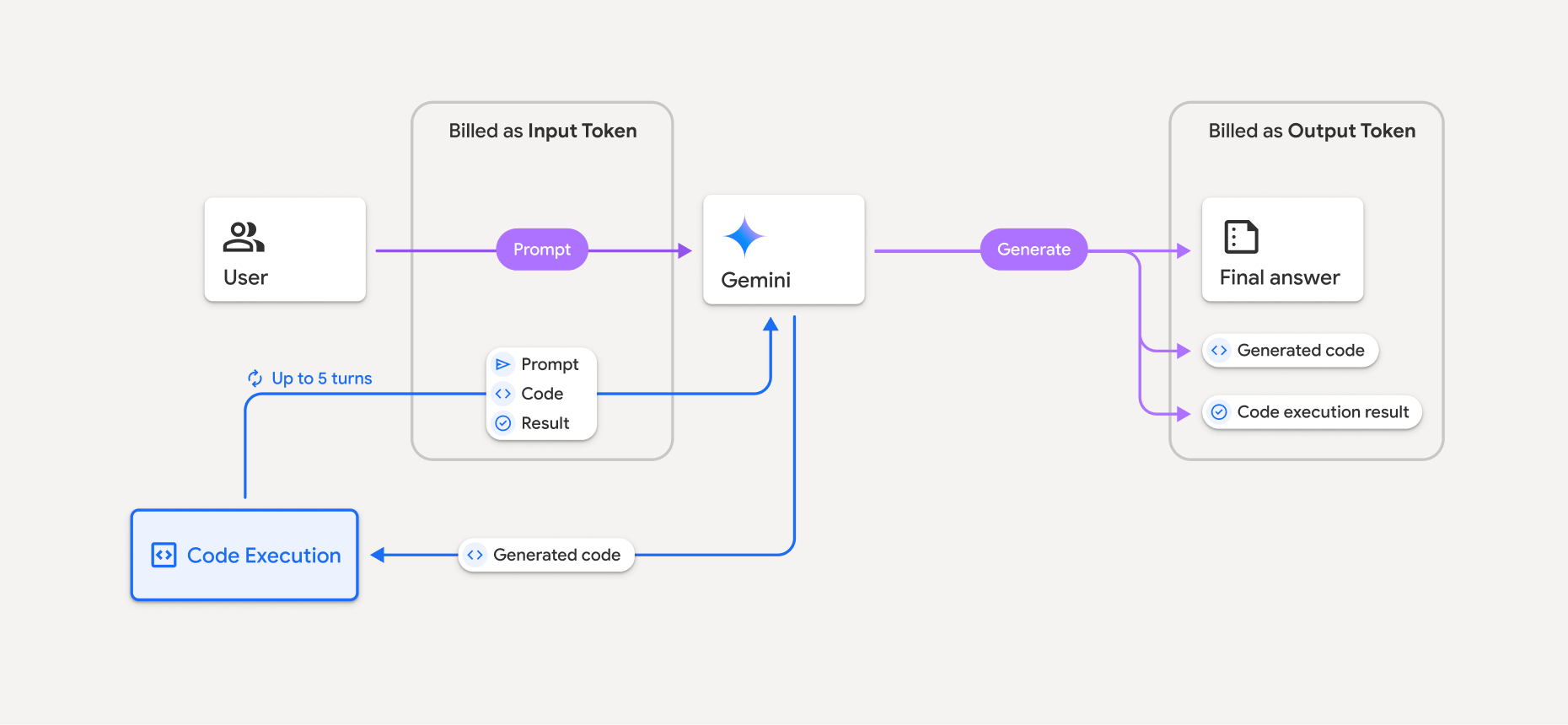
Вот краткое описание того, как происходит выставление счетов за токены при использовании моделью выполнения кода:
Исходный запрос оплачивается один раз. Его токены помечены как промежуточные токены, которые оплачиваются как входные токены .
Сгенерированный код и результат его выполнения оплачиваются следующим образом:
Когда они используются во время выполнения кода, они помечаются как промежуточные токены, которые выдаются за входные токены .
Когда они включаются в состав окончательного ответа, они оплачиваются как выходные токены .
Итоговое резюме в заключительном ответе оплачивается в виде выходных токенов .
API Gemini включает в ответ API промежуточный счетчик токенов, поэтому вы знаете, почему с вас взимается плата за входные токены, помимо первоначального запроса.
Обратите внимание, что сгенерированный код может включать как текстовые, так и мультимодальные выходные данные, такие как изображения.
Ограничения и лучшие практики
Модель может только генерировать и выполнять код на Python. Она не может возвращать другие артефакты, такие как медиафайлы.
Выполнение кода может длиться максимум 30 секунд, после чего истекает время ожидания.
В некоторых случаях включение выполнения кода может привести к регрессии в других областях вывода модели (например, при написании истории).
Инструмент выполнения кода не поддерживает URI файлов в качестве входных/выходных данных. Однако он поддерживает ввод файлов и вывод графиков в виде встроенных байтов. Используя эти возможности ввода и вывода, вы можете загружать CSV-файлы и текстовые файлы, задавать вопросы о файлах и получать графики Matplotlib в качестве результата выполнения кода. Поддерживаемые MIME-типы для встроенных байтов:
.cpp,.csv,.java,.jpeg,.js,.png,.py,.tsи.xml.
Поддерживаемые библиотеки
В среду выполнения кода входят следующие библиотеки. Вы не можете установить собственные библиотеки.
- атрибуты
- шахматы
- контурный
- fpdf
- геопанды
- изображение
- jinja2
- joblib
- jsonschema
- jsonschema-specifications
- lxml
- matplotlib
- mpmath
- numpy
- opencv-python
- openpyxl
- упаковка
- панды
- подушка
- протобуф
- пилатекс
- pyparsing
- PyPDF2
- python-dateutil
- python-docx
- python-pptx
- репортабл
- scikit-learn
- сципи
- морской
- шесть
- striprtf
- симпи
- составить таблицу
- тензорфлоу
- инструмент
- XLRD
- Альтаир
- Шахматы
- Cv2
- Matplotlib
- Мпмат
- NumPy
- Панды
- Pdfminer
- Reportlab
- Сиборн
- Склерн
- Статистические модели
- Striprtf
- SymPy
- Составить таблицу
Оставьте отзыв о вашем опыте использования Firebase AI Logic.